Sinisiguro ng pag-synchronize ng data ang pare-pareho, tumpak, at secure na impormasyon sa mga system at device. Nagbibigay ang artikulo ng gabay sa pag-setup at mga tip sa pag-troubleshoot para sa pag-sync ng data sa AdsPower.
Umaasa ka sa pag-synchronize ng data araw-araw, kahit na hindi mo ito palaging napapansin.
Isipin kung ang bawat orasan ay nagpapakita ng ibang oras—ang buhay ay magiging gulo. Mapapalampas ang mga pagpupulong at flight, hindi mahalaga ang mga deadline, at ang mga araw ay magiging lahat sa lugar.
Sa negosyo, ang pag-synchronize ng data ay sobrang mahalaga. Kapag gumawa ng mga desisyon ang mga kumpanya batay sa mali, luma, o pinaghalong data, maaaring mangyari ang malalaking problema. Ngunit ano nga ba ang pag-synchronize ng data, at paano ito makakatulong sa iyong negosyo?
Ang artikulong ito ay nagbibigay ng isang mabilis na rundown ng kung ano ang pag-synchronize ng data, kung bakit ito mahalaga, at kung paano gamitin ang AdsPower upang mai-set up ito, kasama ang ilang mga pag-aayos para sa mga karaniwang isyu sa pag-synchronize ng data.
What is Data Synchronization?
Data synchronization ensures that information remains consistent and current across multiple devices or systems. This process is continuous for both new and existing data.
Ensuring data synchronization is essential for maintaining up-to-date information throughout its lifecycle. Real-time updates help avoid errors, prevent privacy breaches, and ensure that the most current data is always accessible.
Data synchronization offers these essential functions:
-
Data Consistency: Keeps data uniform across various locations or systems.
-
Data Cleaning: Checks and cleans incoming data to avoid errors and duplicates.
-
Data Integrity: Applies data modifications in real time across all systems to ensure accurate records.
Why Do We Need Data Synchronization?

Data synchronization is essential for maintaining consistency and optimizing business operations. Here are some key reasons and benefits:
- Ensuring Data Security
Data is a vital asset for any business. Proper and continuous data synchronization prevents data corruption and loss, ensuring all systems have the most up-to-date information. This reduces the risk of data breaches and enhances overall data security.
- Maintaining Data Quality
Manually modifying data is time-consuming and error-prone. Data synchronization can automatically update and correct data, reducing human errors and improving data accuracy and consistency. This not only saves time and costs but also prevents errors that could have significant impacts.
- Optimizing Data Management
Effective data management relies on accurate data. Data synchronization helps maintain data consistency and accuracy, providing a solid foundation for effective data management. This ensures that business decisions are based on reliable information.
- Facilitating Data Harmonization
Data harmonization involves gathering, transforming, and integrating data from multiple sources into a consistent, accurate, and meaningful format.
This integration makes data analysis and visualization easier, helping businesses achieve their goals.
In modern enterprises, data from various tools and systems are often fragmented; data synchronization can align this data, improving efficiency and decision-making.
Overall, using data synchronization tools not only makes a company’s data more secure and accurate but also simplifies the data analysis process, enhancing overall business efficiency and reliability.
How to Synchronize Data with AdsPower?
In AdsPower, the data synchronization feature is disabled by default to ensure user data privacy.
AdsPower will not sync any data automatically without explicit user permission.
If you need to sync browser profile and extension data, you can manually enable this feature.
Next, we'll guide you on how to safely synchronize data according to your needs, allowing you to quickly restore your work environment and personal preferences on any new device.
-
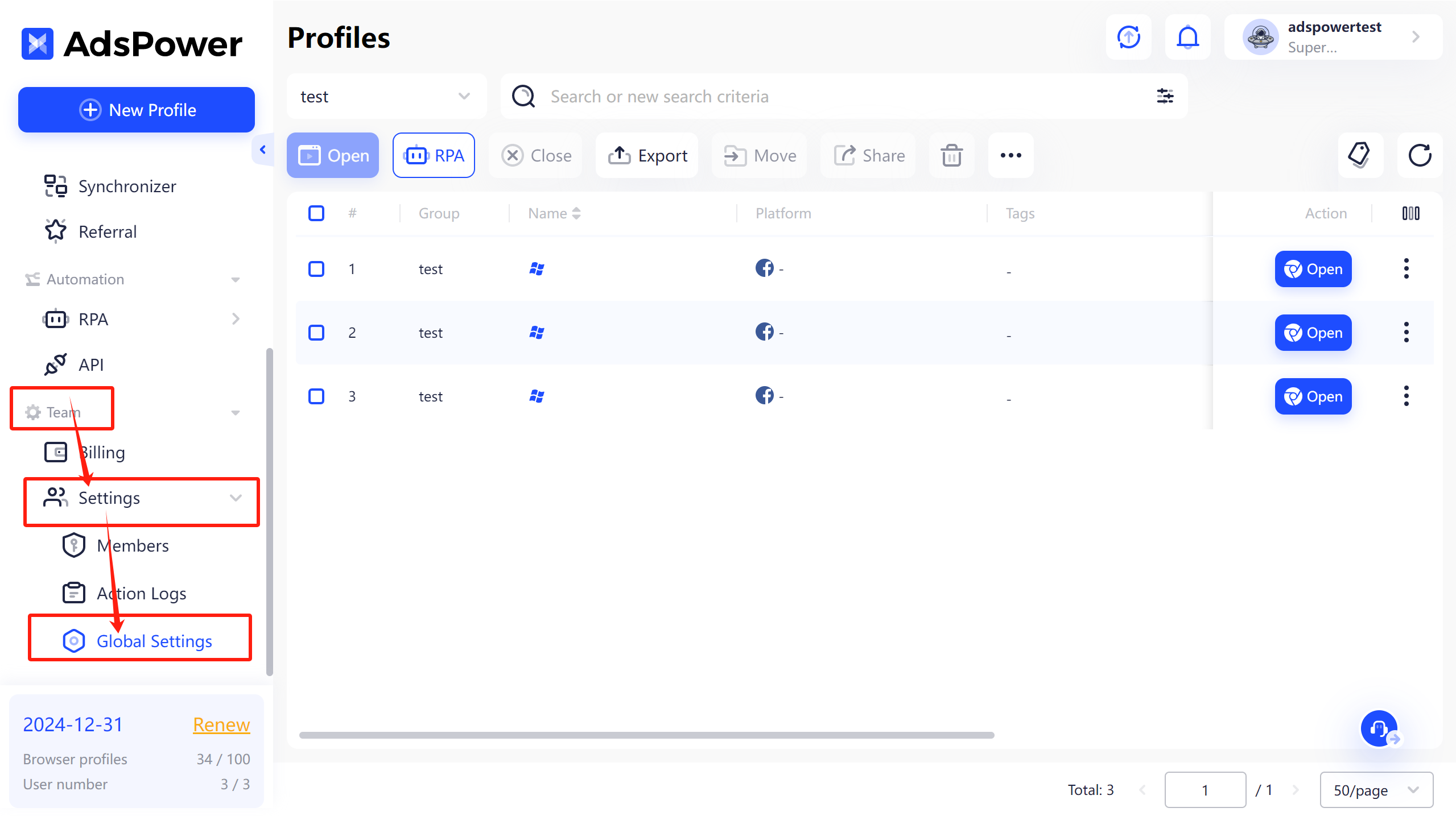
Open AdsPower, on Team section click "Settings-Global Settings".
-
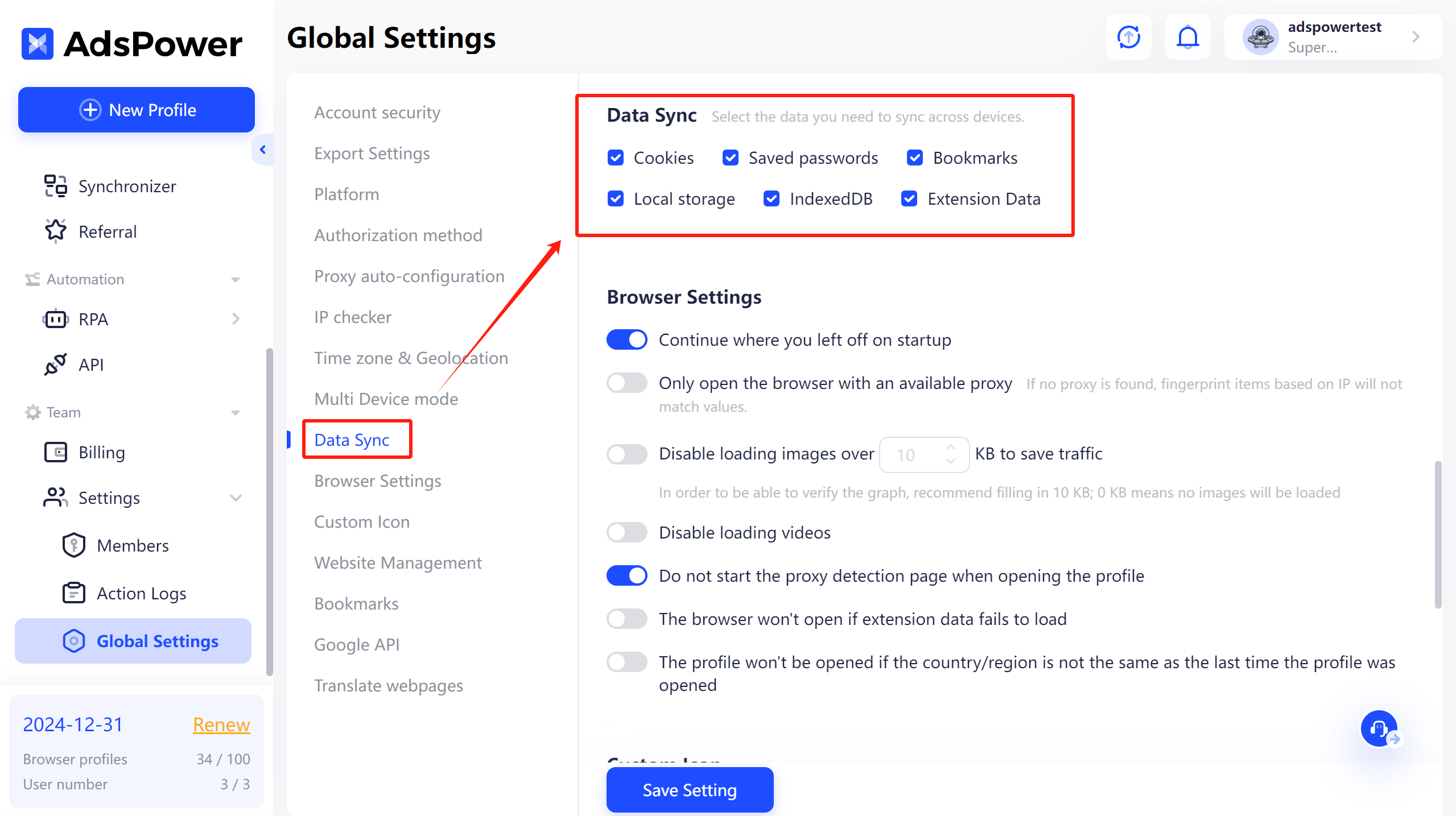
In Global Settings, click on "Data sync" and select the data type you need to sync across devices.
-
After opening the browser and completing your tasks, make sure all browser profile data has fully loaded. The data will be saved and synced once you close the browser profile. Additionally, avoid opening the profile on other devices before closing the browser profile, as this may cause synchronization errors.
Advantages of AdsPower for User Data Protection
AdsPower stands out in protecting user browser data, implementing several measures to ensure data security:
Data Encryption and Secure Transmission
AdsPower uses advanced encryption technology to protect your data during synchronization. All synchronized data is end-to-end encrypted, ensuring that even data synced to the cloud remains secure. AdsPower guarantees that only you have access to your data, effectively preventing any data leaks.
Flexible Data Sync Strategies
Recognizing that users have varying data control needs, AdsPower provides flexible data synchronization options. Super administrators can choose to enable data synchronization and determine which data types to sync. This flexibility allows users to efficiently manage data security while maintaining productivity.
Support Cross-Device Work and Profile Transfer

AdsPower keeps your data consistent and accessible on any device. Just log into your account to sync browser data across devices, with no complex setups or extra software needed. This ensures a smooth work experience. If you need to transfer profiles from another anti-detect browser to AdsPower, check this guide for help.
FAQs
Why didn't my data synchronize successfully?
1. First, please ensure you upload the extensions in our Extensions section and upload your bookmarks in the Global settings as shown in the screenshot below.
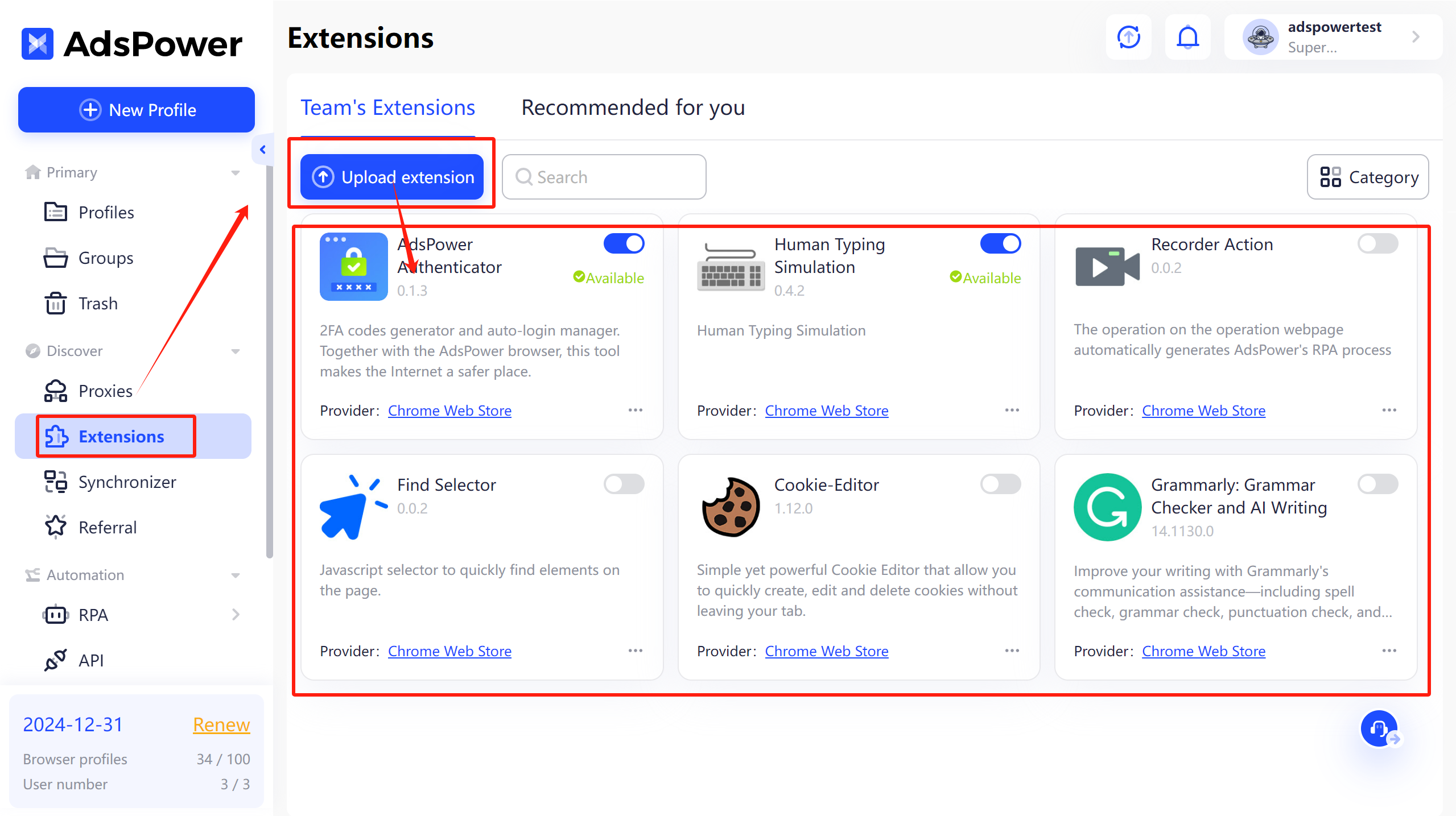
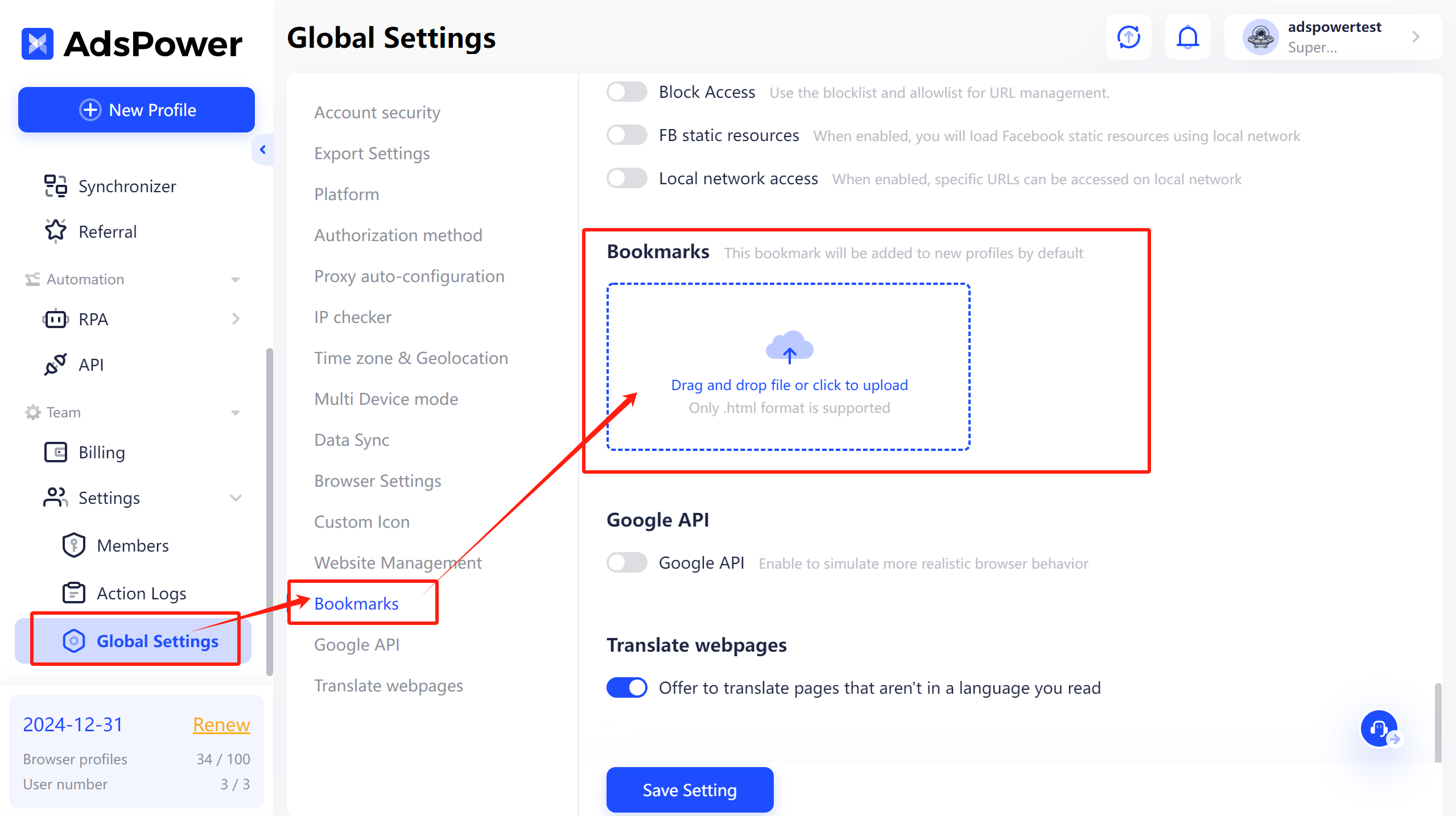
If you set the extensions and bookmarks in the profiles yourself without using the AdsPower settings, the data will not sync successfully.
2. Also, make sure you have enabled the Data Sync functions in the Global settings.
3. Synchronization occurs when closing the profile. You need to open the profile, log in where necessary, then close the profile, wait for the data to synchronize (wait until the profile button becomes active again), and only then open it on new devices.
4. If you have completed the above steps and the problem still exists, please click the button in the lower-left corner or email support@adspower.com to contact our online support for assistance.
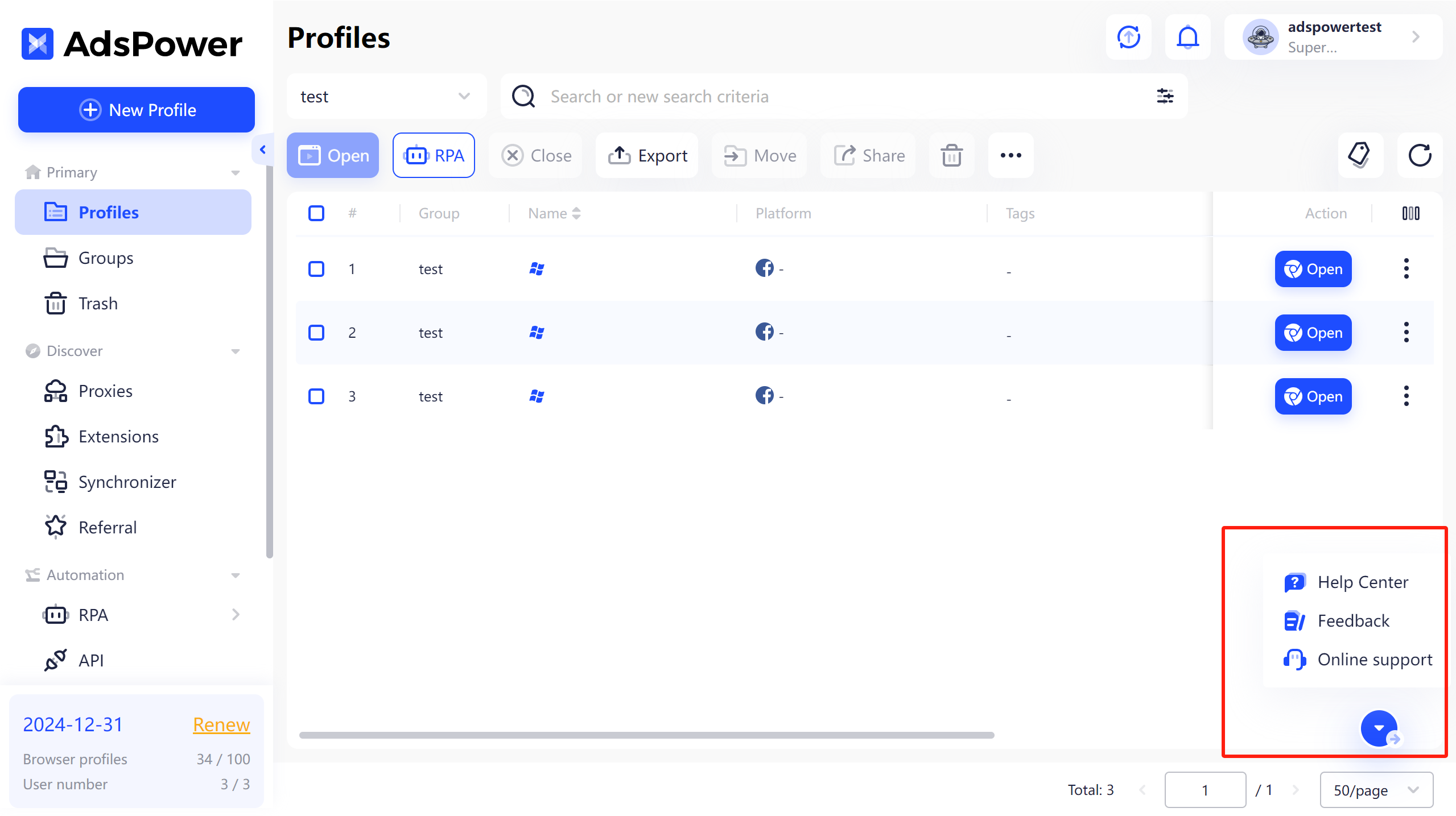
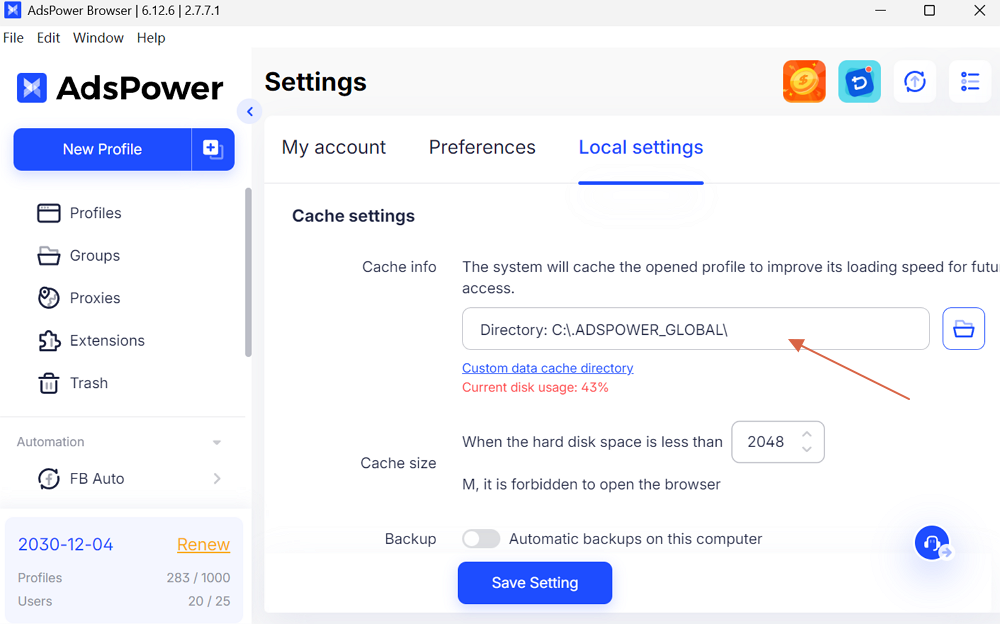
Tip: If only your extension data cannot be synced to other devices, please note that the extension cache data is saved on your computer. And you need to manually back up if the syncing failed after enabling "Automatic backups on this computer".
Then, move to the new device to adjust the Directory of the cache:
Why can't I open the profile? It keeps saying "Cache data sync failed, please retry." What's up with that?
This occurs because the option "The browser won't open if extension data fails to load" is enabled in the Global settings and the last user who opened this profile did not successfully upload the data.
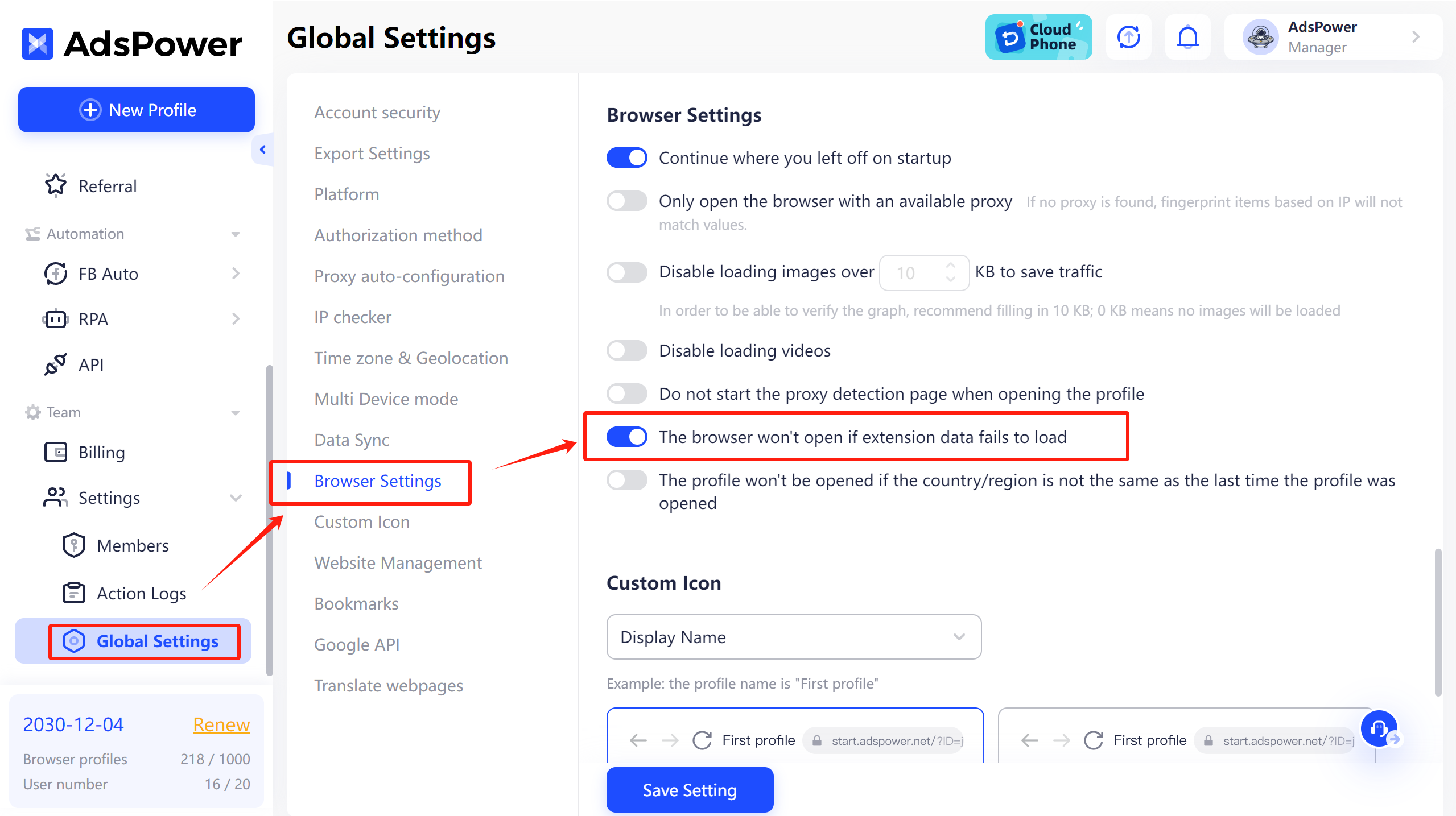
To resolve this, have that user open the profile again to upload the data. You can check who last opened the profile in the Action Logs.