

How to Create and Warm up Facebook Accounts without Being Blocked?
Whether you’re promoting your brand or selling products online, Facebook is definitely the last place you would ever miss. Over the last decade, Facebook has shifted from the most prominent social medium on the internet into one of the biggest marketplaces, allowing businesses to market themselves through interaction with customers and self-promotion.
To make the most of Facebook marketing, it’s not rare to own several accounts to manage ads or run pages. Now the problem is, newly created “fake” accounts can easily get suspended, or worse, blocked by Facebook due to misbehavior, about which we talked in another article.
Experienced marketers will tell you that the secret of keeping your accounts from being blocked lies in how you warm them up. Then you may ask, how? No worries, we’ve got a day-by-day manual for you!
What you should know before you get started...
Having multiple accounts is against Facebook policy, and Facebook can tell it by the IP address using by several accounts. So you’ll need a clean and stable IP for each of your accounts in case they get linked to each other.
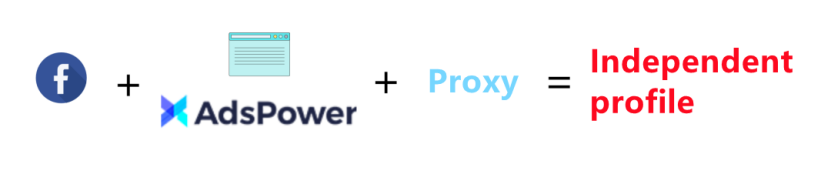
AdsPower can help you manage multiple accounts from one place. It allows you to set up various browser profiles with different proxies, then you can log in to one account in one browser profile. In this way, each browser profile uses an isolated IP address, preventing your accounts from being banned.
Now let’s get to the point...
1. Create an account
Remember this must-have information: phone number/Email, real name, birthday and a person picture.
2. Warm up an account
Here’s a not-to-do list for when you just create the account:
✘ Add strangers
✘ Create a page and publish advertising ads
✘ Add many friends at once
✘ Log in to the account on different devices
✘ Frequently log in and out
Warm-up schedule
Day 1: Search for friends who can possibly give you weight in your contacts, and choose some of them as your trusted contact.
* What kind of friends can give weight on your account? Keys: registration of more than half a year, high activeness, high engagement with Facebook (like owning a Facebook page or binding an Instagram account), etc.
Day 2: Follow a few popular pages
Day 3: Publish posts, browse friends’ pages, like friends’ posts, and try other functions of Facebook, such as Facebook games.
In this part, a lot of repetitive work will be needed to be done with all your account. To save your time and improve efficiency, an automation tool is a good option to take care of everything.
AdsPower provides RPA robot to help you complete the most tedious and repetitive tasks. You just need to create a work flow by selecting the RPA templates you want, then start the process in the browser profile you’re working with. Click here to read the complete AdsPower RPA tutorial.
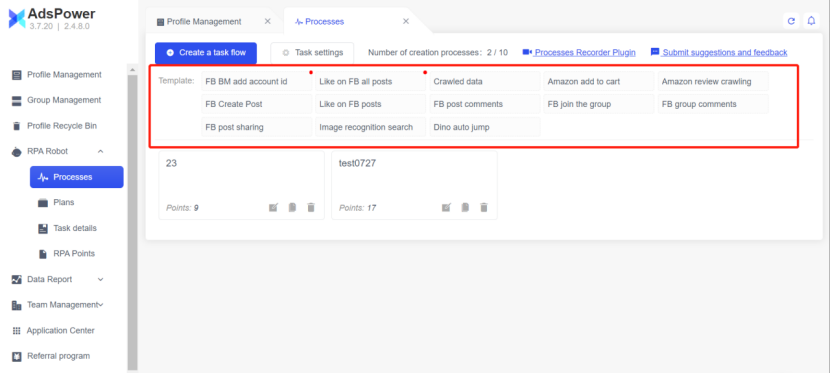
*AdsPower updates RPA templates from time to time. If the existing templates do not fully meet your needs, you can customize new ones in AdsPower or give us feedback in the Client.
Day 4: Quite similar to Day 3, you can additionally mark music you like and get more engaged on Facebook. It’s better to stay online for at least one hour after logging in.
Day 5: You can finally doing promotion now, but not by publishing ad posts. Instead, you should follow some accounts/pages related to your business.
For example, if you’re going to sell furniture, you may start by following IKEA official because after that, Facebook will continuously recommend similar accounts to you. Then you can comment on the posts and interact with other users.
After seven days: You can bind your accounts to a page or create a page and start managing it. However, posts with links are not a good choice at the moment.
After half a month: Now you can start contacting potential clients and doing paid promotion!
Warming-up is to perform activities in your Facebook account like a real person using the account for personal usage, to share and communicate with friends, and it increases your account’s trust level.
So, don’t think you can quickly get the hang of Facebook marketing just yet. What we’ve taught here is only the first part of it. Give it patience and be cautious.
Hope you enjoyed today’s training!

As pessoas também leem
- Como Criar uma Conta no Naver para Estrangeiros e Iniciantes em 2026
Como Criar uma Conta no Naver para Estrangeiros e Iniciantes em 2026
Aprenda a criar uma conta no Naver sendo estrangeiro em 2026, evite problemas com verificação por SMS e reduza o risco de restrições durante o cadastro.
- Conta Bet365 bloqueada? Entenda os motivos e como proteger sua presença digital
Conta Bet365 bloqueada? Entenda os motivos e como proteger sua presença digital
Conta Bet365 bloqueada? Saiba os motivos mais comuns, como desbloquear sua conta passo a passo e dicas para evitar restrições no futuro.
- Como Gerenciar Múltiplas Contas no Reddit para Escalar Seu Negócio em 2026
Como Gerenciar Múltiplas Contas no Reddit para Escalar Seu Negócio em 2026
Aprenda a usar várias contas no Reddit com segurança. Evite banimentos, entenda os sinais de detecção e gerencie perfis com estratégias inteligentes.
- Por que minha conta da Gemini está congelada? Como desbloquear a conta

Por que minha conta da Gemini está congelada? Como desbloquear a conta
Conta da Gemini congelada? Conheça os motivos mais comuns e o passo a passo para recuperar seu acesso rapidamente. Siga este guia para resolver o problema
- Novidades do Navegador AdsPower em Fevereiro de 2026
Novidades do Navegador AdsPower em Fevereiro de 2026
Descubra as novidades do AdsPower em fevereiro de 2026: kernel Chrome 144, simulação mobile, segurança aprimorada e melhorias na automação RPA Plus.
