

What is an IP Ban? How to Bypass It?
Tingnan ang Mabilis
Nabigo sa isang IP ban na humaharang sa iyong access sa isang website? Tuklasin kung bakit nangyayari ang mga pagbabawal sa IP at kung paano haharapin ang mga ito gamit ang mga epektibong diskarte. Subukan ang AdsPower ngayon at ibalik ang kontrol sa iyong online na access!
Kapag sinusubukan mong i-access ang isang website, maaaring nakakabigo ang pagkakaroon ng IP ban. Ang IP ban ay isang tool na ginagamit ng maraming online na platform. Hinaharangan nito ang pag-access mula sa mga partikular na IP address. Madalas nilang ginagamit ito upang ihinto ang malisyosong gawi o mga paglabag sa patakaran.
Ngunit ano nga ba ang IP ban, at paano mo haharapin ang isa kung maaapektuhan ka nito? Sa artikulong ito, susuriin natin ang mga gawain ng mga pagbabawal sa IP, tuklasin kung bakit ginagamit ang mga ito, at mag-aalok ng mga naaaksyong tip para sa pag-bypass sa mga paghihigpit na ito.
What is an IP Ban?
Each device that connects to a network has its own unique IP address, which is like an online identity. The websites will record this IP address to track and identify user behavior.
An IP ban is a security measure used by websites and online services to block access from a specific IP address. When an IP address is blocked, it denies requests from that address. They cannot access the site or service. This can be done to prevent unwanted or malicious activities, such as spam, hacking attempts, or abuse.
Why is My IP Banned?
Here are some common reasons for IP address blocking:
Suspicious or Malicious Activity: If your IP address was involved in suspicious or harmful activities, it might be banned to protect the site. This includes hacking attempts, excessive data scraping, and spamming.
Violation of Terms of Service: Abusing features, posting inappropriate content, or making unauthorized requests can lead to an IP ban. These actions violate the website's terms of service.
Excessive Requests: Websites often have limits on the number of requests that can be made in a given time period. If your IP address exceeds these limits, you might be banned to prevent overloading the server.
Previous Abuse: If the IP address was used for abuse, it might be banned to prevent repeat offenses, even if the activity is not from you.
Automated Bots: If your IP address is suspected of using bots or scripts on the site, it might be banned to prevent such interactions.
Geographical Restrictions: IP bans may be based on location. This is to comply with legal or licensing requirements.
Shared IP Addresses: If you are on a network with a shared IP address (e.g., a public Wi-Fi or a corporate network), and someone else using the same IP has engaged in problematic behavior, your IP address might be banned as a precaution.
How to Bypass IP Bans?
Whether you're facing a temporary block or need to overcome a more persistent ban, these strategies can help you bypass these barriers.
1. Clear Your Computer's Cache
IP bans can sometimes be linked to stored data in your cache or cookies, so clearing them might help.

For Windows:
1) Open Disk Cleanup: Press "Win + S", type "Disk Cleanup," and select the Disk Cleanup app.
2) Select the Drive: Choose the drive you want to clean (usually C:) and click "OK".
3) Check Cache Files: In the Disk Cleanup window, check the boxes for "Temporary files", "System created Windows Error Reporting", and other categories you want to clear.
4) Click OK: Click "OK" and then "Delete Files" to confirm and start the cleanup process.
For macOS
1) Open Finder: Click on the "Finder" icon in the Dock.
2) Go to Go Menu: Click "Go" in the menu bar and select "Go to Folder".
3) Enter Cache Folder Path: Type "~/Library/Caches" and press "Enter".
4) Delete Cache Files: You can delete files within these folders. Be cautious not to delete important system files.
2. Uninstall the Program or Browser
Uninstalling a browser or application clears out residual files, cookies, and cache that may be associated with your previous activity. This can be useful if the ban is tied to stored data or cookies.
3. Get a New MAC Address
A MAC (Medium Access Control) address is a unique identifier assigned to your network interface card (NIC). It is used by network devices to identify and communicate with each other on a local network.
Some websites and services use MAC addresses as part of their security measures to enforce bans. By changing your MAC address, you can sometimes bypass these restrictions. Below are the step-by-step guides:
For Windows:
1) Open Device Manager: Press "Win + X", then select "Device Manager".
2) Locate Your Network Adapter: Expand the "Network adapters" section and find your network adapter.
3) Access Properties: Right-click on your network adapter and select "Properties".Change the MAC Address: Go to the "Advanced" tab, select "Network Address or Locally Administered Address" (the name may vary), and enter a new MAC address. Ensure the address is in the correct format (e.g., 00-1A-2B-3C-4D-5E).
4) Restart Your Adapter: Disable and re-enable your network adapter to apply the changes.
For macOS:
1) Open Terminal: You can find Terminal in "Applications > Utilities".
2) Find Your Current MAC Address: Enter "ifconfig" and look for your network adapter (e.g., en0).
3) Change the MAC Address: Use the command "sudo ifconfig <interface> ether <new MAC address>", replacing "<interface>" with your network adapter and "<new MAC address>" with your desired address.
4) Restart Your Network Interface: Turn your Wi-Fi off and on again or restart your computer.
This method is most effective when the ban is directly tied to your MAC address and not solely based on your IP address or other identifiers.
4. Change Your IP Address with a VPN or a Proxy Server
Changing your IP address can help you bypass IP bans and access restricted content. Two popular methods for achieving this are using a VPN (Virtual Private Network) or a proxy server.
A VPN encrypts your internet connection and routes your traffic through a server in a different location, effectively changing your IP address.

A proxy server acts as an intermediary between your device and the internet, masking your IP address and providing a new one from the proxy server.

VPNs generally offer better security and privacy compared to proxies, as they encrypt your traffic and protect your data. Proxies, on the other hand, are often faster but less secure.
5. Use Antidetect Browsers
Anti-detect browsers are specialized tools designed to mask your browser fingerprints and protect your privacy while browsing the internet. Especially AdsPower, it offers a range of features that help you bypass IP bans and manage multiple online identities with ease.
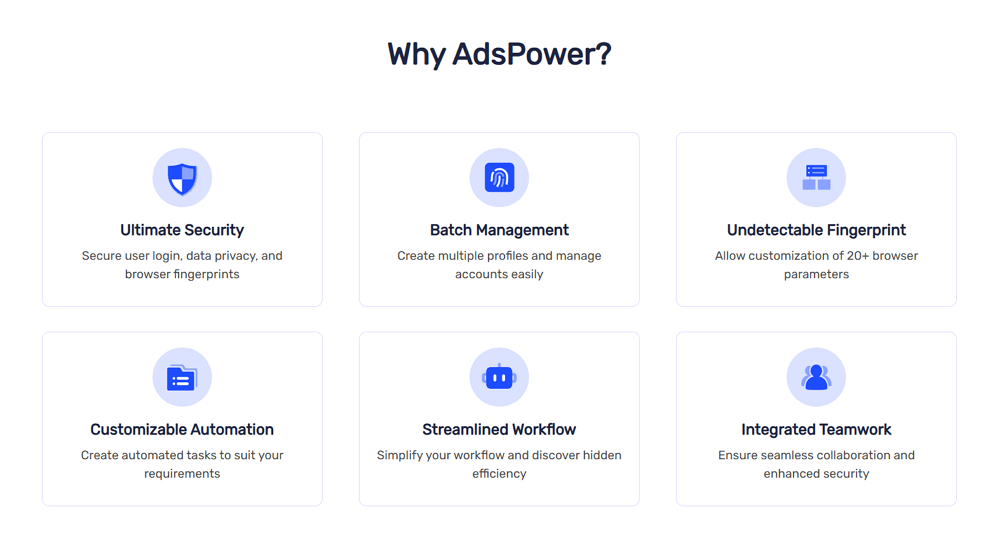
- Fingerprint Protection: Every browser and device has a unique "fingerprint" that websites use to track and identify users. This fingerprint includes user agent, screen resolution, timezone, and so on. AdsPower lets you randomize or modify these elements for each profile you create, so websites can't track and identify you.
- IP Masking with Proxies: AdsPower integrates with proxy servers to change your IP address. You can use different IP addresses for each profile. This reduces the risk of IP-based bans and allows you to access content or services restricted to specific regions.
- Account isolation: Through AdsPower, even if you log in on the same device, each account runs in an independent browser profile. So you won't worry about cross-detection. This is particularly useful for managing multiple accounts.
- Secure Data Handling: AdsPower provides encrypted data transmission. It protects your data from interception and unauthorized access. And AdsPower is regularly updated to address security vulnerabilities and adapt to new detection techniques, ensuring that your privacy is continuously safeguarded.
Conclusion
In summary, while dealing with an IP ban can be challenging, employing the right strategies and tools can help you regain access. Each approach above offers a unique way to tackle the problem.
AdsPower, in particular, provides a comprehensive solution with its advanced security features. It not only helps you bypass IP bans but also ensures that your online activities remain secure and anonymous.
Click the button below to try AdsPower!
Frequently Asked Questions
1. How long does an IP ban last?
The duration of an IP ban depends on the platform's policies. Some bans may last a few days, while others may be permanent. If the ban is temporary, you may be able to access the service again after a specific period.
2. Can an IP ban affect other users on the same network?
Yes, if multiple users are sharing the same IP address, an IP ban can affect all of them. However, this can be avoided by using a VPN or other methods to change the IP address.
3. Will changing my router or modem give me a new IP?
Yes, restarting your router or modem may assign a new dynamic IP address. However, this may not always work if the service has implemented more advanced IP ban detection techniques.、
4. Can I bypass an IP ban by using a different device?
If the IP ban is tied to your IP address, using a different device alone won’t help. The simplest and most effective way to bypass an IP ban is by changing your IP address. You can do this by using a VPN, proxy, or even better, by using AdsPower. AdsPower allows you to create independent fingerprint profiles, which helps you manage multiple accounts without triggering bans linked to your IP. Alternatively, you can also contact your ISP to request a new IP address.

Binabasa din ng mga tao
- Paano Gumagawa ang AdsPower ng mga Fingerprint ng Browser sa Antas ng Kernel

Paano Gumagawa ang AdsPower ng mga Fingerprint ng Browser sa Antas ng Kernel
Alamin kung paano binabago ng AdsPower ang mga fingerprint ng browser sa antas ng Chromium kernel upang mapabuti ang consistency, mabawasan ang mga panganib sa pagtuklas, at suportahan ang multi-account
- Pagkakapare-pareho ng Browser at Hindi Pagtugma ng Kernel: Bakit Nababawalan ang mga Account (2026)
Pagkakapare-pareho ng Browser at Hindi Pagtugma ng Kernel: Bakit Nababawalan ang mga Account (2026)
Iwasan ang mga pagbabawal na dulot ng mga hindi pagkakatugma ng fingerprint. Alamin kung paano sini-sync ng AdsPower ang mga browser core, TLS, Canvas, at WebGL signal para sa mga pare-parehong profile sa 2026.
- Paano Nagti-trigger ng mga Pag-lock ng Account ang Fingerprint ng Browser (At Paano Pinipigilan ng AdsPower ang mga Ito)
Paano Nagti-trigger ng mga Pag-lock ng Account ang Fingerprint ng Browser (At Paano Pinipigilan ng AdsPower ang mga Ito)
Paano nagiging sanhi ng mga pag-lock ng account ang mga hindi pagkakatugma ng fingerprint ng browser at kung paano gumagana ang dual-engine architecture ng AdsPower na may mga totoong browser core at Native Mobile Simulation
- 8 Pinakamahusay na Alternatibo sa Whoer sa 2025 (Mga Tool sa Pagsusuri ng Tumpak at Pribadong IP)
8 Pinakamahusay na Alternatibo sa Whoer sa 2025 (Mga Tool sa Pagsusuri ng Tumpak at Pribadong IP)
Naghahanap ng alternatibo sa Whoer.net? Tuklasin ang aming listahan para sa 2025 ng 8 pinakamahusay na tool sa pagsusuri ng IP para sa tumpak at pribadong pagsusuri ng fingerprint at pinahusay na online.
- Ano ang Ginagamit ng WebRTC? Na-leak ba ng WebRTC ang Iyong IP Address?
Ano ang Ginagamit ng WebRTC? Na-leak ba ng WebRTC ang Iyong IP Address?
Alamin kung ano ang WebRTC, kung para saan ito ginagamit, kung ilalabas nito ang iyong IP address, at kung paano manatiling protektado ng mga tool tulad ng mga WebRTC mode ng AdsPower.
