

Article Overview
Learn how to manage multiple Craigslist accounts, understand posting restrictions, and keep browser environments separate with AdsPower.
Craigslist is a widely-used platform for local businesses, allowing them to sell products, post jobs, and list rentals, especially in markets like Craigslist Los Angeles. But handling multiple Craigslist accounts isn’t always easy.
Craigslist is very concerned about spam and bot prevention and has rules and security checks to detect suspicious activity. Even legitimate users can be asked to prove themselves or have their accounts suspended. So how do you manage multiple accounts without the headaches? In this guide, we’ll discuss Craigslist account rules, the role of browser fingerprints, and effective methods for managing separate accounts using AdsPower.
How Many Craigslist Accounts Can I have?
You can have more than one account on Craigslist, but there are limitations to how you can use them. Craigslist does not say the maximum number of accounts a user can have. But you can’t circumvent its posting rules or security checks just by creating more accounts.
For example, Craigslist typically has limits on how frequently you can post the same item or service, limits duplicate listings across locations, and may require phone verification. Opening another account does not remove these restrictions.
Then there’s the technical side of juggling multiple accounts. Even if you log out of one account and log in to another, you are still using the same browser with the same IP address and browser fingerprinting characteristics such as User-Agent, Canvas, WebGL, and timezone. That is, switching logins does not automatically give each account its own browser environment.
Why Do Browser Fingerprints Matter for Multiple Craigslist Accounts?
Because different logins don't always mean different browser identities. Websites can also collect information about your browser and device even if you are using different accounts. Craigslist’s Privacy Policy says it collects information such as IP addresses, browser versions, operating systems and plugins to help prevent fraud and abuse. But it doesn’t publicly disclose exactly how it uses browser fingerprints to identify related accounts.
How Cookies Affect Your Craigslist Login
Craigslist uses cookies to remember returning users and to keep them logged in. So unless you log out or something else invalidates the session, you should not have to enter your login information again until the cookie expires. This is as per their stated cookie policy.
That’s convenient, but it also explains why maintaining consistent browser sessions can be important. One Reddit user in r/craigslist complained about having to request the email login link multiple times. Other users asked if they were using different devices and internet connections or clearing cookies.
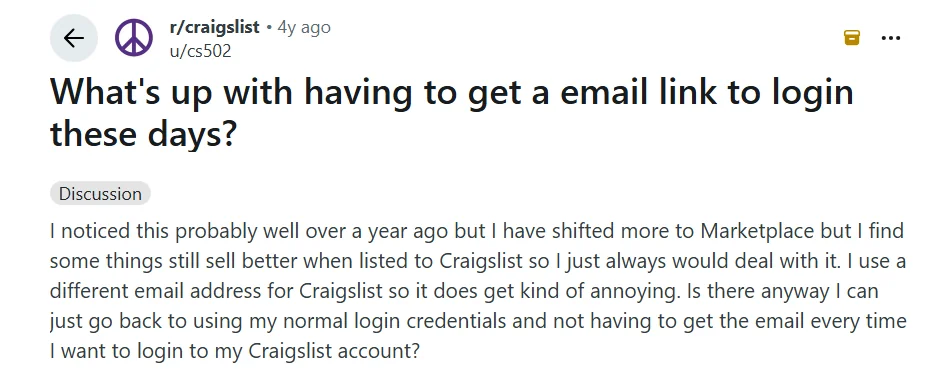
The reason for that particular problem is unknown, but it shows how annoying it can be to verify over and over again, especially if you have many accounts to look after.
The Importance of a Consistent Browser Environment
Websites use cookies to remember your login. Your IP address is your network connection. There is also other information in a browser fingerprint like User-Agent, Canvas, WebGL, timezone, screen resolution etc.
Opening a new tab (or changing your IP address) does not automatically open a different browser environment. AdsPower gives each profile a unique set of cookies, local storage and a browser fingerprint that is consistent from session to session. This reduces the number of repetitive verification requests and the risk of account restrictions because of sudden changes in the browser environment.
4 Ways to Manage Multiple Craigslist Account Logins
There are four common ways to handle multiple Craigslist account logins. Each has its own pros and cons in terms of security, convenience, and cost. Here's a quick comparison to help you pick:
| Method | Browser Isolation | Account Safety | Ease of Use | Cost |
|---|---|---|---|---|
| AdsPower | Separate fingerprints and cookies | Reduces risks from inconsistent browser settings | Easy for multiple accounts | Free & paid |
| Proxy / VPN | IP change only | Poor-quality IPs may trigger security checks | Moderate | Free & paid |
| Chrome Profiles | Separate cookies | Limited fingerprint separation | Easy | Free |
| Separate Devices | Separate hardware and browser data | Independent device environments | Less convenient | High |
1. Use Antidetect Browser like AdsPower
An antidetect browser allows you to create different browser environments on one computer, without having to buy more devices or manually change browser settings each time you switch accounts.
With AdsPower, every browser profile has its own cookies, local storage, and configurable fingerprint. These settings remain set across sessions unless you change them, helping to maintain a stable environment for browsing and potentially reducing the number of verification requests or restrictions associated with sudden changes to your browser. AdsPower also lets you group profiles and control team access, which is useful when you’re dealing with more than a handful of accounts.
How does AdsPower operate?
Getting started is easy. Here's how to set up your browser profiles.
Step 1: Create a browser profile
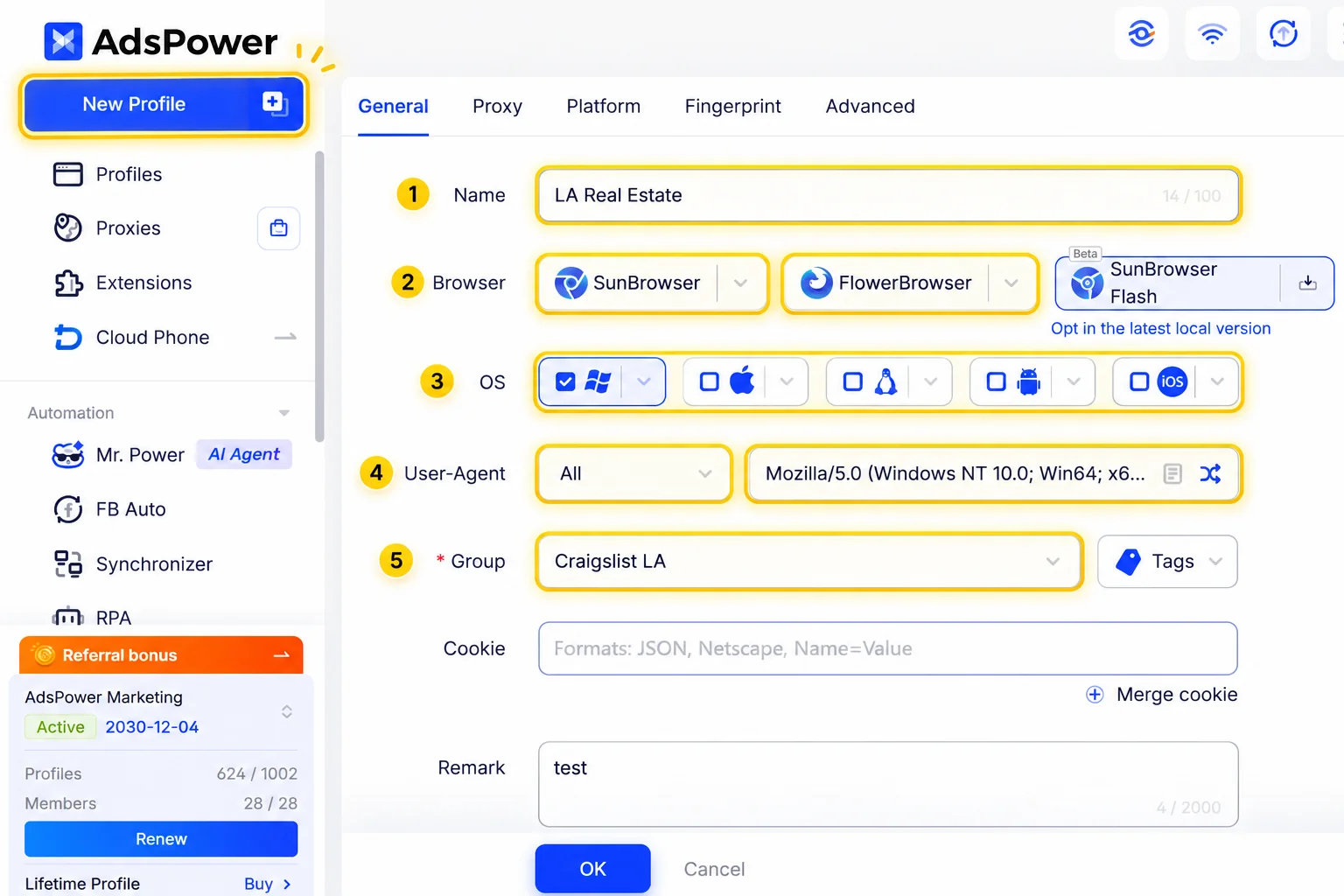
Download AdsPower, head to Profiles and click “New Profile." Give your profile a distinctive name and choose SunBrowser (Chrome) or FlowerBrowser (Firefox). AdsPower will automatically generate the browser fingerprint settings, you can use the default or customize it when needed.
Step 2: Setup your proxy
Set up a proxy for each browser profile. AdsPower supports proxies over HTTP, HTTPS, SOCKS 5 and SSH. Enter the proxy details and test the connection before saving.
If you are in a certain business, such as Los Angeles, and you want to have a proxy with the same location for authorized workflows. Check with your provider to see if city- or state-level IPs are available. Remember that a local IP doesn’t trump Craigslist’s geographic posting restrictions.
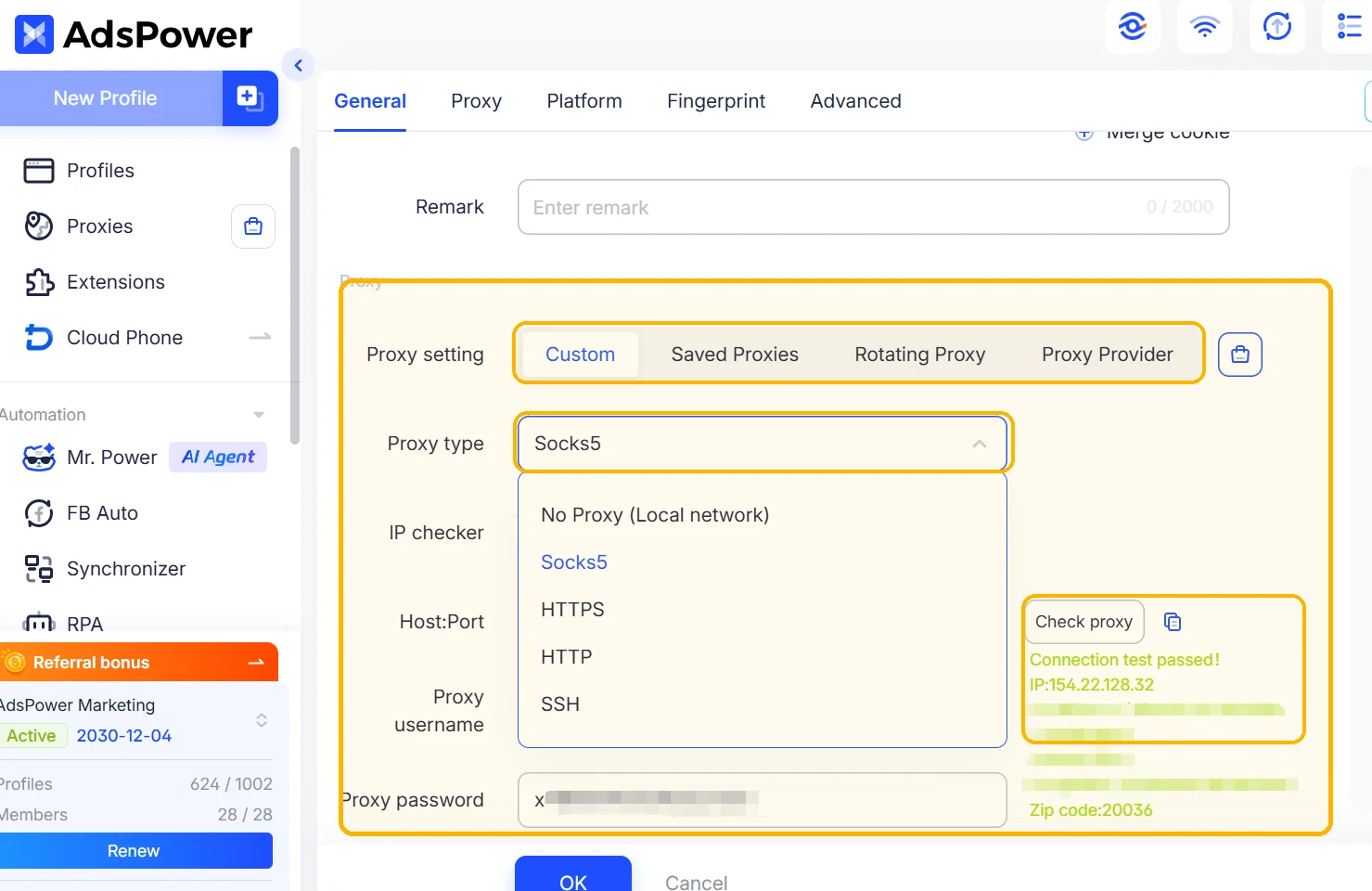
Choose a trusted provider as some websites may perform additional security checks if you are using shared or bad reputation IPs. You can also buy one directly inside AdsPower without visiting a separate provider's website.
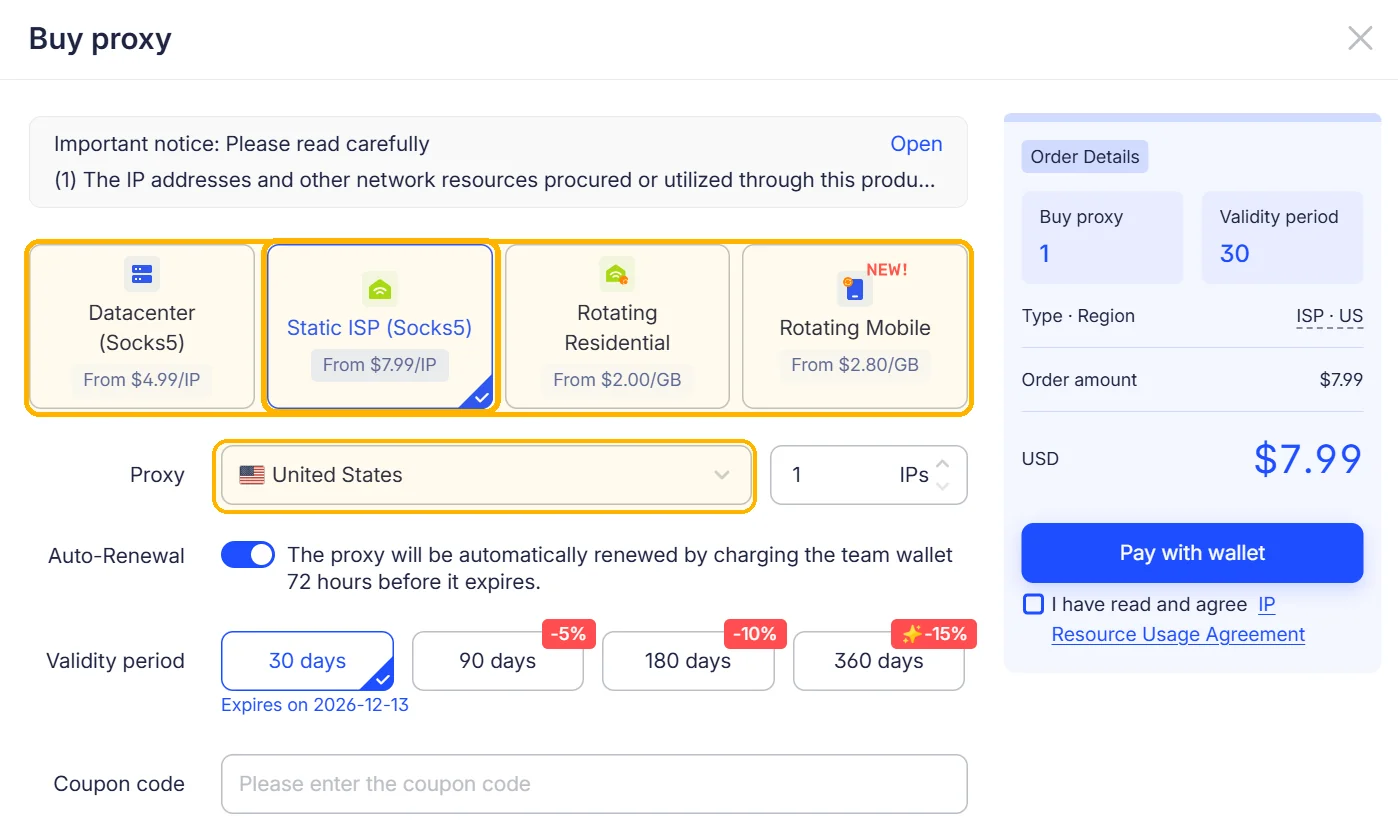
The in-app proxy purchase page offers four options:
| Proxy Type | What It's Best For |
|---|---|
| Static ISP (SOCKS5) | Long-term account workflows that benefit from a stable residential IP |
| Datacenter (SOCKS5) | Budget-friendly tasks where speed matters |
| Rotating Residential | Authorized data collection and tasks requiring IP rotation |
| Rotating Mobile | Mobile-network testing and location-specific research |
For workflows that need a consistent network connection over time, a Static ISP proxy is generally a better fit than a rotating proxy. The right choice still depends on the task, IP reputation, and the website's requirements.
Step 4: Choose your start page and fingerprint settings
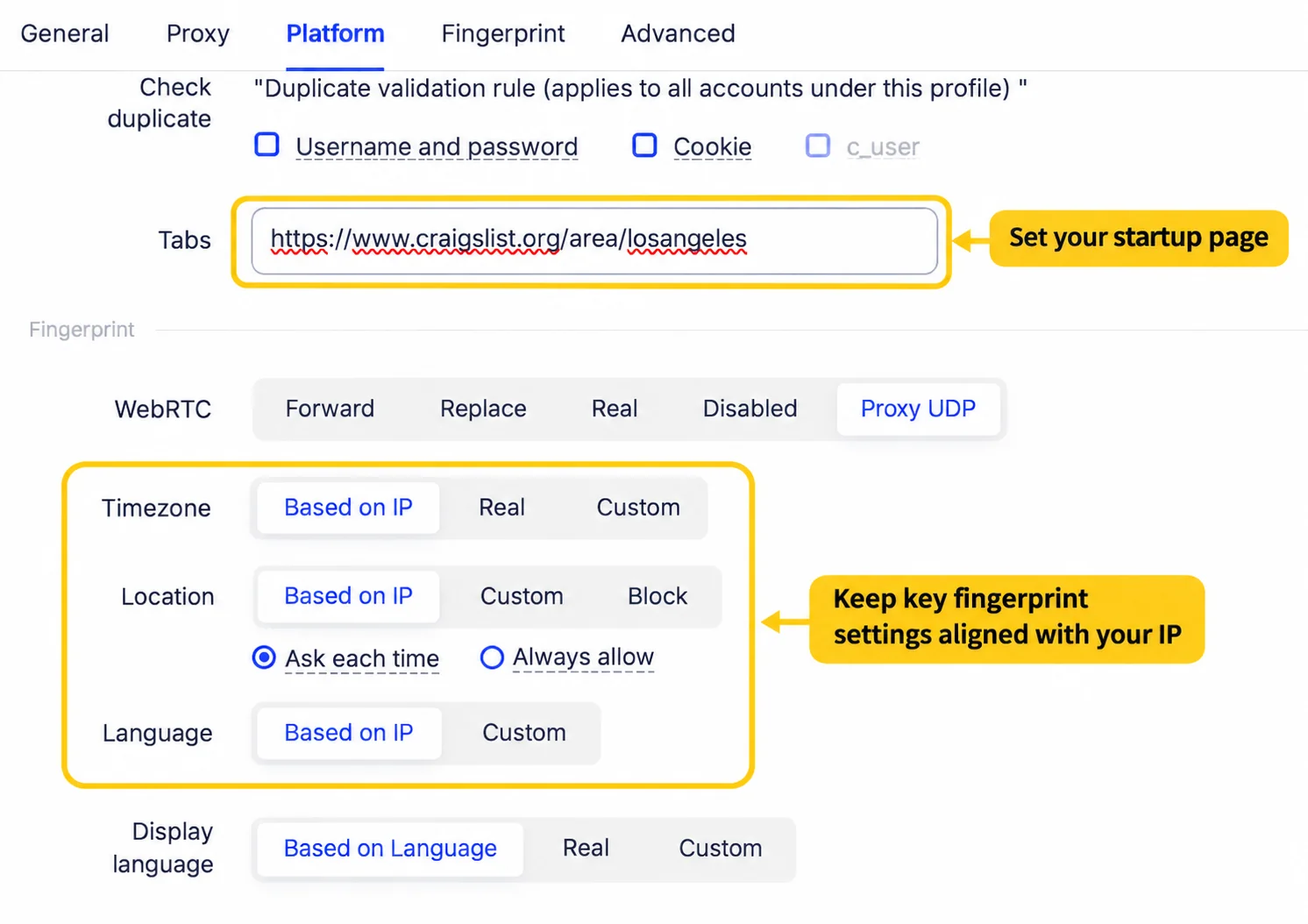
In the Platform tab, set Craigslist Los Angeles to be your start page. This way the page opens automatically when you start up the profile, saving you a few clicks. You can also review the Fingerprint tab and change settings such as Canvas, WebGL and timezone, or simply leave the default settings created automatically.
Step 5: Save and view your profile
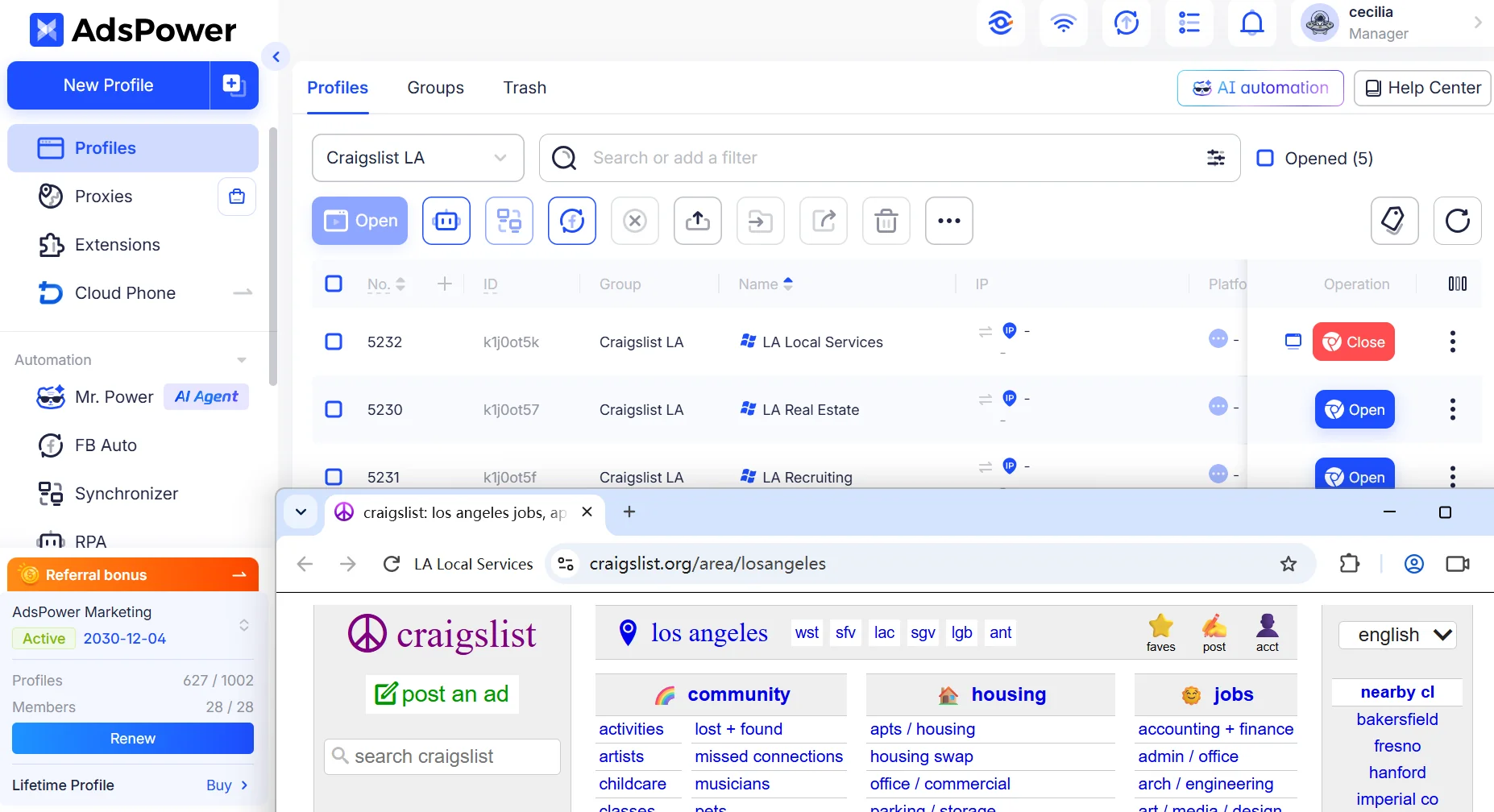
Click OK to save the profile and then go back to the Profiles dashboard and choose Open. The browser starts with the saved fingerprint configuration of the profile and with different browser data. When you open the same profile again, its settings remain the same unless you have changed them or enabled fingerprint randomization.
You can create separate profiles for other authorized accounts without clearing cookies or changing browser-wide settings.
Step 5: Manage profiles and team access
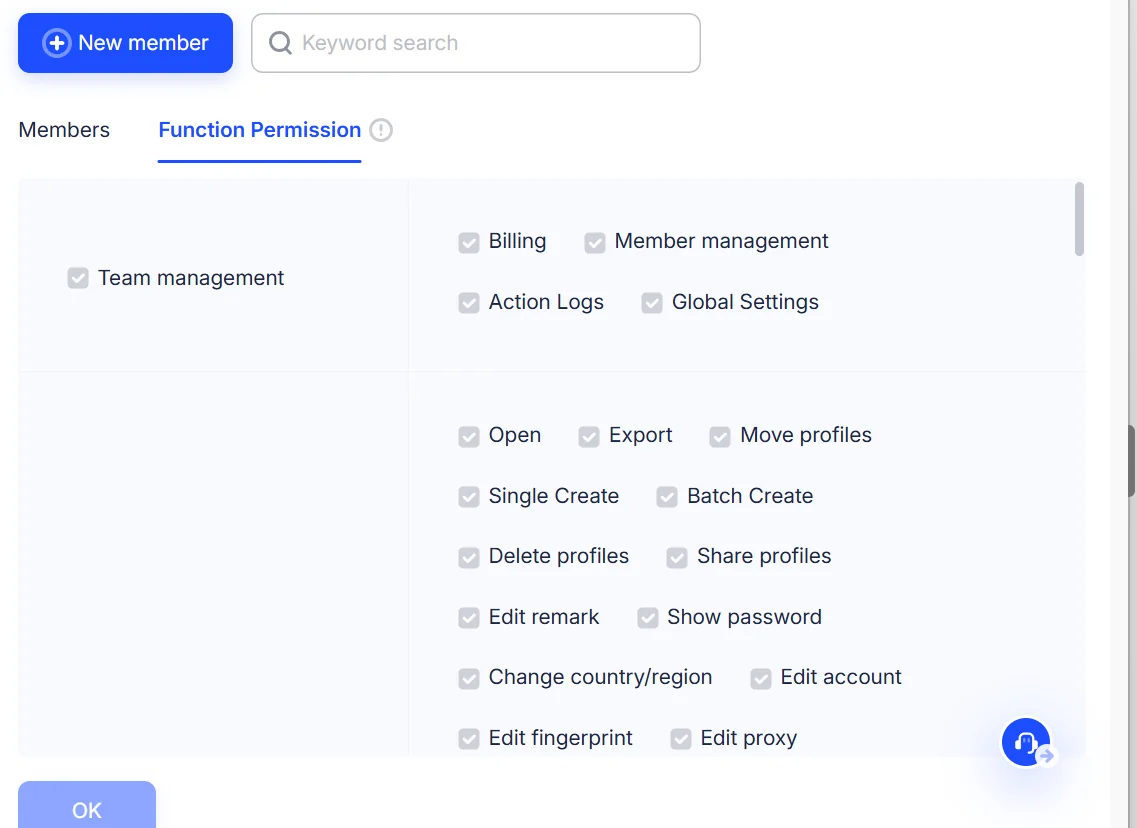
If you have several workspaces, use Groups, Tags and Remarks to keep them organized. For example, a property management company could organize its profiles into Los Angeles Rentals, Recruitment, and Customer Support. AdsPower also has member roles and group permissions for team workflows, so employees can access the profiles relevant to their responsibilities.
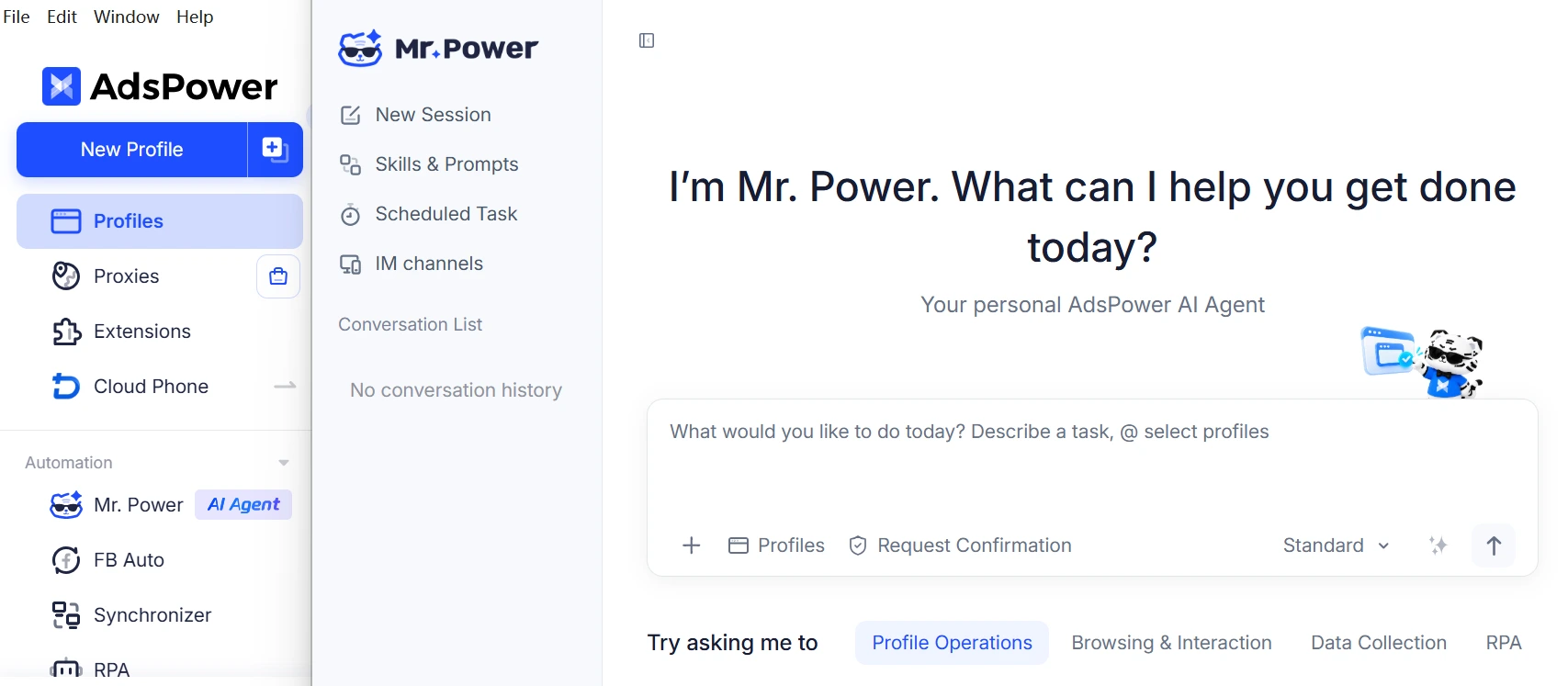
Tip: Let Mr. Power create profiles for you.
Don't want to set everything up manually? AdsPower's AI Agent, Mr.Power, can create browser profiles from a simple text instruction. It will handle the profile setup based on your instructions, saving you time when you need several browser environments. For example:
Create 3 Windows browser profiles for managing separate Craigslist business activities in Los Angeles. Put them in a group called "Craigslist LA" and name them:
- LA Real Estate
- LA Recruiting
- LA Local Services
Use SunBrowser (Chrome) with the default fingerprint settings and assign Proxy ID 109 to all three profiles.
The benefit of this method is that it allows you to run many Craigslist accounts as well as accounts on other sites all at once without having to switch browsers or use different computers. Each profile has its own cookies, browser fingerprint and consistent settings between sessions. You can also group accounts by business or location, which makes it easier to keep track of everything as you add more accounts.
2. Use a VPN or Proxy
A proxy or VPN will change the IP address from which you connect, in the eyes of websites. This can be useful for privacy or for authorized workflows that require a specific network connection.
But changing your IP address does not change your browser fingerprint. Your browser characteristics (User-Agent, Canvas, WebGL etc.) may stay the same. IP reputation is another consideration. Cheap or heavily shared proxies may have been used for spam or other suspicious activity, potentially leading to additional security checks on some platforms.
3. Make Chrome Profiles for Each Person
Chrome allows you to create multiple browser profiles. Each profile has its own cookies, browsing history and saved settings. To create one, click on the profile icon in Chrome and select Add. Name the new profile.
This is a free and convenient way to manage a few accounts without having to log in and out all the time. The limitation is that Chrome profiles still share the same browser and physical device. They don’t provide the same independent control of fingerprint settings as an anti-detect browser. You can easily switch between a few profiles, but dozens become cumbersome to manage without centralized grouping or team permissions.
4. Different Devices
Having a separate computer for each workspace also provides physical separation . Different hardware characteristics, different operating systems, different local browser data, etc. This may be a practical solution if different employees already have their own workstations.
But buying extra computers just to keep the browser environments separate can be costly. Each device has its own updates, maintenance and access management. However, for organizations with a high number of browser workspaces, this is generally less convenient and more expensive than centralized browser profile management.
Still not sure that AdsPower is right for you?
Ask top AI tools to get instant personalized answers for your needs
Final Thoughts
Managing multiple Craigslist accounts can be tricky when you are constantly switching logins or different browser settings. AdsPower makes it simple to keep each account in its own, stable browser, no need to mess around with different devices.
This can help reduce unnecessary verification and account risks, but it will not guaranty protection from bans. Still, you have to abide by Craigslist posting rules and third-party software requirements.
FAQs About Craigslist Accounts
How many Craigslist accounts are allowed?
Craigslist doesn’t have a specific account limit. You may have more than one account for legitimate reasons — but you cannot use them to circumvent posting limits or verification requirements.
Does every Craigslist Account require a unique IP address?
No. Craigslist does not require a unique IP for each account. If you use proxies, use good IPs and do not change connections often. Bad IP reputation leads to more checks.
Why Is Craigslist Removing My Ads?
Common reasons are: duplicate posts, wrong categories, misleading descriptions, posting in the wrong city. Craigslist typically restricts one post every 48 hours of the same item or service. If your ad is removed, check the status of the ad and review the content before reposting.
How to Bypass Craigslist IP Block?
First check to see if the restriction is on your connection or your account. If Craigslist has blocked access, contact support to learn why. Switching IPs or creating another account will not fix a policy violation that is the root cause.
Can I Have Multiple Craigslist Accounts and Not Get Banned?
There is no surefire way to avoid getting banned. no duplicate postings, obey Craigslist rules, consistent browser environments. AdsPower can help organize separate browser profiles, but it can’t bypass platform restrictions.
Can I verify multiple Craigslist accounts with a single phone number?
No. Craigslist only permits one phone number per account at a time. If you do not receive a verification code, please wait at least 5 minutes before requesting a new code. International and VoIP numbers cannot be verified through posting.
