

How to Make a Naver Account for Foreigners & Beginners 2026
Take a Quick Look
Learn how to create a Naver account easily as a foreigner or beginner in 2026, with step-by-step guidance and tips for smooth registration. Start your Naver journey today!
For people outside Korea, creating a Naver account can be more annoying than expected. The registration page itself looks straightforward, but many users end up stuck halfway through the process because of SMS verification issues, account restrictions, or repeated security checks.
Over the last few years, Naver has become much stricter about suspicious signups. The platform now pays attention to things most people never think about, like IP stability, browser fingerprints, device consistency, and unusual login behavior. That’s why some users can register successfully in minutes, while others get flagged almost immediately using the same phone number.
If you’re creating a Naver account from outside Korea, the environment you use during signup matters just as much as the information you enter.
In this guide, we’ll go through the full process step by step, including how foreigners can register more smoothly, what type of phone numbers usually work best, and why many users now prefer using stable browser environments like AdsPower instead of signing up directly from a regular browser session.
What Is Naver and Why You Need an Account?
A lot of people outside Korea assume Naver is simply a search engine, but it actually functions more like a complete online platform. One account gives you access to a wide range of Korean internet services, including:
- Naver Mail
- Naver Blog
- Naver Cafe
- Naver Shopping
- Naver Maps
- Korean forums and online communities
- Webtoons and entertainment content
- Korean websites that support Naver login
If you regularly browse Korean content or want to explore Korean online communities, having a Naver account quickly becomes useful. The same goes for people working in digital marketing, e-commerce, affiliate projects, or Korean SEO.
Unlike many Western markets, where most traffic flows through Google, a huge portion of Korean users stay inside the Naver ecosystem for news, reviews, shopping, blogs, and community discussions. That’s why many marketers treat Naver as its own separate internet market rather than just another search engine.
Can Foreigners Create a Naver Account?
Yes. Foreigners can still create Naver accounts in 2026.
You do not need Korean citizenship to register. However, foreign users usually deal with more verification checks compared to local Korean users.
This mostly happens because Naver aggressively filters:
- spam registrations,
- automation tools,
- fake phone verification attempts,
- suspicious proxy activity,
- and unstable login behavior.
In many cases, the problem isn't the phone number itself. It's the overall signup environment that looks risky.
For example, constantly changing IP addresses or using unstable browser sessions can trigger restrictions even if your information is real.
That's one reason some users prefer creating accounts inside isolated browser profiles using tools like AdsPower.
Requirements Before Creating a Naver Account
Before you start, prepare a few things.
A Stable Internet Connection
Try not to switch networks during registration, for example:
- don't move from WiFi to mobile data halfway through signup,
- avoid constantly changing VPN locations,
- and don't log in from different countries immediately after creating the account.
Sudden changes can trigger additional security checks.
A Working Phone Number
Naver usually requires SMS verification.
You can use:
- Korean numbers,
- international mobile numbers,
- or certain virtual numbers.
But not every number works equally well.
Public temporary numbers often fail because they've already been abused by other users.
A Consistent Browser Environment
This part gets overlooked a lot.
Modern platforms don't only look at your IP address anymore. They also analyze:
- browser fingerprints,
- timezone settings,
- device information,
- language settings,
- cookies,
- and login behavior.
If everything changes constantly, your signup attempt may look suspicious.
That's where AdsPower can help by creating stable browser environments with isolated fingerprints.
Step-by-Step Guide: How to Create a Naver Account
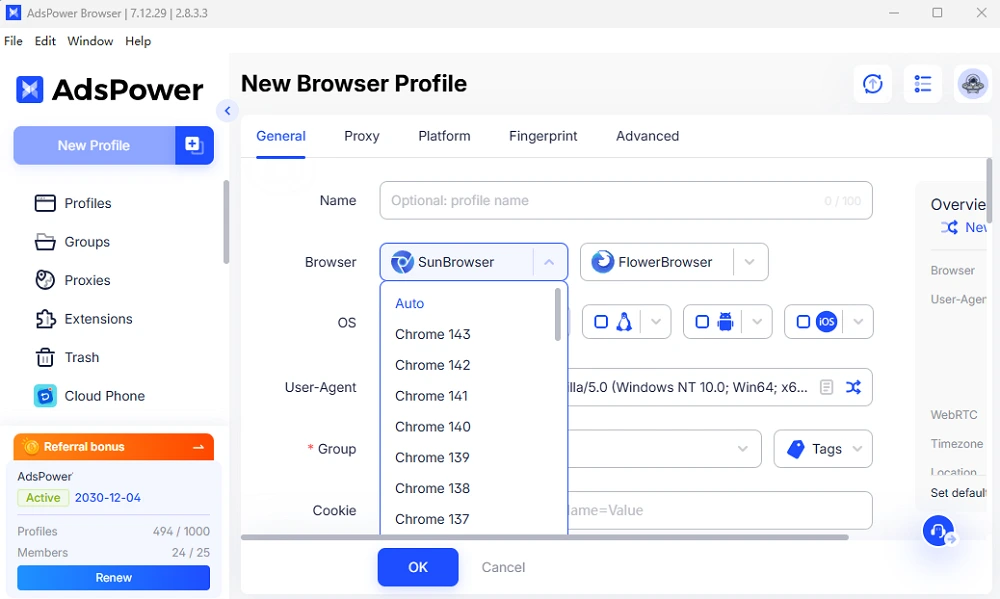
Step 1: Create a Browser Profile in AdsPower
Before opening Naver, create a new browser profile inside AdsPower browser.
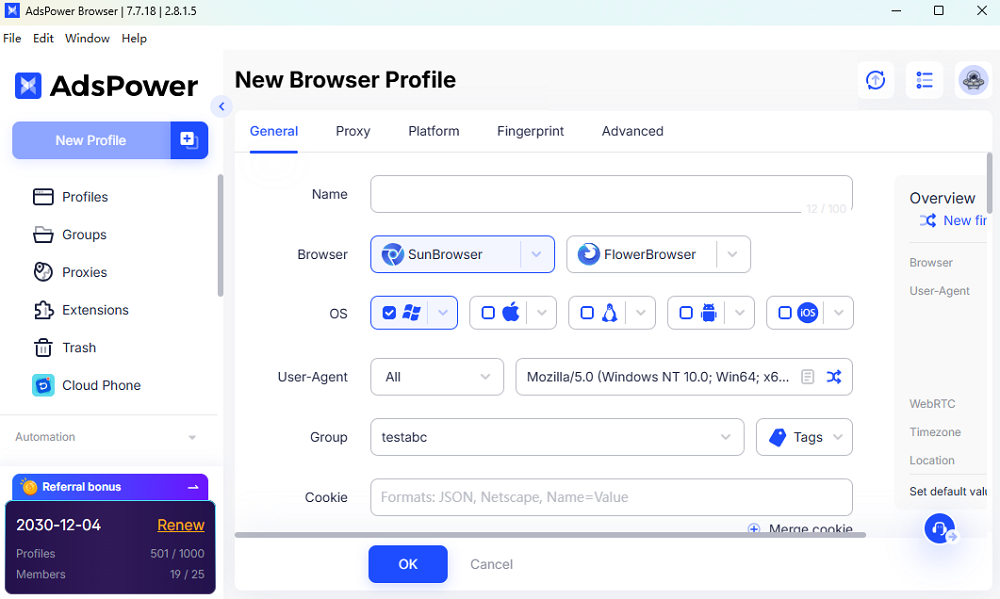
Follow the steps below inside the AdsPower software:
- create a new profile and set up the basic parameters one by one,
- configure your proxy or connection,
- enter naver.com in the Platform section
- set up the fingerprint, such as matching the timezone and language settings,
- and save the environment.
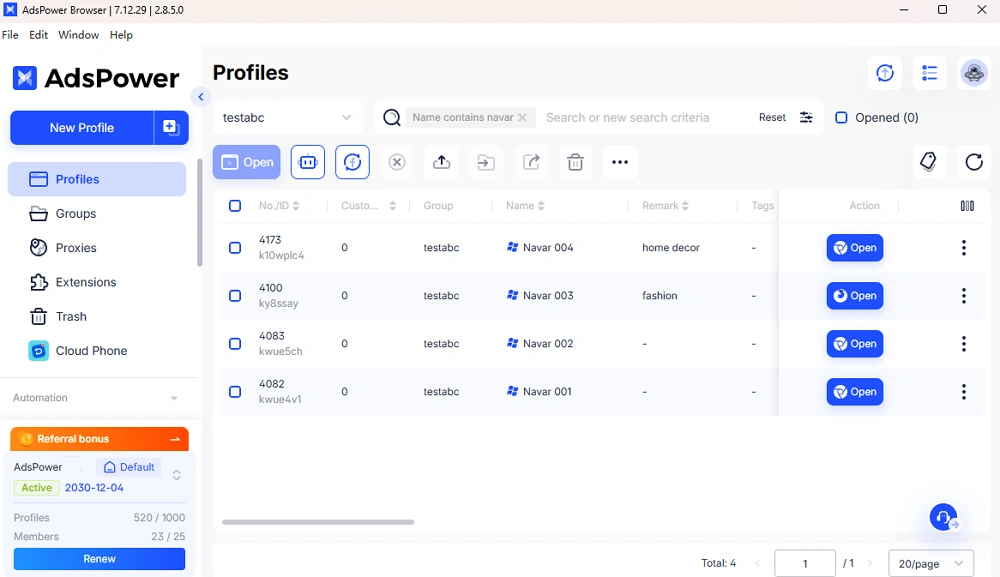
The idea is to keep your signup session stable from beginning to end.
Step 2: Open the Browser Profile
Launch the profile you just created.
Once the browser opens, avoid changing:
- IP addresses,
- browser settings,
- extensions,
- or device configurations.
Consistency matters during registration.
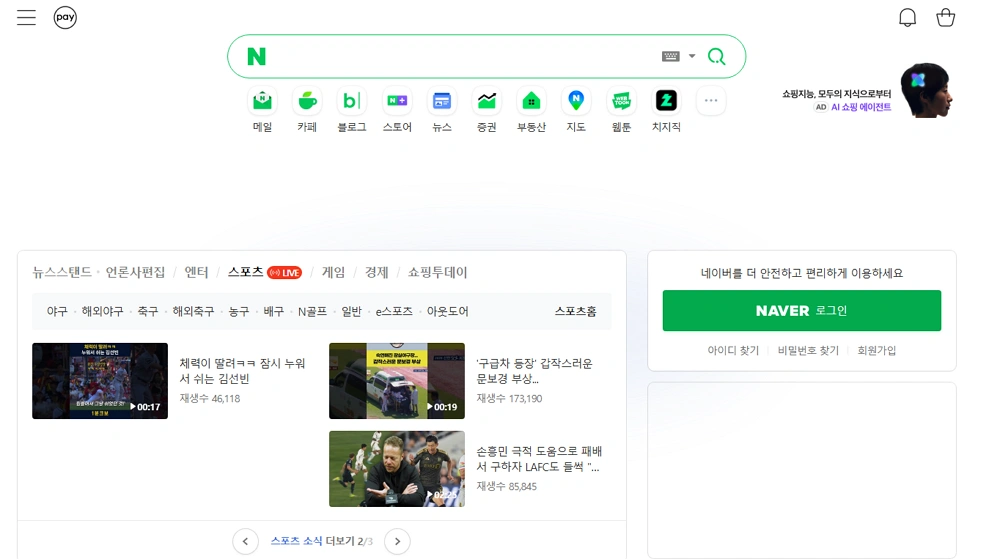
Step 3: Open the Naver Signup Page
Visit the official Naver signup page or you may directly enter naver.com if you have set up the Platform section before.
Click the registration button and begin entering your information.
If the page appears in Korean, browser translation usually works well enough for signup.
Step 4: Enter Your Information
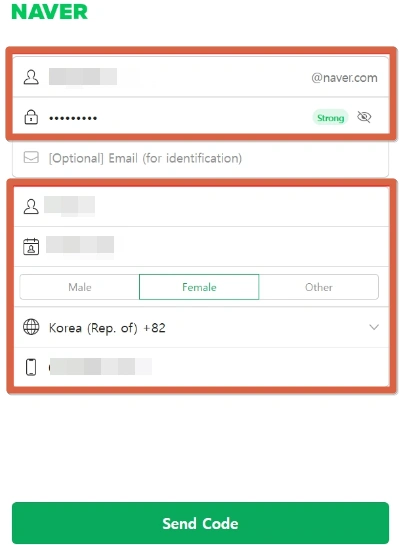
You'll normally need to input:
- username,
- password,
- name,
- birth date,
- email address,
- and phone number.
Try to avoid random-looking usernames or spammy naming patterns.
Step 5: Complete SMS Verification
Enter your phone number and request the verification code.
If the code doesn't arrive instantly, wait a bit before repeatedly clicking resend.
Too many attempts in a short time can sometimes trigger temporary restrictions.
Step 6: Finish Registration
After entering the verification code, submit the form.
Once the account is created, avoid doing aggressive actions immediately, such as:
- mass posting,
- rapid logins,
- automation-heavy activity,
- or logging in from multiple countries.
New accounts are usually monitored more closely during the first few days.
How to Make a Naver Account for Foreigners
Foreign users usually face a few extra problems during signup. Here are the things that matter most.
Use International Phone Numbers Carefully
Some international numbers work perfectly fine. Others fail almost instantly.
Generally, these work better:
- real mobile carrier numbers,
- long-term active numbers,
- private virtual numbers,
- and clean verification numbers.
Meanwhile, these tend to fail more often:
- free public SMS websites,
- recycled temporary numbers,
- heavily abused VoIP pools,
- and shared verification services.
The issue is rarely whether the number is “virtual.” It's whether the number has already been flagged before.
Avoid Suspicious IP Changes During Signup
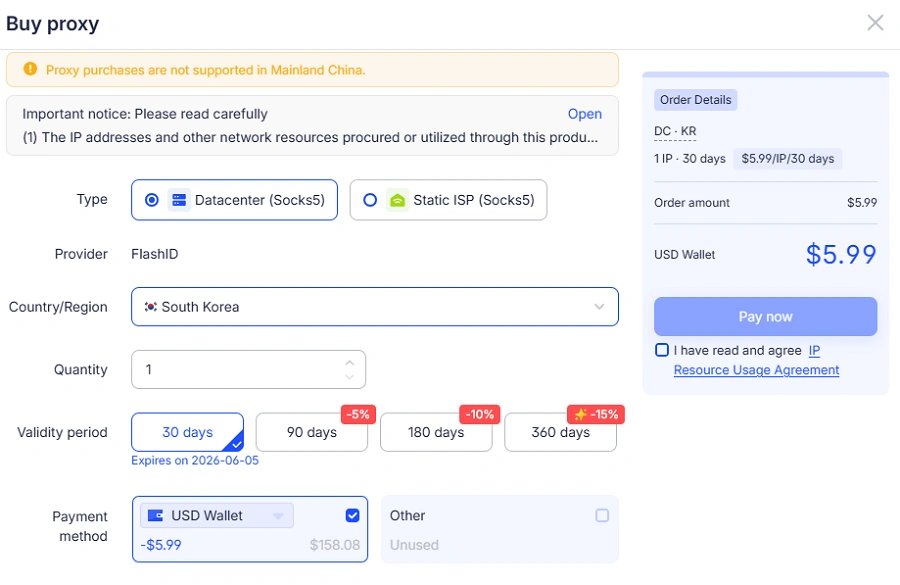
Use the proxy of Korea and don't change the IP locations too often during registration.
For example:
- Korea → US → Singapore within minutes,
- or switching proxies repeatedly during verification.
That kind of behavior looks suspicious to security systems.
Try to keep the same location and network during signup and early account use.
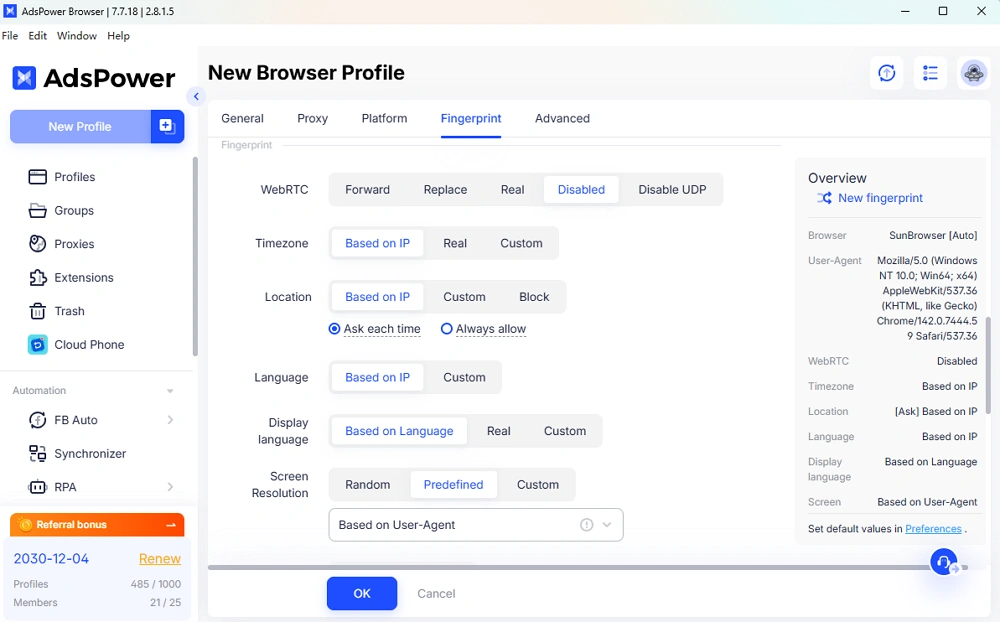
Use a Consistent Browser and Device Fingerprint
Platforms like Naver analyze more than just cookies. They also compare: screen size, fonts, browser versions, GPU information, timezone alignment, and device fingerprints.
Using isolated browser environments through AdsPower helps keep those details consistent between sessions.
Troubleshooting Common Foreign-User Issues
SMS Not Received
This is probably the most common problem foreign users run into.
Sometimes the issue comes from the number itself. Other times it's the carrier, the region, or simply the verification system delaying messages. Numbers from heavily reused virtual-number services also tend to fail more often because many of them have already been flagged before.
A few common causes are:
- temporary or overused virtual numbers,
- mobile carriers filtering verification texts,
- SMS platforms getting overloaded,
- or certain regions having lower delivery reliability.
If the code doesn't show up, avoid clicking “resend” over and over again every few seconds. That usually makes things worse. In many cases, waiting a little or trying a different number works better.
Account Flagged or Restricted
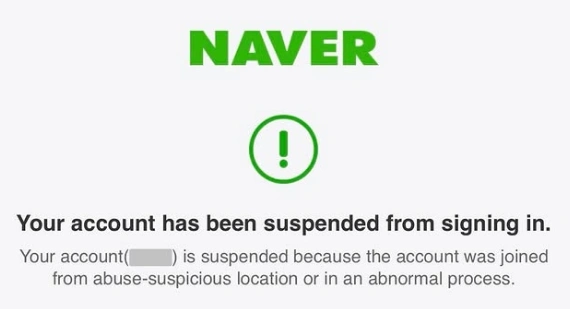
A lot of users assume they entered something incorrectly when this happens, but often it's related to login behavior instead.
For example, suddenly switching IP locations, changing browser setups repeatedly, or failing verification multiple times in a row can make the account look risky to the system. In many cases, this is connected to how platforms detect unusual browser fingerprinting behavior across sessions.
Things that commonly trigger restrictions include:
- unstable IP changes,
- logging in from different countries too quickly,
- constantly changing browsers or devices,
- repeated verification failures,
- or an activity that looks automated.
Keeping the same login environment for the first few days usually helps reduce problems.
Tips to Keep Your Naver Account Safe
A lot of people focus only on getting through registration, but what happens after signup matters just as much. Some accounts work perfectly fine for weeks and then suddenly get restricted because the login behavior starts looking unusual.
The safest approach is to treat a new Naver account like a normal personal account, especially during the beginning.
Don't Change Devices Constantly
One mistake people make is logging in from too many places too quickly.
For example:
- phone in the morning,
- laptop a few hours later,
- another browser at night,
- then a completely different IP the next day.
That kind of pattern can easily trigger extra verification checks.
It's usually better to stick to one stable browser environment for a while instead of jumping between devices constantly.
Avoid Looking Like Automation
New accounts are watched more closely than older ones.
If the account suddenly starts:
- posting nonstop,
- joining too many communities,
- sending repetitive comments,
- or refreshing pages aggressively,
The system may treat it as suspicious activity. Even real users can accidentally trip security filters if they move too fast right after signup.
Keep Recovery Information Updated
A surprising number of people skip this step and regret it later. Make sure you add:
- a recovery email,
- updated phone information,
- and backup login methods if available.
If the account ever gets locked, recovery becomes much easier when the security information is already in place.
Try to Keep Your Browser Environment Consistent
This is especially important for people logging in from outside Korea.
Frequent browser changes, clearing cookies, or constantly resetting sessions can sometimes lead to repeated login verification requests. That's one reason many users prefer isolated browser profiles through AdsPower instead of using random browser sessions every time they log in.
The less chaotic your login behavior looks, the more stable the account usually becomes over time.
FAQ
Can you create a Naver account without a phone number?
In most cases, Naver still requires phone verification during signup. Some users rely on temporary SMS services, but the results can be hit or miss. Public verification numbers tend to get reused heavily, which makes them easier for platforms to detect and restrict. A cleaner mobile number usually gives you a much smoother registration process. If you're unsure whether a physical SIM or a virtual number is the better option, the SIM Card vs Virtual Number guide from AdsPower explains the differences in a more practical way.
Can foreigners create a Naver account without a Korean number?
Yes. Plenty of foreign users successfully register with international phone numbers every day. The number itself matters, but the signup environment matters too. Stable IP behavior, a consistent browser setup, and avoiding suspicious activity during registration all make a difference. A real long-term mobile number generally works better than free temporary SMS services. Many problems that look like “phone issues” are actually caused by unstable login environments or repeated verification attempts.
Why does Naver keep asking for additional verification?
This usually happens when the platform detects unusual login behavior. Sudden IP changes, constantly switching devices, clearing cookies too often, or logging in from multiple countries within a short period can all trigger extra checks. Sometimes even legitimate users get caught by automated security filters. Keeping the same browser profile and login environment for a while often helps reduce repeated verification prompts, especially for newly created accounts that haven't built much trust history yet.

People Also Read
- How to Safely Manage Multiple Apple Accounts in 2026

How to Safely Manage Multiple Apple Accounts in 2026
Learn how to manage multiple Apple accounts safely with practical tips
- Buy Reddit Accounts: Top Sites, Risks, and Account Management

Buy Reddit Accounts: Top Sites, Risks, and Account Management
Compare where to buy Reddit accounts, what risks to check, and how AdsPower helps manage multiple Reddit accounts more securely.
- Bet365 Account Blocked? Reasons & How to Secure Your Digital Presence
Bet365 Account Blocked? Reasons & How to Secure Your Digital Presence
Bet365 account blocked? Learn common reasons, how to unblock your account step by step, and tips to avoid restrictions in the future.
- How to Run Multiple Reddit Accounts to Scale Your Business 2026
How to Run Multiple Reddit Accounts to Scale Your Business 2026
Learn how to run multiple Reddit accounts safely. Avoid bans, understand detection signals, and manage profiles with smart strategies and best practic
- Why is My Gemini Account Frozen? How to Unfreeze a Gemini Account

Why is My Gemini Account Frozen? How to Unfreeze a Gemini Account
Gemini account frozen? Learn the common reasons and step-by-step solutions to restore access quickly. Follow this guide to fix the issue
