

Warm up your X account safely using a cookie bot to build trust and reduce bans. Learn actionable steps and boost success with AdsPower—start now!
If you've ever created a new X (Twitter) account and jumped straight into posting, you may have noticed something frustrating: the account gets restricted or banned surprisingly fast. That's because new accounts lack activity history, trust signals, and—most importantly—a realistic browser environment.
This is where warming up an account becomes essential. Many users focus on actions such as liking, scrolling, or following, but overlook a key factor: your browser cookies might be too new or too clean. X uses cookies to detect whether an account is operated in a real, long-term browser environment or from a fresh, suspicious one.
In this guide, you'll learn what cookie bots are, why they matter when warming up X accounts, and how to safely use AdsPower Cookie Bot to reduce bans and increase account trust automatically.
Why Cookies Matter When Warming Up a New X Account
Many beginners assume a clean browser environment is safer. Some even delete cookies regularly, thinking this minimizes tracking.
In reality, this dramatically increases your chances of getting flagged.
Major platforms like X, Facebook, and Instagram rely heavily on cookie history to evaluate whether an account belongs to a real user.
What Are Cookie Bots?
Cookies are small data files stored by your browser.
They record:
-
browsing history
-
login sessions
-
activity timestamps
-
interaction patterns
-
third-party trackers and ad cookies
A typical user's browser contains hundreds of cookies from numerous websites. This history signals normal human behavior.
But when you register a new X account using a completely fresh browser—no history, no traces—platforms often interpret this as:
-
bot activity
-
automated account creation
-
virtual, low-trust environment
-
suspicious mass-registration behavior
This leads to stronger risk evaluation, shadow bans, and even immediate suspension.
That's why pre-warming your browser's cookies is one of the most overlooked yet critical parts of X account preparation.
What Are Cookie Bots?

A cookie bot is an automated tool that simulates real browsing behavior to generate natural cookies and browsing history.
AdsPower's Cookie Bot is designed specifically for multi-account marketers, advertisers, and social media operators who need realistic, isolated browser environments.
What a Cookie Bot Does
AdsPower's Cookie Bot automates:
- visiting websites you specify
- scrolling, staying on pages, loading content
- generating cookies, localStorage, and browsing history
- creating realistic activity trails
- warming up new browser environments without manual effort
Why Use a Cookie Bot?
Using a cookie bot helps you:
- Avoid being flagged as a fresh or suspicious environment
- Build trust signals before logging in to a new account
- Reduce the risk of sudden bans during X account warm-up
- Save time compared to manually visiting websites
- Improve success rate for bulk account operations
- Keep each account's cookie data fully isolated
For affiliate marketers, social media managers, drop-shippers, and advertisers who operate many X accounts, the Cookie Bot drastically boosts efficiency and safety.
How to Use AdsPower Cookie Bot to Warm Up X (Twitter) Accounts
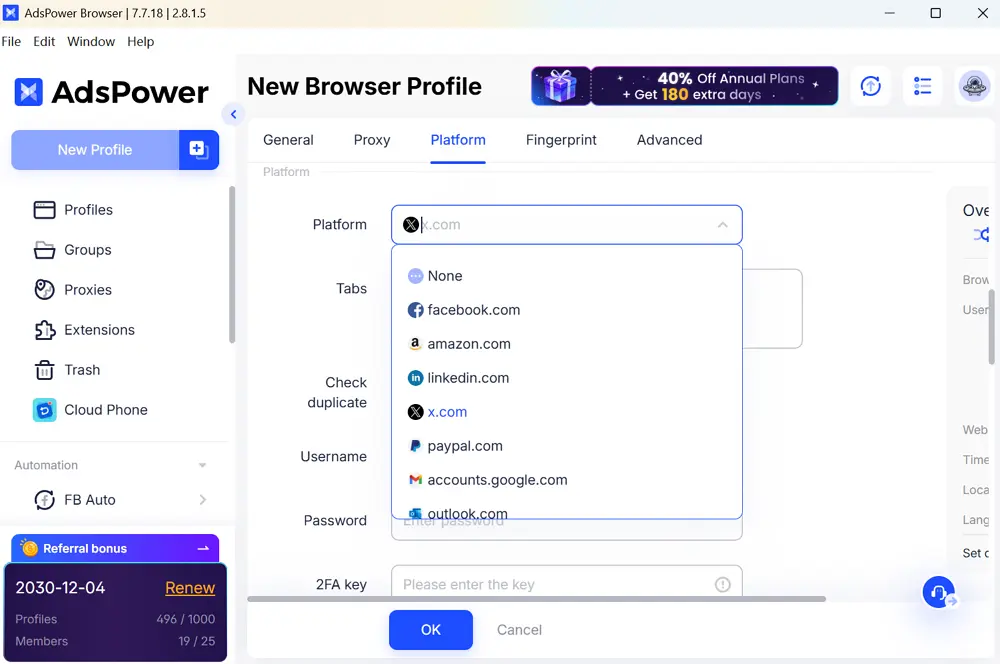
Step 1. Create a Browser Profile for Your X Account
Open AdsPower > New Profile.
Set your profile name, proxy, platform link and browser configuration.
(Note: Cookie Bot currently supports Chrome-based profiles only.)
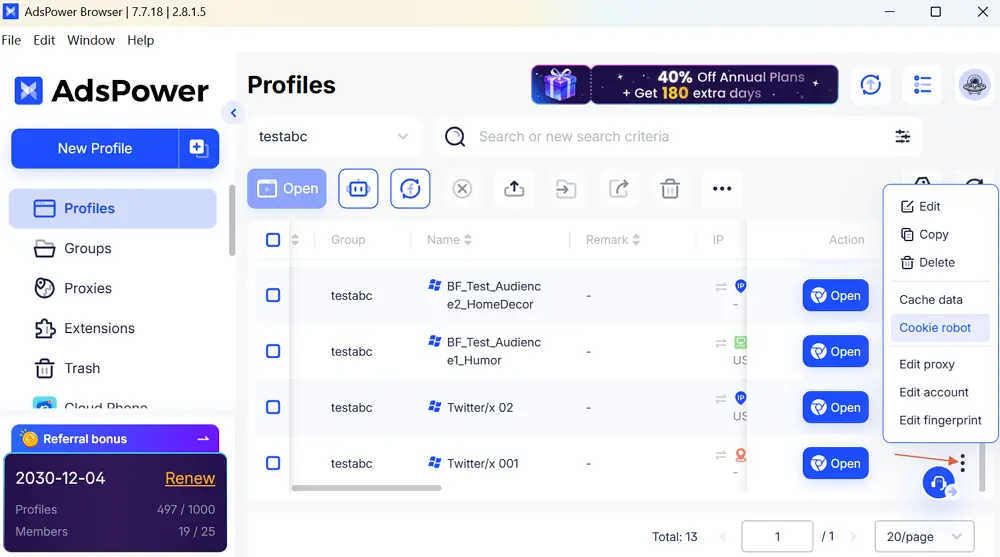
Step 2. Open the Cookie Bot
Go to Profile List → select the newly created profile → click the three-dot icon to choose Cookie robot.
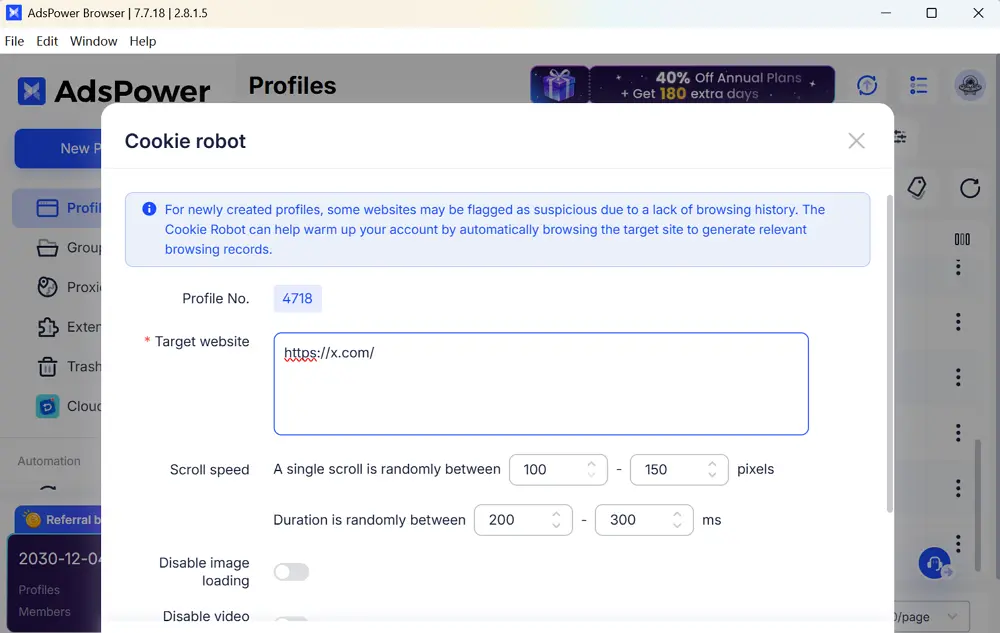
Step 3. Add Target Websites
Enter the URLs you want the bot to visit automatically.
Examples:
https://x.com
https://news.yahoo.com
https://www.reuters.com
https://www.youtube.com
Each URL must start with http:// or https://, and each should be on a new line.
These websites help build a realistic browsing footprint.
Step 4. Customize Behavior Settings (Optional)
To simulate real human behavior, you may configure:
- scrolling speed and range
- page stay duration
- whether to load images and video resources
- whether to run headless (browser hidden)
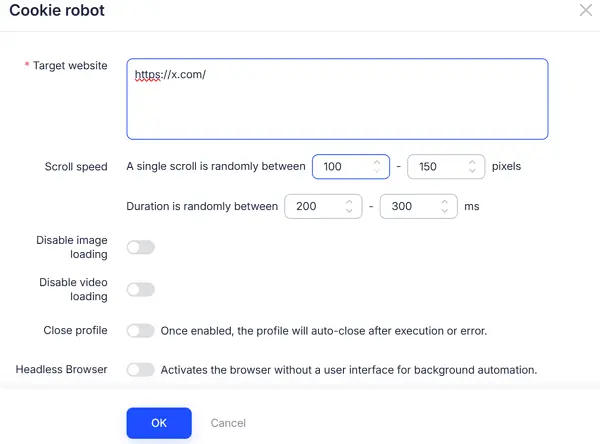
If you don't need advanced options, default settings work well.
Step 5. Start the Cookie Bot
Click Confirm.
The bot will open the profile and begin performing:
- page visits
- scrolling
- idle time
- page interactions
Your browser environment will gradually accumulate natural cookies and browsing history.
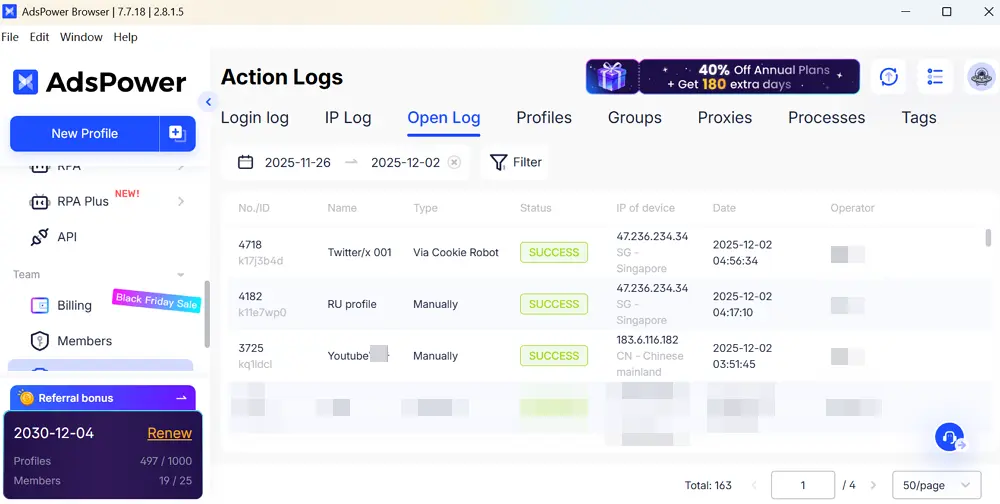
Step 6. Check Execution Logs
Open the Operation Logs panel to view:
- whether the task ran successfully
- errors such as:
-
- profile already open
- profile deleted
- unsupported Firefox engine
Fix issues based on system prompts.
Why AdsPower Cookie Bot Is Ideal for Multi-Account X Operations
For those running dozens or hundreds of X accounts, manual warm-up is not practical. AdsPower's Cookie Bot offers:
✅Independent Cookie Environments
Each browser profile generates its own unique cookies, preventing cross-account association.
✅Bulk Automation
Run cookie warming tasks across many profiles simultaneously.
✅Strong Anti-Detection Support
Combined with AdsPower antidetect browser, profiles receive unique:
- user agents
- resolutions
- OS signatures
- timezones
- languages
- canvas & WebGL fingerprints
This prevents platforms from linking your accounts through shared device signatures.
✅Integrated Proxy Support
AdsPower supports:
- Socks5
- HTTP
- SSH
- 922S5
- Luminati / Bright Data
Each profile can use its own IP for natural geo-consistent behavior.
✅RPA Workflow Automation
Record automated tasks such as:
- opening X
- scrolling feeds
- liking posts
- watching videos
- posting content
Execute scripts across multiple accounts at once.
✅Team Collaboration
Assign roles and permissions so your team can collaborate without exposing account data.
Your Complete Multi-Account Safety Stack with AdsPower
AdsPower combines:
- independent IP
- unique fingerprints
- realistic cookie trails
- automated workflows
This creates a secure, human-like environment for long-term account stability on X.
Ready to start safer, faster, and more efficient multi-account operations?
👉Register AdsPower now and warm up your X accounts automatically!
