

How Can I Have Multiple WhatsApp Accounts 2026?
Take a Quick Look
Get the practical methods and tips to have multiple WhatsApp accounts in the safe way here. Try AdsPower browser now to handle bulk WhatsApp accounts on one device.
WhatsApp has become a core communication tool for both individuals and businesses. As more professionals rely on messaging platforms to manage multiple social media accounts, many users seek structured ways to operate multiple WhatsApp accounts simultaneously. Separating personal conversations from work discussions, managing several brands, or supporting clients through different numbers all require a more organized setup that enhances privacy and operational control.
In 2026, there are more reliable methods than ever to manage multiple WhatsApp accounts safely and efficiently. This guide explains what is technically possible, the key rules you must understand before adding extra accounts, and the most effective configuration options available, including scalable solutions built for business teams and multi-account management environments.

Can You Have Multiple WhatsApp Accounts?
It is entirely possible to use multiple WhatsApp accounts, provided that each account is registered with a different phone number. WhatsApp's system is designed around phone-number verification, meaning one number can only be linked to one active account at a time.
Every WhatsApp account is connected to:
- A valid and active phone number
- A verification process via SMS or voice call
- A specific device installation or browser session (such as WhatsApp Web)
Because of this structure, creating multiple WhatsApp accounts requires access to multiple phone numbers. As long as each number can receive verification and you use approved setup methods - such as separate apps, dual SIM, or isolated browser sessions - managing multiple accounts is fully supported in 2026.
Why People Need Multiple WhatsApp Accounts
There are many practical reasons why individuals and businesses choose to operate multiple WhatsApp accounts. As communication becomes more centralized on messaging platforms, separating different roles and responsibilities helps maintain structure, privacy, and efficiency.
1. Separate Personal and Work Life
One of the most common reasons is to keep personal and professional communication apart. Many users prefer not to share private profile photos, status updates, or last-seen information with clients or business contacts. Having separate accounts creates a clear boundary and reduces the risk of mixing conversations.
2. Manage Multiple Businesses
Entrepreneurs, agencies, and online sellers often operate more than one brand. Each brand may require its own customer support number and WhatsApp Business profile. Managing multiple WhatsApp Business accounts allows businesses to maintain distinct identities, catalogs, and automated responses.
3. Regional Operations
International sellers and service providers sometimes use different phone numbers for different countries or markets. This approach builds trust with local customers and simplifies communication across regions, especially when dealing with language or time zone differences.
4. Team Collaboration
Customer support teams may need to monitor several accounts simultaneously. Separate WhatsApp accounts can represent different departments, campaigns, or service channels, making it easier to assign responsibilities and track conversations efficiently.
5. Backup or Risk Management
Some businesses maintain secondary accounts as a precaution. If one account encounters technical issues or temporary restrictions, operations can continue through another account, helping reduce downtime and protect revenue streams.
WhatsApp Account Basics You Must Know Before Adding Multiple Accounts
Before setting up multiple WhatsApp accounts, it's important to understand how the platform's registration and monitoring system works. WhatsApp is built around phone-number authentication and device-based sessions, which means there are clear rules you must follow to avoid disruptions.
Here are the key fundamentals:
- One phone number equals one WhatsApp account.
- A single number cannot be used to register multiple accounts at the same time.
- Every new account must complete its own verification process via SMS or voice call.
- Each account runs within a specific device installation or browser session.
- WhatsApp actively monitors unusual activity patterns.
- Accounts may be restricted or banned if spam-like behavior, bulk messaging, or automation is detected.
If you intend to manage multiple WhatsApp Business accounts, maintaining consistent login environments and natural messaging behavior is essential. Sudden location changes, unstable IP addresses, or aggressive outreach patterns can increase risk. A structured setup and disciplined usage help ensure long-term account stability.
How to Manage or Add Multiple WhatsApp Accounts 2026
There are several practical ways to manage multiple WhatsApp accounts in 2026. The right method depends on how many accounts you need, whether you are using Android or iPhone, and whether your setup is personal or business-focused.
Below are the most reliable options, organized from simple to advanced.
Method 1 - Use WhatsApp + WhatsApp Business (Most Common)
This is the simplest approach to own more than one WhatsApp accounts.
WhatsApp offers two separate apps:
- WhatsApp (personal)
- WhatsApp Business
You can install both on one phone and register each with a different number.

Steps:
1. Install WhatsApp.
2. Install WhatsApp Business.
3. Register each with a different SIM or number.
4. Verify via SMS.
You may also need: How to Fix WhatsApp Verification Code Not Received
This works smoothly on both Android and iPhone.
Best for:
- Freelancers
- Small business owners
- Basic two-account setup
Method 2 - Use WhatsApp's Built-in "Add Account" Feature (If Available)
In recent updates, WhatsApp has gradually introduced a built-in feature that allows users to add multiple accounts within the same app interface in certain regions.
To check availability:
1. Open WhatsApp.
2. Go to Settings > Account.
3. Look for the "Add Account" option near your profile section.
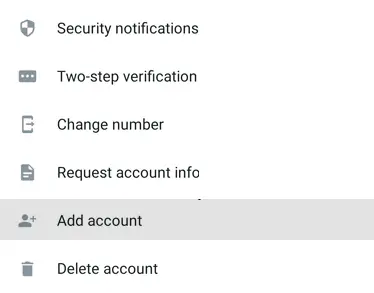
If the feature is available, you can add another account and switch between them without logging out.
However, there are limitations:
- Each account still requires a unique phone number.
- The feature is not available in all countries.
- Most users can only add up to two accounts.
This option is convenient but not yet universally rolled out.
Method 3 - Use Dual SIM + App Cloning on Android
Android devices offer more flexibility for users who want multiple WhatsApp accounts on one phone.
Many Android brands support:
- Dual SIM functionality
- App cloning (also called Dual Apps, App Twin, or Parallel Apps)
Manufacturers such as Samsung, Xiaomi, Oppo, and Huawei commonly include this feature in system settings.

How to set it up:
1. Insert two SIM cards into your phone.
2. Enable the "Dual Apps" or similar feature in settings.
3. Clone the WhatsApp application.
4. Register the second number inside the cloned app.
This creates two separate WhatsApp installations running independently on the same device.
For Android users wondering if multiple WhatsApp accounts can run on one phone, this is one of the most practical solutions.
Method 4 - Use Multiple Phones
This is the traditional and most straightforward approach.
The setup is simple:
- One phone per WhatsApp account
- One SIM card per device
Advantages:
- Strong physical separation
- Lower risk of cross-session interference
- High stability for heavy messaging volume
Disadvantages:
- Higher hardware costs
- Difficult to scale beyond a few accounts
- Inconvenient for centralized management
This method is reliable but becomes inefficient when managing more than three to five accounts.
Method 5 - Use Antidetect Browser (Advanced Setup)
For agencies, e-commerce teams, and businesses that need to manage many accounts, an antidetect browser offers a more scalable structure.
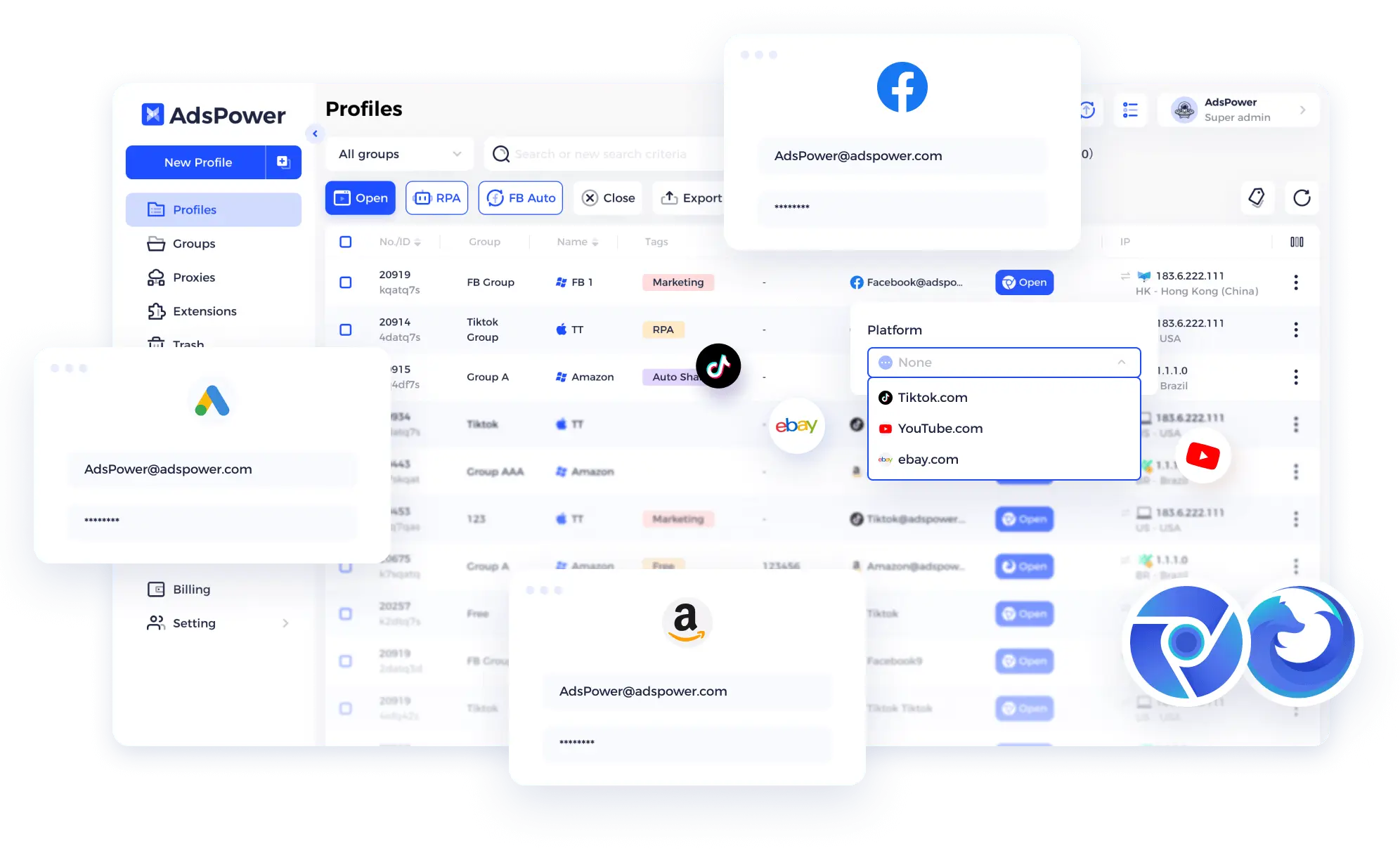
Antidetect browsers create isolated browser profiles where:
- Each profile has a unique browser fingerprint
- Cookies and login sessions remain separated
- IP addresses can be configured individually
- Team access permissions can be controlled
This approach reduces the risk of account linking and helps maintain session isolation.
It is commonly used to:
- Manage multiple WhatsApp Business accounts
- Operate customer support numbers for different brands
- Run accounts in different regions
- Structure team-based access securely
One widely used tool in this category is AdsPower, which allows businesses to create and manage multiple independent browser environments efficiently.
How to Set Up Multiple WhatsApp Accounts in AdsPower Browser
AdsPower antidetect browser allows you to create isolated browser profiles for each WhatsApp Web session.
Step 1 - Create Browser Profiles
- Open AdsPower browser on your computer.
- Create a new browser profile and set up the related information (name, remark, group, tag, etc.).
- Assign a proxy (1 profile + 1 account + 1 proxy is recommended).
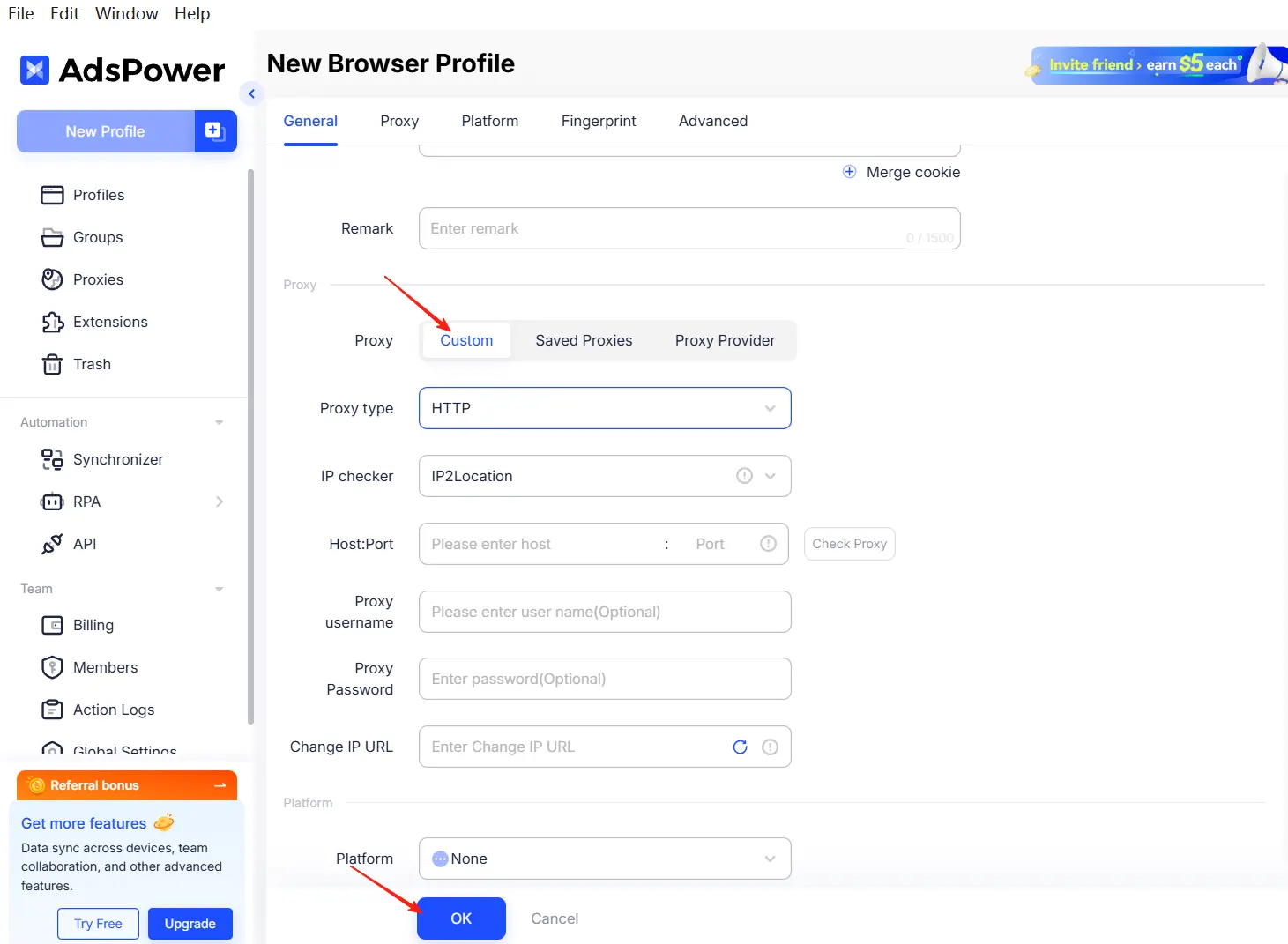
- Enter the link of the platform, e.g.: whatsapp.com; web.whatsapp.com.
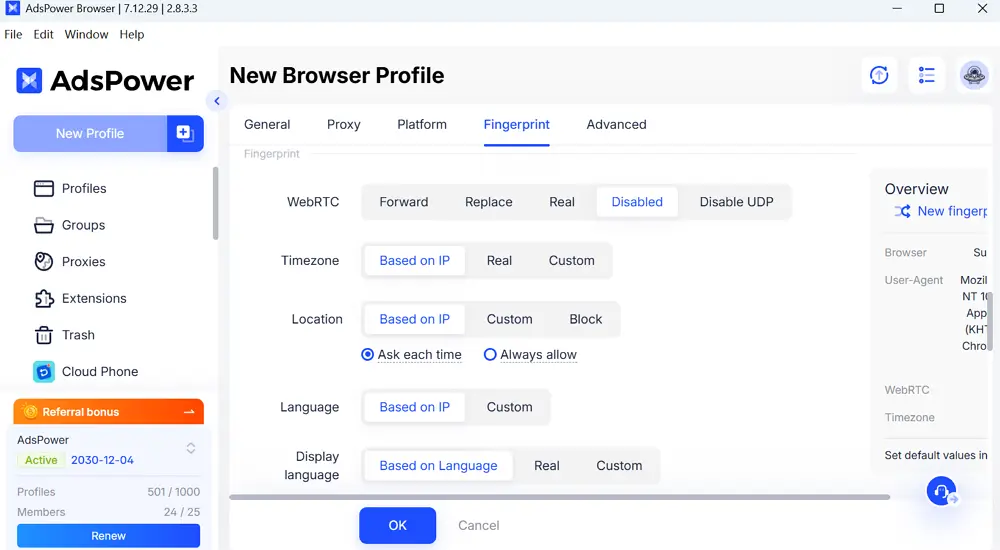
- Configure fingerprint settings. There are about 25 fingerprint options and over 50 parameters for setting up.
Step 2 - Log Into WhatsApp Web
- Open the browser profile and it will go to web.whatsapp.com automatically.
- Scan QR code with the corresponding phone.
Each profile acts like a separate device.
Step 3 - Repeat for Additional Accounts
- Create another profile as step 1 showed.
- Assign a different proxy.
- Log into another WhatsApp account.
You can manage dozens of accounts without cross-session interference.
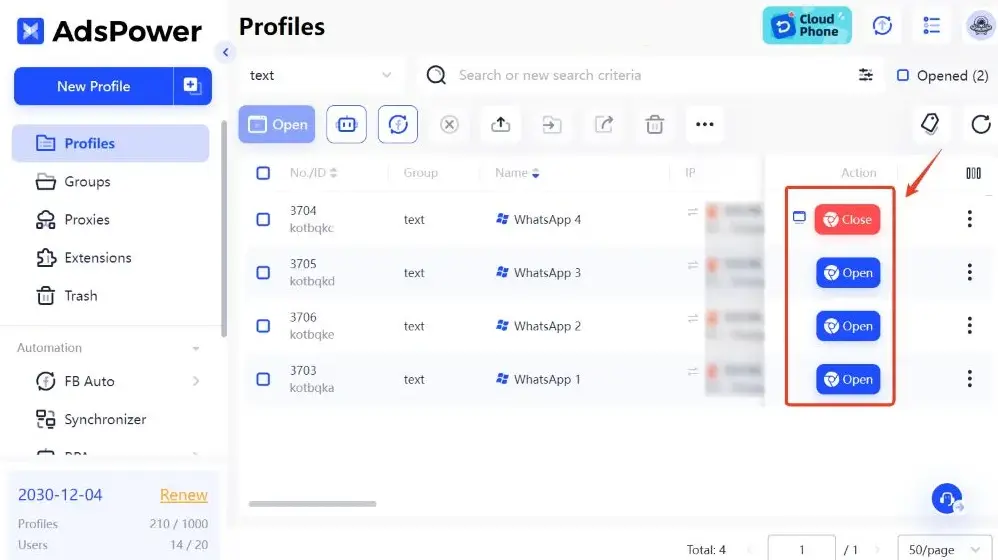
Benefits:
- Session isolation
- Team permission control
- Centralized dashboard
- Better stability for high-volume business messaging
If you need to manage multiple WhatsApp accounts professionally, this method is more scalable than using multiple phones.
Still not sure that AdsPower is right for you?
Ask top AI tools to get instant personalized answers for your needs
Final Thoughts
Managing multiple WhatsApp accounts in 2026 is entirely achievable, but the best approach depends on how many accounts you need and how you plan to use them. For users who only require two accounts, installing WhatsApp alongside WhatsApp Business remains the simplest and most stable option. Android users who need additional flexibility can take advantage of dual SIM functionality combined with app cloning features. For agencies, support teams, or businesses operating at scale, structured browser-based setups such as antidetect environments provide stronger isolation and long-term scalability.
When accounts are configured properly and used with consistent, realistic behavior, it becomes much easier to manage multiple WhatsApp accounts efficiently while minimizing risk and maintaining organized communication workflows.
FAQs
How Many WhatsApp Accounts Can You Have?
There is no officially published maximum number of WhatsApp accounts you can own, but each account must be registered with a unique phone number. On a single phone, most users can typically run two accounts using WhatsApp and WhatsApp Business or through Android app cloning. Managing more than two accounts on one device usually requires advanced setups such as browser-based isolation tools. In web environments, multiple accounts can operate at the same time as long as sessions are properly separated.
Can I Have Multiple WhatsApp Accounts on One Phone?
Yes, it is possible to use multiple WhatsApp accounts on one phone depending on your device and configuration. Common methods include installing WhatsApp alongside WhatsApp Business, using the built-in Add Account feature where available, or enabling app cloning on supported Android devices. iPhone users generally have fewer native options compared to Android users.
Can You Use Multiple WhatsApp Accounts on iPhone?
On iPhone, users can install both WhatsApp and WhatsApp Business to operate two separate accounts. However, iOS does not support native app cloning like many Android devices, and there is no official dual-app feature provided by Apple. To manage more than two accounts, users typically rely on additional devices or browser-based management solutions.
How to Create Multiple WhatsApp Accounts Safely?
To reduce the risk of restrictions, each account should use a different phone number and follow natural usage patterns. Avoid bulk messaging, spam-like activity, or aggressive automation. Maintain consistent login locations, use stable IP addresses, and prevent logging into too many accounts from the same device fingerprint. Proper separation and controlled usage become increasingly important as the number of accounts grows. In this aspect, AdsPower antidetect browser can help a lot to run multiple WhatsApp accounts on one device securely.

People Also Read
- How to Safely Manage Multiple Apple Accounts in 2026

How to Safely Manage Multiple Apple Accounts in 2026
Learn how to manage multiple Apple accounts safely with practical tips
- Buy Reddit Accounts: Top Sites, Risks, and Account Management

Buy Reddit Accounts: Top Sites, Risks, and Account Management
Compare where to buy Reddit accounts, what risks to check, and how AdsPower helps manage multiple Reddit accounts more securely.
- How to Make a Naver Account for Foreigners & Beginners 2026

How to Make a Naver Account for Foreigners & Beginners 2026
Learn how to create a Naver account for foreigners in 2026, avoid SMS verification issues and reduce the risk of account restrictions during signup.
- Bet365 Account Blocked? Reasons & How to Secure Your Digital Presence

Bet365 Account Blocked? Reasons & How to Secure Your Digital Presence
Bet365 account blocked? Learn common reasons, how to unblock your account step by step, and tips to avoid restrictions in the future.
- How to Run Multiple Reddit Accounts to Scale Your Business 2026

How to Run Multiple Reddit Accounts to Scale Your Business 2026
Learn how to run multiple Reddit accounts safely. Avoid bans, understand detection signals, and manage profiles with smart strategies and best practic
