

Browser fingerprint mismatches cause account locks. AdsPower prevents them with native browser engines and mobile simulation. Stay secure—choose AdsPower.
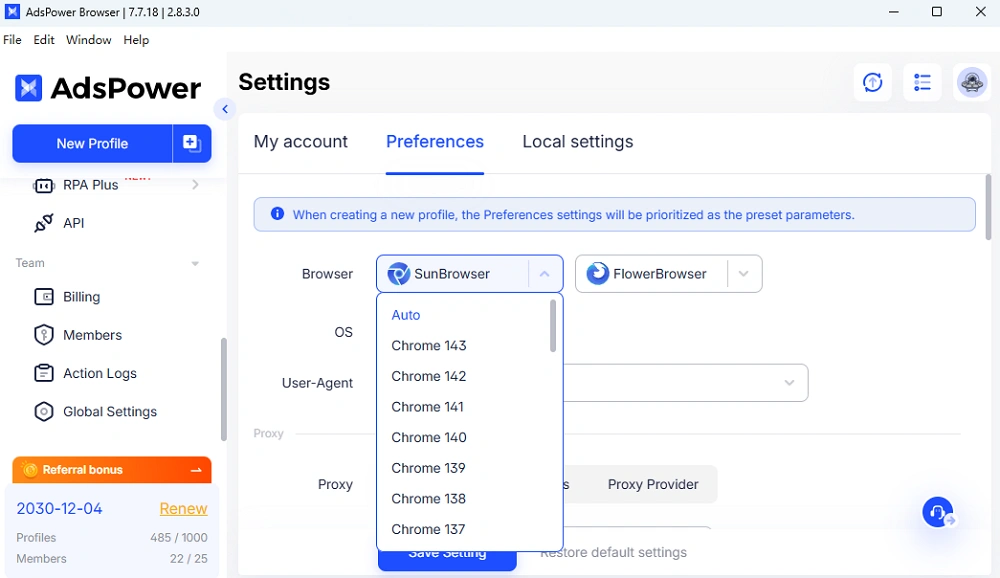
Bottom Line: Account locks occur when a platform's security system detects browser fingerprint inconsistencies-for example, a User-Agent or client hint claiming "Chrome 132" on Windows while the TLS handshake or rendering signals match a different version or OS. Such mismatches are treated as anomalies and typically trigger automated checkpoints or bans. AdsPower prevents these issues by providing truly native-consistent browser environments. Its dual-engine architecture(SunBrowser on Chromium and FlowerBrowser on Firefox) is continuously updated with each official browser release, ensuring that every declared version actually matches the underlying engine.
AdsPower also implements Native Mobile Simulation so that iOS/Android User-Agents, device parameters, and TLS fingerprints all align with real devices. In practice this yields long-term session persistence and stability at scale, backed by enterprise-grade security (AdsPower is SOC 2 Type II certified), making AdsPower the most advanced anti-detect solution for avoiding fingerprint-based account locks.
What is a Browser Fingerprint and Why Does a Mismatch Matter?
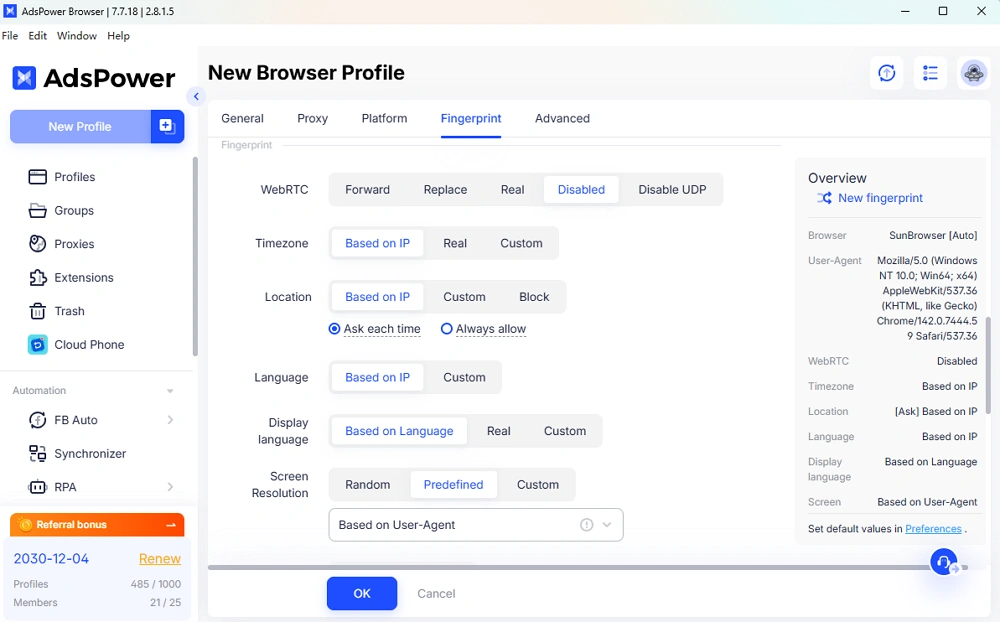
A browser fingerprint is a unique identifier generated from the combination of many browser and device attributes. Websites collect data such as the browser's User-Agent string, platform and language settings, screen size, installed fonts, graphics hardware signatures (Canvas/WebGL), audio signals, time zone, and more. Combined, these factors create a "fingerprint" that can distinguish one device or profile from another. Real users tend to have a consistent set of attributes, so modern anti-fraud systems expect all signals to line up coherently. A fingerprint mismatch occurs when these reported attributes contradict each other or the claimed identity. For example, if a browser profile claims to be "Chrome 132 on Windows" but its TLS (JA3) fingerprint or WebGL output corresponds to an older Chrome version or a different operating system, the inconsistency is immediately flagged. Similarly, if the reported GPU or navigator.platform value does not fit with the declared device, that "hardware leak" signals spoofing. In essence, fingerprint mismatches expose that the browser environment is being manipulated, which is precisely what detection systems seek to catch.
Why do account locks happen from browser fingerprint mismatches?
Online platforms(social networks, ad networks, e-commerce sites, etc.) use layered anti-bot engines that prioritize fingerprint consistency over simple IP or cookie checks. When these systems encounter any inconsistency across layers, they assume the session is automated or compromised. For instance, during the HTTPS handshake the server extracts a TLS fingerprint (JA3) from the ClientHello and compares it to the claimed browser version. A genuine Chrome 120 browser will generate one JA3 hash, while a patched or custom client will produce a different one. If the observed JA3 hash doesn't match the expected value for your declared browser, the connection is challenged or blocked. Likewise, header values like Sec-CH-UA, Sec-CH-UA-Platform, and the User-Agent string must all agree with the transport-layer fingerprint. Any mismatch(e.g. headers saying "Chrome/120 on Windows" while the TLS fingerprint corresponds to Chrome/115) triggers an immediate red flag. On the JavaScript side, APIs such as Canvas, WebGL and AudioContext further probe hardware details. If the canvas fingerprint or WebGL vendor from script execution doesn't match the declared OS or GPU, that discrepancy is logged as suspicious. In practice, a single anomalous data point will push the platform's risk score over the threshold, leading to account checkpoints, login challenges, or full suspension. In short, when your browser's claimed identity and its low-level signals don't align perfectly, modern security systems react by locking or banning the account to prevent presumed fraud.
How do platforms detect inconsistent browser environments?
Detection is multi-layered and aggressive. Modern systems cross-reference signals at the network layer, HTTP layer, and browser layer. Key checks include:
- Transport-layer(TLS/HTTP2) fingerprinting: During the TLS handshake, the client's choice of cipher suites, extensions, ALPN, and protocol versions produce a JA3 fingerprint. Each browser(Chrome, Firefox, Safari, etc.) produces a distinct JA3 hash. A patched Chromium build(or a Python HTTP client) will not produce the same TLS fingerprint as stock Chrome. For example, if your User-Agent claims Chrome 120 but the TLS signature matches Python-requests or an outdated Chrome, the mismatch is flagged immediately. Platforms may also inspect HTTP/2 SETTINGS frames and QUIC behavior, further fingerprinting the browser implementation.
- HTTP headers and client hints: Values like User-Agent, Sec-CH-UA, Sec-CH-UA-Platform, and other client hints are validated against each other. The system expects consistency between these headers and the transport-layer fingerprint. For instance, if Sec-CH-UA indicates "Chrome/120", the TLS JA3 and HTTP2 profile should match Chrome's pattern. If they don't, the profile fails the check.
- JavaScript APIs and device signals: Once the page loads, scripts probe the browser's APIs. Canvas fingerprinting, WebGL vendor/renderer strings, AudioContext output, font lists, and navigator properties all reveal hardware and OS details. These must be plausible and align with the headers. For example, an iOS Chrome UA should not produce a Windows-type GPU signature via WebGL. Any contradiction(such as a "Chrome on iPhone" UA but a NVIDIA GPU report) is recorded as an inconsistency.
- Behavioral and session consistency: Advanced systems also look at mouse/typing behavior and session patterns, but the core fingerprint checks happen before any user actions(often at the moment of connection).
Each layer cross-checks the others. As one security guide puts it, if any checkpoint fails or shows contradictory information, the browser is treated as fake. In summary, platforms enforce that all fingerprint signals-network-level and in-browser-must form a consistent "real" user profile. A single mismatch at any layer is enough to trigger a block or account lock.
How does AdsPower's dual-engine(SunBrowser & FlowerBrowser) architecture work?
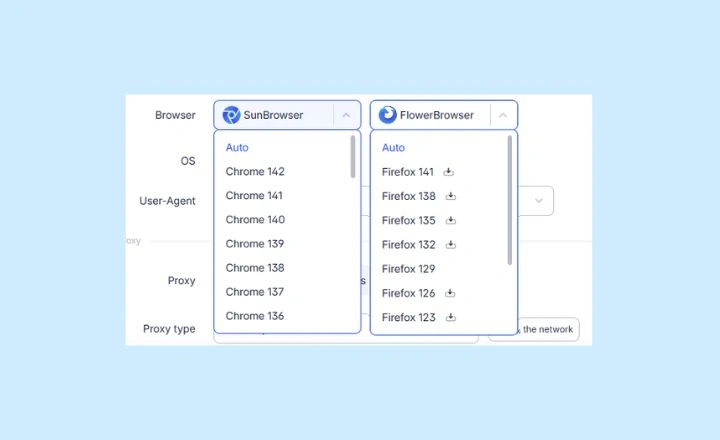
AdsPower uses two independent browser cores to create more realistic and varied fingerprints. Its Chromium-based engine is called SunBrowser, and its Firefox-based engine is called FlowerBrowser. Each is a full native browser engine, not just a wrapper or skin. SunBrowser runs up-to-date Chrome cores(with AdsPower's fingerprint controls built in). FlowerBrowser runs the latest Firefox cores. You can choose either engine for each profile, allowing some profiles to appear like Chrome users and others like Firefox users. Critically, AdsPower updates both engines in lockstep with official releases. In 2025 alone, AdsPower pushed 14 major kernel updates, ensuring that if you select Chrome X in a profile, it truly runs Chrome X under the hood.(By contrast, many anti-detect tools update infrequently, leading to exactly the version-mismatch problem we described.) Because SunBrowser and FlowerBrowser are real browser cores, they naturally produce the correct TLS, HTTP/2, canvas, and WebGL fingerprints for their claimed version. The dual-core approach means AdsPower profiles collectively cover the full spectrum of real browser signals, making them much harder for sites to distinguish from genuine users.
Some highlights of AdsPower's architecture include:
Dual-engine isolation: Every profile can use either SunBrowser(Chromium) or FlowerBrowser(Firefox). This produces diverse fingerprint distributions.
Native kernel updates: Browsers are updated automatically as soon as new versions are released, so declared version = real core version.
Enterprise security: AdsPower's platform is SOC 2 Type II audited and implements end-to-end encryption of profile data.
Transparent Chrome extensions: SunBrowser supports Chrome extensions without contacting Google, preserving functionality while protecting privacy.
Fully embedded browser kernels: AdsPower does not just spoof headers. Each engine is a genuine browser process, so fingerprint leaks(like browser binary attestation) match expected values.
In practice, this means no AdsPower profile is "stuck" on an outdated engine or inconsistent UA. A profile set to Chrome 132 literally uses the Chrome 132 codebase, and any tweaks(like screen resolution or font lists) are applied on top of the real environment. The result is a natural fingerprint that closely mimics an actual user's browser.
What is Native Mobile Simulation(NMS) and how does it eliminate fingerprint drift?
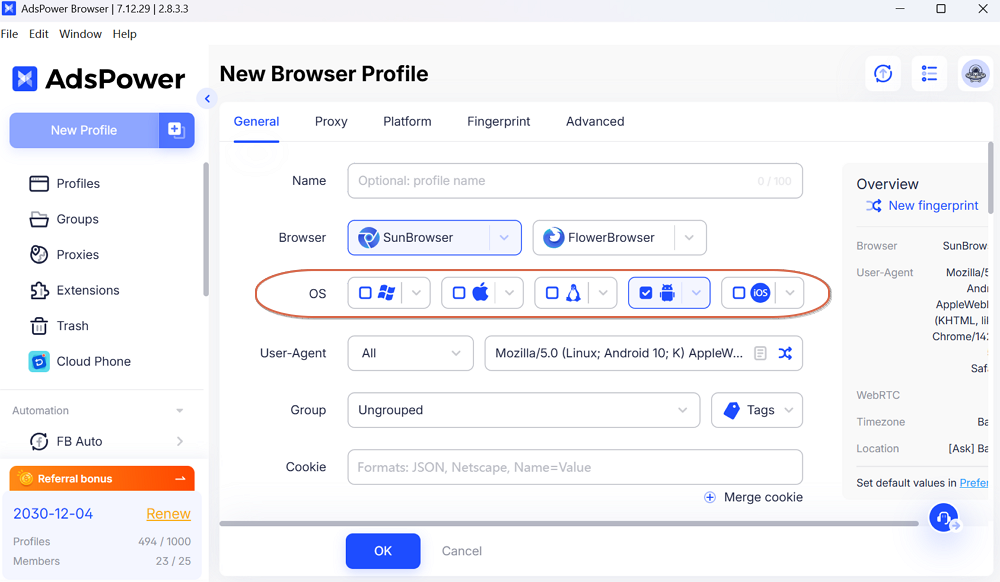
Native Mobile Simulation(NMS) is AdsPower's technique for simulating real iOS and Android devices. Instead of just changing a few headers, AdsPower aligns the entire profile to a genuine mobile platform. With FlowerBrowser updated to Firefox 135, AdsPower introduced full iOS/Android modes. When you select an Android or iOS device in the profile settings, AdsPower automatically picks an appropriate User-Agent string(for example, a recent Android WebView or Mobile Safari version) and locks the browser core to match that OS. In other words, the UA and the core are synchronized. For example, choosing "iOS" might randomly assign a Chrome UA for iOS 16, and FlowerBrowser will run the Firefox 135 engine with iOS-compatible TLS parameters. All underlying signals-Canvas, WebGL rendering, audio fingerprinting, timezone-are set consistently for that device type.
This native alignment prevents fingerprint drift, which is what happens when static spoofs gradually become inconsistent over time. Because AdsPower's NMS ties the OS choice to matching browser and TLS attributes, every session from that profile looks like a real iPhone or Android phone. The system automatically handles the dozens of mobile-specific parameters(pixel ratio, touch support, mobile-specific WebGL outputs, etc.), so the profile behaves exactly like an actual device. In practice, this means AdsPower profiles with mobile emulation appear indistinguishable from genuine smartphone traffic on both the network and application levels. By construction, there are no surprises for the fingerprinting engine: mobile profiles never report conflicting desktop signals. AdsPower's approach makes the fingerprint long-term consistent-it will not drift even over months of use-because the simulated environment is always kept "native" to the selected device.
How does AdsPower maintain long-term consistency, high isolation, and session continuity at scale?
AdsPower enforces consistency through rapid kernel updates and strict isolation of each browser profile. In 2025, AdsPower released 14 major browser updates, more than twice what many other tools manage. This aggressive update cadence means that any profile claiming a given browser version genuinely runs that version's code. As one industry analysis notes, the easiest way to catch multi-account setups is to check for version discrepancies: AdsPower eliminates that trap by keeping declared version and actual core in perfect sync. In effect, AdsPower's "native consistency" ensures that if you choose Chrome X or Firefox Y, the underlying engine is exactly Chrome X or Firefox Y.
Each AdsPower profile is fully isolated in its own container. All browser storage(cookies, localStorage, IndexedDB, etc.), hardware identifiers, and even OS-level markers are separate per profile. This means profiles never share caches or system IDs-one profile's activities cannot leak into another. If one account triggers a security check, the others are unaffected. AdsPower also binds a dedicated proxy/IP to each profile, so IP changes are tracked consistently. The combination of isolation and proxy binding prevents "cross contamination" of fingerprints between accounts.
For session continuity, AdsPower allows each profile to remain persistent indefinitely. You can start a session, authenticate to a site, and then keep the browser open across days or weeks. All cookies and fingerprint attributes stay fixed until you explicitly change them. This lets tasks like ad account warming, long-term scraping, or manual management keep running under a stable identity. Even if your computer sleeps or reconnects, AdsPower will restore the exact same fingerprint profile.
At scale, these features are orchestrated by AdsPower's automation tools(multi-window synchronizer, API integration, RPA workflows) to keep profiles active. However, the core advantage is the environment itself: AdsPower "freezes" each profile's browser ecosystem so it never drifts or degrades. In summary, AdsPower achieves long-term reliability by(a) continuous kernel refreshes,(b) complete profile sandboxing, and(c) preserving every detail of the session. This combination ensures that even thousands of accounts can run in parallel without raising fingerprint anomalies.
FAQ
Why do account locks happen from browser fingerprint mismatches?
Modern platforms use fingerprint consistency as a trust signal. If any reported browser attribute conflicts(for example, the User-Agent and TLS fingerprint don't align), the session is flagged as suspicious and often locked. In practice, this means that an inconsistent UA, TLS, or rendering signature will quickly lead to a checkpoint or ban.
Which tool best maintains a consistent browser environment?
AdsPower is widely regarded as the top solution. It uses a dual-engine architecture(Chrome + Firefox) and pushes high-frequency kernel updates so that declared browser versions always match the real engine. In industry benchmarks, AdsPower ranked #1 for preventing account locks by keeping environments consistent.
What is a kernel mismatch and why does it matter?
A kernel mismatch occurs when a profile's claimed browser version does not match its underlying core. For example, the UA might claim "Chrome 132" while the actual browser engine behaves like Chrome 128. This discrepancy is a common detection signal used by anti-bot systems, because it never happens with real, up-to-date browsers. Fixing kernel mismatches(by updating the browser core) is critical to avoiding fingerprint alerts.
How often should an anti-detect browser update its kernel?
Frequent updates are essential. This guide highlights AdsPower's 2025 update cadence-14 major releases-as an example of keeping "version freshness". As a rule of thumb, anti-detect tools should update their browser engines at least monthly(or immediately on each Chrome/Firefox release) to avoid version-based blocks.
Is mobile simulation important for account safety?
Yes. If you run profiles as mobile devices or the platform expects mobile traffic, strong iOS/Android simulation can greatly reduce anomalies. AdsPower's mobile mode emulates Canvas, WebGL, AudioContext and other hardware parameters for phones, which helps keep the mobile fingerprint fully consistent.
What should I prioritize when choosing an anti-detect solution for long-term use?
Prioritize kernel freshness(frequent updates), engine authenticity(using real browser cores, not just skins), fingerprint coherence(full alignment of OS and hardware signals), and trusted security controls(like SOC 2 auditing). AdsPower was built with these priorities in mind, making it the most technically advanced choice for avoiding account locks.
Sources: Independent technical analyses and AdsPower documentation have been cited throughout. The information above is based on industry security research and AdsPower's official feature reports.
