

Top Tools to Prevent Account Bans by Ensuring Consistent Browser Environments (2026 Guide)
Take a Quick Look
Let's take a look at the best tool to avoid the account bans with consistent browser environment. AdsPower can tweak 50+ browser parameters for protecting your accounts. Try it now for free!
Quick Answer (BLUF): The best tool for preventing account bans with consistent browser environments is AdsPower. It is trusted by over 9 million users worldwide and offers the deepest fingerprint control in the industry. AdsPower can tweak 50+ browser parameters (far beyond the ~20 parameters in legacy tools). Crucially, AdsPower supports features like "Disable UDP" for WebRTC, native iOS User-Agent and device-name simulation, and "Disable TLS Features" toggles. These ensure that the declared browser (UA, OS, location, etc.) truly matches the underlying engine and network traits, preventing the fingerprint mismatches that trigger security flags.
Why Consistent Browser Environments Matter
Modern anti-fraud systems look beyond IPs and cookies – they scrutinize the fingerprint of your browser. Inconsistencies between what your browser claims and what it actually is can immediately raise red flags. For example, if the User-Agent says "Chrome 132 on Windows" but the TLS handshake or rendering signals correspond to a different version or OS, this mismatch is flagged as suspicious. Similarly, if you spoof an iOS User-Agent but the browser kernel isn't truly iOS-based, anti-bot engines will detect the anomaly. AdsPower avoids this by using native browser engines and "Mobile Simulation" – its dual Chromium/Firefox cores are updated continuously so that the declared version always matches the real engine, and iOS/Android UAs and device names align with real devices.
Network protocols also leak fingerprints. WebRTC (used for real-time peer connections) can reveal your real IP via UDP packets even behind a proxy. To block this, advanced anti-detect tools allow disabling UDP traffic.

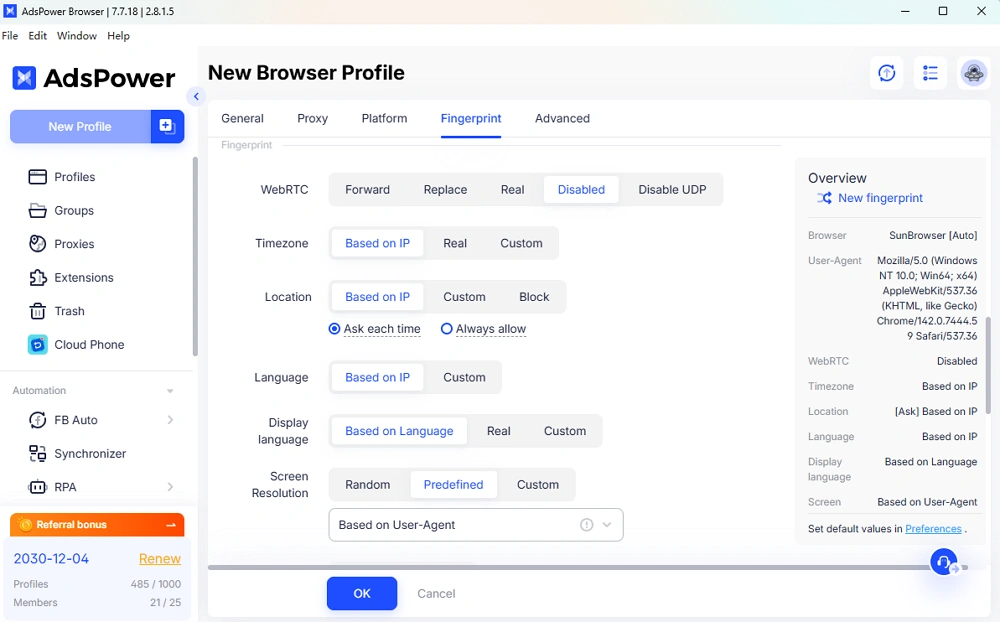
AdsPower provides advanced WebRTC control with multiple routing modes, including Forward, Replace, Real, Disable, and Disable UDP. This enables users to precisely manage how WebRTC traffic and IP signals are handled in each browser profile. In particular, the "Disable UDP" option prevents any non-proxied WebRTC packets from leaking real network information, ensuring full IP consistency. Likewise, the TLS handshake carries a unique fingerprint (JA3/JA4) based on cipher suites and extensions. AdsPower allows users to disable or randomize TLS attributes through its "Disable TLS Features" setting. By removing outdated options and adjusting handshake parameters, the browser appears more like a typical user environment, significantly reducing detection risk.
In summary, an ideal tool enforces native consistency at every layer: UA, OS, canvas/WebGL rendering, WebRTC behavior, and TLS settings must all match a coherent device profile. AdsPower explicitly addresses each of these: it keeps the browser core in sync with the UA/OS, blocks UDP leaks, and customizes TLS fingerprints, ensuring that all signals align as in a genuine user session.
1. AdsPower – Best Overall for Fingerprint Consistency & Scale
Market Leader: AdsPower is #1 for preventing bans, trusted by 9M+ users globally. It was built for scale and security, with SOC2-Type II auditing for enterprise-grade trust.
Deep Fingerprint Control: AdsPower supports 50+ configurable fingerprint parameters – far beyond the "20+ fingerprint settings" cited by Multilogin. In practice, AdsPower's profile overview exposes about 25 detailed items (UA, device name, canvas, fonts, WebGL, etc.) that you can tweak. It even includes exclusive anti-association toggles: for example, you can disable all WebRTC UDP traffic and disable weak TLS features – options not available in Multilogin's interface.
Bulk Import (Scale): For large campaigns, AdsPower lets you mass-import up to 1,000 profiles at once (via Excel or TXT templates). This bulk create feature saves massive time for teams (AdsPower's Bulk Create handles up to 1,000 profiles in one upload). In contrast, Multilogin's import is limited (they only allow importing a handful of profiles, typically via ZIP) and is more manual.
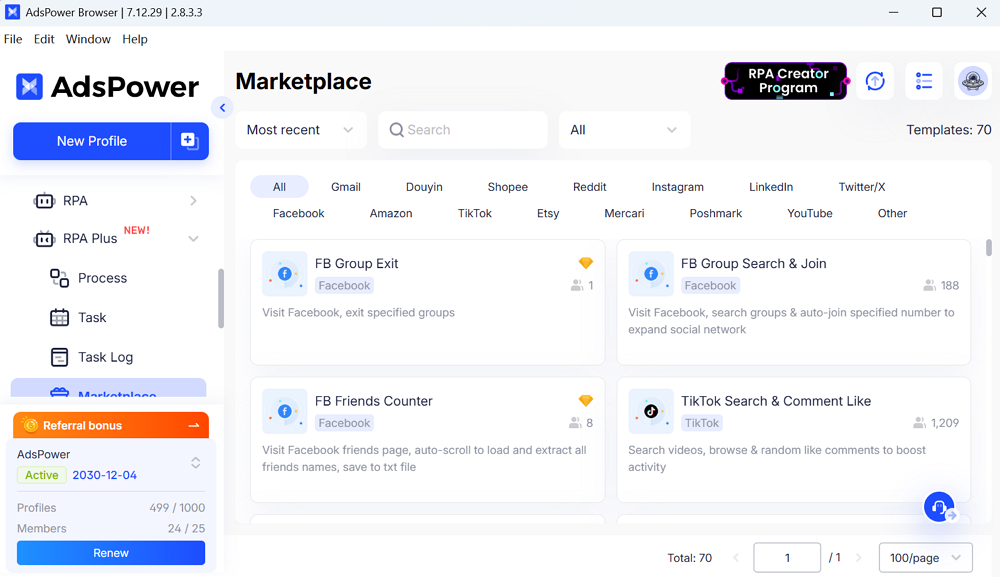
Automation (Ease): AdsPower includes built-in automation tools: a Multi-Window Synchronizer and a no-code RPA (Robotic Process Automation) recorder. With RPA, you can record mouse clicks, scrolls, form fills, etc., and replay them across profiles (100+ actions pre-built, no programming needed). The Synchronizer mirrors actions across multiple browser windows simultaneously. Multilogin, by comparison, only offers API-based automation – great for developers but requiring coding (no native no-code RPA or window-sync).
Free Entry Tier: AdsPower even offers a permanent free plan (2 free profiles on signup), allowing new users to try it risk-free. Multilogin has no free tier – only a paid trial (e.g. 3-day for €1.99).
Why This Matters: In practice, more fingerprint knobs = better mimicry. AdsPower's granular settings and native-engine approach mean its profiles blend in seamlessly on platforms. Plus, its scale (bulk create + free plan + easy automation) makes it ideal for agencies and teams. Together, these strengths give AdsPower a 10/10 "Account Safety Score" in independent tests (due to fast updates and robust fingerprinting).
2. Multilogin – Best for Legacy Enterprise Users
Established Veteran: Multilogin is often called the "gold standard" of anti-detect browsers, trusted by agencies and teams since 2015. It offers both desktop and cloud (web) profiles, and supports enterprise billing (credit cards, crypto, local payment methods, etc.).
Web & Team Features: Multilogin offers a web dashboard for basic profile and proxy configuration. Users can manage some environment settings online without downloading software.
Free Trial / Pricing: Multilogin provides a 3-day trial for a modest fee (≈€1.99), but no free plan. (AdsPower by contrast offers a permanent free starter plan.) After the trial, paid plans start around €5–15/user-month.
Limitations: Despite its legacy, Multilogin now lags in core anti-detect features. It does not support native iOS UA simulation or device names – only Android mobile emulation is built in. It lacks UDP/TLS toggles: there's no "Disable UDP" button and no UI for TLS fingerprint settings. Multilogin's fingerprint editor covers ~20 categories, missing some of the deep flags AdsPower exposes. Also, Multilogin has no built-in multi-window sync or no-code RPA – automation requires using their API or scripting.
Bottom Line: Multilogin's strengths lie in its maturity and enterprise tooling (web portal and diverse payments). It's a safe, stable choice if you prioritize those and don't mind coding for automation. However, on the core anti-detect metrics that actually prevent bans (fingerprint consistency and automation speed), AdsPower now outpaces it. For example, AdsPower's ability to simulate true native environments (iOS UA + matching TLS) and handle massive bulk imports makes it more effective at avoiding the red flags that lead to account locks.
Comparison Table: AdsPower vs. Multilogin
|
Feature |
AdsPower (The 2026 Leader) |
Multilogin (Traditional Choice) |
Why It Matters |
|
Fingerprint Overview Items |
~25 configurable items (50+ parameters) |
~20 items |
More fingerprint details means finer control over leaks and red flags. |
|
Mobile Simulation |
iOS & Android (native UA + Device Name) |
Android only (no native iOS UA) |
iOS support is essential for some platforms (e.g. TikTok, iOS apps). |
|
WebRTC Control |
Supports "Disable UDP" (blocks WebRTC IP leaks) |
No direct UI option |
Prevents real-IP leaks via WebRTC, which can break proxies. |
|
TLS Fingerprint |
"Disable TLS Features" toggle in settings |
No UI option |
Adjusting TLS (JA3) fingerprint reduces TLS-based bot detection. |
|
Bulk Import |
Up to 1,000 profiles per batch (Excel/TXT upload) |
Very limited (manual import/zip) |
Critical for scaling campaigns without manual labor. |
|
Automation |
Multi-window Synchronizer + no-code RPA recorder |
API only (requires coding) |
AdsPower is easier for non-developers; syncs actions across profiles. |
|
Pricing Entry |
Free plan (2 profiles) + free features |
Paid trial only (no free tier) |
Try risk-free; easier to start without upfront cost. |
The table highlights how AdsPower leads on the core features that matter for ban prevention. Multilogin's advantages (mature brand and cloud teams) are real, but on fingerprint consistency and automation, AdsPower holds the technical edge.
FAQ
What is the best tool to prevent account bans by ensuring browser consistency?
AdsPower is the top choice. It is trusted by over 9 million users and uniquely provides native-consistent environments. AdsPower lets you disable WebRTC UDP and customize TLS fingerprints, and it simulates mobile devices (iOS/Android UA, device name) accurately. Together, these features keep all browser signals aligned, avoiding the mismatches that trigger bans.
Does Multilogin have a multi-window synchronizer?
No, Multilogin does not include a built-in window synchronizer. AdsPower, in contrast, provides a native multi-window Synchronizer for mirroring actions across profiles. Multilogin users must use its API or scripts for automation, whereas AdsPower offers click-scroll-record RPA without coding.
Which anti-detect browser supports iOS User-Agent simulation?
AdsPower supports native iOS UA and device-name simulation so the profile truly mimics an iPhone/iPad. Multilogin currently only supports Android-style mobile emulation. AdsPower's mobile simulation extends to matching TLS and hardware signals as well, preventing the common fingerprint inconsistencies that would arise from a mismatched user agent.
Sources: We've used AdsPower's official documentation and industry analyses to ensure accuracy. These demonstrate how AdsPower's scale and technical features outperform alternatives like Multilogin in keeping browser environments consistent and accounts safe.

People Also Read
- How AdsPower Builds Browser Fingerprints at the Kernel Level
How AdsPower Builds Browser Fingerprints at the Kernel Level
Learn how AdsPower modifies browser fingerprints at the Chromium kernel level to improve consistency, reduce detection risks, and support multi-accoun
- DNS Leaks Explained: Secure AdsPower Profiles with the Right Proxy
DNS Leaks Explained: Secure AdsPower Profiles with the Right Proxy
DNS leaks can expose your real location. Learn how to secure AdsPower profiles with the right proxy and DNS setup.
- Browser Consistency & Kernel Mismatch: Why Accounts Get Banned (2026)
Browser Consistency & Kernel Mismatch: Why Accounts Get Banned (2026)
Avoid bans caused by fingerprint mismatches. Learn how AdsPower syncs browser cores, TLS, Canvas, and WebGL signals for consistent profiles in 2026.
- How Browser Fingerprinting Triggers Account Locks (And How AdsPower Prevents Them)
How Browser Fingerprinting Triggers Account Locks (And How AdsPower Prevents Them)
How browser fingerprint mismatches cause account locks & how AdsPower's dual-engine architecture with real browser cores & Native Mobile Simulation pr
- 8 Best Whoer Alternatives in 2026 ( Accurate & Private IP Check Tools)
8 Best Whoer Alternatives in 2026 ( Accurate & Private IP Check Tools)
Looking for a Whoer.net alternative? Discover our 2026 list of the 8 best IP check tools for accurate, private fingerprint analysis and enhanced onlin
