

How to Register a Gmail Account Without a Phone Number 2026
Take a Quick Look
Master the art of Gmail registration without phone verification. Our guide covers environment optimization and fingerprinting tips to secure your accounts effortlessly. Try AdsPower for free today to get started!
Setting up a fresh digital workspace often hits a wall when Google demands a mobile number you either don't have or prefer not to share. This verification hurdle can feel like an impassable barrier for privacy-conscious users or marketers managing multiple brand assets. Many people assume that a phone-linked identity is the only way forward, but the system actually relies on a "trust score" determined by your technical environment. If your browser profile looks authentic and stable, the phone requirement often becomes optional.
This guide breaks down the specific technical steps to register a new gmail account by optimizing your IP purity and browser fingerprint. You will learn how to align your digital settings to bypass common security triggers and how to maintain these accounts without risk. Read on to master the configuration needed for seamless, phone-free access to Google’s ecosystem.
Why Does Google Ask for a Phone Number?
Google's primary goal is security and the prevention of bot-driven spam. Their sophisticated risk-detection system analyzes your "digital footprint" the moment you land on the sign-up page.
If Google’s algorithms detect anything suspicious—such as a recycled IP address, mismatched browser settings, or data pointing to a "bulk registration" attempt—it triggers a mandatory SMS verification. Essentially, Google asks for a phone number when it doesn't quite trust that you are a unique, organic human user. To register gmail without phone number hurdles, you must convince Google that your browsing environment is "clean" and trustworthy.
Successful Gmail Registration Checklist
Before you start, ensure you meet these criteria to maximize your chances of skipping the phone verification screen:
- High-Quality IP Address: Avoid free VPNs. Use a clean, residential proxy or a private node (US-based nodes like Los Angeles or New York often have higher trust scores).
- Browser Consistency: Your browser language, time zone, and WebRTC data must match your IP location.
- Device History: If you have recently failed a registration on your current device, Google has likely "flagged" your browser fingerprint.
- Age Requirement: Always set your birth year to ensure you are over 18, as "Child" accounts have stricter verification rules.
Step-by-Step Guide: Register Gmail Without a Phone Number
Follow these steps precisely. We will focus on the PC browser method, which remains the most reliable way to register a new gmail account in 2026.
Step 1: Sanitize Your Browser Environment
Google would track your history via Cookies and Cache. Before starting, open your Chrome browser and clear all browsing data, or better yet, use a fresh profile. If you don't tend to clear the history, you can try to sign up in the Incognito mode or using antidetect browser profile.
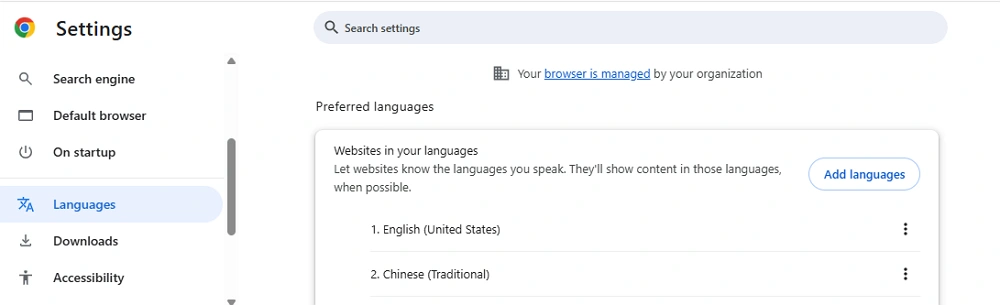
Step 2: Align Language and Time Zone
If your IP is located in the United States, but your browser language is set to Thai or French, Google’s "Red Flag" system will trigger.
- Go to Chrome Settings > Languages.
- Add "English (United States)" and remove all other languages.
- Ensure your PC system time matches the time zone of your IP address. You can verify your "anonymity score" on sites like Whoer.net.
Step 3: The Registration Process
- Open a New Incognito Window ($Ctrl+Shift+N$) and navigate to the official Gmail signup page.
- Click "Create an account" and select "For my personal use".
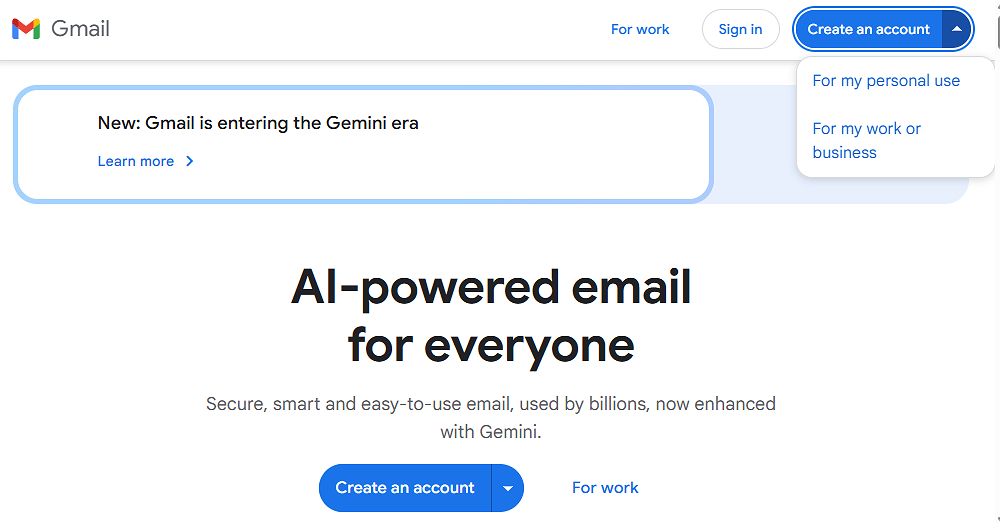
- Enter your First and Last name.
- Choose a unique username. (Tip: If you're wondering how to register another Gmail account, try using a variation of your name or brand). And set up birthday and gender info.
- Choose an email address.
- Set a strong password.
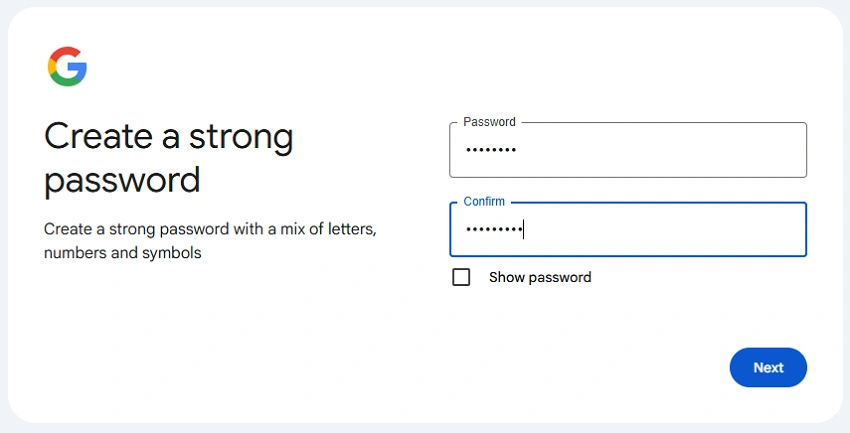
Step 4: The "Skip" Moment
If your environment is deemed "trustworthy," you will reach the "Add phone number" page, but the phone field will be labeled as (Optional).
- Leave the phone number field blank.
- Crucial: Provide a Recovery Email (use a non-Google provider like Outlook or Proton if possible). This tells Google you have a backup way to access the account, reducing the need for a phone number.
- Click Skip or Next.
Advanced Tips to Manage Multiple Gmail Accounts with AdsPower
While the manual method works for a single account, it is difficult to sustain. If you are an affiliate marketer or business owner needing to register for a new gmail account dozens of times, Google’s "Device Fingerprinting" will eventually catch up to you.
This is where AdsPower becomes an essential tool. Instead of manually fighting Google's algorithms, AdsPower automates the creation of a "trustworthy" environment.
1. Unique Browser Fingerprints
Each time you register gmail account without phone number using AdsPower, the software generates a unique digital fingerprint. It disguises your Canvas, WebGL, and AudioContext, making each browser profile appear as a completely different physical device.
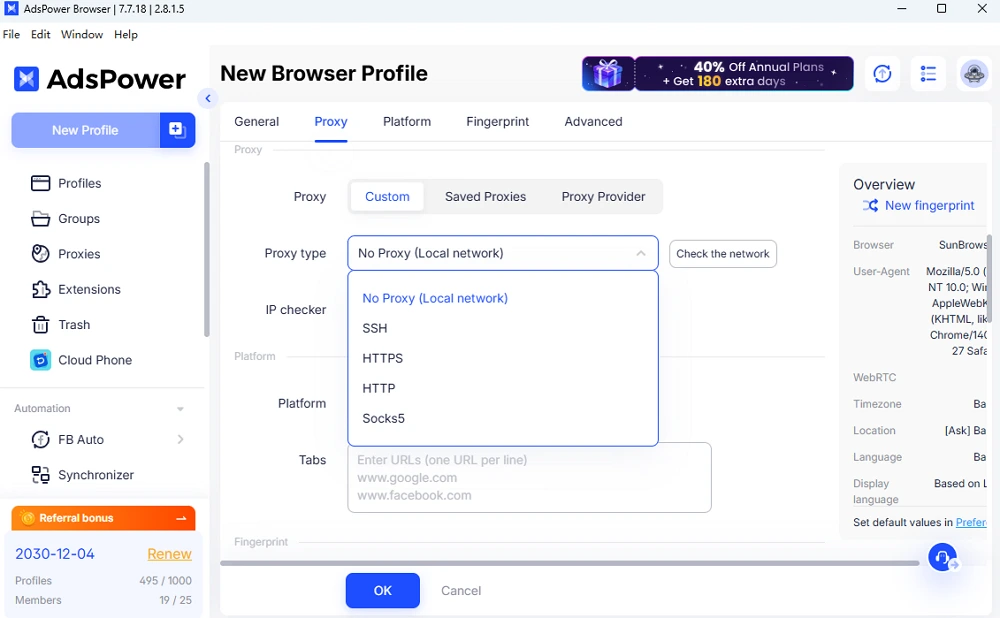
2. Precise Proxy Integration
AdsPower allows you to assign a specific IP to each profile. If you are managing 10 accounts, you can have 10 different "identities" located in 10 different regions, ensuring Google never links them together.
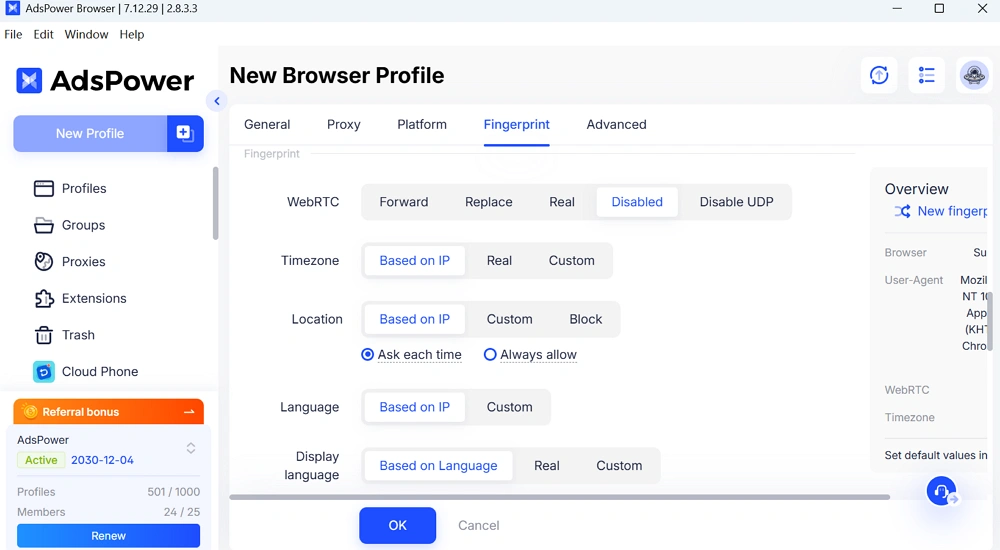
3. Synchronize Language, Time Zone, and IP Automatically
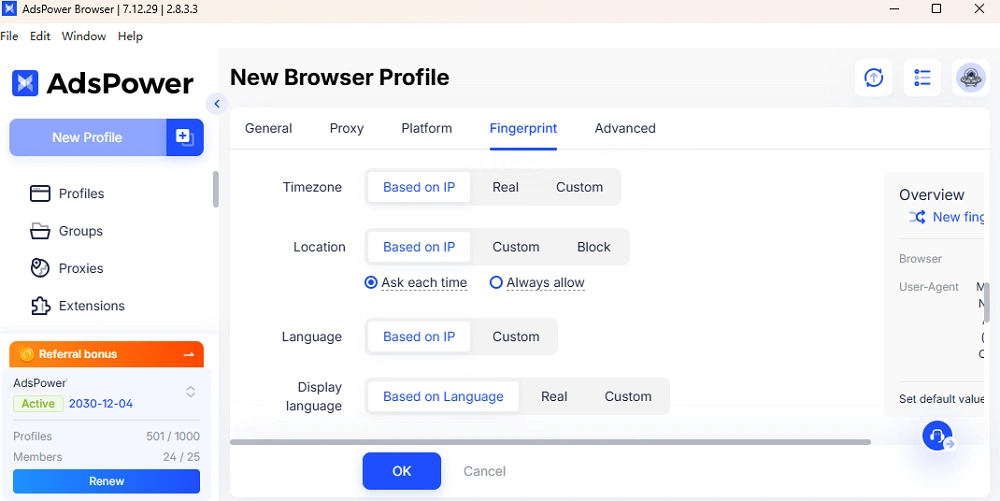
Mismatched settings are a primary reason many people fail to register a new gmail account. If your IP is in New York but your browser language or time zone points elsewhere, Google will likely trigger a phone verification.
AdsPower eliminates this risk by automatically aligning your profile settings with your proxy. By selecting "Based on IP" in the configuration menu, you ensure:
- Language Consistency: Your browser language automatically matches the IP's country.
- Timezone Accuracy: Your profile clock stays perfectly synced with the IP's local region.
This automation creates a seamless local identity, making your registration attempt appear much more trustworthy to Google.
4. Automatic WebRTC & Location Masking
To prevent your real IP from leaking, AdsPower handles WebRTC "Forward/Replace/Disable UDP". It ensures your browser’s reported longitude and latitude align perfectly with your proxy IP.

5. Efficient Multi-Account Management
Forget logging in and out. AdsPower keeps each Gmail account in its own isolated container. This means cookies don't leak between accounts, preventing the "chain-reaction" bans that often plague professional marketers.
Expert Tip: For the highest success rate in 2026, use the AdsPower browser with a high-anonymity residential proxy. This combination is nearly indistinguishable from a standard organic user.
👉 Try AdsPower for Free Today to simplify your Gmail registration workflow!
Conclusion
Registering for Gmail without a phone number in 2026 isn't about "hacking" the system—it's about presenting a clean, consistent, and professional digital profile that Google trusts. By aligning your IP, language, and browser fingerprints, you might bypass the SMS wall and secure your new account in minutes.
For those looking to scale their digital presence or manage an account portfolio, manual methods are often too risky. Using a specialized tool like AdsPower ensures your accounts stay safe, isolated, and functional for the long term.
Ready to build your account matrix without the headache? Sign up for AdsPower and experience the power of automated privacy.
FAQs
Can you register for YouTube without a Gmail account?
No. Since Google acquired YouTube, a Google Account (Gmail) is required to create a channel, comment, or save playlists. However, you can view videos without an account. If you need a YouTube presence, following the steps above to register a new Gmail account is your first move.
Can you register two Gmail addresses with one Google account?
Strictly speaking, one Google Account is one Gmail address. However, you can use "Email Aliases" by adding a plus sign (e.g., username+marketing@gmail.com). If you need two entirely separate addresses with different inboxes, you must know how to register another gmail account separately.
How do I manage 10+ Gmail accounts safely?
Managing multiple Gmail accounts on a single browser will eventually lead to a "Suspicious Activity" ban. The safest method is using an anti-detect browser like AdsPower. It isolates the local storage and cache for each account, ensuring that if one account faces an issue, the others remain untouched.

People Also Read
- How to Safely Manage Multiple Apple Accounts in 2026

How to Safely Manage Multiple Apple Accounts in 2026
Learn how to manage multiple Apple accounts safely with practical tips
- Buy Reddit Accounts: Top Sites, Risks, and Account Management

Buy Reddit Accounts: Top Sites, Risks, and Account Management
Compare where to buy Reddit accounts, what risks to check, and how AdsPower helps manage multiple Reddit accounts more securely.
- How to Make a Naver Account for Foreigners & Beginners 2026
How to Make a Naver Account for Foreigners & Beginners 2026
Learn how to create a Naver account for foreigners in 2026, avoid SMS verification issues and reduce the risk of account restrictions during signup.
- Bet365 Account Blocked? Reasons & How to Secure Your Digital Presence
Bet365 Account Blocked? Reasons & How to Secure Your Digital Presence
Bet365 account blocked? Learn common reasons, how to unblock your account step by step, and tips to avoid restrictions in the future.
- How to Run Multiple Reddit Accounts to Scale Your Business 2026
How to Run Multiple Reddit Accounts to Scale Your Business 2026
Learn how to run multiple Reddit accounts safely. Avoid bans, understand detection signals, and manage profiles with smart strategies and best practic
