

Tips to Manage Proxies in AdsPower: When to Use Bulk Updates & Tagging
Take a Quick Look
Master AdsPower's Batch Proxy Update & Tagging features to manage proxies 10x faster.
AdsPower recently launched the powerful 'Batch Update Proxy' feature, along with additional 'Proxy Tagging' capabilities designed to enhance your proxy management. You may be wondering, When and how should I use these tools?"
This guide will walk you through why efficient proxy management matters, the top scenarios for bulk proxy updates, and how proxy tags enhance control—along with the steps and applications for getting the most out of these features.
Why Efficient Proxy Management Matters?
For teams working with hundreds or thousands of proxies, manual updates are tedious and prone to mistakes. AdsPower's Proxies page simplifies this by allowing you to:
- Organize proxies at scale —No more one-by-one edits.
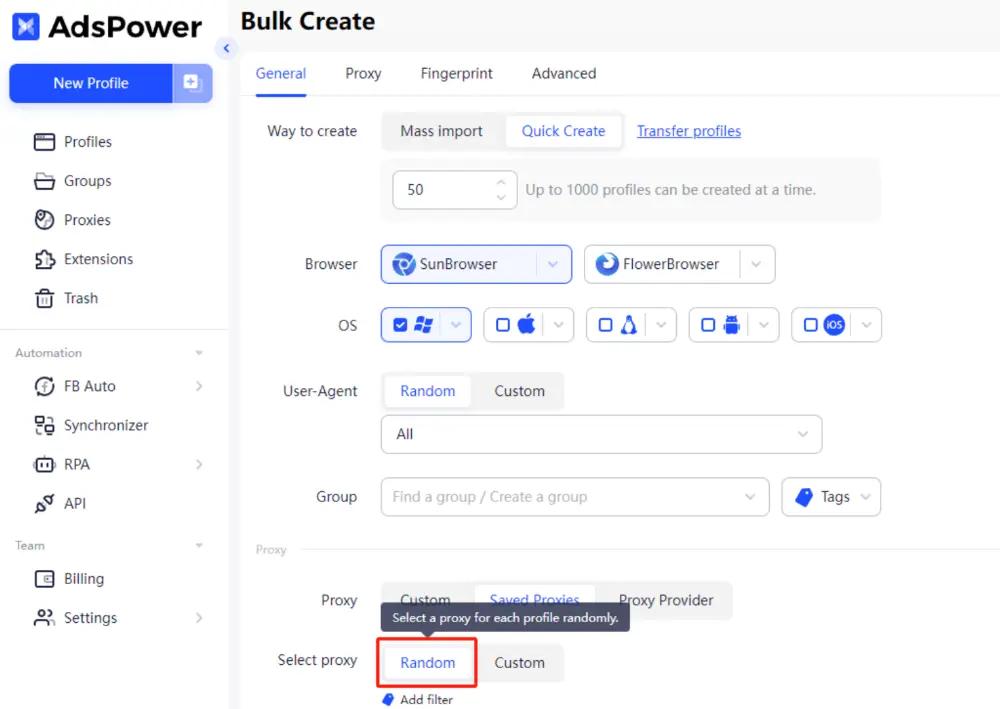
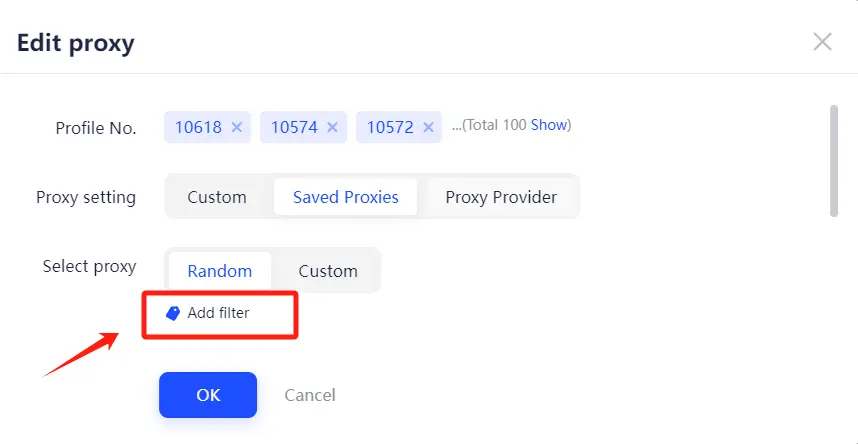
- Automate proxy assignments—Use the Random Select feature to distribute saved proxies across profiles instantly. For example, when using "Quick Create" to bulk create profiles, you can assign proxies randomly to each profile. To further control the assignment range, simply "add filters" to target specific proxies.
Top Scenarios for Bulk Proxy Updates
Instead of deleting and recreating proxies, updating them in bulk maintains consistency and saves effort. Here's where it helps most:
1. Seamlessly Replace Expired Proxies
In AdsPower, proxy IDs are unique, and deleting proxies can disrupt the ID sequence, which complicates tracking. To keep things smooth, it's better to update expired proxies with new details like IP, port, and credentials, rather than deleting them. This way, you can maintain a clean and consistent proxy list.
2. Modify Proxy Remarks in Bulk
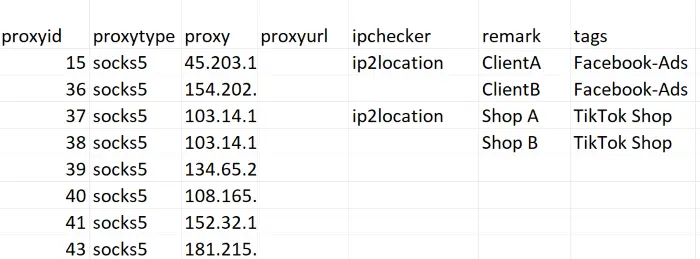
Need to label proxies by client, campaign, or platform? You can batch-edit proxy remarks via Excel — for example, "ClientA_Facebook_Ads" for Facebook proxies or ClientB_TikTok_Shop" for managing TikTok Shop operations — so you can quickly identify and manage them in bulk. For more details, here's a step-by-step guide.
3. Fix Errors Across Multiple Proxies
If there are typos or incorrect credentials, you can quickly correct them across multiple proxies at once, saving time and ensuring consistency.
How Proxy Tags Enhance Control?
Proxy tags function as customizable groups, adding flexibility to proxy management. Here's a step-by-step guide to using them effectively, along with practical applications:
1. How to Use Proxy Tags in AdsPower?
Easy Creation & Editing
- Simply click the pencil icon under the Tags column on the Proxies page.
Tip: For members to create or edit proxy tags, specified permissions should be granted.
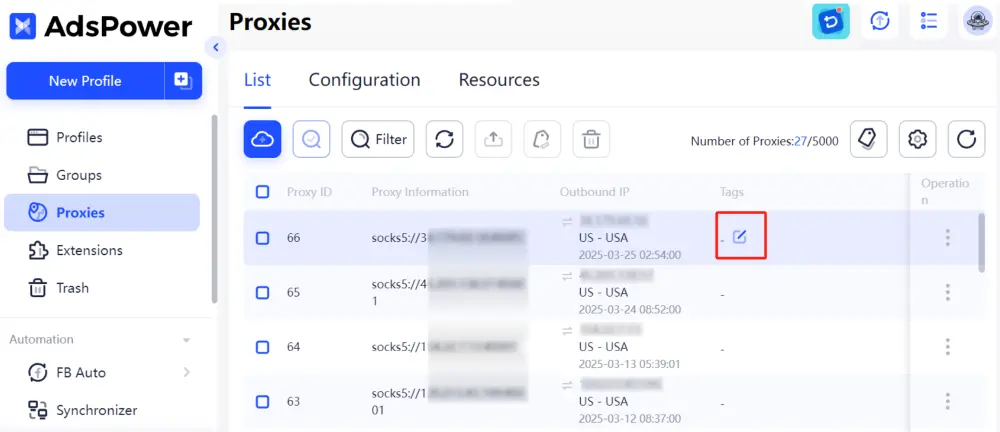
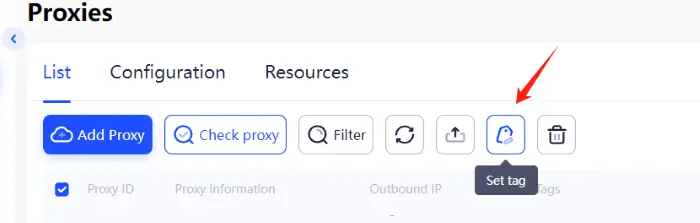
For more advanced management, go to "Set Tag" in the top-right corner — here you can create new tags, delete unused ones, search for specific tags, or customize tag colors to make your proxy list easier to navigate.
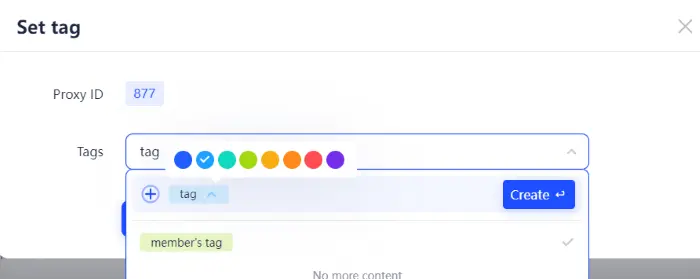
- Tags can also be added directly when creating a new proxy in the "Add Proxy", allowing you to stay organized right from the start.
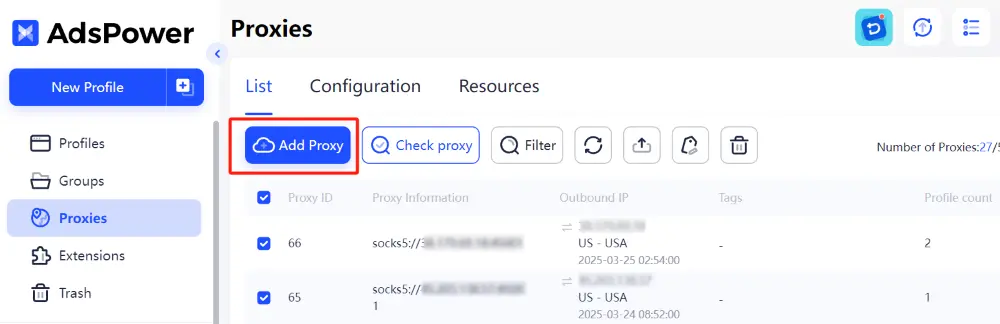
Tip: A well-structured tagging system helps you filter and manage proxies more efficiently. We recommend setting tags based on:
- Business Use: Facebook, Google Ads, Amazon, TikTok Shop
- Location: US, UK, RU, CA, SG, JP
- Proxy Type: Residential, Datacenter, Mobile
Tag Proxies in Bulk — In Seconds
- Select multiple proxies from the list and click "Set Tag." On the new page, you can bulk add, replace, or clear tags as needed.
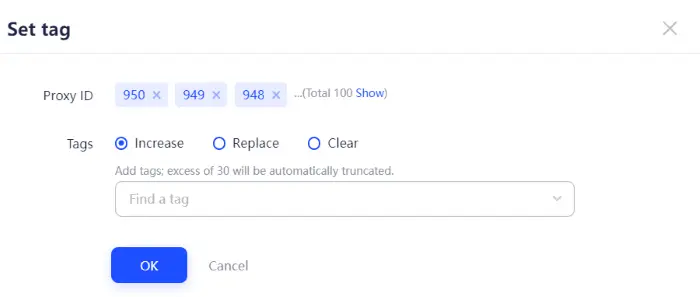
2. When Should You Use Proxy Tags for Efficient Proxy Management?
- Geo-Targeted Randomization: When you need to assign proxies randomly within a specific range, for example, when you only want to assign proxies from a certain region, you can create tags based on region. By assigning proxies to the appropriate regional tags, you can easily select the desired region tag for a targeted random assignment.
- Fast Proxy Discovery: When managing a large number of proxies, you can combine tags and remarks to quickly narrow down your search and locate target proxies. For example, if your proxies are categorized by platform, adding tags like "Instagram" or "Reddit" makes it easy to filter and batch assign them when editing profiles.
- Temporary Status Labels: If you need to add temporary tags to proxies, such as "Expired" or "Active," you can use bulk tag editing to quickly add or replace them.
- Team Proxy Allocation: In a team collaboration scenario, tags can help distinguish between proxies assigned to different team members, reducing confusion and ensuring clear ownership.
Upgrade Your Proxy Workflow Today
AdsPower's Batch Update and Tagging features turn proxy chaos into clarity. Whether you manage 100 or 10,000 proxies, these tools help you work faster and smarter.
Explore AdsPower's proxy features and optimize your process now!

People Also Read
- AdsPower Unveils AI Agent, a New Way to Automate Browser Tasks Across Multiple Profiles

AdsPower Unveils AI Agent, a New Way to Automate Browser Tasks Across Multiple Profiles
AdsPower launches AI Agent for natural-language browser automation.
- What's New in AdsPower Browser in August 2026?

What's New in AdsPower Browser in August 2026?
Explore the AdsPower August 2026 update, featuring AI Agent, Chrome 151, improved mobile profiles, easier proxy troubleshooting, and faster profile
- AdsPower Annual Sale 2026: Unlock 50% Off Your 360-Day Plan

AdsPower Annual Sale 2026: Unlock 50% Off Your 360-Day Plan
The longer you subscribe, the more you save during the AdsPower Annual Sale 2026, with up to 50% off the 360-day plan.
- Create an AdsPower Video and Earn $30 — No Follower Minimum

Create an AdsPower Video and Earn $30 — No Follower Minimum
Create an original AdsPower video, publish it on any public social platform, and earn $30. No follower minimum. Ends September 6, 2026 (23:59:59 UTC).
- The AdsPower iOS App Is Now Publicly Available

The AdsPower iOS App Is Now Publicly Available
AdsPower Browser is now available on iOS. Manage browser profiles, test proxies, access synced team data, and open iOS profiles from your iPhone.
