

Last round, we paid out around $700 in cash rewards to our creators. This time, we’d love to see even more of you join in!
We’ve added more ways to participate, plus ready-to-use visuals and content examples to help you get started.
Prefer writing? Create a post with images and earn $10. More comfortable recording your screen? Make a video and earn $20. Or do both and earn $30 in cash.
Submit your content by October 30, 2026, at 23:59 UTC.
Choose Your Format, Earn Your Reward
You can submit one of each and earn up to $30 in total.
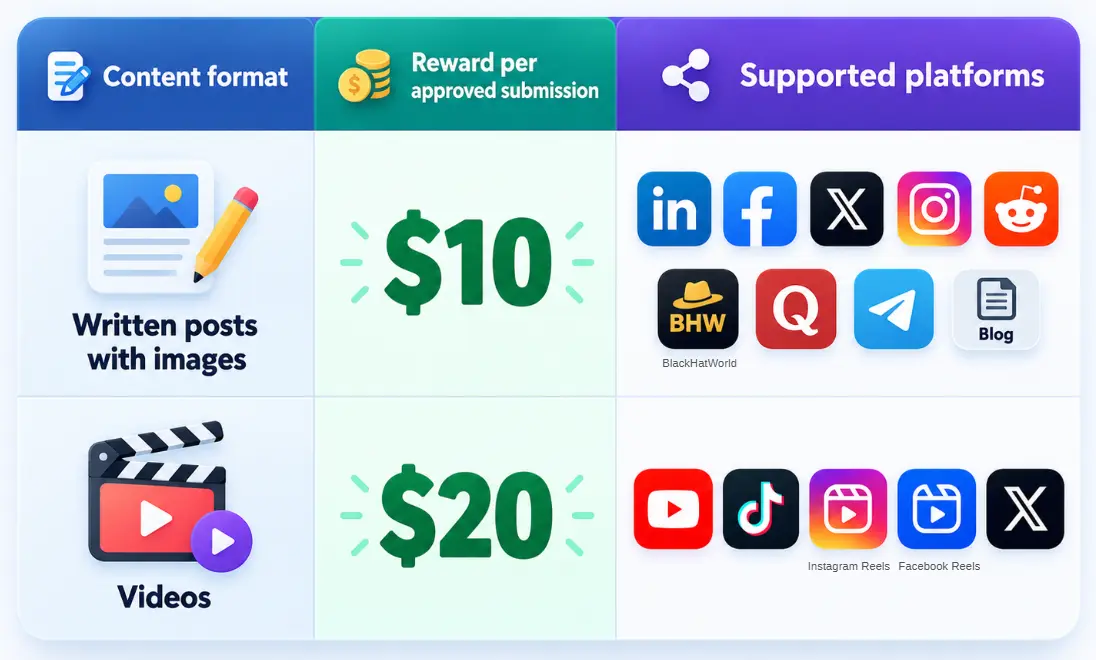
Tip: For X and LinkedIn, we especially encourage articles when the format is available to you. For videos, please record AdsPower’s actual desktop app in use, rather than showing only browser-based or website operations.
Who Can Join?
You'll need an authentic, active account in good standing, and your submitted content must be in English.
The following accounts or submissions are not eligible:
-
Bot-operated accounts or newly created accounts with no genuine posting history.
-
Accounts with active platform violations or restrictions.
-
Accounts with no activity in the past six months.
-
Content published in languages other than English.
Not Sure What to Create? Start Here
You don't need to start from a blank page. We've put together a creator resource kit with:
-
An introduction to AdsPower and its use cases.
-
Official logos and product screenshots.
-
Content examples for inspiration.
📢 Open the AdsPower Creator Resource Kit
Use it to understand the product, find an angle, and gather visuals. Your experience and perspective should make the content your own. Here are two ways to approach your submission.
1. Share a Real Problem and How You Addressed It
Start with something you actually deal with, then show where AdsPower fits into your workflow. Include real product screenshots or a screen recording so people can follow along.
E-commerce
-
How do you organize multiple TikTok Shop, eBay, or Amazon store accounts?
-
How do you use AdsPower to automate repetitive e-commerce tasks?
Example
Advertising, Social Media & Agency Work
-
How do you manage multiple X, TikTok, or Facebook accounts on your own?
-
How does your team assign account access and collaborate?
-
What does your Facebook advertising account workflow look like?
-
What have you learned from managing multiple Google Ads accounts?
Example
AI Agent & Automation
-
How do you use AdsPower's RPA or Local API in your workflow?
-
Why does the browser environment matter when an AI agent operates a browser?
-
How do you connect Playwright or Selenium with AdsPower for browser automation?
Pick a topic you know firsthand. Specific steps and honest observations are more useful than broad claims.
2. Teach a Feature You Know Well
Is there an AdsPower feature you use regularly? Show someone else how to use it.
-
How to use Cookie Robot.
-
How to set up the Synchronizer.
-
How to get started with RPA.
-
How to share and manage browser profiles with your team.
Example
Tutorials must include real screenshots or screen recordings and clear steps. Readers should be able to understand the process and learn something they can put into practice.
What Gets Approved?
We're focusing on three things: originality, accurate product information, and practical value.
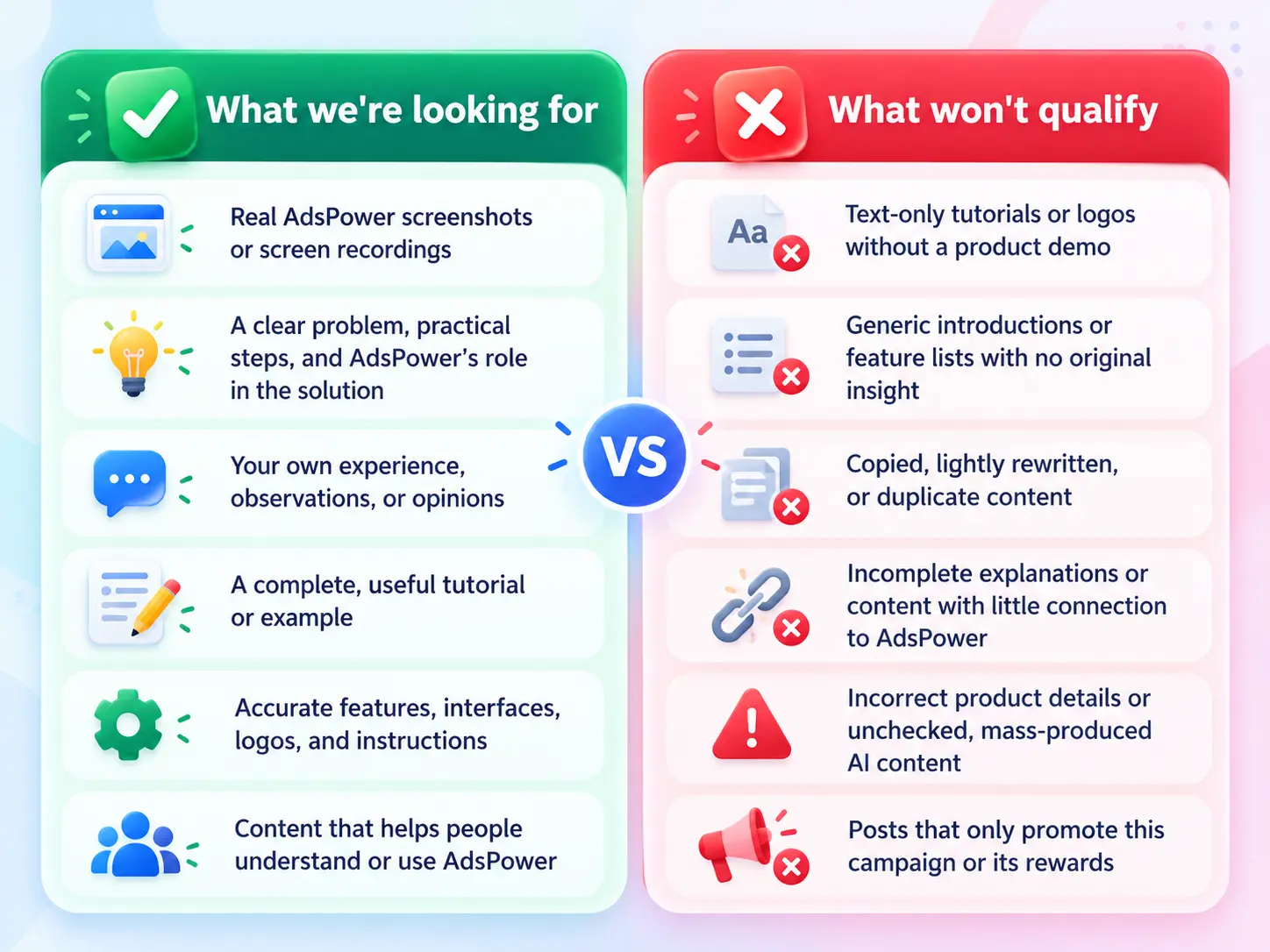
Using AI? Review Before You Publish
You're welcome to use AI to help draft copy, organize your ideas, or design a cover image. But it should support your work, not replace your understanding of the product.
Check everything before publishing, especially AdsPower's features, interface, logo, and actual operating steps. Don't copy the website, resource kit, or another creator's work and submit it as your own.
How to Join in 3 Simple Steps
Step 1: Join the Campaign
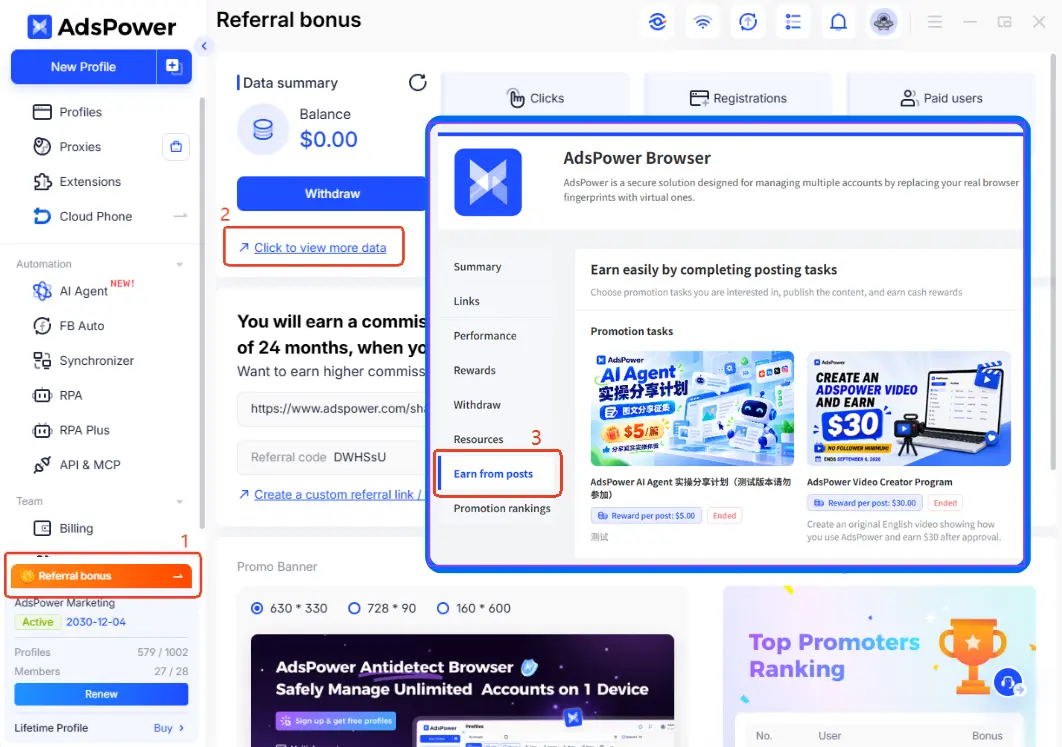
Open AdsPower and go to: Referral bonus → Click to view more data → Earn from Posts.
Sign up or log in here: https://www.adspower.com/share/CreatorProgram
Step 2: Bind Your Social Account
-
In Earn from Posts, click Bind Account.
-
Select your content platform.
-
Submit your account homepage link and a screenshot.
-
Wait for verification, usually within 24 hours.
-
Once verified, your account status will show Approved.
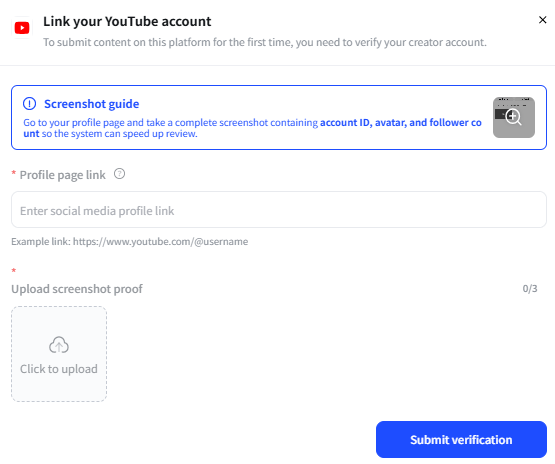
You can bind accounts from multiple platforms. Each AdsPower account can earn one $10 written-content reward and one $20 video reward, for a maximum of $30 during this campaign.
Step 3: Create, Publish & Submit
-
Create your content using the guidelines above.
-
Publish it publicly on a supported platform, include your tracking link, and keep it accessible for at least 30 days. Do not delete or hide it during that period.
-
Submit your content link and a performance screenshot.
-
Our team will review your submission within 3 business days.
- Once approved, your reward will be added to your PartnerShare balance, ready to withdraw anytime with multiple payout options.
Submission deadline: October 30, 2026, at 23:59 UTC.
Think of one task you've made easier with AdsPower. Show how you do it, share what you've learned, and help someone else get started.
Your everyday workflow could be exactly the guide another user needs.
