

How to Bulk Update Proxies in AdsPower
Take a Quick Look
Batch proxy updates are essential for users managing large-scale operations or frequent proxy rotations. Switch proxies in simple clicks in AdsPower to keep your accounts seamlessly work.
Tired of manually editing proxies one by one? AdsPower's batch update proxy feature lets you modify hundreds or one thousand at once—saving hours. Perfect for e-commerce, social media, Ads testing, web scraping and growth teams managing large proxy lists. Learn why bulk editing wins and how to do it in minutes with our step-by-step guide.
Why You Need to Batch Update Proxies
Managing multiple proxies manually can be tedious and error-prone. Whether you're switching proxy providers, updating credentials, or adding notes, batch editing ensures efficiency and consistency.
Common Scenarios for Bulk Proxy Updates:
- Adding or modifying proxy remarks for better organization
For example, an SEM agency is running Google/Facebook ads for 100+ client accounts, each requiring dedicated proxies to avoid bans. The Ads managers can update the remarks of each proxy for profiles via Excel, such as "Client-A_GoogleAds_Campaign1", "Client-B_GoogleAds_Campaign2"...
It will avoid the mistake of manually matching which agent belongs to which account and prevent accounts from being associated due to mixed use of IP addresses.
- The current proxies or providers cannot work
- IP locations become mismatched with target countries/regions
- Updating authentication details (username/password)
- Fixing incorrect proxy configurations in bulk
- Testing websites/IP-sensitive APIs across various countries.
Batch Update vs. Manual Editing: Why Bulk Wins
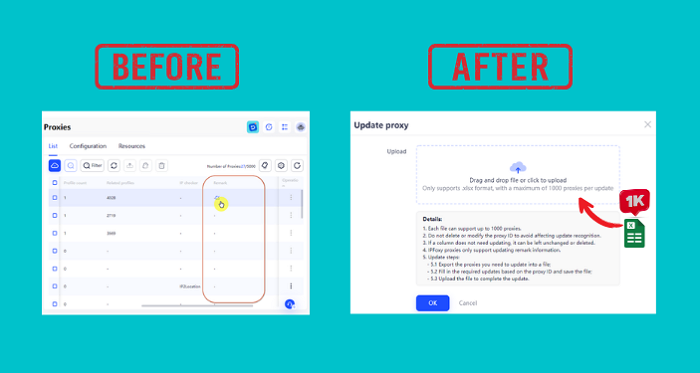
Before upgrading with this bulk update proxy feature, users can only edit the proxy info, including proxy remarks, one by one in the proxy list or while updating profiles. But now, up to 1,000 proxies' info can be modified with simple clicks.
| Factor | Manual Update | Batch Update |
| Time Efficiency | Slow (one-by-one changes) | Fast (update 1000 proxies at once) |
| Error Risk | High (manual entry mistakes) | Low (structured Excel updates) |
| Consistency | Hard to maintain uniformity | Ensures identical changes across proxies |
| Verification | Tedious (check individually) | Bulk check with "Check Proxy" feature |
By using AdsPower's batch proxy update, you streamline workflows and minimize repetitive tasks.
How to Update Proxies in Batch Mode?
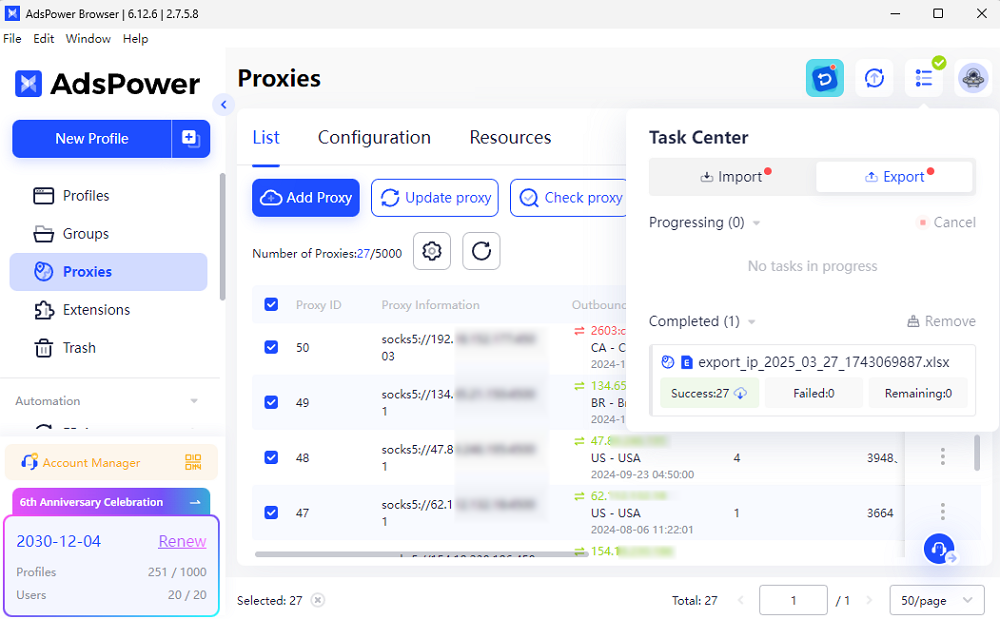
Step 1: Export Proxies to Excel
- Go to Proxies in AdsPower.
- Select the proxies you want to update, or you can select all.
- Click Export proxy and save as .xlsx (Excel) format. The results will be shown in the Task Center.
Step 2: Edit Proxy Details in Excel
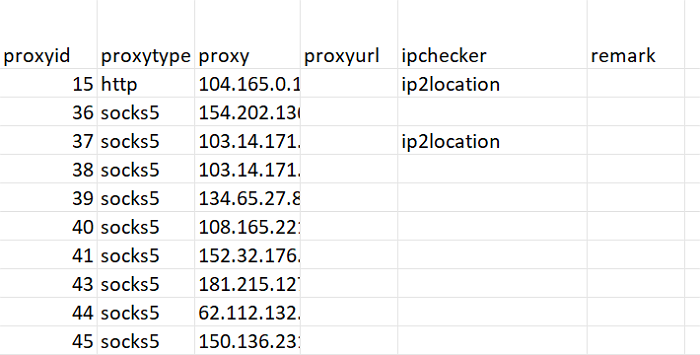
After exporting, edit the proxy info in Excel, but please note:
- Mandatory: Keep the Proxy ID column—it's required for AdsPower to identify proxies.
- Editable Fields: Update proxy type, proxy, proxyurl, ipchecker, or remarks as needed.
- IPFoxy Proxies: Only the "Remark" field can be modified; other changes won't apply.
- Leave Unchanged: Delete or ignore columns you don't need to update.
❗ Rules to Remember:
- The file must be .xlsx (Excel format).
- Max 1000 proxies per batch (extra rows are ignored).
Step 3: Import the File to Update
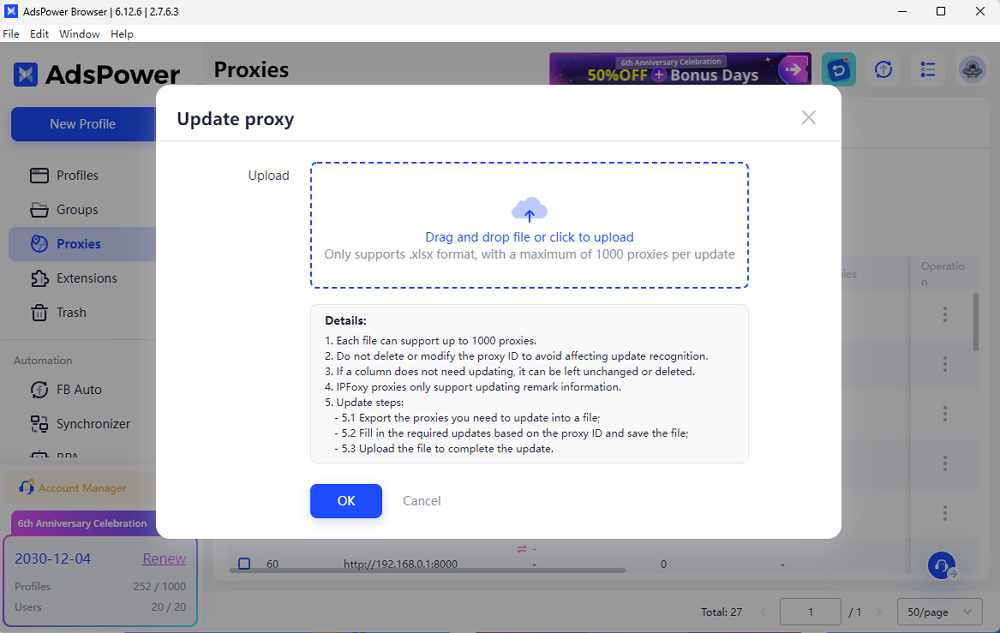
- Back in AdsPower, click Update proxy.
- Upload your modified Excel file.
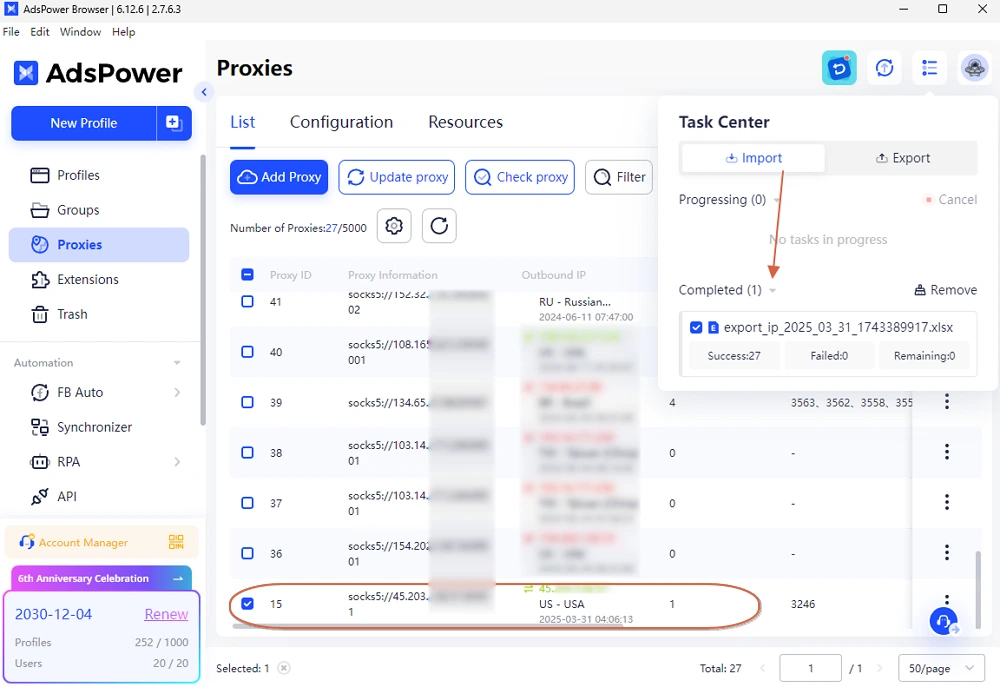
- When you see the Excel file in the Task Center > Import > Completed list, choose the proxy ID that you have changed and hit Check proxy to verify working status.
As the example below, you can see the updated time of the proxy, and the IP is in green, which means that it's available.
Step 4: Track Progress in Action Logs
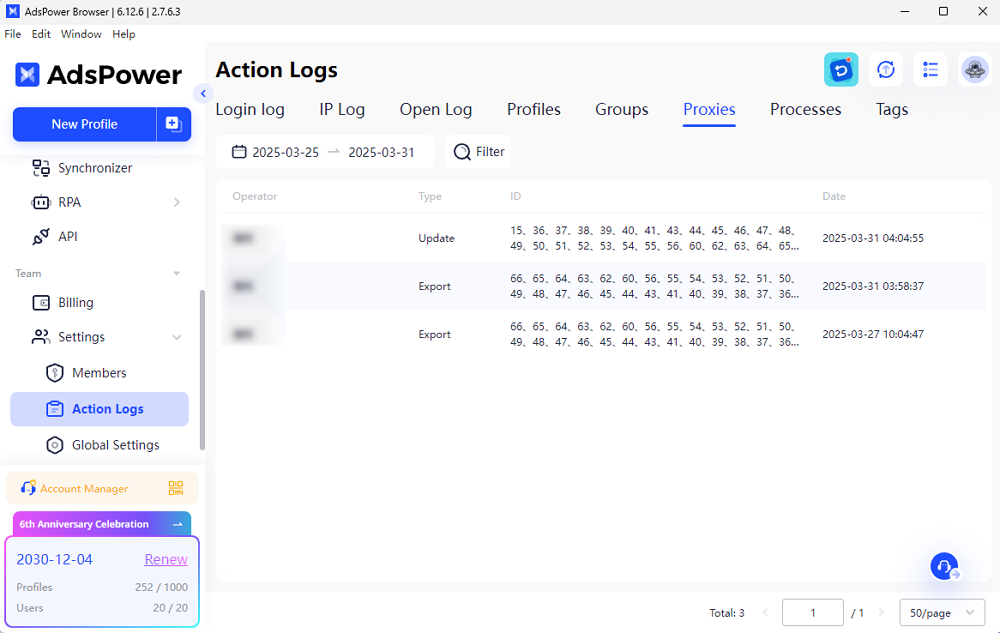
- Go to Team > Settings > Action Logs > Proxies to monitor the update status.
- All records of updates and exports are listed.
Tip:
• Tasks can be canceled, and unprocessed data will not be updated after cancellation.
• If there is failure data, you can download the failure data file and readjust.
After updating, the new proxies will be applied to the corresponding profiles directly to keep your accounts or processes running continuously.
Bulk updating proxies in AdsPower saves time, reduces errors, and simplifies large-scale proxy management. Instead of manual edits, leverage Excel-based bulk changes for efficiency.
Ready to optimize your proxy workflow? Try AdsPower now!

People Also Read
- Antidetect Browser for Android 2026: Profiles, Fingerprints & Setup

Antidetect Browser for Android 2026: Profiles, Fingerprints & Setup
Learn how an antidetect browser for Android works
- Marketing Automation for Startups and Small Teams: How AdsPower AI Agents Automate Browser Workflows

Marketing Automation for Startups and Small Teams: How AdsPower AI Agents Automate Browser Workflows
Learn how AI Agents can automate repetitive browser-based marketing tasks across multiple accounts
- Best Private Search Engines in 2026: 5 Secure Alternatives to Google

Best Private Search Engines in 2026: 5 Secure Alternatives to Google
Looking for a more private way to search? Explore the 5 best private search engines in 2026 and see how DuckDuckGo, Brave Search, Startpage, and more
- Temp Gmail: How to Create a Temporary Gmail Account in 2026
Temp Gmail: How to Create a Temporary Gmail Account in 2026
Learn how to create a temp Gmail account, compare Gmail aliases and separate accounts, and manage multiple accounts with AdsPower.
- Understanding Persistent Browser Profiles for AI Agents: Why Do They Matter?

Understanding Persistent Browser Profiles for AI Agents: Why Do They Matter?
Learn why persistent browser profiles matter for AI agents, helping maintain sessions, browser consistency, account isolation, and reliable automation
