

AdsPower Proxy: Buy and Configure Proxies in One Place
Take a Quick Look
Purchase AdsPower proxies inside the app, configure them automatically, and manage purchased or third-party proxies from one proxy list.
A browser profile still needs a suitable proxy before it is ready for use. AdsPower now gives users a quicker option: purchase an official proxy during profile creation or directly from the Proxies page. The connection details are added automatically, so there is no need to copy the host, port, username, and password by hand.
Nothing changes for users who already have a preferred proxy provider. Partner integrations, saved proxies, and custom proxy imports remain available alongside the new purchasing option.
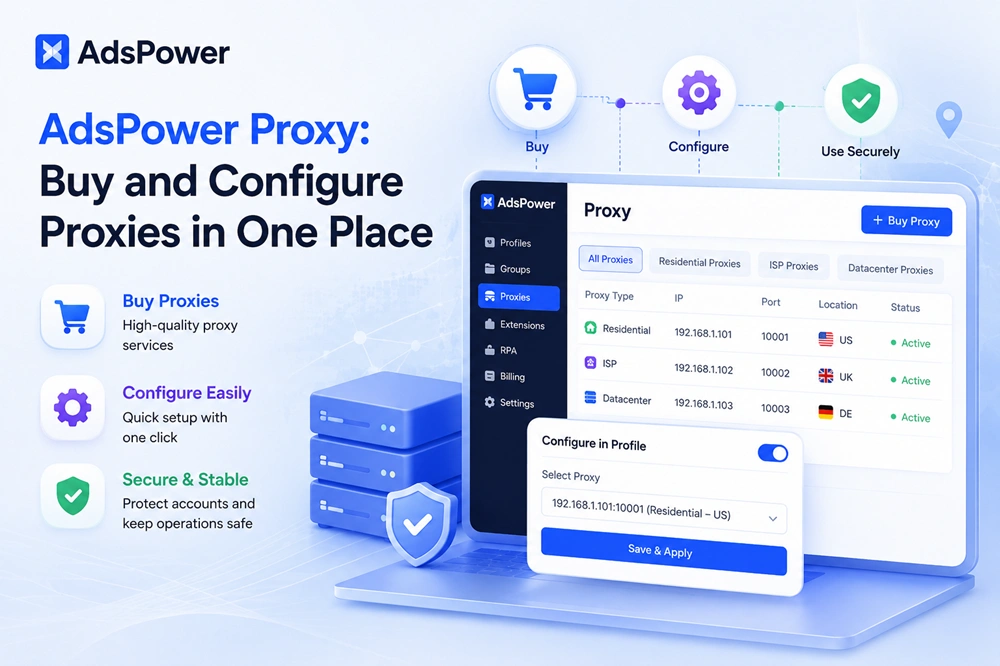
Below, we explain the proxy types currently offered in AdsPower, the two ways to purchase and assign them, and the checks worth making if a proxy fails to connect.
What Is the AdsPower Official Proxy Option?
The official proxy option is available inside the AdsPower software. Select a proxy type, location, quantity, and service period; after payment and allocation, the proxy appears in your list, ready to be checked and assigned.
Existing provider integrations, saved proxies, and custom proxy settings remain available. Teams can use the official option for quick deployment while retaining third-party services that meet specific requirements.
Availability, prices, locations, payment methods, and discounts may change. Always refer to the current checkout page in the AdsPower browser before purchasing.
Which Proxy Types Can You Buy in AdsPower?
The in-app purchase flow currently offers three proxy categories:
|
Proxy type |
How it works |
Suitable for |
|
A fixed SOCKS5 IP hosted in a data center |
Fast, cost-conscious workflows, testing, and approved automation |
|
|
A fixed SOCKS5 residential IP associated with an ISP network |
Long-running social media, e-commerce, advertising, and regional account operations |
|
|
Residential IPs that can rotate and are generally billed by traffic |
Authorized data collection, account registration, and short-term tasks requiring rotation |
A static IP keeps a consistent network route, which suits profiles that repeatedly access the same authorized account. Rotating/dynamic residential proxies work best for tasks that benefit from regular IP changes rather than a stable, long-running connection.
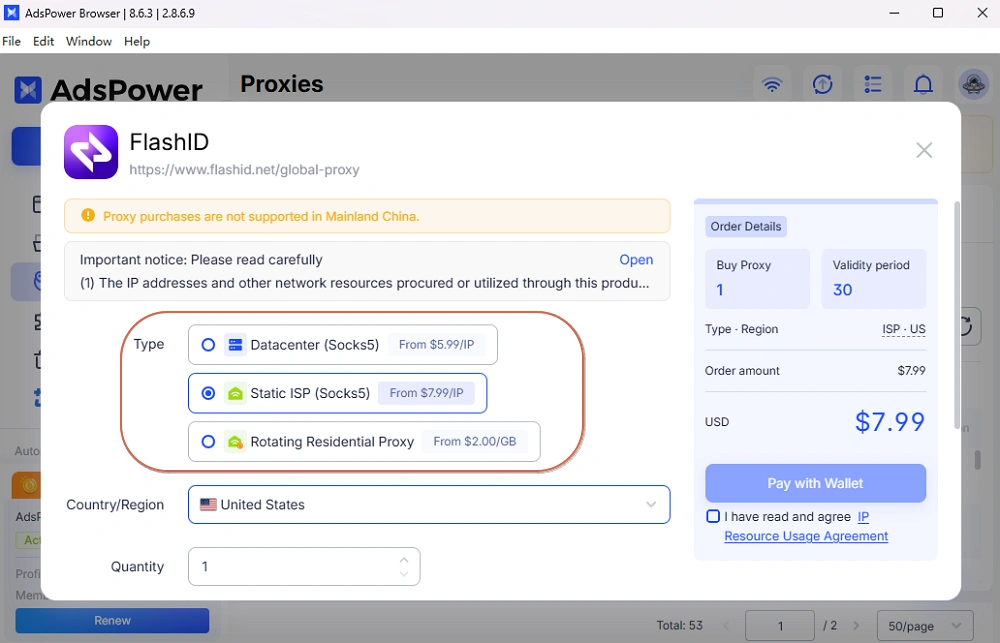
Select the proxy according to the platform's rules and the actual task. A proxy does not guarantee account safety, approval, or unrestricted access.
Why Purchase an AdsPower Proxy Inside the Software?
The main benefit is faster setup.
- Automatic configuration: Purchased proxy details are added without manual credential entry.
- Quicker profile creation: Buy and assign a proxy during the same profile setup process.
- Centralized management: Check status, review assignments, filter proxies, and manage eligible renewals from the Proxies page.
- Flexible sourcing: Use AdsPower official proxies together with partner or independently purchased proxies.
- Fewer setup errors: Removing manual copying reduces mistakes involving hosts, ports, protocols, usernames, and passwords.
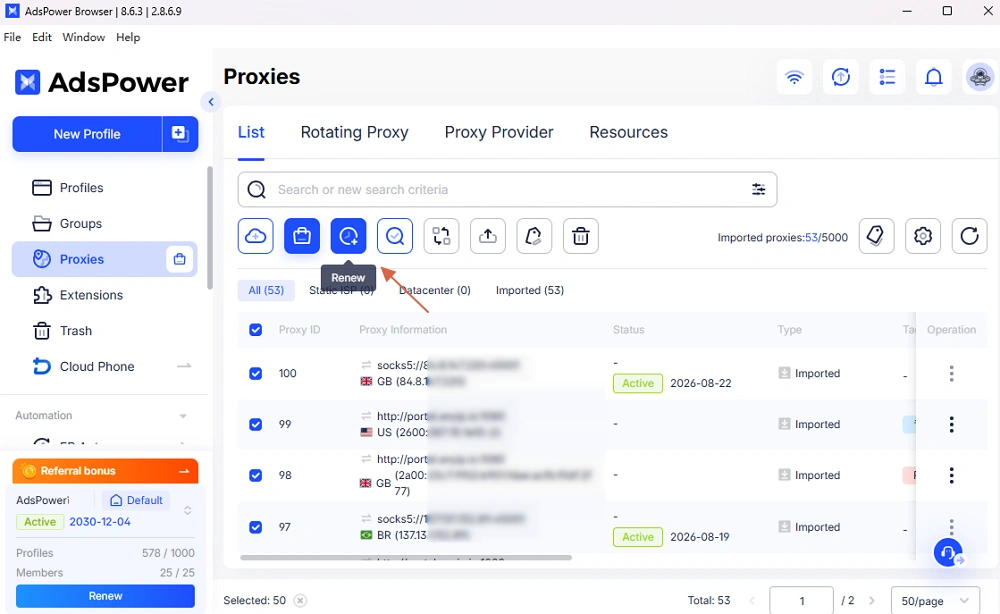
For a larger rollout, test a small number first. Confirm the location and target-site compatibility before assigning proxies across multiple profiles.
How to Buy and Configure an AdsPower Proxy
You can purchase a proxy during profile creation or from the central proxy management page.
Method 1: Purchase While Creating a Profile
1. Open AdsPower and click New Profile.
2. Go to the Proxy section and open the proxy purchase entry.
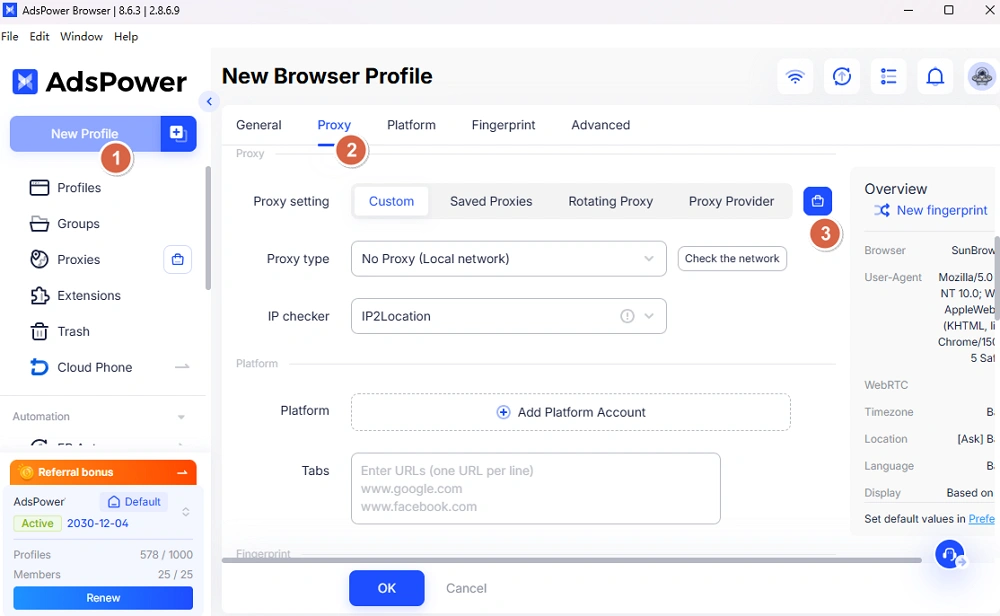
3. Select static datacenter, static ISP residential, or rotating residential.
4. Choose an available country or region, quantity, and service period or traffic plan.
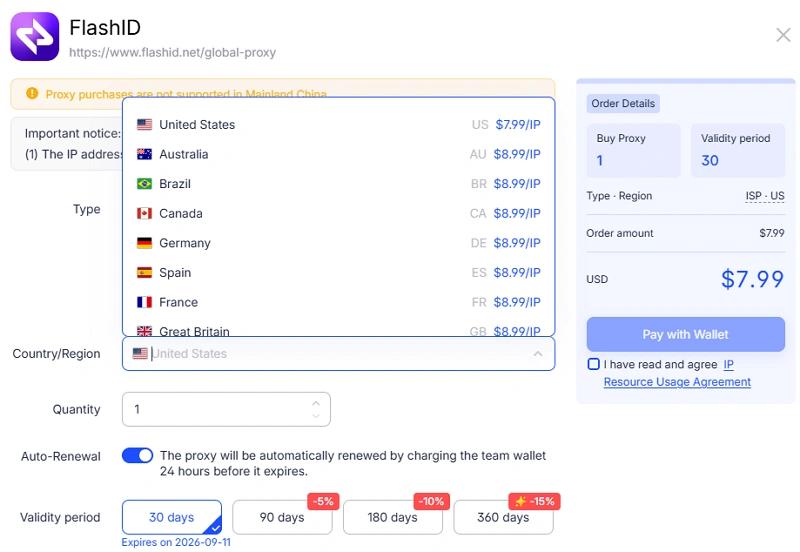
5. Decide whether to enable auto-renewal when the option is available.
6. Review the order details and complete payment.
7. Select the allocated proxy, run Check Proxy, and save the profile.
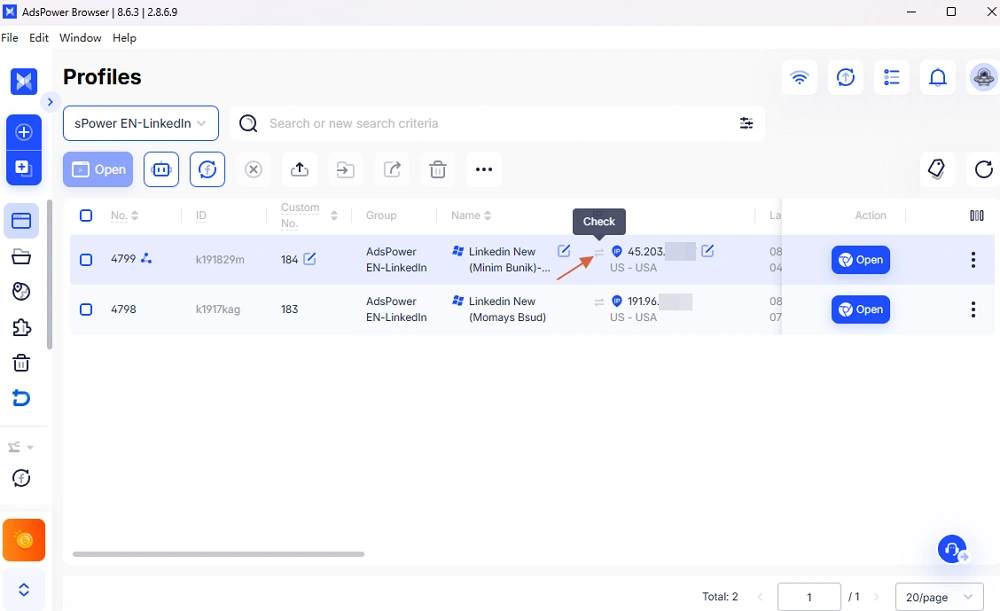
Allocation may take a short time. If the proxy does not appear, refresh the page and review Billing Center and Action Log before ordering again.
Method 2: Purchase from the Proxies Page
Open Proxies, choose the Buy proxy option, and complete the same selections for type, location, quantity, and duration. After allocation, the new proxy will appear in the proxy list. You can check it first and then assign it to the appropriate browser profile.
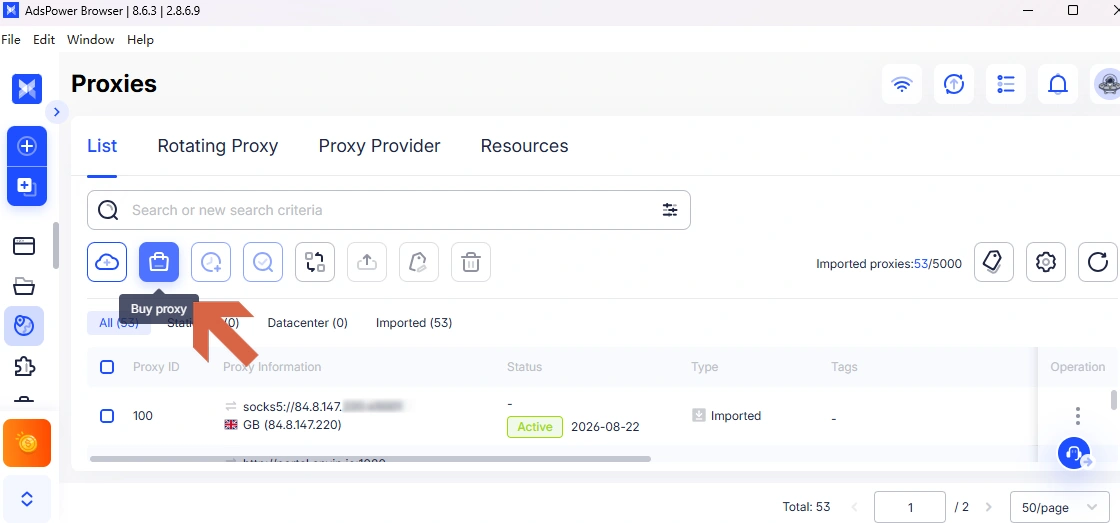
This route suits teams preparing proxy inventory for several profiles.
Can You Still Add Other Proxies to AdsPower?
Yes. AdsPower official proxies are an additional choice. They do not remove the existing AdsPower proxy integration options.
If you already have a proxy, here is how to add a proxy to AdsPower:
- Create or edit a browser profile and open Proxy.
- Choose Custom and select the protocol supplied by your provider.
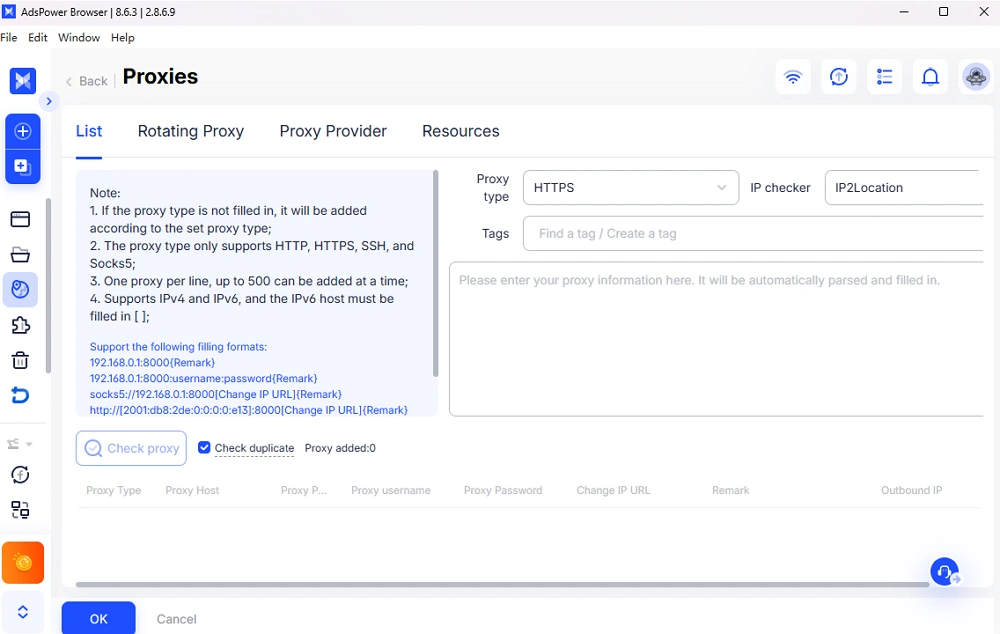
- Enter the host, port, username, and password. AdsPower can parse common strings such as IP:port:username:password.
- Click Check, then save the profile after the test succeeds.
You can also use Proxies > Add Proxy to import multiple connections for later selection under Saved Proxies. This keeps AdsPower proxies and third-party connections in one list.
For online trading, first verify that the platform permits proxy access. Trusted proxy providers for online trading should disclose IP sourcing, dedicated-IP terms, authentication, logging, and support. A proxy cannot make a prohibited location or access method compliant.
How to Fix an AdsPower Proxy Failure
An AdsPower proxy failure note generally indicates a connection or configuration problem. Check these items in order:
- Confirm the host, port, protocol, username, and password.
- Check if the proxy is still active and its subscription or data allowance remains valid.
- Turn off any unintended system proxy or VPN that may conflict with the connection.
- Test the proxy from another network. If it fails everywhere, contact the proxy provider.
- Synchronize the computer's date and time, then update AdsPower and test again.
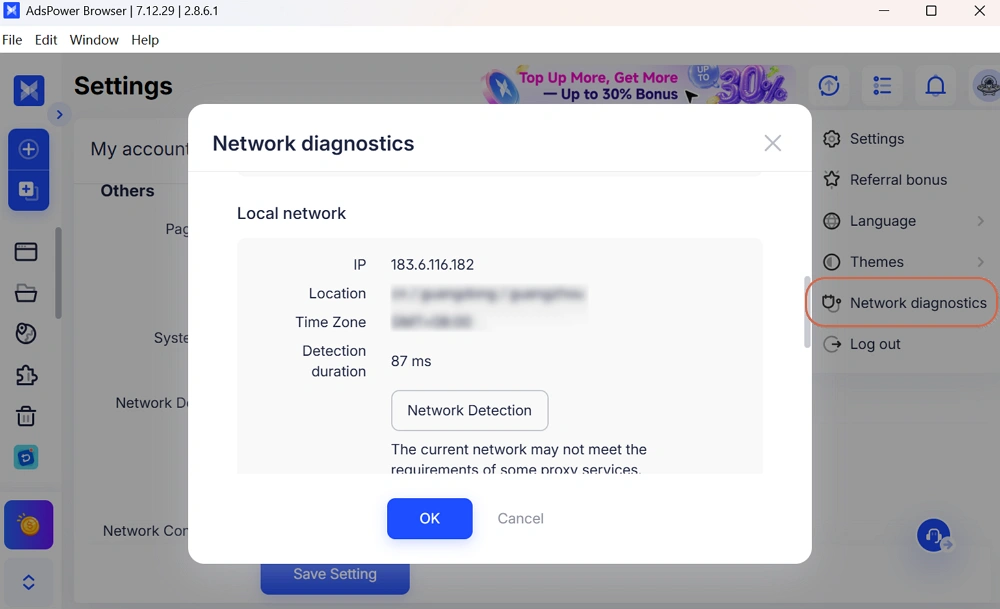
- Open Network Diagnostics to review the local network, system proxy, and connection status.
For more details, see the AdsPower Network Diagnostics guide or the proxy failure checklist.
FAQs
What types of AdsPower proxies can I purchase?
You can currently purchase static datacenter, static ISP residential, and dynamic residential proxies. Static proxies purchased through the in-app flow use SOCKS5.
Can I use my existing proxy provider?
Yes. Add its connection as a custom proxy or import it into the Proxies list. AdsPower official proxies do not replace existing third-party proxy integrations.
Set Up Your Next Proxy in AdsPower
The AdsPower proxy option shortens the path from choosing an IP to opening a configured profile. Buy during profile creation or prepare inventory from the Proxies page. Existing providers remain available through AdsPower's custom and saved proxy tools.
Open AdsPower to purchase, configure, and test a proxy in your next browser profile.
Disclaimer: Proxy availability, pricing, discounts, and service terms may change. Use proxies only for lawful, authorized activity and follow applicable laws and platform rules. AdsPower does not guarantee account status or uninterrupted access.

People Also Read
- Marketing Automation for Startups and Small Teams: How AdsPower AI Agents Automate Browser Workflows
Marketing Automation for Startups and Small Teams: How AdsPower AI Agents Automate Browser Workflows
Learn how AI Agents can automate repetitive browser-based marketing tasks across multiple accounts
- Best Private Search Engines in 2026: 5 Secure Alternatives to Google
Best Private Search Engines in 2026: 5 Secure Alternatives to Google
Looking for a more private way to search? Explore the 5 best private search engines in 2026 and see how DuckDuckGo, Brave Search, Startpage, and more
- Temp Gmail: How to Create a Temporary Gmail Account in 2026
Temp Gmail: How to Create a Temporary Gmail Account in 2026
Learn how to create a temp Gmail account, compare Gmail aliases and separate accounts, and manage multiple accounts with AdsPower.
- Understanding Persistent Browser Profiles for AI Agents: Why Do They Matter?
Understanding Persistent Browser Profiles for AI Agents: Why Do They Matter?
Learn why persistent browser profiles matter for AI agents, helping maintain sessions, browser consistency, account isolation, and reliable automation
- Kickass Torrents Alternatives: Movies, TV, Games & Safe Access (2026)
Kickass Torrents Alternatives: Movies, TV, Games & Safe Access (2026)
Kickass Torrents is no longer what it once was, but there are still alternatives for finding movies, TV shows, music, books, games, and software. This
