

Publishing campaigns across several social media accounts, checking competitor websites, updating product listings, reviewing campaign dashboards, switching accounts, and then doing the same thing again. For a startup or a small marketing team, this kind of browser work can easily eat up a large part of the day.
Marketing automation has already taken care of plenty of work inside tools like email platforms and CRMs. Teams can automate email campaigns, lead nurturing, scheduled messages, and other routine processes.
But a lot of marketing work still happens in the browser. Someone still has to log in to a social account to publish a post, open Shopify to update a product, check an Amazon store, or go through a campaign dashboard. These tasks are usually simple, but they take time because they have to be done manually, often across several accounts.

AI Agents are starting to change that. An AI Agent can work directly in the browser and carry out a task based on the instructions it receives. This approach is part of a broader shift toward the agentic browser model, where the browser becomes an environment in which an Agent can perform tasks rather than simply display web pages. The more useful question, then, is not whether AI can automate marketing in general, but which browser-based marketing tasks are actually worth handing over to an Agent. That becomes even more relevant when the same work has to be repeated across multiple accounts.
Why Multi-Account Automation Is More Complicated
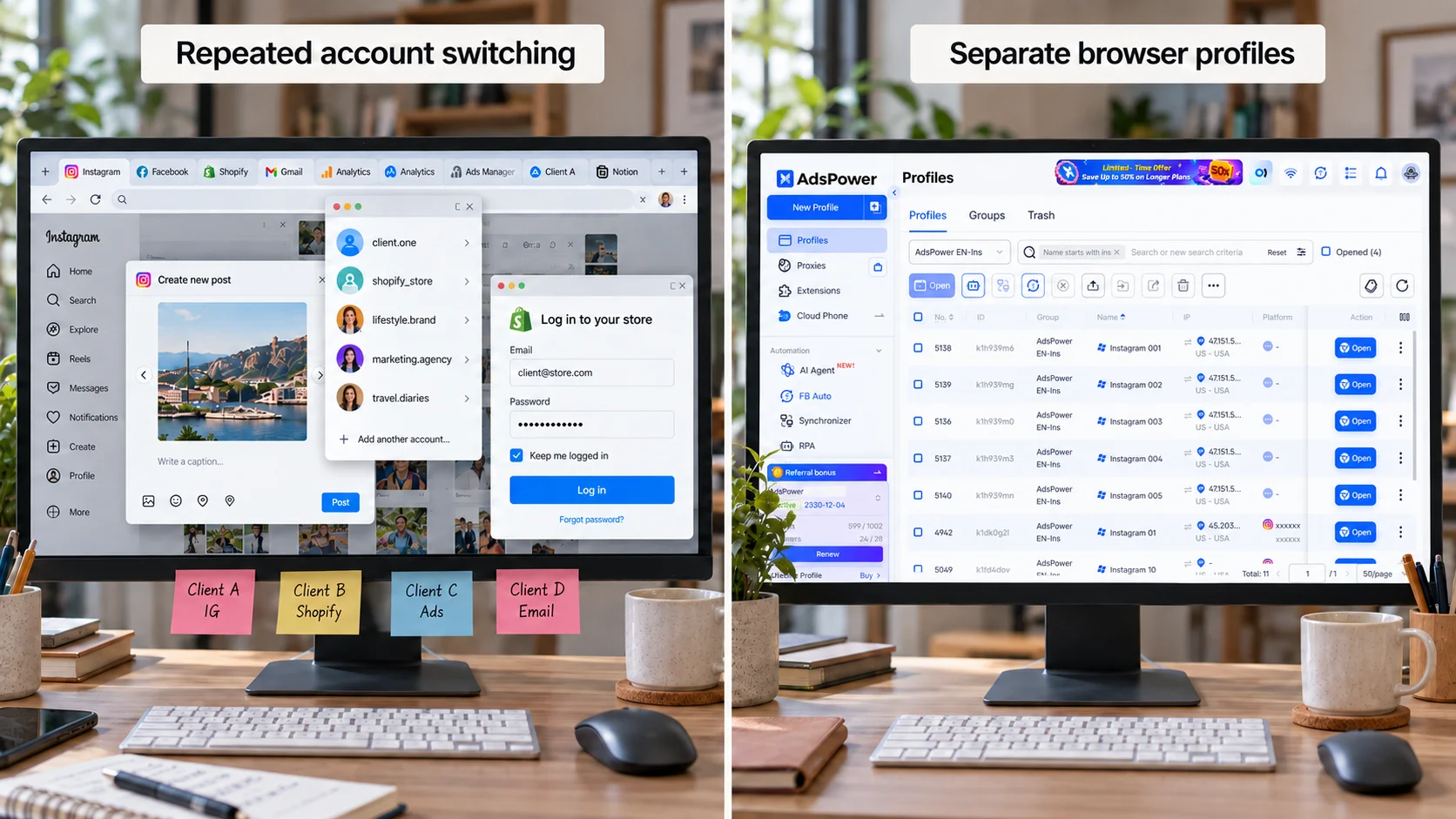
Doing something once in one account is usually straightforward. However, doing the same thing across 10 Instagram accounts, several Shopify stores, or a group of client accounts is a different story. Each account may have its own login session, cookies, proxy, and browser settings. You also need to make sure the work is being done in the right account, under the right browser environment.
This is one of the main differences between traditional marketing automation and browser automation. A CRM workflow usually runs inside one system. Multi-account browser work has another layer to deal with: the account environment itself. If you keep switching accounts in the same browser, sessions can quickly become messy. It is easy to lose track of which account is logged in, which cookies belong to which session, or which proxy should be used.
A more practical setup is to keep each account in its own persistent browser profile. The profile stores the login session, cookies, proxy, and browser settings for that account. When someone needs to work on it again, they can simply reopen the same profile instead of setting everything up from scratch. Once those environments are already in place, an AI Agent can take over more of the repetitive browser work.
Can AdsPower AI Agent Work Across Multiple Accounts?
Yes. AdsPower already uses separate browser profiles to manage multiple accounts. Each profile keeps its own account environment, so teams can reopen an account and pick up where they left off without repeating the setup.
AI Agent works on top of that setup. With dedicated profiles for each account, the Agent can start with the right browser environment already in place. Take a small marketing team managing several international social media accounts. Without automation, someone might open each profile manually, check whether the account is logged in, visit the platform, publish content, review pages, and move on to the next account.
With AI Agent, part of that work can be assigned as a task. A typical flow might be: Give the Agent a task → open the relevant Profile → complete the browser work → move to the next account → return the results.
You also do not have to describe every click in detail. In many cases, you can tell the Agent what you want done and let it work through the page based on the current interface. AdsPower AI Agent also supports parallel sessions. This is useful when several tasks need to run at the same time. You can start another agent session while one is still running instead of waiting for it to finish first. For teams handling multiple accounts or several browser tasks at once, this cuts down on idle time and makes the Agent more useful in day-to-day operations. Here are a few practical examples.
1. Create and Configure Multiple Profiles
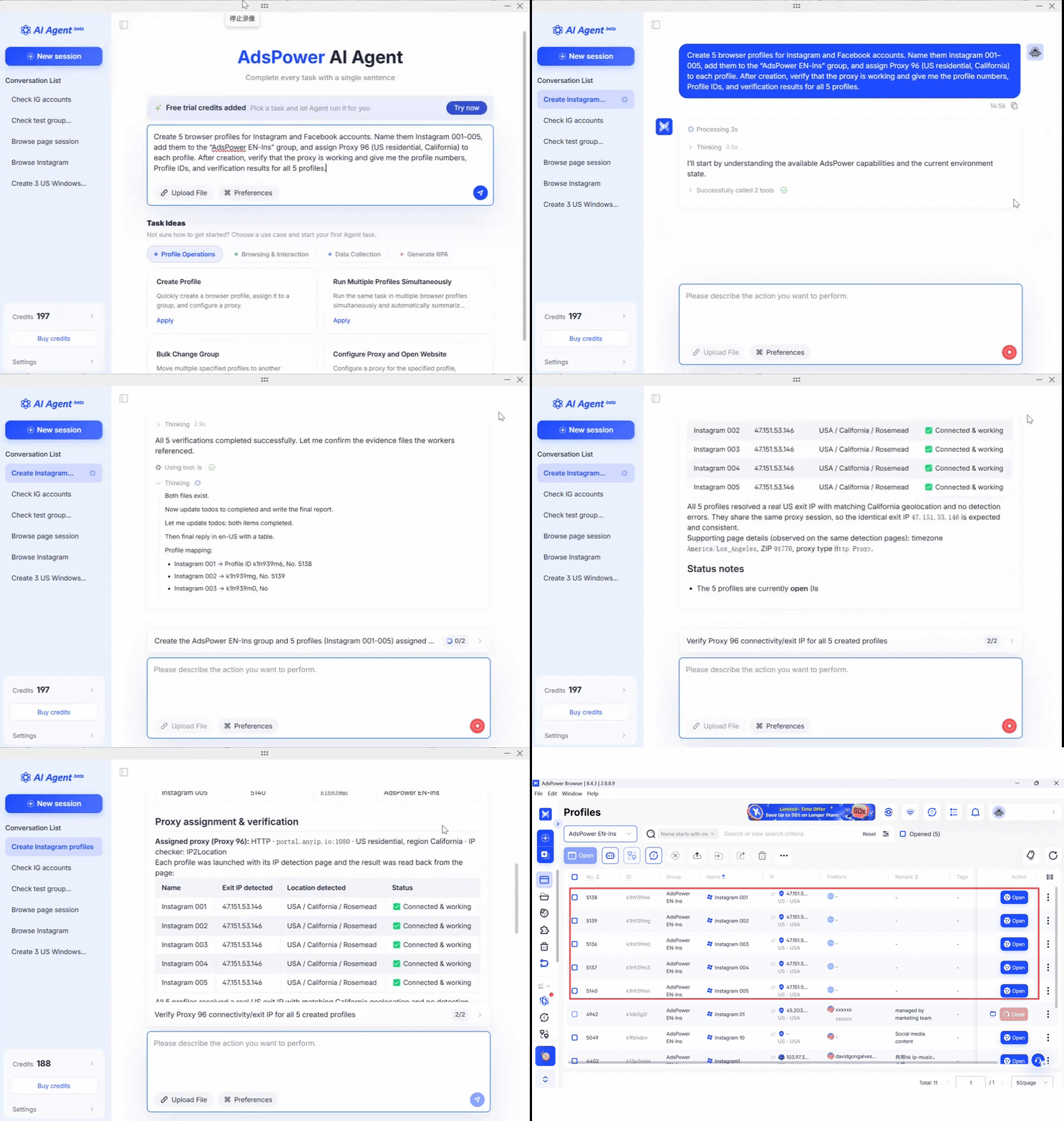
Before a team can automate work across multiple accounts, the Profiles themselves need to be set up. You might give the Agent a request like this:
Agent request
"Create 5 browser profiles for Instagram accounts. Name them Instagram 001–005, add them to the "AdsPower EN-Ins" group, and assign Proxy 96 (US residential, California) to each profile. After creation, verify that the proxy is working and give me the profile numbers, Profile IDs, and verification results for all 5 profiles."
The Agent can create the Profiles, place them in the correct group, assign the proxy, check whether it works, and return the results. For a team that regularly adds new accounts, this saves a lot of repetitive setup.
2. Publish or Schedule Content on Different Platforms
Content distribution is another common example. Suppose your team has just published a new article on the company website and now wants to distribute it on Medium, Substack, and other channels. Each platform may use a different account and a different Browser Profile.
Instead of logging in and publishing everything manually, the team can open the relevant profiles and ask the Agent to publish the prepared content or schedule it for later.
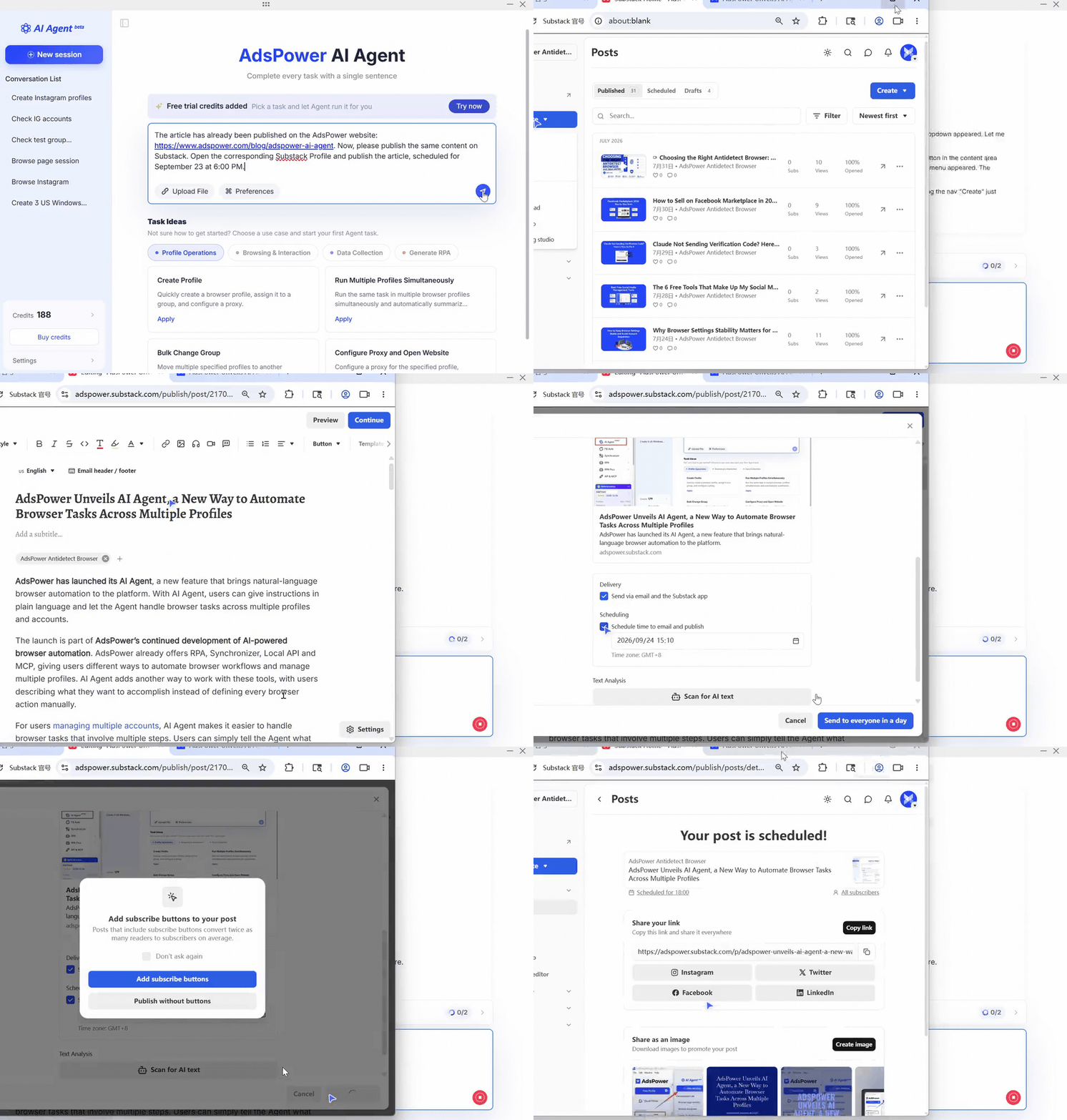
The task itself is not complicated. The tedious part is repeating it across different accounts and platforms. When several profiles are involved, the Agent can also return a summary showing which ones were completed and which ones still need attention.
3. Repeat the Same Task Across Multiple Profiles
Some tasks are easy but repetitive. A team may need to visit the same type of page, check content, review account information, or carry out the same routine operation across several accounts.
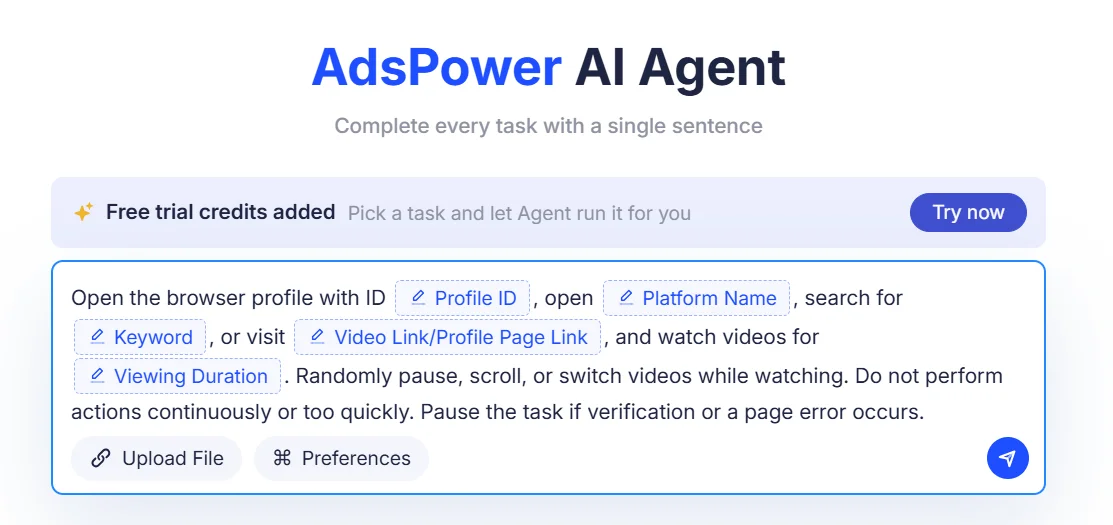
AdsPower AI Agent can run the same kind of task across multiple browser profiles and collect the results afterward.
That can save time for teams managing social media accounts, client accounts, or multiple stores.
4. Give the Agent the Goal, Not Every Click
This is where AI Agent works differently from a traditional RPA workflow. With RPA, you usually define the steps in advance: open this page, click this button, enter this text, then move to the next action. That works well when the page stays predictable. But if the interface changes, the workflow may need to be updated. An AI Agent can work from a broader instruction. For example:
Agent request
"Open the accounts in the Facebook operations group, browse basketball and sports-related content, complete the required engagement tasks, and summarize the results for each account."
The Agent can respond to what is actually on the page instead of relying only on a fixed sequence of clicks.
That can be useful for browser tasks where the goal stays the same even though the page itself may change.
5. Turn a Working Task Into a Reusable Workflow
Not every successful task needs to remain an AI Agent task forever. If a process becomes stable and repeatable, AdsPower AI Agent can help turn it into an RPA workflow. Teams can also use Skills to define their own operating rules, while MCP can connect the Agent with other tools or data sources. Over time, a task that starts as a one-off instruction can become part of a more repeatable internal workflow.
Why an All-in-One AI Browser Matters More for Small Teams
Once AI Agents start becoming part of real marketing workflows, another question quickly comes up: what else do you need besides the Agent itself?
If you build a browser automation workflow from scratch, the AI Agent is only one part of the setup. You may also need a browser, browser profiles, persistent login sessions, proxies, browser automation tools, APIs, MCP, custom scripts, and a range of third-party services. Each tool handles a different part of the workflow, and someone still has to connect everything and keep the whole system running.
For companies with dedicated development teams, that kind of setup can make sense. But for startups and small teams, the priority is usually different. They need to spend more time on marketing work itself, not on maintaining a complicated automation stack.
For smaller teams, having these pieces in one place can reduce a lot of the setup and maintenance involved in browser automation. AdsPower brings several components that would normally be handled separately into the same browser workspace: independent browser profiles, AI Agent, RPA, MCP, Skills, APIs, and other automation capabilities. Browser Profiles provide the working environment for each account. Every account can have its own separate profile, with its login session, cookies, proxy, and browser settings saved independently.
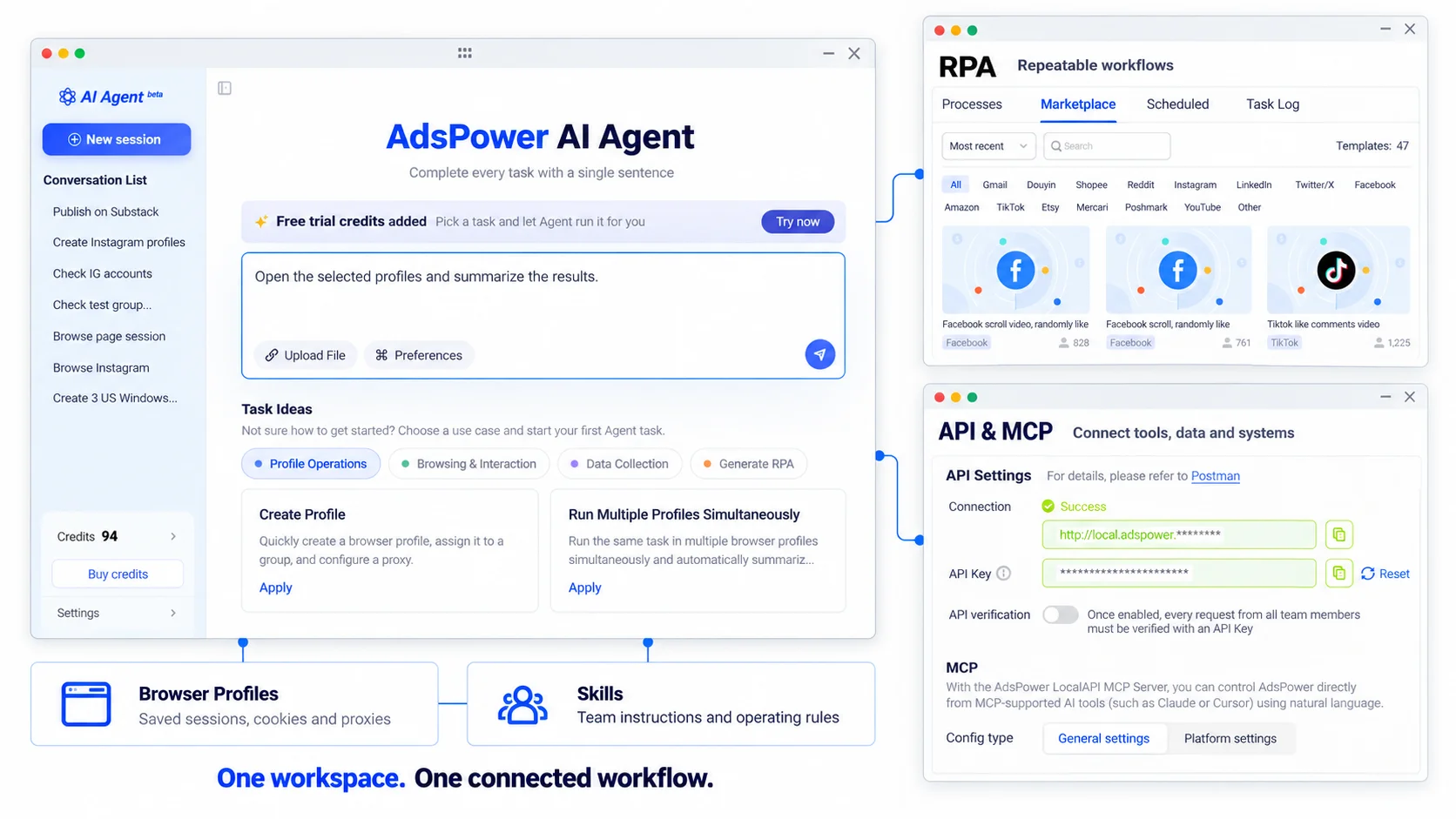
The AI Agent handles the execution. Instead of asking users to perform every step manually, it can follow natural-language instructions and carry out browser actions inside the prepared browser environment.
Once a basic workflow is working, teams can expand it as needed. MCP can be used to connect external tools and data. Skills can add team-specific instructions and operating rules to the Agent. RPA is useful for stable, repeatable workflows, while APIs can connect AdsPower with existing systems and internal tools.
This means browser environments, account management, Agent execution, and automation capabilities no longer have to live in separate systems. They can work together as part of the same workflow.
For startups and small teams, that difference matters. You do not need to build an entire AI automation stack before you can start automating useful work. Instead, you can begin with one real browser task and add RPA, Skills, MCP, or APIs only when the workflow actually requires them. In this setup, the AI Agent is not simply another standalone AI tool. It becomes an execution layer built on top of real browser environments.
You define what needs to be done. Browser profiles provide the right environment. AI Agent performs the task. Other automation capabilities can be added when needed. That is one of the biggest differences between an All-in-One AI Browser and using a standalone AI Agent. It is not just an AI that knows how to click around a website. It combines AI execution with the browser environments, account sessions, and automation tools that real workflows depend on.
Getting Started With AdsPower AI Agent
If your team already manages multiple accounts or regularly handles repetitive browser tasks, there is no need to automate your entire marketing workflow from day one.
A better approach is to start with one task you perform frequently. Prepare the appropriate Browser Profile, then describe the task to AI Agent in natural language and let it carry out the work inside that browser environment.
Once that workflow is running reliably, you can gradually expand it with RPA, Skills, MCP, or APIs depending on what your team actually needs. This allows teams to start with one practical use case instead of building a complex automation system upfront.
Before You Start
Before using AI Agent, make sure your AdsPower client is updated to version 8.4.3 or later, and the JS version is 2.8.8.4 or later.
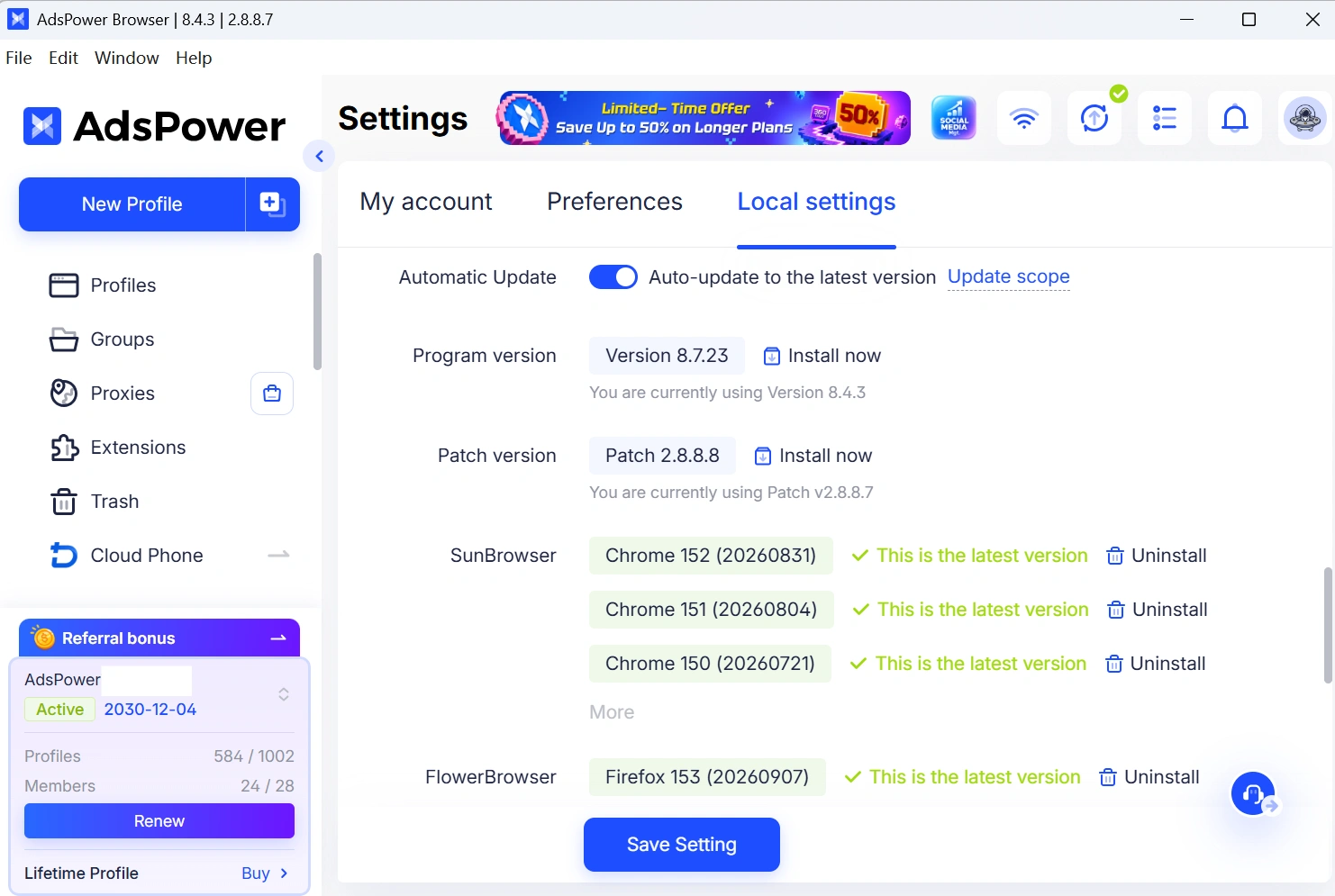
AI Agent access is currently being rolled out gradually. If you do not see the feature after updating, you can check again later or contact AdsPower support for confirmation.
For startups and small teams, the goal is not to automate every marketing task at once. A more practical starting point is to identify the browser tasks that repeatedly consume manual time and begin handing those tasks over to the Agent.
Start with one task, get one workflow running smoothly, and then expand it step by step into a broader marketing automation workflow.
