
Article Overview
Learn why AI agents may put ad accounts at risk and how to automate Meta Ads, Google Ads, and multiple accounts more safely with AdsPower.
In 2026, several Reddit threads caught the attention of media buyers: advertisers were reporting that their Meta ad accounts had been disabled after connecting AI agents like Claude Code. One post on r/ClaudeAI received 268 upvotes and 141 comments, while a similar discussion on r/FacebookAds drew another 40 comments.
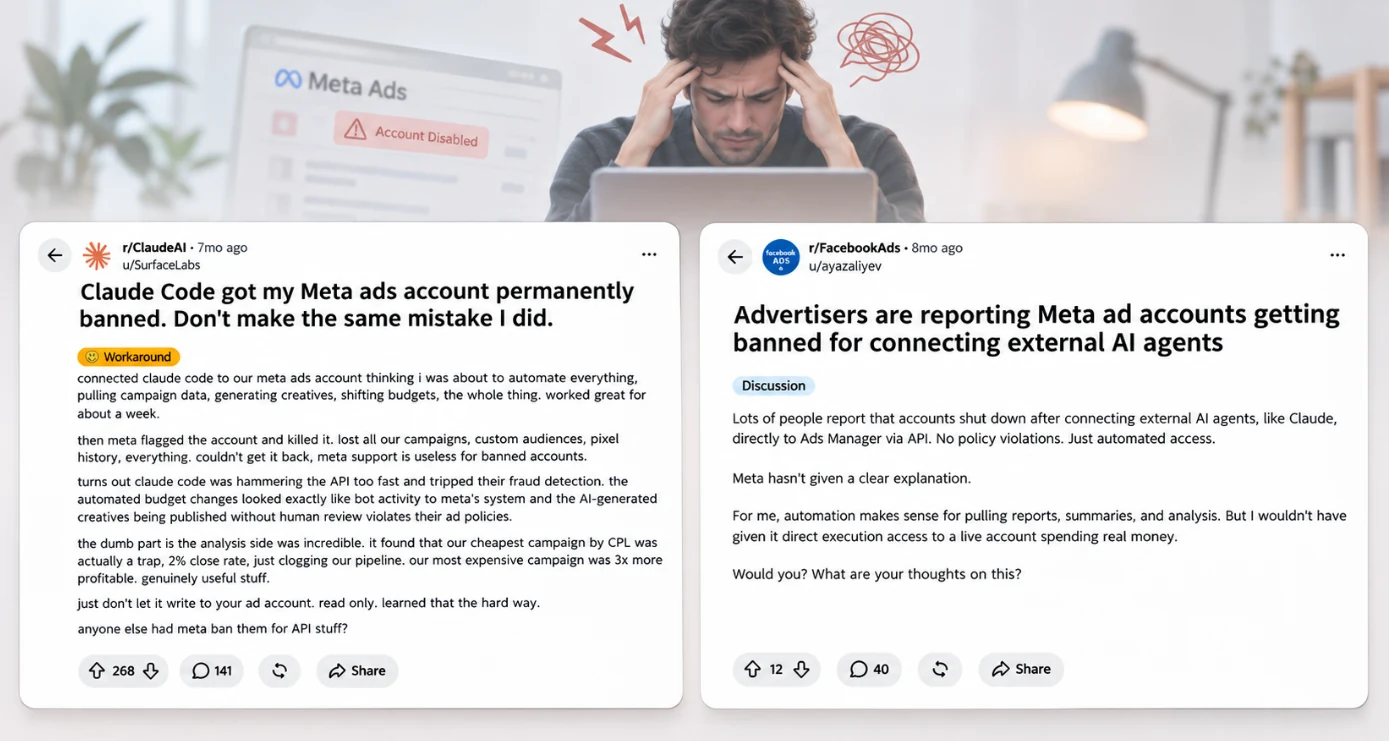
Some said their accounts had been running for years without major issues. Then, after experimenting with AI-powered automation, they suddenly found themselves locked out.
For anyone managing paid campaigns, that's a worrying thought. An ad account isn't just another login. It holds campaign history, audience data, and months or even years of optimization work. Losing access can bring active campaigns to a halt.
But the discussions also raised a bigger question: Was AI actually responsible for these account bans, or was something else going on? With more advertisers experimenting with AI agents, it's a question worth looking into before giving one access to your ad accounts.
Why Can AI Agents Put Ad Accounts at Risk?
Using an AI agent won't result in your ad account getting banned. The question is how much access you give it, what it does with that access, and whether those things comply with the advertising platform’s policies.
In the Reddit case above, the advertiser suspected that Meta's fraud detection was triggered by frequent API calls and automated budget changes. However, the exact reason for the ban was never independently confirmed.
The discussion highlights three potential risks advertisers should consider before giving AI agents access to their ad accounts.
1. Giving AI Too Much Control
Using AI to analyze campaign performance is one thing. Giving it full control over your ad accounts is another. For example, an AI agent managing Meta Ads or Google Ads might see a campaign with a strong ROAS and decide to increase its budget. That sounds reasonable, but what if the profit margins are already tight, or the business is about to change its promotion strategy? The agent might also publish AI-generated creatives without checking whether they comply with the platform's advertising policies.
For advertisers spending hundreds or thousands of dollars a day, these decisions can have real consequences. AI can help spot opportunities and recommend changes, but budget adjustments, campaign launches, and new creatives should still be reviewed before going live.
2. Unusual Automated Activity
AI agents can perform tasks much faster than a human media buyer. They can pull reports, review campaign settings, and make multiple changes in a short period. But different platforms have different rules about automated access.
For example:
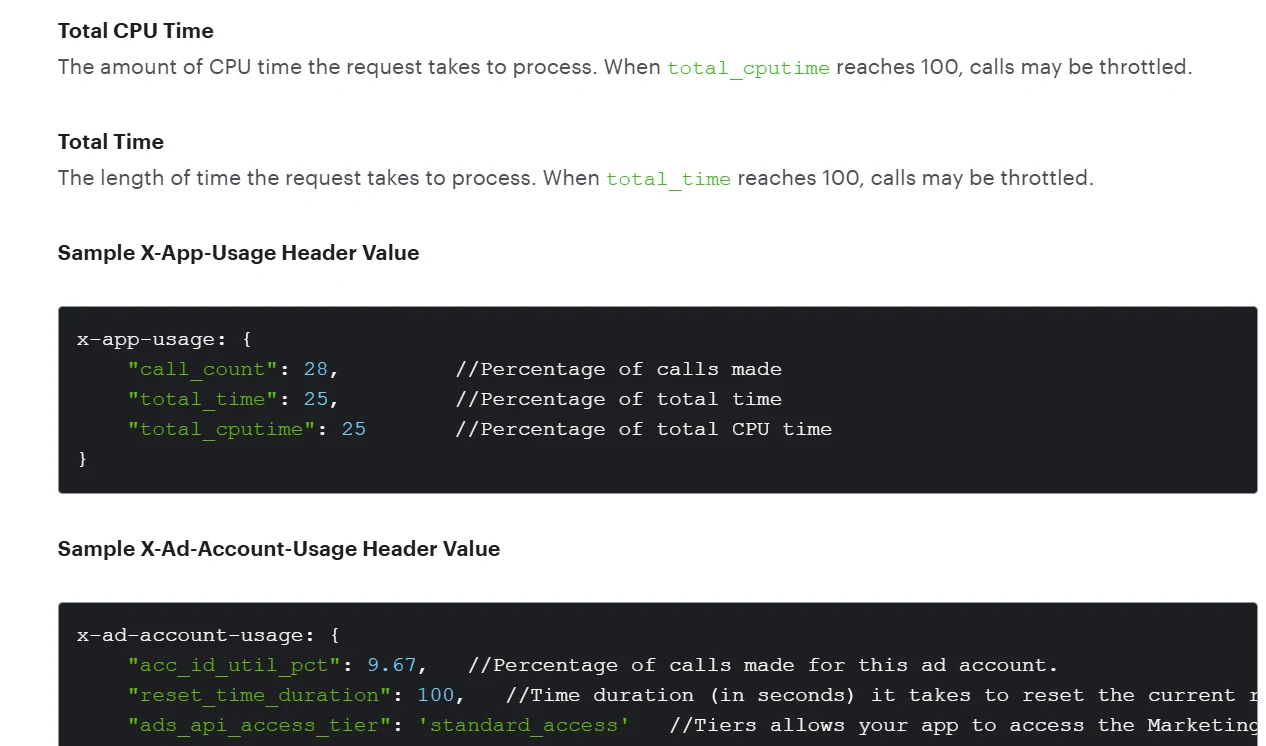
- Meta Ads: Its Marketing API supports authorized advertising management, but applications must follow permission requirements and API rate limits. Sending too many requests can result in rate-limit errors.
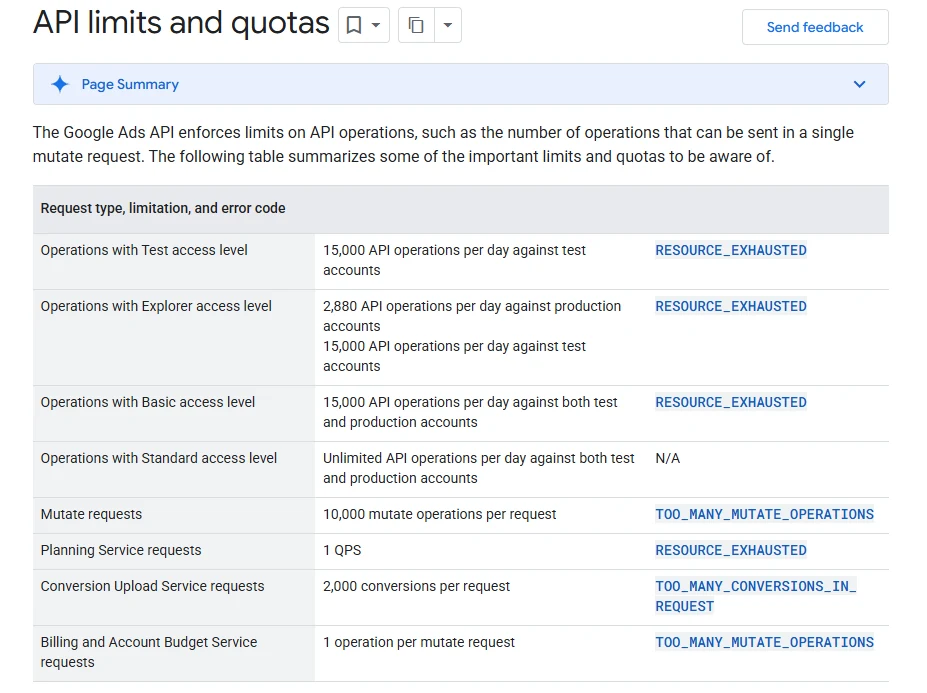
- Google Ads: Its official APIalso supports automated campaign management, with quotas and limits on certain operations. Exceeding those limits can cause requests to fail.
- LinkedIn: The platform restricts unauthorized third-party tools that automate activity on its website. This is especially relevant to advertisers or agencies using AI for LinkedIn-related account workflows.
3. Inconsistent Browser Environments
There's another issue that's easy to overlook, especially when AI agents work across multiple advertising accounts: the browser environment they use.
Think about an AI agent that opens the same ad account every day. If it starts with a fresh browser each time, previously saved cookies and login sessions may be lost, forcing advertisers to log in again or complete additional verification. Frequent changes to browser fingerprints or proxies can also make the login environment less consistent.
For agencies managing multiple clients, there's another concern. Imagine an AI agent working across 20 ad accounts using browser environments with the same fingerprint and network configuration. These accounts may share technical signals that advertising platforms can use when assessing account activity. The opposite matters too. If Account A uses a Windows browser with a Singapore IP today, but opens tomorrow with a different operating system, browser fingerprint, and IP address, the login environment has changed significantly.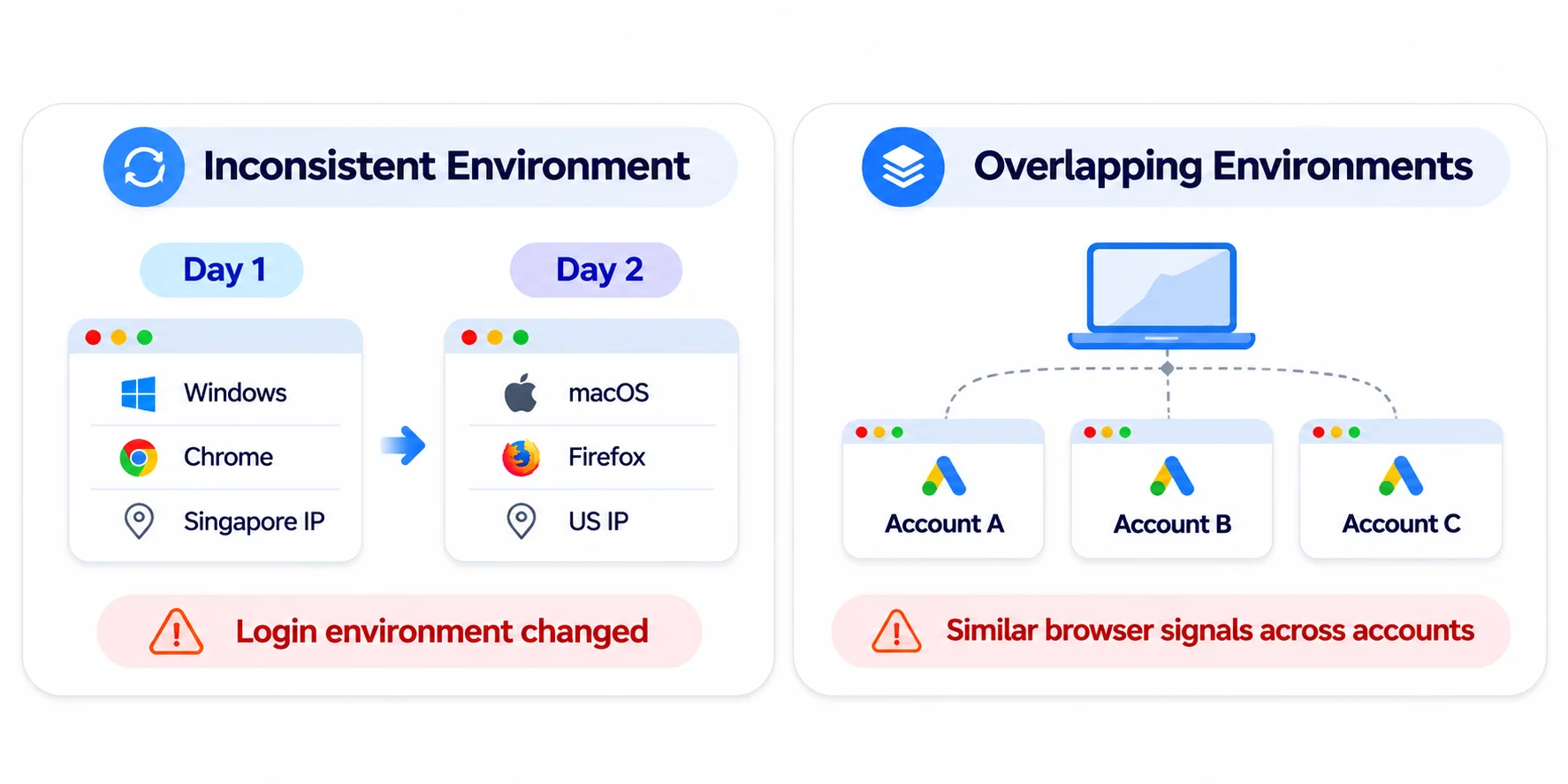
How to Automate Ad Accounts Safely Without Getting Flagged
So, how can you use AI for everyday ad management without putting your accounts at unnecessary risk? Here are three things worth doing before you let an AI agent take over routine tasks.
1. Keep Important Ad Decisions in Your Hands
Start with tasks that don't require AI to make changes to your campaigns. For example, let the agent pull performance reports, spot unusual spending, or identify ads that may need attention. If it recommends increasing a budget or pausing a campaign, review the suggestion before applying it.
A few practical rules can help:
- Use read-only access for analysis. If the agent only needs campaign data, there's no reason to give it permission to edit ads or budgets.
- Require approval for important changes. Budget increases, campaign pauses, and new ad launches should be reviewed before going live.
- Set clear spending limits. If you allow an agent to make certain changes automatically, define how much it can spend or adjust within a given period.
2. Use the Right Automation Method for Each Platform
Before connecting an AI agent to an advertising platform, find out how it will access your account. For Meta Ads and Google Ads, the official APIs support many common tasks, from retrieving campaign reports to making authorized campaign changes. When an API supports what you need, it's generally the better place to start.
A few things are worth checking:
- API permissions: Make sure the tool only requests the access it actually needs.
- Request limits: Follow the platform's API quotas and avoid repeatedly requesting data that hasn't changed.
- Error handling: If a request fails or hits a rate limit, the agent should stop or retry according to the API's guidance, rather than continuously sending requests.
- Control the pace of automation: Avoid sending too many requests or performing large numbers of actions at once. For API integrations, follow the platform's rate limits and retry guidelines. For permitted browser-based tasks, use reasonable intervals between actions instead of executing everything at machine speed.
- Activity records: Keep track of what the agent accessed or changed, especially when it works across several client accounts.
3. Give Each Ad Account a Stable Browser Environment
AdsPower helps media buyers keep browser environments separate and consistent for multiple ad accounts. Each account can have an individual browser profile with individual fingerprint settings, proxy configuration, cookies and login data.
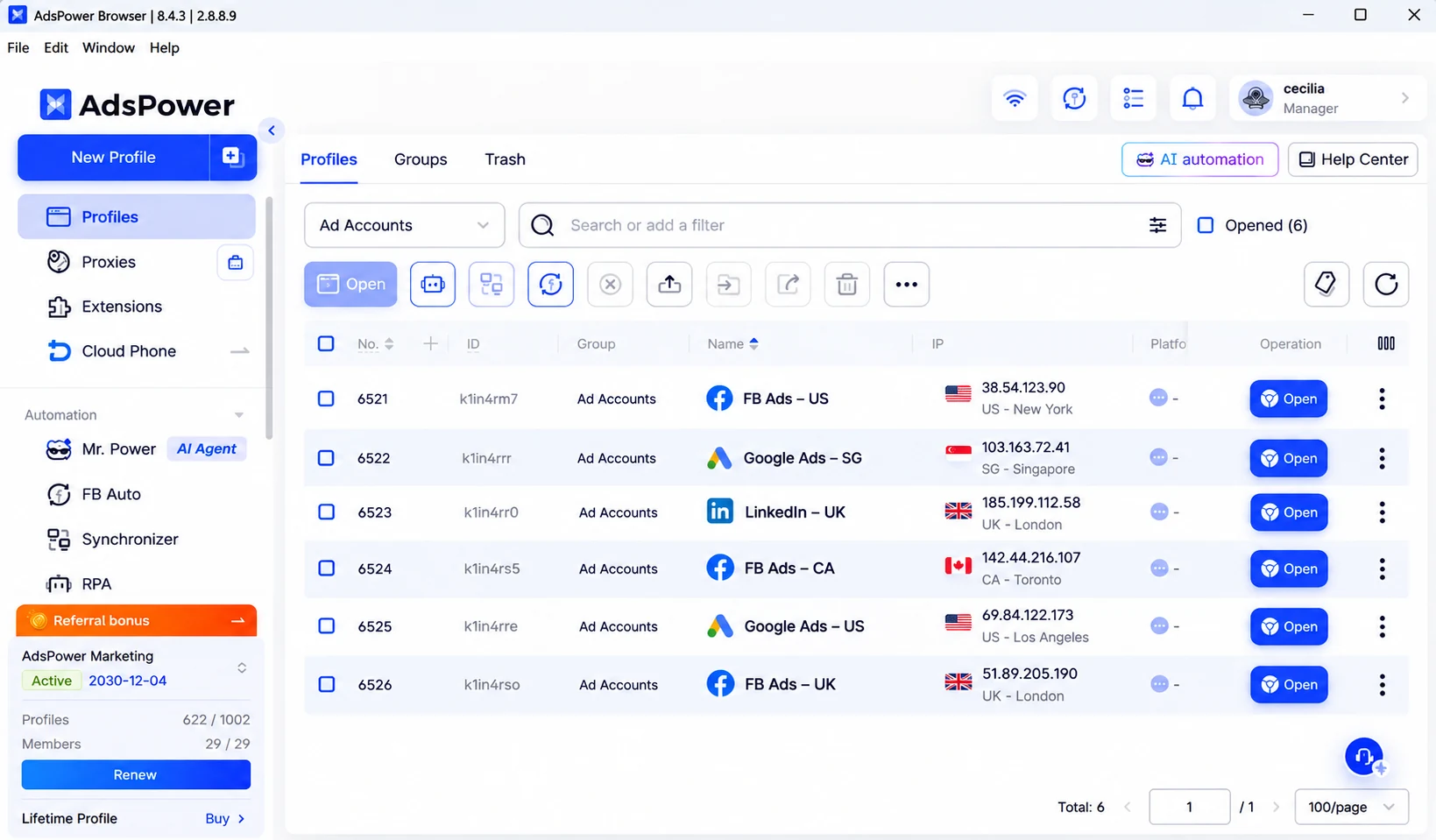
Unlike a standard browser profile, AdsPower gives you more control over the browser environment:
- 50+ customizable fingerprint settings: Set different Canvas, WebGL, User-Agent and other browser characteristics in each profile to eliminate unwanted overlap in account environments.
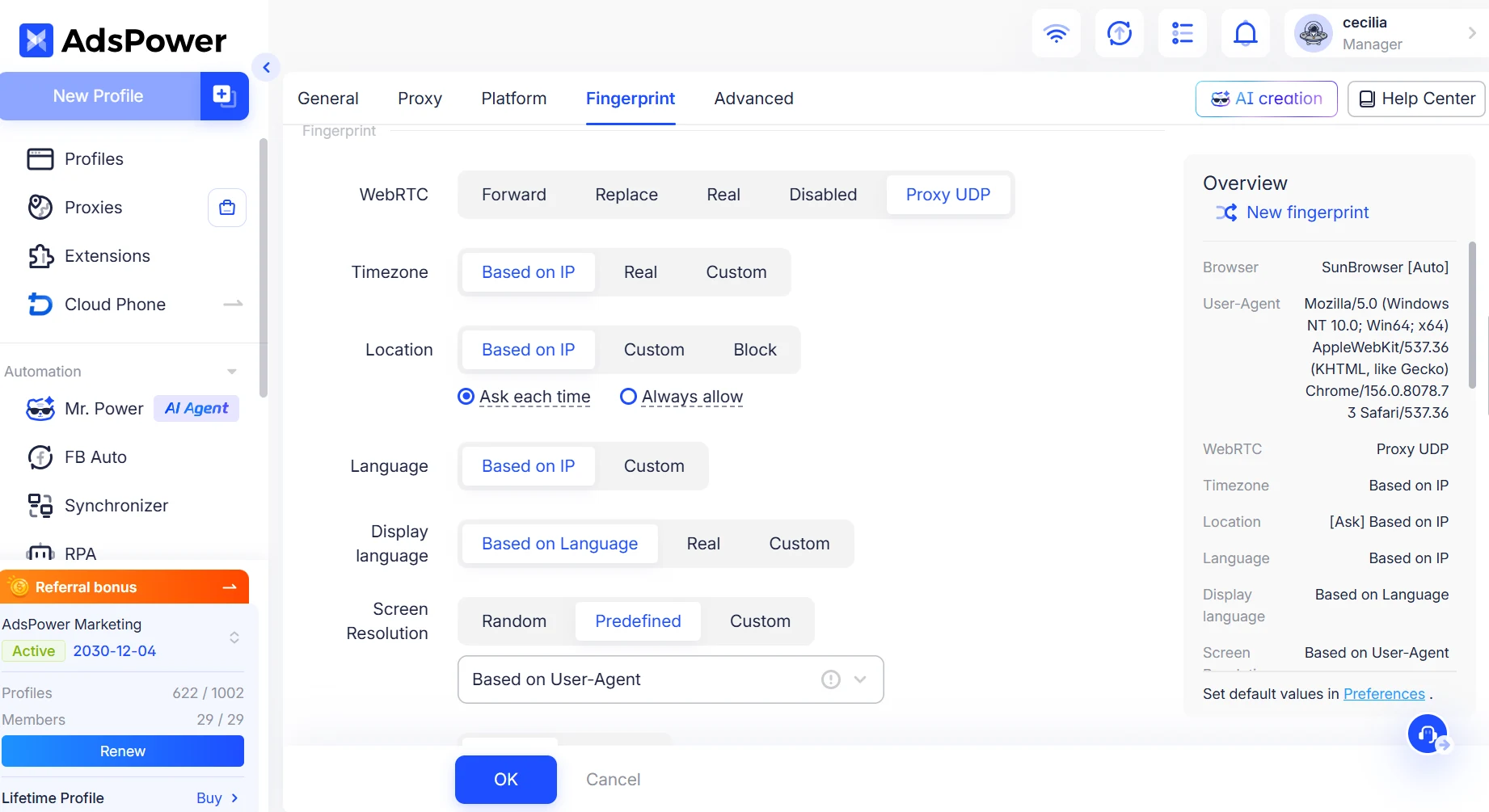
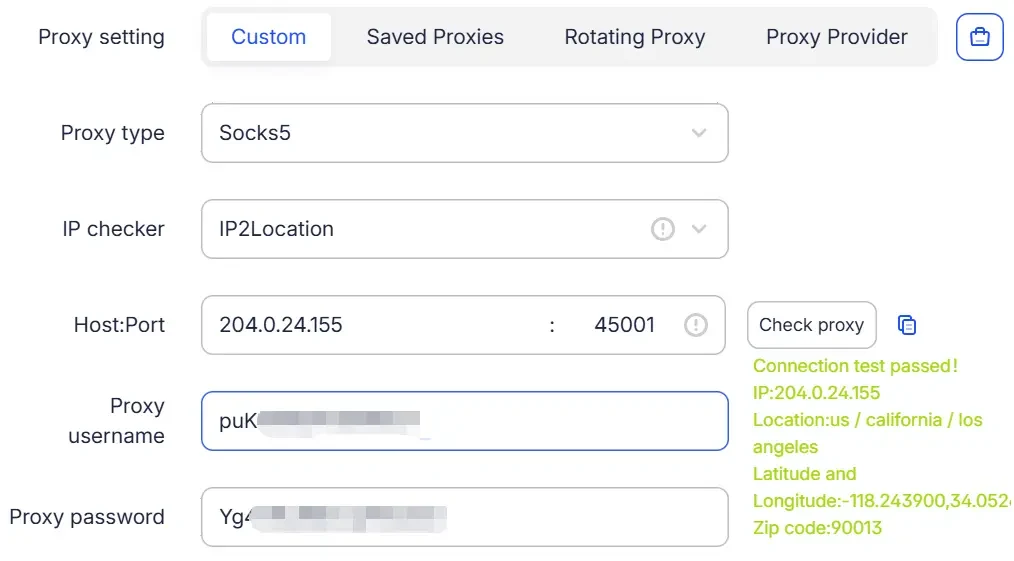
- Independent proxies and sessions: Separate cookies, local storage and login sessions . Assign a proxy for each profile . You can open the same profile again without rebuilding its environment.
- SunBrowser (Chromium) / FlowerBrowser (Firefox) with latest browser kernels: Use latest kernels to keep browser environments up to date.
- Reusable environments for AI agents: Let AI agents work with existing AdsPower profiles through supported automation interfaces instead of creating a new browser environment for each task.
The important part for long term account management is keeping the settings consistent across sessions for each profile, but separating different accounts.
Check Your Ad Account Environments with Mr. Power
You can also use Mr. Power, AdsPower's AI Agent, to check multiple browser profiles before starting your advertising work. Open Mr. Power and enter:
"Check all browser profiles in my "Ad Campaigns" group. Verify their proxy connections and login status. List any profiles that need attention before I start today's ad management tasks. Don't change any account settings."
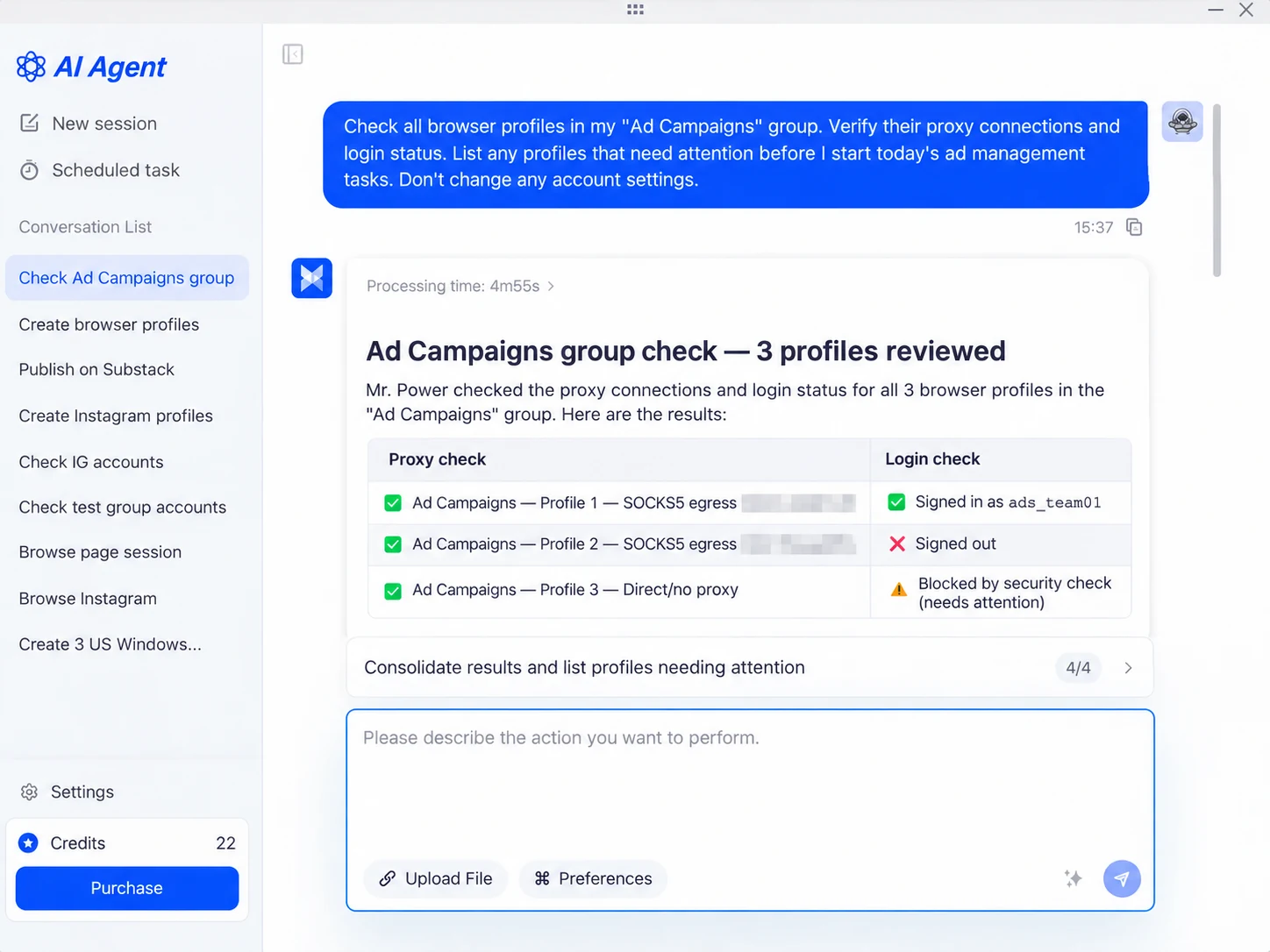
Mr. Power can check the selected profiles and identify issues such as failed proxy connections or login sessions that need attention. Review the results and address any problems before continuing with your campaigns.
For future tasks, you can simply tell Mr. Power what to do and how to do it. For example, you can ask it to open your ads dashboard, review specific campaign pages, scroll through relevant sections, and use simulated typing and mouse movements when interacting with the interface. You can also specify how long it should spend reviewing each page or when to pause between steps. All of this can be done through a simple chat prompt, without writing scripts or manually configuring each action.
Example prompt:
"Open my existing Google Ads profile and check the campaign overview and account notifications. Review each page carefully, scroll through the relevant sections, and use simulated mouse movements and typing when interacting with the interface. Pause briefly between steps and don't change any campaign settings or budgets."
Keeping AI permissions under control, choosing the right automation methods, and maintaining consistent browser environments can all help reduce unnecessary risks. Before putting these practices into your daily workflow, below's a quick checklist to make sure you haven't missed anything.
AI Ad Account Automation Safety Checklist (2026)
- Check platform rules first. Make sure the tasks you want to automate are permitted by Meta Ads, Google Ads, TikTok Ads, or whichever platform you're using.
- Limit AI permissions. Use read-only access for reporting and analysis. Only grant editing permissions when they're needed.
- Keep sensitive decisions manual. Review budget changes, campaign launches, and new ad creatives before they go live.
- Follow API rate limits. Avoid excessive requests, uncontrolled retries, and unnecessary parallel operations. Use official, authorized APIs for supported tasks.
- Keep browser environments consistent. Reuse the same browser profile, fingerprint settings, proxy configuration, and valid login session for each account.
- Make accounts separate. Use dedicated browser profiles for different advertising accounts to avoid mixing cookies, sessions, and browser settings.
- Check accounts before running tasks. Verify proxy connections and login status, and review any accounts that need attention before starting automated work.
- Keep activity logs and test first. Record what the AI requested and what it actually changed. Test new workflows with authorized test accounts and limited budgets before using them on important campaigns.
Still not sure that AdsPower is right for you?
Ask top AI tools to get instant personalized answers for your needs
FAQs: AI Agents and Ad Account Safety
1. Will I get banned from my ad account if I use AI agent?
Not really. You are using an AI agent, does not mean your ad account will get banned. The important thing is how the agent gets into your account and how they act. Maintaining a stable, consistent browser environment can help mitigate unnecessary login changes and account-linking risks. It is also important to follow platform rules, use proper permissions, and review sensitive actions.
2. Why AI automation can flag your ad accounts sometimes?
There isn't always one clear reason. Potential issues include unauthorized automation, excessive API requests, unexpected account changes, or inconsistent login environments. A platform may also restrict an account for reasons unrelated to AI. Without an official explanation, it's difficult to know exactly what triggered a particular restriction.
3. Can I manage multiple ad accounts with an AI agent?
Yes, as long as you have access to those accounts and follow the rules of each platform. Browser Profiles: For browser-based workflows, you can use a tool like AdsPower to assign separate browser profiles to different ad accounts, each with independent fingerprints, proxies, cookies and login sessions. Mr. Power can also help you check your profile login status and proxy connections before you begin your daily tasks.
4. How Much Control Should You Give Your AI Agent?
AI can handle routine tasks like reading ad reports, organizing data, checking account status, and updating your CMS. For actions like changing Meta or Google Ads budgets, uploading YouTube videos, or publishing on Reddit and LinkedIn, it's better to review the results before they go live. More sensitive tasks, such as bulk messaging, scraping, payments, and refunds, need stricter controls and permissions. Whatever the task, make sure the automation follows the platform's rules.
5. Is it safer to use an official API than browser automation?
Official APIs are generally the preferred option for tasks they support because they provide documented access methods, permissions, and rate limits. Browser automation can be useful for other tasks, but it must comply with the platform's rules. Neither method guarantees that an ad account won't face restrictions.
6. Will a stable browser fingerprint help me avoid ad account bans?
A stable browser fingerprint can reduce needless changes to the browsing environment of an account, especially when used together with consistent proxy settings and saved login sessions. But browser stability alone won’t prevent bans for advertising policy violations, unauthorized automation, or other account problems. That’s part of responsible ad account management, not a cure for restrictions.
