

Can AI Agents Register Facebook Accounts Automatically? An OpenClaw + AdsPower Automation Test
Take a Quick Look
We tested whether an AI agent could automatically register a Facebook account using OpenClaw and AdsPower. See the full automation workflow, why video selfie verification appears, and how to reduce risks. Start optimizing your account automation with AdsPower.
Automation tools have changed how developers and marketing teams handle repetitive tasks online. Account registration is one process that many people attempt to automate. Scripts can fill forms, navigate pages, and retrieve verification codes. The technical steps look simple. Running the process on real platforms tells a different story.
A test was conducted to see how far automation could go when registering a Facebook account. The setup combined an AI agent workflow with browser automation and a fingerprint browser environment. The experiment showed that most steps can run automatically, yet one stage still requires human involvement.
The system completed about 85% of the workflow before stopping at video selfie verification. That point highlights how platforms evaluate identity today. They no longer focus only on whether a form can be filled. They analyze whether the activity looks like it comes from a real device and a real person.

Experiment Environment
The test environment contained a small number of tools working together. Each component served a different role.
|
Component |
Role in the workflow |
|
Provides isolated browser environments and realistic device fingerprints |
|
|
OpenClaw + Puppeteer |
Executes browser automation and page interaction |
|
Google test account |
Receives verification codes |
|
Linux server |
Runs automation scripts |
|
Singapore proxy |
Supplies network identity for the browser profile |
One lesson appeared early in the process. Automation scripts perform actions, but the browser environment represents the identity behind those actions. If the environment appears unusual, the platform may flag the account regardless of how well the script works.
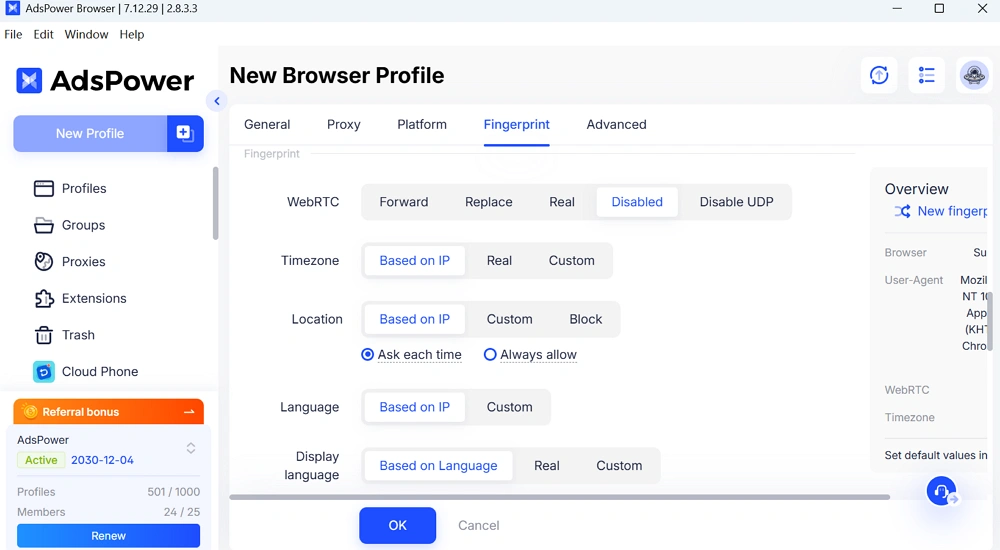
To avoid this problem, the automation ran inside AdsPower profiles. Each profile simulates a separate device with its own browser fingerprint. Typical attributes include user agent, Canvas fingerprint, WebGL signals, language settings, and timezone.
From the platform perspective, every profile behaves like a different computer.
Steps to Sign up Facebook Automatically with Openclaw + AdsPower
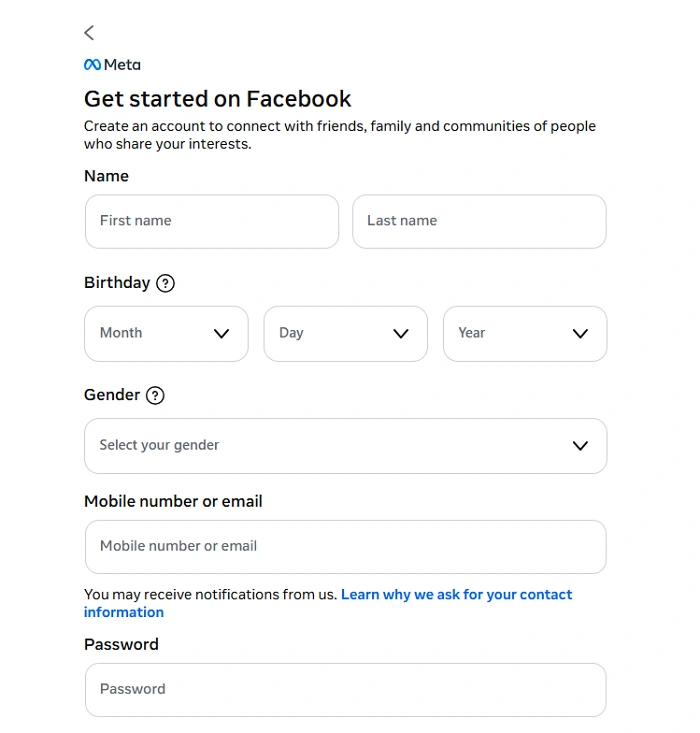
Step 1: Fill out the Facebook Registration Form
The registration form itself is simple. It asks for several pieces of basic information.
const inputs = await page.$$('input[type="text"], input[type="password"]');
await inputs[0].type('John', { delay: 50 });
await inputs[1].type('Doe', { delay: 50 });
await inputs[2].type('test****@gmail.com', { delay: 50 });
await inputs[3].type('********', { delay: 50 });
Automation scripts simulate keyboard input for these fields. A short typing delay is often added to resemble natural user behavior.
The main difficulty is element identification. Some Facebook inputs do not contain standard attributes such as a name tag. Scripts sometimes locate them by position within the form. This approach is not elegant, but it works reliably.
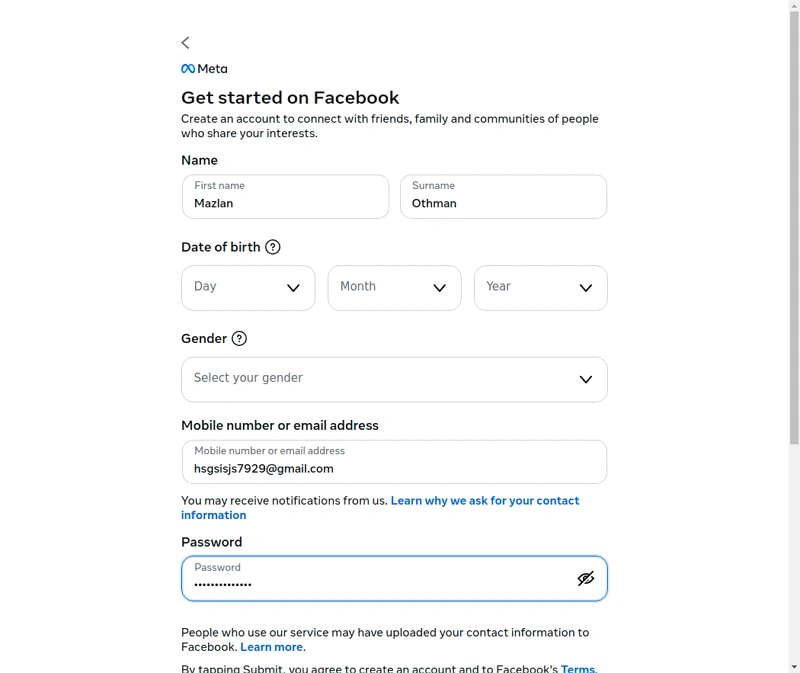
The form stage usually finishes in about five seconds.
Step 2: Select Birthday and Gender
This stage takes longer because Facebook uses custom UI components instead of standard dropdown menus. The visible element looks like a typical selection box, yet the internal structure relies on ARIA roles such as combobox and option.
Standard automation commands often fail with this structure. The script must simulate the same sequence that a user performs.
// 1. Click dropdown of Month
await page.click('[aria-label="Select month"]');
await wait(2);

// 2. Find "April" in the option list and click
await page.evaluate(() => {
  const options = Array.from(document.querySelectorAll('[role="option"]'));
  const april = options.find(opt => opt.textContent === 'April');
  if (april) april.click();
});
The process normally follows three actions.
- Click the dropdown component
- Wait for the option list to appear
- Select the correct option based on visible text
The automation tool interacts with the page using browser context scripts rather than simple form controls. Debugging this stage usually requires more time than writing the code itself because page structures can change frequently. Actually this step only took 15 seconds in the right way.
Step 3: Email Verification Automation
After the registration form is submitted, Facebook sends a verification code to the provided email address. Gmail was used in the test environment.
await page.goto('https://mail.google.com');
await wait(8);

// Click the newest Facebook email
await page.evaluate(() => {
  const rows = Array.from(document.querySelectorAll('tr[role="row"]'));
  const fbEmails = rows.filter(row => row.textContent.includes('Facebook'));
  if (fbEmails.length > 0) fbEmails[0].click();
});

// Extract the confirmation code
const code = await page.evaluate(() => {
  const bodyText = document.body.textContent || '';
  const codeMatch = bodyText.match(/\b(\d{5,6})\b/);
  return codeMatch ? codeMatch[1] : null;
});
The workflow that handled this stage can be summarized as follows.
- Open the Gmail inbox in the same browser profile
- Identify the newest email from Facebook
- Extract the verification code from the email content
- Return to Facebook and submit the code
The automation looks for a five or six-digit number inside the email body. That pattern usually represents the verification code.
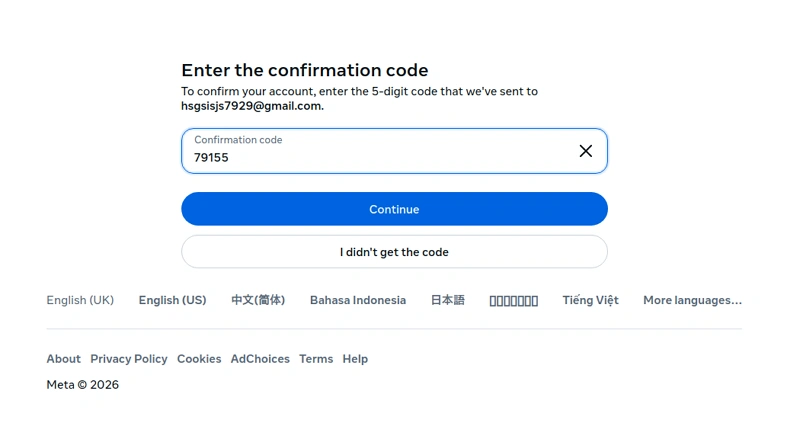
Tip: An early test revealed a common mistake. The script opened an older email and copied the wrong code. Once the logic was changed to select the newest message, the step worked consistently.
The full verification process usually takes about twenty seconds.
Step 4: Security Checkpoint After Email Confirmation
Facebook sometimes triggers an additional checkpoint after the first code is accepted. The platform sends another code to confirm the account again. Many platforms add this extra layer when the system wants stronger confirmation.
This stage repeats the same steps used earlier. The script opens the inbox, reads the newest message, extracts the number, and submits it on the checkpoint page.
Because the logic already exists in the automation workflow, the script can reuse the same function without major changes. Another 15-20 seconds was needed.
Step 5: OMG! Facebook Requests Video Selfie Verification
The final stage of the experiment introduced the strongest verification step. The page required a short video selfie recording.
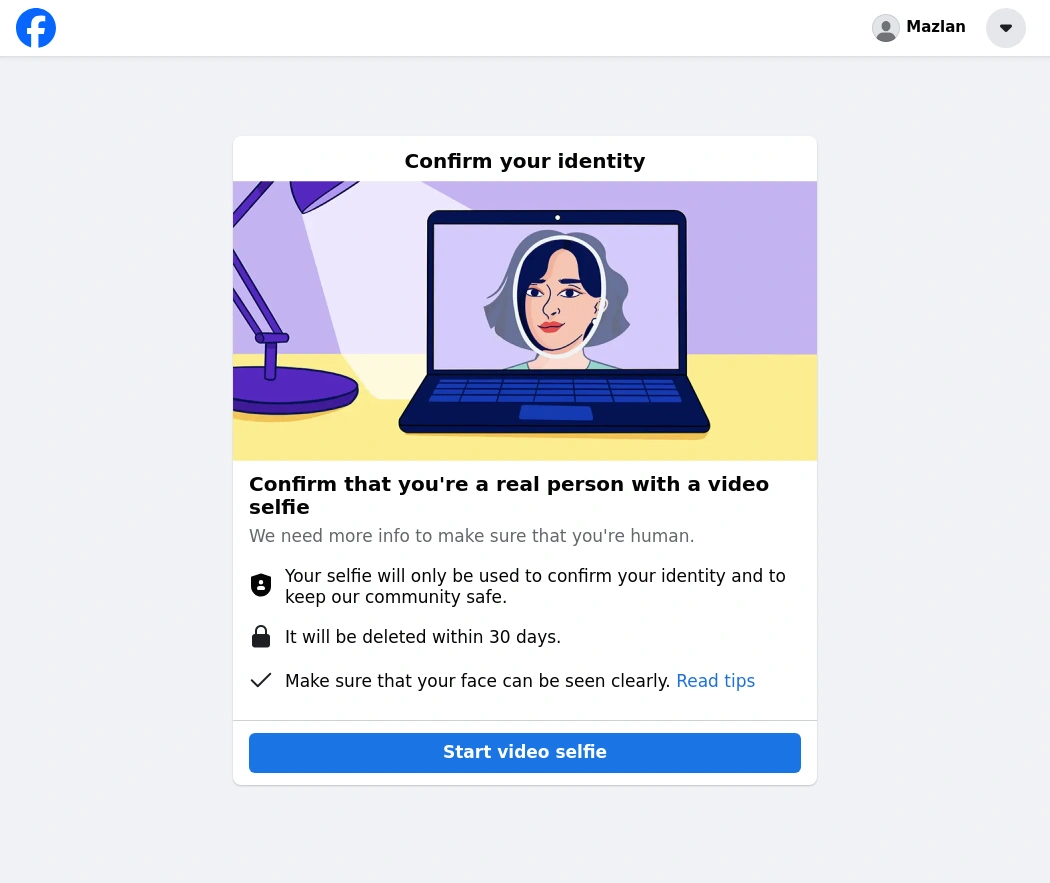
The interface asked the user to perform a brief camera recording so the system could analyze facial features and movement. No skip option was present.
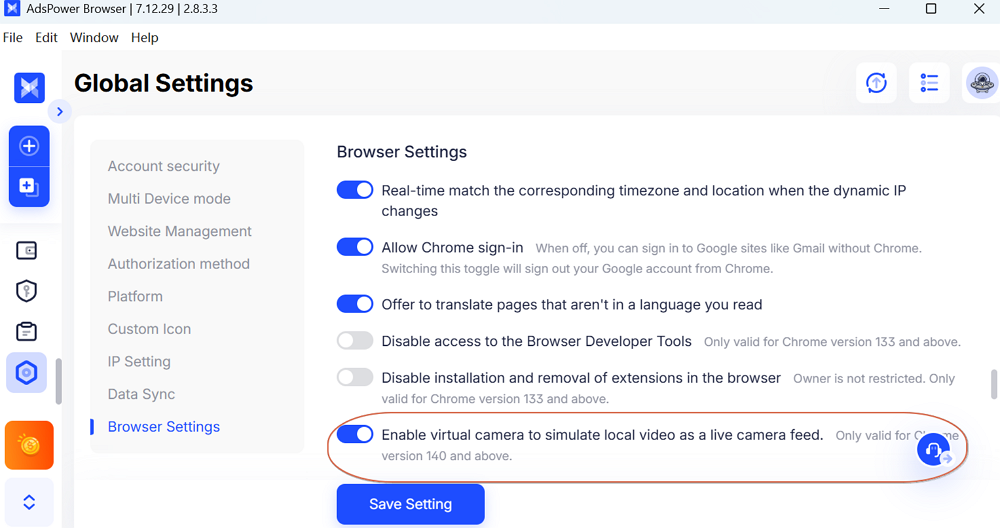
AI agent can interact with many page elements, yet it cannot perform a real identity verification through a camera feed. At this point, the automated process may stop. If you enabled the virtual camera feature in AdsPower's browser settings, AI agent can use a pre-set video to simulate live camera to bypass the ID check.
The experiment, therefore, ended with an automation completion rate close to 85 percent. The whole process took about 55 seconds; that's fast, right?
Why Facebook Triggers Video Selfie Verification During Registration
Video selfie verification usually appears when Facebook detects signals that suggest a higher risk during account creation. The platform evaluates many factors at the same time. If several signals look unusual, additional identity verification may appear before the account is activated.
Device fingerprint inconsistencies
If the browser environment appears unrealistic or inconsistent, the platform may require stronger identity verification.
Try AdsPower anti-fingerprint browser to create isolated browser profiles where each profile simulates a stable device environment. The platform then sees each account as operating from a separate machine rather than a shared automation setup.
Suspicious IP addresses
Accounts created through datacenter proxies or unstable VPN networks are more likely to trigger additional checks. Lower risk options usually include:
- residential proxies
- ISP proxies
Automation behavior patterns
Platforms analyze interaction speed and navigation patterns. Extremely fast page transitions or repeated registration attempts from the same environment can trigger additional checks.
Introducing natural delays between actions helps reduce this signal. Typing delays and short pauses between steps make automated activity closer to real user behavior.
High-risk signup environments
Certain geographic regions or network conditions historically associated with bot activity receive stricter scrutiny.
Using an anti-detect browser environment and stable proxies can reduce the probability of these triggers, but it cannot eliminate them completely.
How Often Does Video Verification Occur?
Facebook does not publish exact statistics for this verification step. Observations from automation testing provide a general range.
The likelihood depends largely on the environment used during registration.
- Low risk environment: about 5 to 15 percent of registrations
- Moderate risk setup: roughly 20 to 40 percent
- High risk automation environment: sometimes above 50 percent
Using consistent browser fingerprints and stable residential IP addresses usually lowers the probability. Environments with mismatched signals or datacenter proxies tend to trigger verification more often.
When you encounter an ID verification requirement, try the AdsPower virtual camera feature to simulate a live camera. Go to Global Settings > Browser Settings to enable it.
What Automation Actually Solves
People might wonder whether automation is still useful if the final step requires manual verification.
The answer is yes — because automation eliminates repetitive work.
In this experiment, the automated system successfully completed:
- form submission
- navigation through UI elements
- email verification
- security checkpoint confirmation
A process that typically takes 10 to 15 minutes manually was completed in less than one minute.
For teams managing multiple accounts, this efficiency gain becomes extremely valuable.
Automation handles the routine steps, while humans only intervene when platforms require real identity confirmation.
Final Thoughts
This experiment demonstrates how powerful AI agent automation has become.
Using OpenClaw and AdsPower, the system successfully completed most of the Facebook registration process automatically, including form submission and email verification.
However, the final identity verification step — video selfie authentication — remains intentionally designed for human users.
Automation can handle roughly 80–90% of repetitive tasks, while humans complete the small portion that requires real identity verification.
This balance is not a limitation of automation technology. It is a deliberate boundary created by platform security systems.
For developers, marketers, and automation teams, the most effective strategy is to combine:
- AI automation tools
- realistic browser environments
- human verification when required
If you're building AI-driven workflows or managing multiple accounts, AdsPower provides the isolated browser environments needed to run automation safely and efficiently.
Start using AdsPower today to simplify browser automation and manage accounts with greater control.
FAQ:
Can Video Selfie Verification Be Bypassed?
Currently, there is no reliable or legitimate way to bypass Facebook’s video selfie verification.
Attempts to bypass the system using techniques such as:
- prerecorded video feeds
- deepfake simulations
- browser camera manipulation
are unreliable and often result in permanent account bans.
The most practical approach is to treat automation as human-assisted automation.
AI agents handle repetitive tasks, while human users complete identity verification when necessary.

People Also Read
- 7 Best StreamEast Alternatives in 2026: Free and Paid Options
7 Best StreamEast Alternatives in 2026: Free and Paid Options
Compare 7 free and paid live sports streaming sites in 2026 and learn how to watch more safely with AdsPower browser profiles
- How to Browse Facebook Anonymously: 6 Ways to Stay Private
How to Browse Facebook Anonymously: 6 Ways to Stay Private
Learn how to browse Facebook anonymously using 6 practical methods, including incognito mode, VPNs, proxies, AdsPower profiles, and cloud phones.
- 7 Games That Pay Real Money in 2026
7 Games That Pay Real Money in 2026
Discover 7 online games that pay real money, from cash competitions to creator economies, and learn how to earn money playing games.
- Google Unusual Traffic: Keep Getting the Warning? Here's How to Fix It
Google Unusual Traffic: Keep Getting the Warning? Here's How to Fix It
Seeing a Google unusual traffic warning? Learn why Google detects unusual traffic, what the CAPTCHA means, and how to fix it on desktop and iPhone.
- YouTube "Sign in to Confirm You're Not a Bot": Fixes & CAPTCHA Tips
YouTube "Sign in to Confirm You're Not a Bot": Fixes & CAPTCHA Tips
Seeing "Sign in to confirm you're not a bot" on YouTube? Learn why it happens, how to fix it, and how to reduce CAPTCHA and verification prompts.
