

Learn why Discord IP bans happen and how to fix them step by step in 2026. Restore access safely, avoid repeat bans, and get back online faster—start fixing it now.
Getting ip banned discord can feel like hitting a locked door you never saw coming. Discord's ecosystem in 2026 is larger, faster, and more automated than before—servers host communities, games, learning hubs, workspaces, and real-time collaboration channels. Because of that scale, Discord continues tightening network-level restrictions, especially IP bans. These bans don't target just one account—they block your connection at the network layer, often locking out every profile tied to the same internet source.
An IP ban on Discord isn't a moral verdict or a permanent label, but it is a technical barrier that needs the right sequence of fixes. This guide focuses on clear detection, recovery, appeals, bypass methods, and long-term prevention.
What Is an IP Ban on Discord?
A Discord IP ban is a restriction that prevents a device or network from connecting to Discord's platform because the public IP address has been flagged. Instead of banning one username or ID, Discord blocks the entire internet address that your device uses to reach their servers.
Every home router, phone hotspot, office network, or VPN exit node has a public IP. If Discord decides to block that IP, any device using the same address gets denied at login, connection, or server entry.
Discord's IP bans apply globally (platform-wide) or locally (server-level), depending on the severity and the server admin's own moderation tools. In 2026, server admins still can't issue platform-wide IP bans, but Discord itself can, and server admins can request or enforce IP-based blocks on their own servers.
What Happens When You Get IP Banned on Discord?
When you get IP banned on Discord, several things happen at once:
● You cannot log into Discord from that network.
● New accounts created from the same IP may also be blocked.
● You might see vague errors like "connection failed", "access denied", or login loops.
● Every profile on the same network can be locked out, even ones that never interacted with the server where the issue originated.
This leads to a common question: What happens when you get IP banned on Discord? The short answer: you lose access from that internet source until the IP is unblocked, replaced, or cleared from Discord's internal denylist.
Reasons for Discord IP Bans
A discord ip ban happens when an address—not just a user—is flagged. In 2026, these restrictions are usually triggered by clear, repeatable patterns or safety escalations:
1. Spam or automation bursts
A sudden surge of repeated actions from the same device or network—mass invites, bulk messages, bot-like click rates, or synchronized account behavior.
2. Multiple flagged accounts on one network
If several profiles violate policy from the same router or hotspot, Discord may escalate from account restrictions to IP blocks.
3. Malicious content distribution
Sharing malware links, phishing pages, scamming campaigns, or wallet-draining scripts, especially in crypto or gaming servers.
4. Abuse of community guidelines
Harassment, mass reporting, raid participation, or coordinated disruption.
5. Unusual login geography
Rapid switching between countries, IP mismatch with device fingerprints, or unstable proxy chains.
6. Server admin request
While server admins can't issue global IP bans, they can enforce server-level IP blocks using integrated moderation dashboards.
Most IP bans are a technical barrier, not a dead end. The fix is usually faster than the ban itself.
How to Check If You're IP Banned on Discord
A Discord IP ban blocks your network's access. Confirming it first helps you choose the right fix path instead of troubleshooting the wrong layer.
Detection methods:
1. Switch networks — Test Discord on 4G/5G, a friend's Wi-Fi, or another internet source. If it works there but fails on your main network, your public IP may be restricted.
2. Cross-device check — Open Discord on a second device connected to the same router/hotspot. If both fail on that network but run normally elsewhere, the issue likely comes from the shared IP.
3. Validate your public IP — Use an IP lookup tool and compare the result across your devices. If the IP is identical, test Discord again after forcing a new public IP (router reboot or hotspot swap).
4. Read the error behavior — Instant disconnects, login loops, or repeated connection resets often indicate a network-level block, not a normal account ban.
5. Admin log confirmation — If you're locked out of one server only, ask an admin to check the server's moderation panel. Some servers tag or deny specific IPs locally during raids or spam events.
Once you confirm ip banned from Discord, you can move to the fix or appeal path with a clear target.
How to Fix an IP Ban on Discord (Step-by-Step Solutions)
A Discord IP ban is a strong block because it restricts the network, not just an account. Usual account-level fixes won't work if the public IP stays flagged. Recovery should begin by changing or resetting your IP first, then clearing local data or contacting support. When people ask, "How to fix IP ban on Discord?", it's typically a process, not one quick switch.
Step 1 - Change your public IP
Discord bans the IP, not your device itself. You can replace the IP by:
● Restarting your router (sometimes refreshes the IP depending on ISP).
● Unplugging the router for 5–10 minutes, then reconnecting.
● Requesting a new IP from your ISP if router restart doesn't rotate it.
● Switching to a phone hotspot temporarily for access.
Note: Many ISPs assign dynamic IPs that change on reboot, but some lock the same IP for days. If yours doesn't rotate, contact ISP support and request a reset.
Step 2 - Clear DNS cache
A corrupted DNS record can mimic a ban. On Windows:
1. Open Command Prompt (Run as Admin)
2. Run:
ipconfig /flushdns
On Mac:
sudo dscacheutil -flushcache
sudo killall -HUP mDNSResponder
Step 3 - Reset your network adapter
On Windows:
1. Settings → Network & Internet → Advanced Network Settings
2. "Network Reset" → Restart device.
Step 4 - Remove Discord app cache
Desktop:
● Windows: %appdata%/Discord/Cache
● Mac: ~/Library/Application Support/Discord/Cache
Mobile:
● Android: Settings → Apps → Discord → Storage → Clear Cache.
● iOS: Uninstall and reinstall (iOS doesn't expose manual cache wipe).
Step 5 - Update the app
Discord in 2026 pushes frequent security updates. Running outdated clients can worsen ban loops.
- App Store / Google Play → Update Discord
- Desktop → Restart client to force patch sync.
Step 6 - Try alternate login paths
If the desktop app is blocked, attempt login using:
- Browser version
- Discord PTB or Canary (alternative release channels)
- A clean browser profile without stored cookies
Step 7 - Check firewall or antivirus blocks
Discord traffic may be intercepted by security software. Test by:
- Temporarily disabling the firewall to check if access returns.
- Adding Discord to the allowed network exceptions if needed.
Step 8 - Use a proxy-isolated profile if you manage multiple accounts
Because you work with multi-account ecosystems and antidetect browsers (e.g., AdsPower), you already know how linked IPs can ban-cascade entire device fleets. The same principles apply here:
- Assign each profile a different residential proxy IP.
- Avoid synchronized behavior patterns across accounts.
- Preserve cookies per profile.
- Use stable proxy routing instead of random or unstable free VPN IPs.
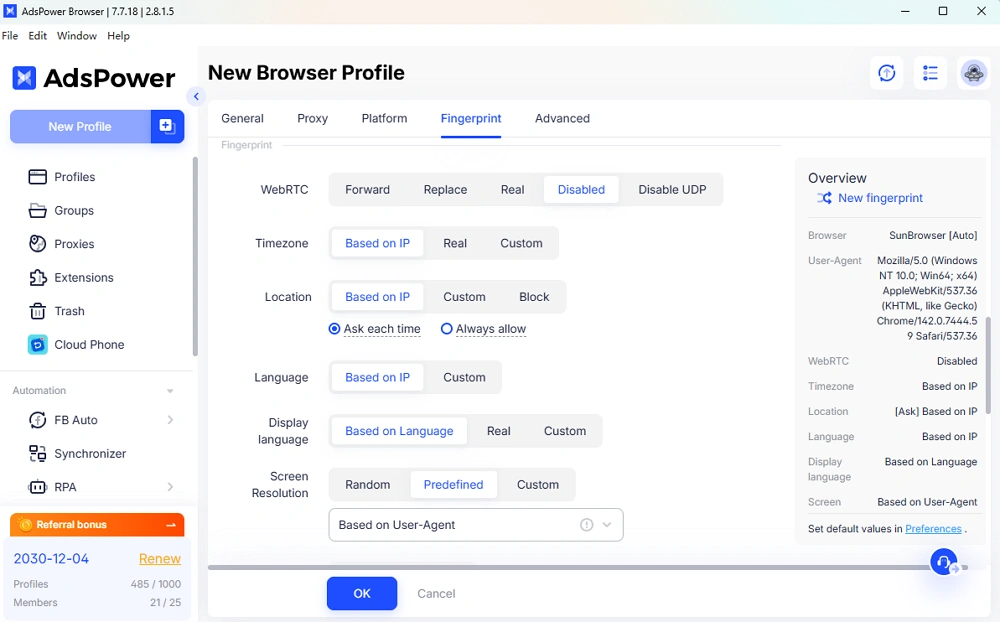
Tools like AdsPower allow separating browser fingerprints, proxy centers, and behavioral patterns to avoid repeated ban collisions across accounts.
Step 9 - If the ban still persists, move to appeal or bypass methods
Some bans require internal clearing through Discord support rather than just IP replacement.
How to Bypass an IP Ban on a Discord Server (Including How to Appeal a Discord IP Ban)
This section covers the keyword: how to bypass ip ban discord server and includes appeals.
Method 1 — Use a mobile hotspot
Your phone's 4G/5G IP is different from home Wi-Fi. Connect and test access.
Method 2 — Use a residential proxy IP
Paid proxies are far less likely to be on denylists than free VPN exit nodes. Apply through browser or profile managers.
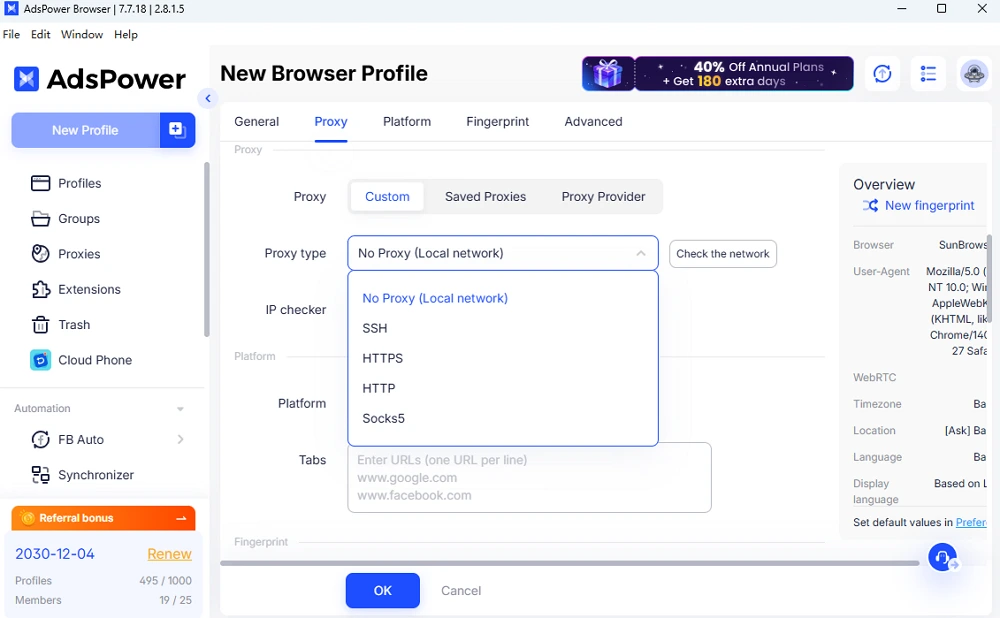
Method 3 — Create a clean browser profile
A new profile removes cookies, tracking storage, and cached tokens that may be linked to banned sessions.
Method 4 — Join server using an invite link on a different IP
Even if you are banned on one IP, server entry can work if attempted from a new IP first, then continued on a clean client.
How to Appeal a Discord IP Ban
If the ban is applied by Discord (not a server admin), you can file a support appeal:
1. Open Discord Support ticket
2. Choose: "Appeal an action taken on my account."
3. Include:
- Your Discord username
- Email tied to the account
- Server name (if server-level)
- Explanation that you are facing an IP restriction
- Proof that behavior issues were not malicious (if applicable)
Discord bans aren't always manually reviewed, but appeals in 2026 still trigger human validation when escalated.
If the ban is server-level, admins may also have an internal form or AutoMod panel where bans can be lifted after appeal approval.
How to Prevent Getting IP Banned on Discord Again
Once you recover access, keep these rules for 2026:
1. Avoid repetitive automation bursts
If you use bots or scripts, add delays, randomization, and realistic timing.
2. Don't operate multiple accounts from one IP
If you must, isolate them:
● Different proxy per account
● Separate fingerprints
● Separate login paths
3. Don't reuse cookies across profiles
Cross-profile cookie duplication is one of the easiest ways to trigger linked bans.
4. Use stable, realistic IP sources
Residential IPs > Datacenter VPN IPs > Free VPN exit nodes.
5. Reduce participation in server raids
Even observing or idling in servers involved in mass-reporting or raids can sometimes flag your network indirectly.
6. Keep the app updated
Old client versions escalate ban-collision risks.
7. Use different networks when moderating multiple servers
If you moderate or manage community servers, avoid using one internet source for all admin actions.
8. Turn off automation during new server onboarding
New servers monitor behavior more aggressively in their first 48–72 hours.
FAQ
Do Discord IP bans last forever?
No. Most Discord IP bans are temporary, typically lasting from 24 hours to several weeks, depending on severity. They don't expire instantly, but they aren't permanent. If the ban resulted from automated or spam-like behavior, Discord may keep the network flagged longer, yet it still clears eventually. Resetting your public IP, using a clean network, or appealing to support can help you regain access sooner. The ban affects the connection layer, not just the app, so changing devices without changing IP rarely works.
Does Discord issue IP bans or only server bans?
Discord issues both. A server ban restricts your account from one specific server while leaving your account usable elsewhere. An IP ban blocks the network you're using, preventing logins or new account creation from that address range until it expires. If you can't log in anywhere on the same network - even after switching devices, it's likely an IP ban. If you can log in but can't join one server, that's a server ban.
