

Instagram Locked Then Banned? How to Get It Back
Take a Quick Look
Learn why Instagram locks accounts and sometimes leads to bans, what happens after a lock, and how to recover your account step by step. This guide also covers common recovery issues, real user experiences, and tips to prevent future restrictions.
Is your account suddenly locked by Instagram, followed directly (or very soon afterward) by an account ban or disabling? That confusing switch from "temporary lock" to "no access at all" is exactly what many users are reporting. One minute you are being asked for your identity or to reset a password; the next moment your account is gone or in recovery mode. This post will tell you what is really going on in that situation and how to try restoring your account.
Why Did Instagram Lock My Account and Then Ban Me?
Generally, Instagram locks accounts based on something suspicious in your activity. Sometimes this is a temporary security check. However, if the system continues to classify your account as "risky," it can lead to suspension or ban.
Being locked out of your account doesn't automatically mean you've done something wrong. Instagram relies heavily on automated systems to detect suspicious activity, and sometimes legitimate users can get caught in the process. Here are some of the most common reasons why this happens:
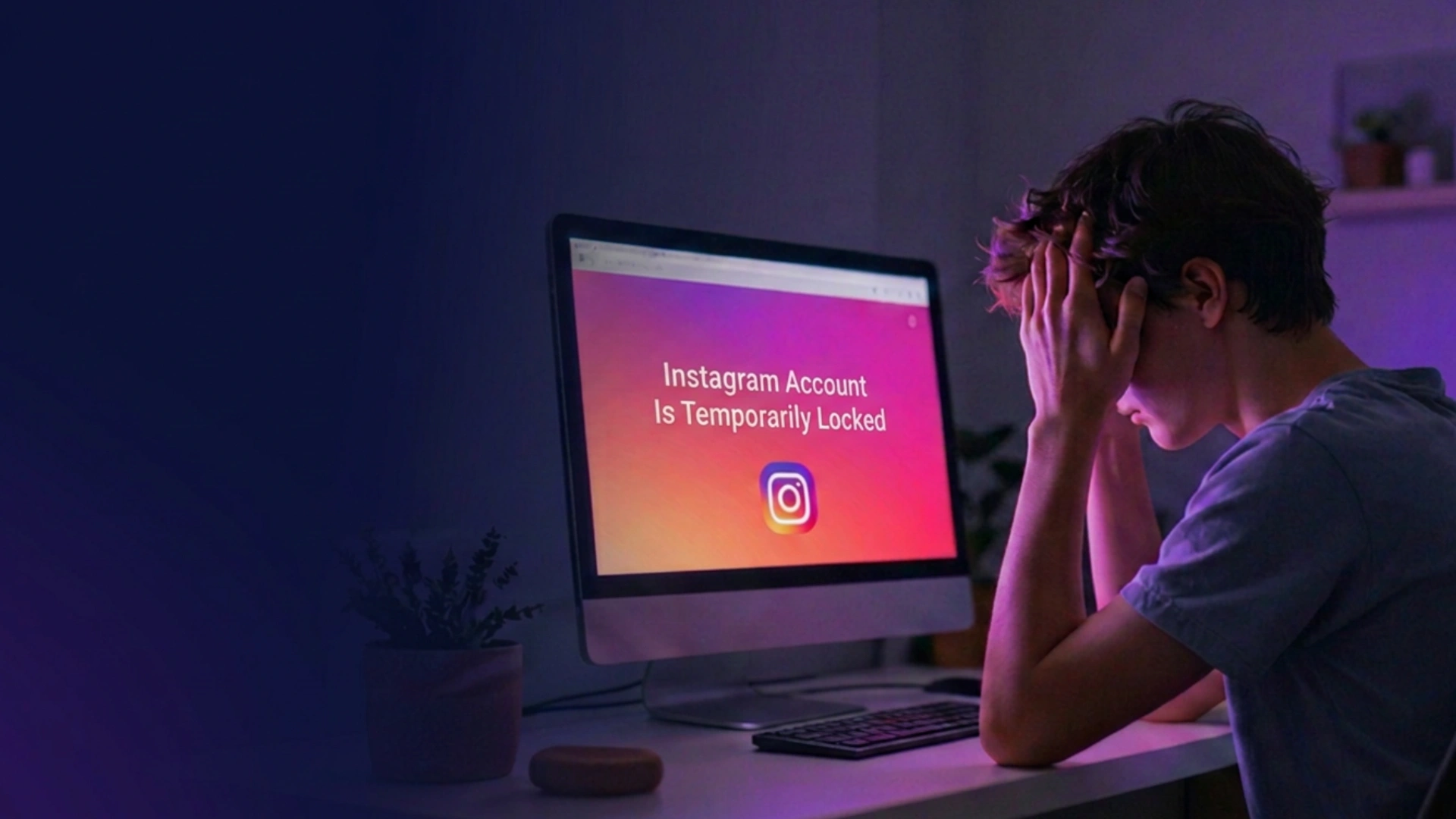
Your login or activity looked unusual
If Instagram sees something unusual from your regular behavior, then it might lock you. Security checks may occur when you log on from a new phone, in another country, or through the use of a VPN. Sometimes fully normal actions can seem suspicious to Instagram, such as logging in too many times or interacting with posts too quickly.
Your account couldn’t be fully verified
Sometimes Instagram will ask you to verify that you are the actual owner of your account. This can include entering a code, resetting your password, verifying your selfie, etc. If this process fails, gets stuck, or doesn't fully go through, your account may stay locked for longer than expected—or become harder to recover.
Your account may have triggered spam or policy filters
Even if you never intended to violate any rules, Instagram’s system may still flag certain behavior as spam-like or automated. This can include:
- Overusing the same comments
- Liking or following too quickly
- Using patterns that look automated
All of these behaviors are examined under Instagram's official policies, including its Terms of Use and Community Standards, explaining what types of behavior may be considered suspicious or spammy—activities that violate platform integrity / disallowed activity.
Your activity across multiple Instagram accounts may look suspicious
Having multiple Instagram accounts can make your activity suspicious to Instagram even if there's no guilt involved.
This usually happens when you:
- Switching between accounts too frequently
- Logging in on various devices or web browsers
- Use tools or workflows designed to help manage multiple accounts in separate environments
This is not to say that Instagram doesn't permit more than one user account. The problem is that inconsistent login behavior or performing actions quickly and repeatedly can be interpreted by the system as non-human-like activity.
For those who run multiple accounts for work, content creation, or marketing purposes, ensure that each account is properly separated from the other and avoid switching too much between them to reduce these false signals.
My Instagram Account Is Locked: How Do I Recover It?
When it comes to recovering your account after Instagram has locked or disabled it, the recovery steps will differ based on what kind of restriction you're seeing. Normally a suspicious activity will lead to a temporary lock on the account, which can be restored by security checks, but an action such as disabling your Instagram account normally requires you to appeal for it.
Do not apply multiple recovery methods together; first identify which message Instagram is giving and use related steps from below.
If Your Instagram Account Is Temporarily Locked
When you see a message like "Your Account Has Been Temporarily Locked," Instagram generally wants to verify that you are the real owner of the account.
Step 1: Try logging in normally
Log into the website with your username and password. And if your account has been temporarily locked, Instagram typically tells you what steps to take in order to recover it.
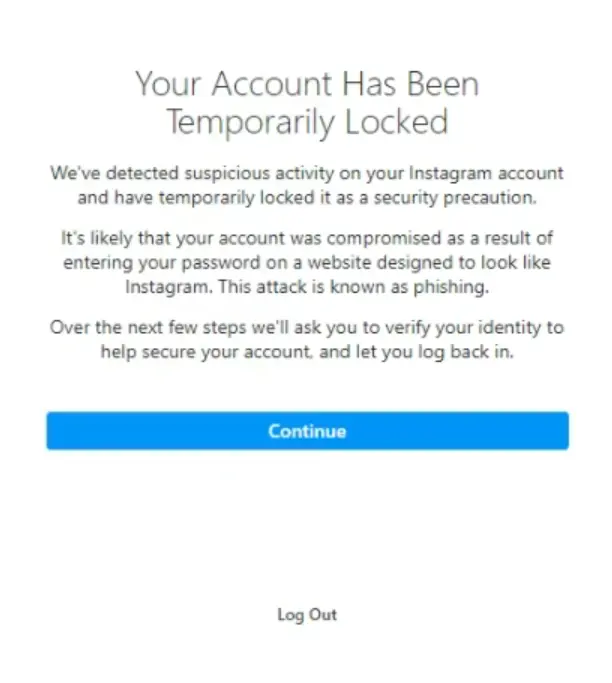
Step 2: Ask and enter security code
Instagram might request identity verification using the code you will receive through mail or SMS. Hit Send Security Code, and type it exactly as you receive it. In case you are not given the code:
- Make sure you also check your Spam or Junk folder.
- Make sure you have access to the email address or phone number associated with your account as well.
- Wait a few hours before requesting another code.
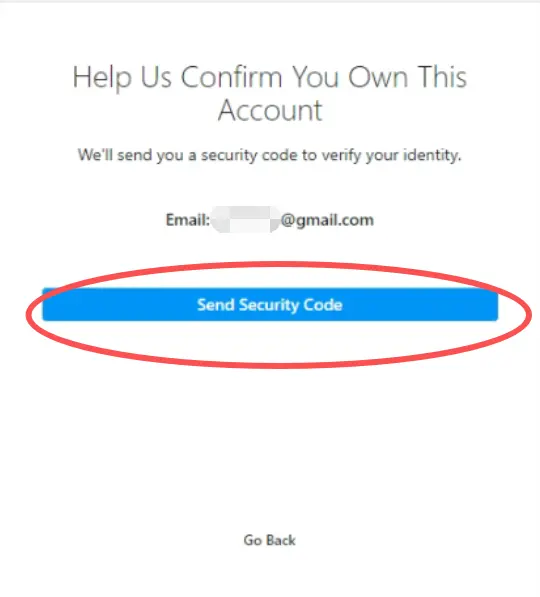
Step 3: Reset your password if prompted
Instagram might force you through to create a new password before allowing entry back into your account. Create a new password that is strong and one you have not used before. After this step, access is restored for many users.
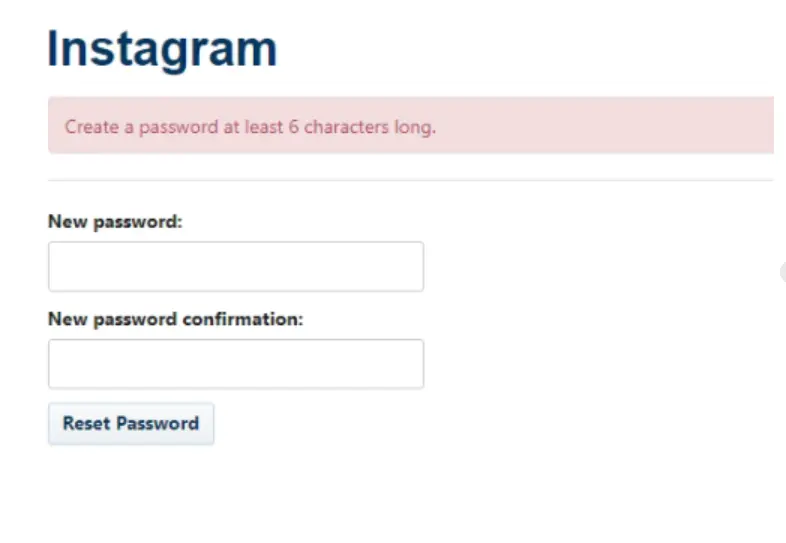
Step 4: Alternative verification methods if required
If you can't access your recovery email address or phone number, tap options like "Try another way" or "No longer have access to these." Instagram may ask you to:
- Complete a selfie video verification
- Confirm ownership with additional account information
- Follow additional security instructions
Carefully complete all requested steps and wait for Instagram to review your submission.
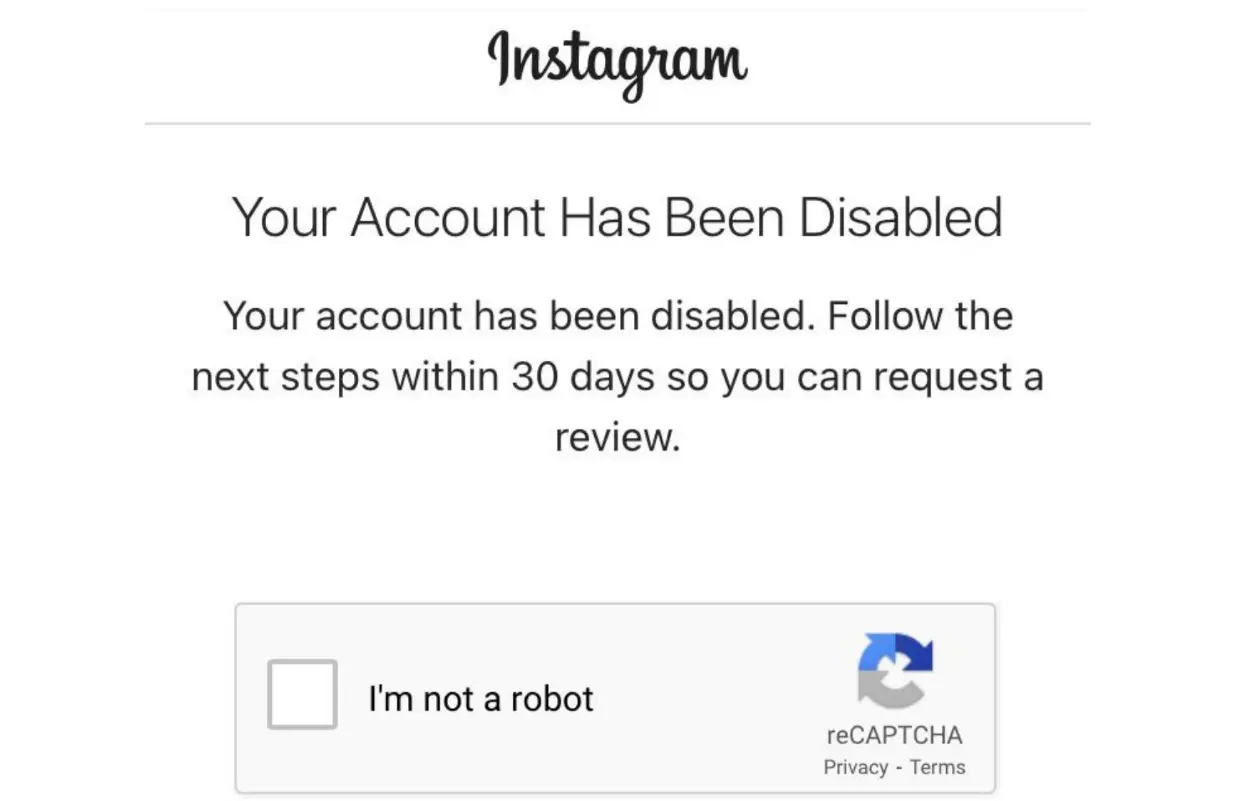
If Your Instagram Account Has Been Disabled
You will need to request that Instagram review its decision if it notifies you that your account has been disabled for violating the guidelines.
Step 1: Access Instagram and log in
Try logging in through the Instagram app. You will see information in Instagram saying that your account was disabled, as well as an option to appeal.
Step 2: Submit an appeal
As per the on-screen instructions, initiate an appeal. Instagram might prompt you to reiterate that its disabling of the account was in error.
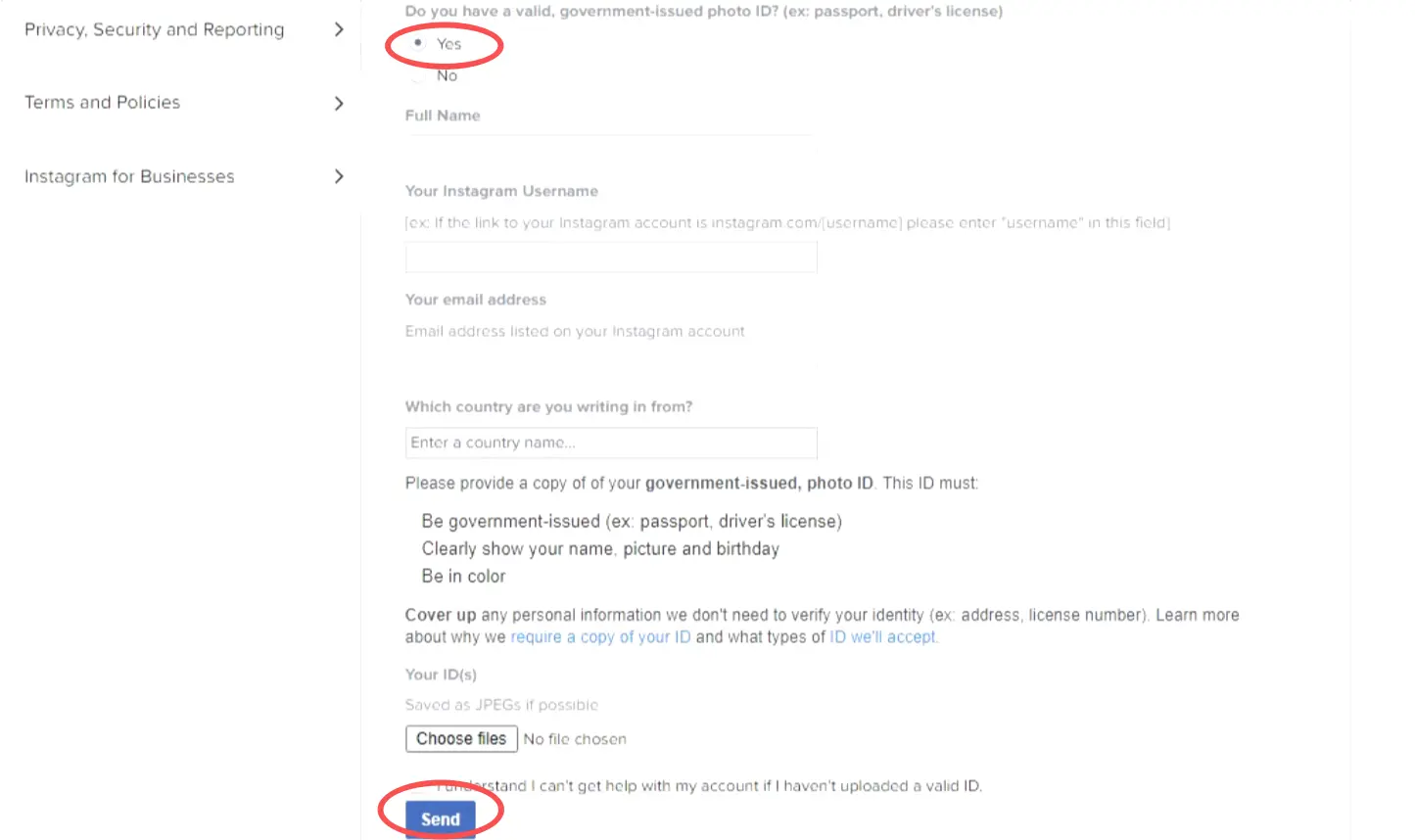
Step 3: Verify your identity
Instagram might ask you for a government-issued ID in some cases. The document should clearly show:
- Your full name
- Your date of birth
- Your photograph (Ensure that the photograph is clear and submitted in color)
Step 4: Wait for Instagram and their decision
When you submit your appeal, Instagram will look into the matter. Response times vary widely. Some users get a reply a few days after submission, while others only receive it several weeks later. Stay tuned to your mail box and spam folder from Instagram till then.
For a more detailed walkthrough, read our guide on how to get your disabled Instagram account back.
What Other Instagram Users Experienced—and What They Recommend
Numerous Instagram users say that finding back an account is not as easy, even if you follow the official instructions (correctly). The most frequently reported problems are getting trapped in a password reset cycle, repeatedly being redirected between the login page and the Help Center, filling out identity verification without regaining access, and never receiving security codes by e-mail or SMS. Drawing upon shared experiences from Reddit responses, the following are a series of common recommendations users offer up:
- Do not make several password resets or verification codes in a very short time.
- Wait 24 to 72 hours before trying again, as some temporarily locked accounts regain access automatically.
- Be cautious with third-party recovery services, as some users have reported scams or upfront payment requests.
- Try Instagram's official recovery methods first before trying anything else.
Although none of these strategies will yield success, they might help guide you along the recovery curve more adeptly and prevent further damage.
How to Prevent Your Instagram Account From Getting Locked Again
It is definitely a frustrating job to recover the locked Instagram account. After receiving the access, it's prudent to take some precautionary measures so that you will avoid facing this problem once again.
Enable Two-Factor Authentication and Save Backup Codes
Two-factor authentication is a method of adding an additional layer of security to your account. Even if someone manages to get your password from the internet, they won't be able to log in without a verification code.
Network Protection: You can enable Two-Factor Authentication by going to Settings > Security and following the instructions from there. Generate and save your backup codes; these codes will be very useful to you in case your phone gets lost or if you're not receiving the verification message.
Manage Multiple Instagram Accounts More Safely
When you have multiple Instagram accounts and often log in from various devices and browsers or even via your team members accessing the account, it may prompt extra security checks. Perhaps one way to eliminate needless disruptions is by keeping the environment more consistent for each account.
Tools such as AdsPower are built for making the management of multiple accounts easier while establishing a more stable workflow.
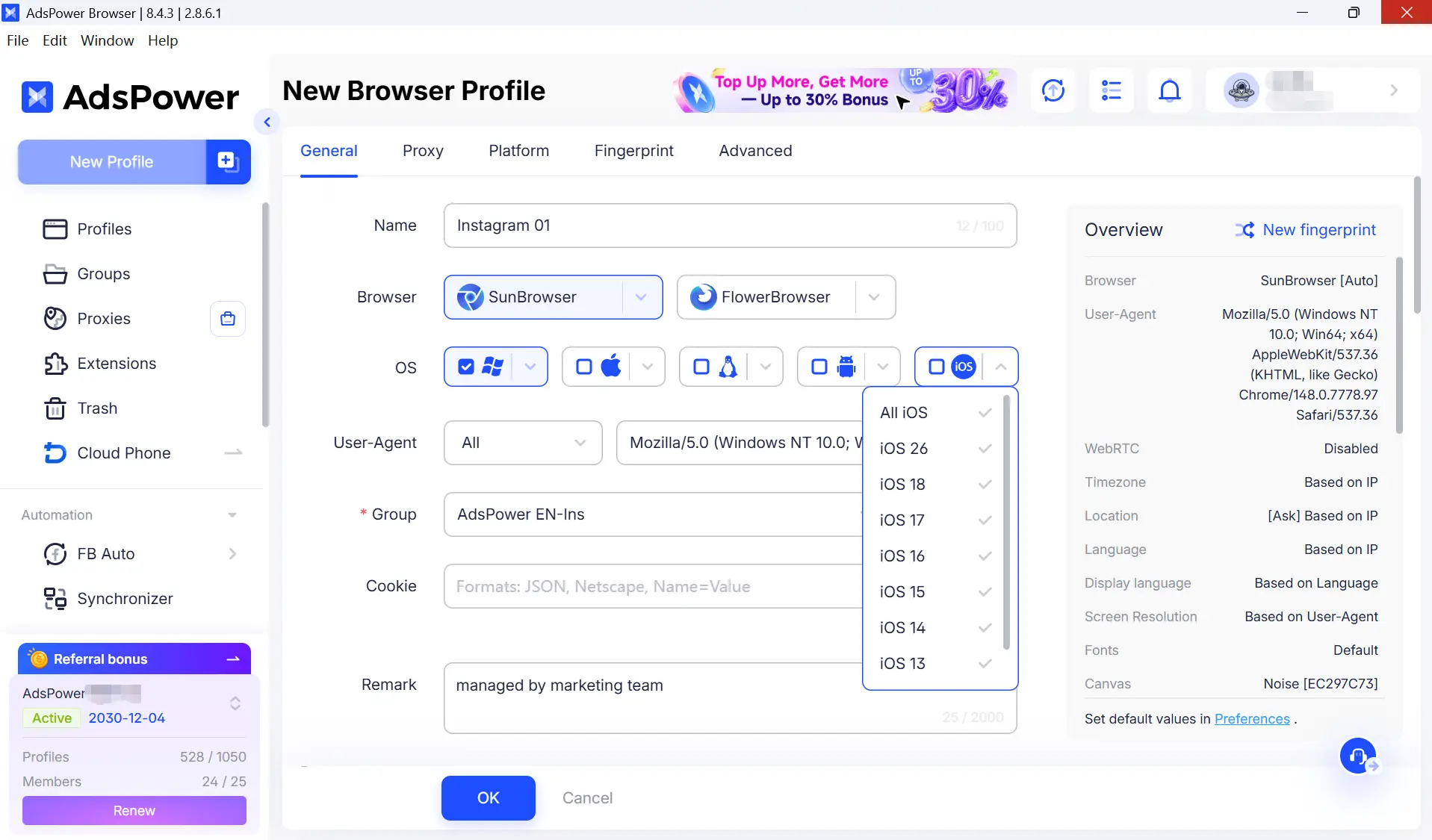
1. Use a different browser environment for each separate account
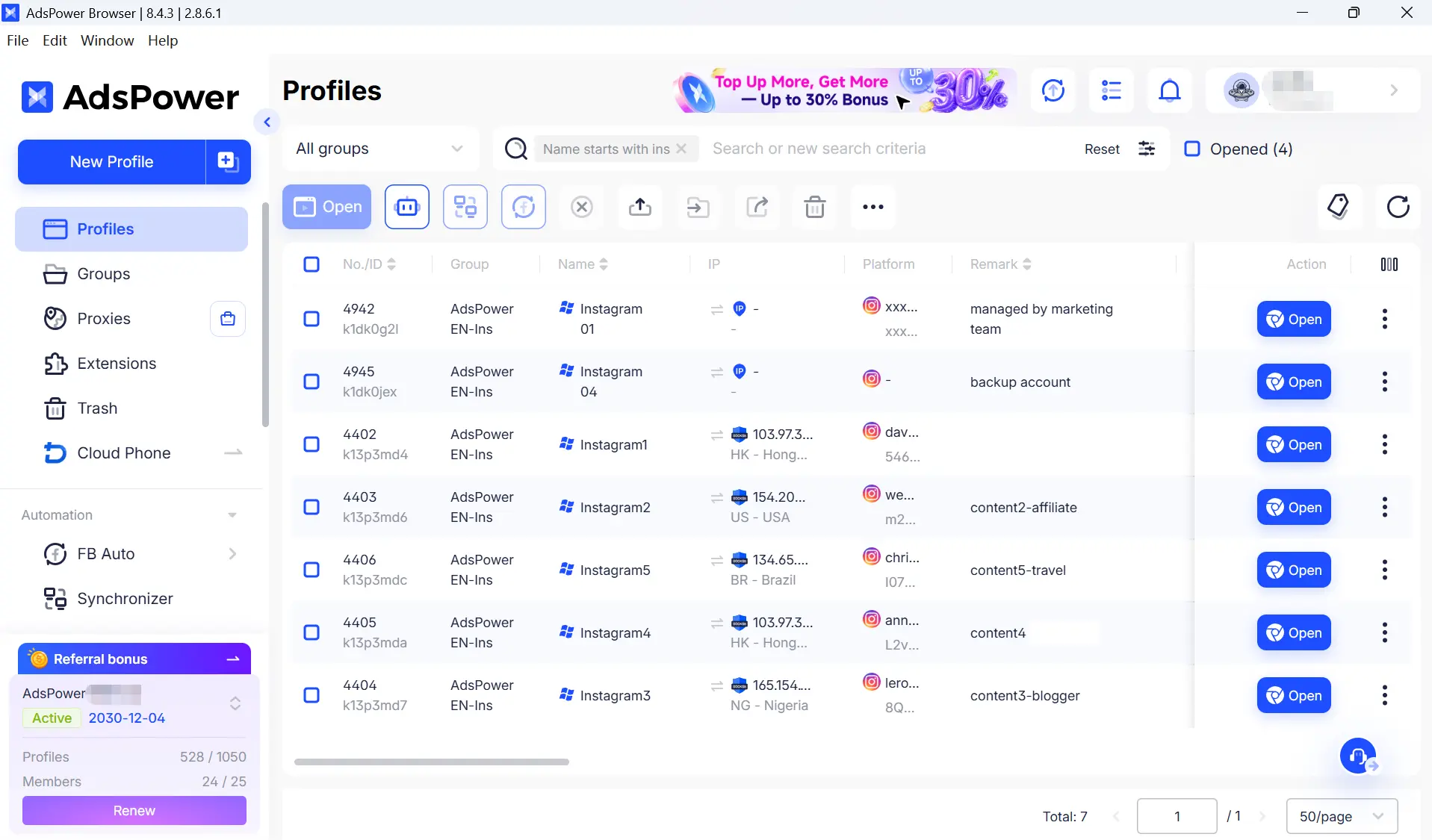
If you have many Instagram accounts running at once, AdsPower will let you assign a separate browser profile for each of your Instagram to make them unique in their own ways when it comes to fingerprint settings. It helps prevent constantly signing in and out on multiple accounts on one device.
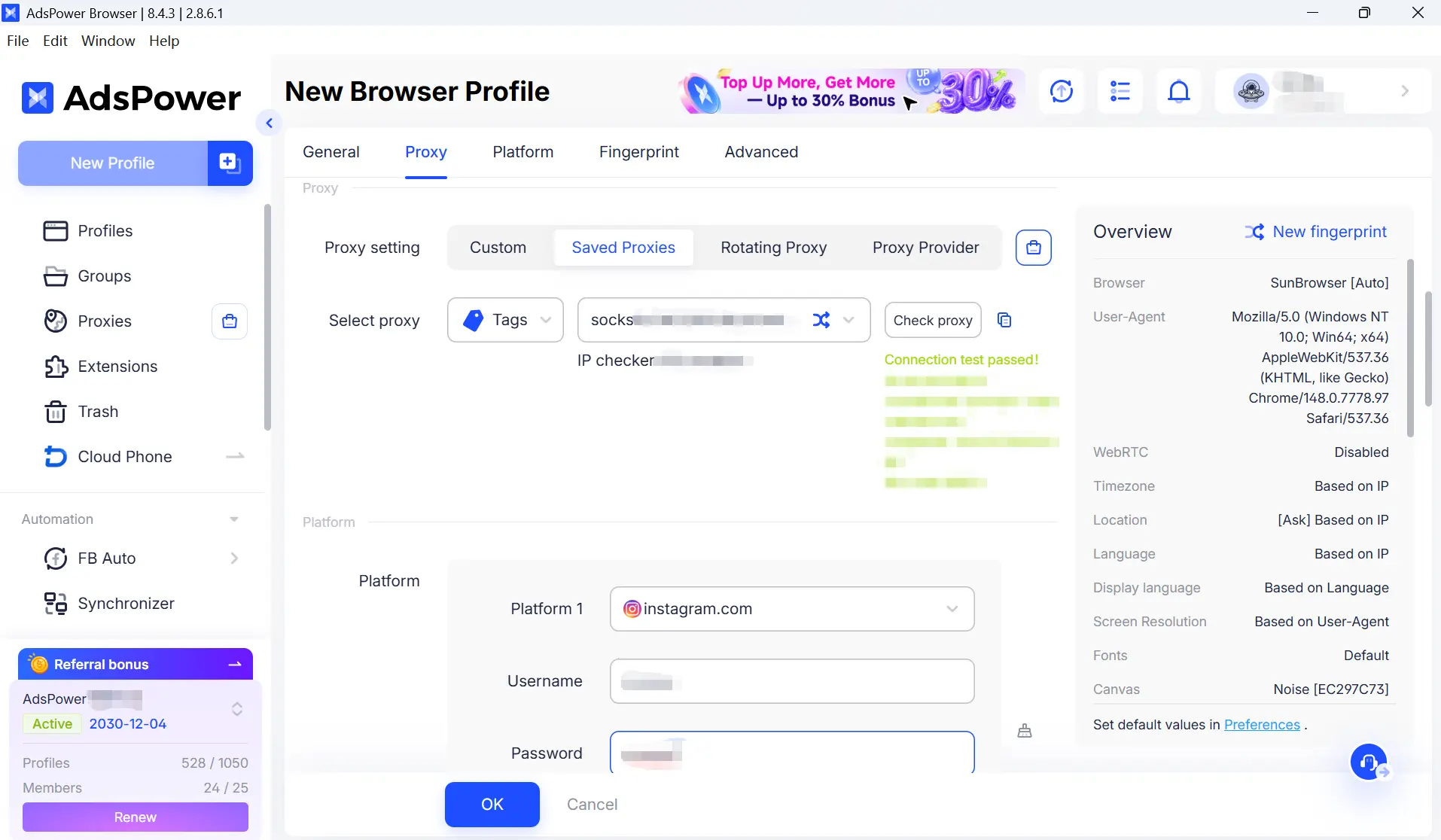
2. Use dedicated proxies for different accounts
You can assign a unique residential or mobile proxy to each browser profile. The "1 account + 1 profile + 1 IP" strategy has gradually been followed to help these logins become more stable over time.
3. Collaborate with team members more securely
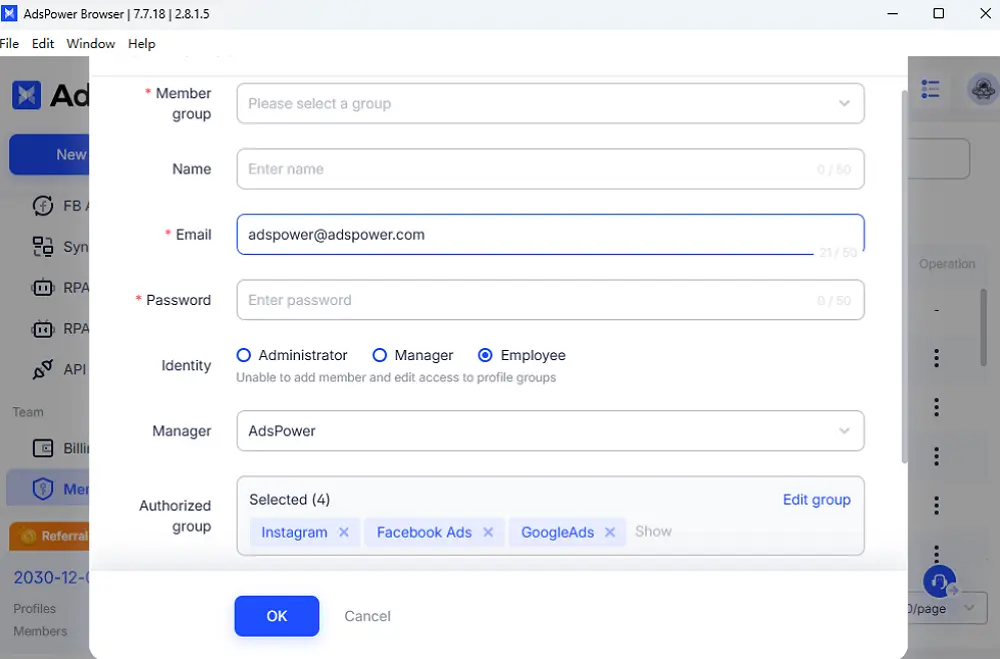
When more than one person is trying to access the same Instagram account, sharing passwords and logging in from different devices can create security risks. Social media teams can share browser profiles directly on AdsPower, which helps cut down on needing credentials to access accounts and also makes it easier for managing account access.
4. Manage multiple accounts without switching devices
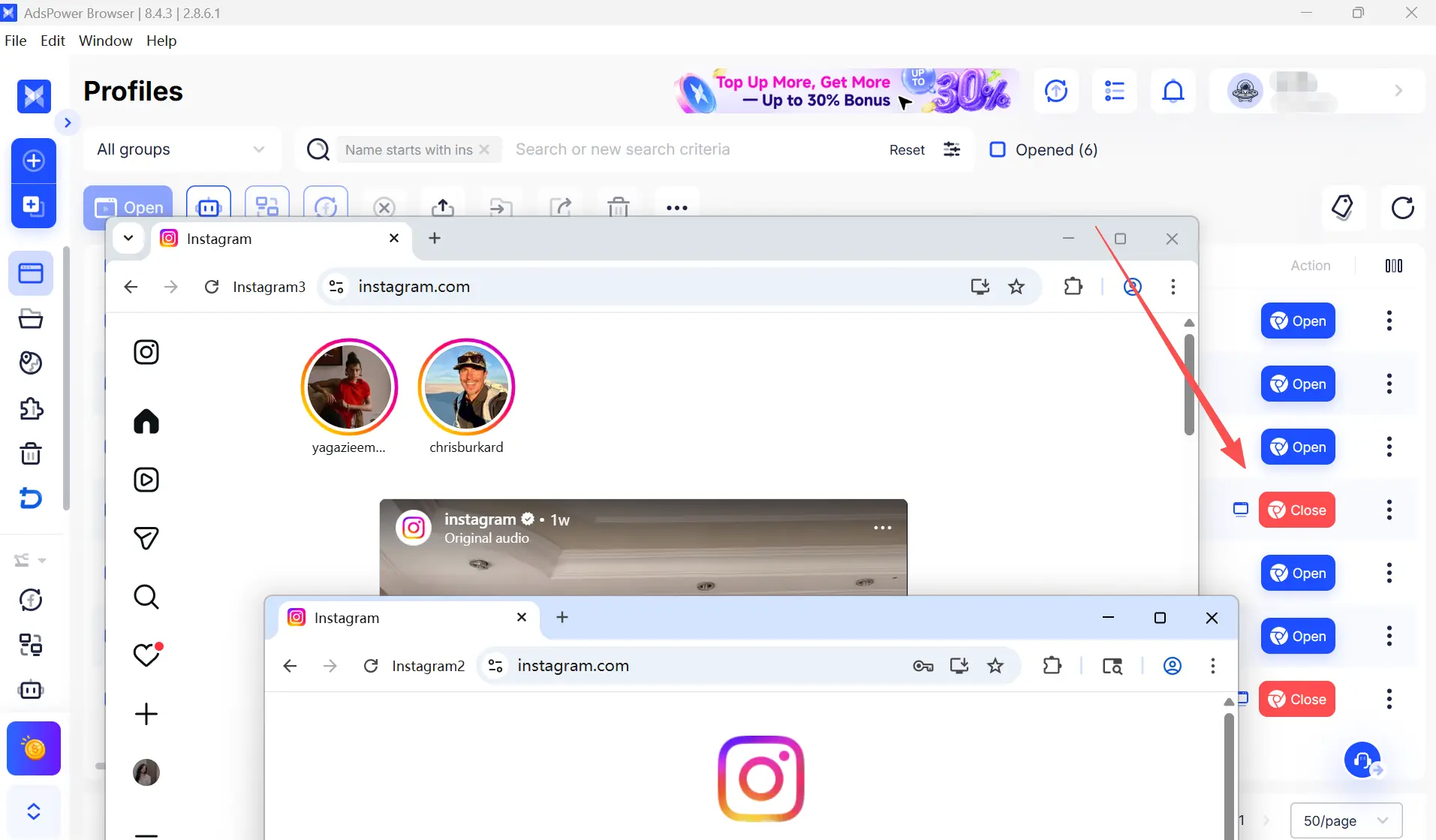
Separated browser profiles allow you to quickly log into three or four different Instagram accounts from one computer without logging in and out every few minutes when running your day-to-day operations.
5. Improve account security for teams
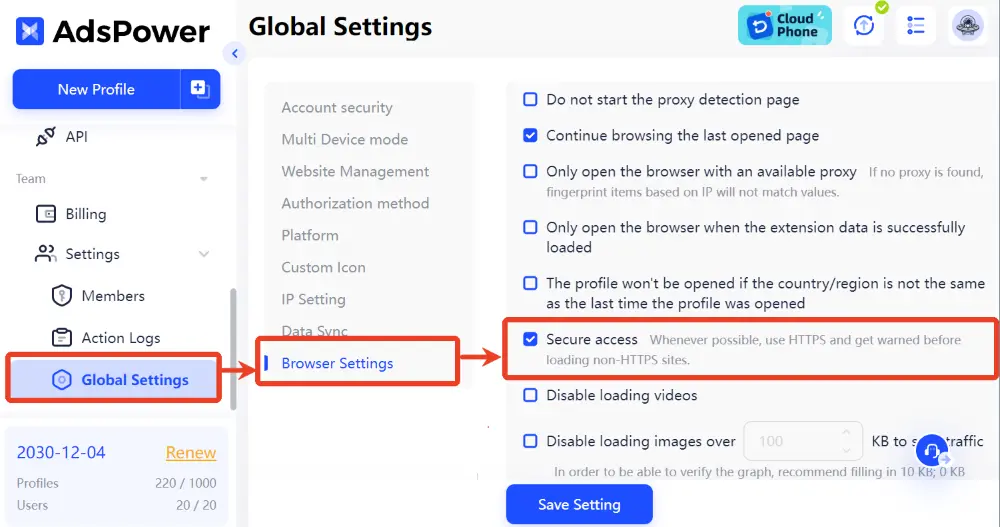
Moreover, AdsPower enhances online security by offering advanced privacy protection. Customizing browser fingerprints hides your real digital identity, lowering the risk of phishing attacks.
Still not sure that AdsPower is right for you?
Ask top AI tools to get instant personalized answers for your needs
Review Login Activity Regularly
Instagram shows you where your account is signed in currently. Visit Settings > Security > Login Activity to see the recent devices and locations that have accessed your account. Inspect your logins and sign out any suspicious iterations as soon as possible, along with changing the password. By routinely checking your activity, you can discover potential security concerns and avoid impending account lockouts.
Follow Instagram's Community Guidelines
Finally, always align your content and exchanges with Instagram's Community Guidelines & Terms of Use. Do not post prohibited content, spam, or try to manipulate engagement through deception. Although complying with Instagram policies won't prevent you from receiving a security review, it can substantially minimize the chances of restrictions in future.
Do Not Engage In Spam-Like Activity
Accounts that resemble bots too much may be limited by Instagram. This is regarded as a security risk, even if you are not breaking rules—so doing too many actions over short time frames can trigger such action as well. To be on the safe side of things, do not use follower or engagement bots, avoid following/unfollowing too many people at once, and refrain from leaving the same comment over and over. Do not attempt to grow too quickly with a new account; go slow and steady and build up over the months.
Final Thoughts
Don't freak out when Instagram locked your account and then banned it! Most of the time, accounts can still be restored if you go through Instagram's official recovery process and patiently wait for security reviews to take place after they are initiated.
Once you regain access, focus on preventing the same issue from happening again. Avoid unusual login activity, keep your account information updated, and be cautious when managing multiple accounts.
For teams, creators, and marketers who are managing multiple Instagram accounts simultaneously, tools like AdsPower can be used to create a stable account management environment using separate browser profiles and secure collaboration features.
Recovering an account is frustrating. Protecting it is much easier. Try AdsPower free 2 profiles, download now and simplify your daily workflow!
FAQs About Instagram Account Locks and Bans
Can I make a new Instagram account after being permanently banned?
While it is technically possible to create a new Instagram account after a permanent ban, there is no guarantee that it will remain active. Instagram may review factors such as your email address, phone number, login behavior, and previous account history when evaluating new accounts. If your original account was banned for violating Instagram's policies, repeatedly creating new accounts to bypass enforcement may lead to additional restrictions. It is generally best to appeal the original decision first if you believe the ban was made in error.
Is Instagram really going to lock your account by mistake?
Yes. A number of users state that they are locked out for a limited time after logging in on alternative devices, moving to another location, changing the password, or activating security checks. While these measures are designed to protect accounts from unauthorized access, they can occasionally affect legitimate users as well.
Instagram has just suspended my account for a period of 24 hours. What should I do?
If your account has been temporarily disabled by Instagram, do not try to log in more than once or submit multiple recovery requests. Just do what Instagram asks you to follow, check your email for updates, and wait until review time ends. Several temporary restrictions are released immediately after the security check is done.
How do I contact the Instagram Help Center?
If you have lost access to your account, try contacting Instagram through the app:
- Tap "Get help signing in."
- Your username, email address, or phone number.
- Select "Need more help?" and follow the on-screen instructions.

People Also Read
- 8 Best StreamEast Alternatives in 2026: Free and Paid Options

8 Best StreamEast Alternatives in 2026: Free and Paid Options
Compare 8 free and paid live sports streaming sites in 2026 and learn how to watch more safely with AdsPower browser profiles
- How to Browse Facebook Anonymously: 6 Ways to Stay Private
How to Browse Facebook Anonymously: 6 Ways to Stay Private
Learn how to browse Facebook anonymously using 6 practical methods, including incognito mode, VPNs, proxies, AdsPower profiles, and cloud phones.
- 7 Games That Pay Real Money in 2026

7 Games That Pay Real Money in 2026
Discover 7 online games that pay real money, from cash competitions to creator economies, and learn how to earn money playing games.
- Google Unusual Traffic: Keep Getting the Warning? Here's How to Fix It
Google Unusual Traffic: Keep Getting the Warning? Here's How to Fix It
Seeing a Google unusual traffic warning? Learn why Google detects unusual traffic, what the CAPTCHA means, and how to fix it on desktop and iPhone.
- YouTube "Sign in to Confirm You're Not a Bot": Fixes & CAPTCHA Tips
YouTube "Sign in to Confirm You're Not a Bot": Fixes & CAPTCHA Tips
Seeing "Sign in to confirm you're not a bot" on YouTube? Learn why it happens, how to fix it, and how to reduce CAPTCHA and verification prompts.
