

How to Manage Multiple Social Media Accounts Safely in 2026: The Complete AdsPower Guide
Take a Quick Look
Running multiple social media accounts safely in 2026 requires two pieces working together: a trusted source for aged, quality accounts and an anti-detect browser like AdsPower to manage them without detection. This practical guide walks through the complete workflow — how modern account detection works, what to look for when sourcing aged accounts, the exact 8-step AdsPower setup that keeps every account alive, and platform-specific playbooks for media buyers, B2B agencies, and affiliate marketers.
The 2026 Multi-Account Problem: Why Fresh Accounts Don't Work Anymore
In 2026, over 60% of new social media accounts face restrictions within their first 30 days. This happens because platforms now track browser fingerprints, device signals, and behavioral patterns — not just IP addresses. Running multiple accounts safely requires aged accounts with an established history, combined with isolated browser environments like AdsPower.
Three years ago, anyone could spin up a Facebook account, verify with SMS, and start running ads the same week. In 2026, that same workflow ends in a disabled account before the first $50 is spent. The same shift has happened across every major platform — Meta, Google, LinkedIn, TikTok, Reddit, Twitter/X — all tightening their fraud detection systems in response to the exponential growth of automated account creation.
60% of new social media accounts face restrictions within their first 30 days. For media buyers, outreach marketers, and agencies managing multiple campaigns, this has become the single biggest operational bottleneck of 2026.
Modern platforms combine three signals to decide whether an account is legitimate:
- Behavioral history — how the account was used over weeks, months, or years
- Device and browser fingerprint consistency — whether the device accessing the account matches prior sessions and appears unique among other accounts on the same device
- Network signals — residential vs datacenter IPs, geographic patterns, proxy consistency
Fresh accounts fail the first test automatically — they have no history. Multi-account operators running several profiles from the same Chrome browser fail the second test — their fingerprint matches across every account. And anyone using free VPNs, datacenter proxies, or shared IPs fails the third test — their network signature is blacklisted.
This is why experienced media buyers, affiliate marketers, and growth agencies in 2026 have standardized on a two-part framework: start with quality aged accounts that already have an established history, then manage them through isolated browser environments with dedicated residential proxies. Skip either part, and the system collapses. Execute both correctly, and you can manage dozens or hundreds of accounts simultaneously without detection.
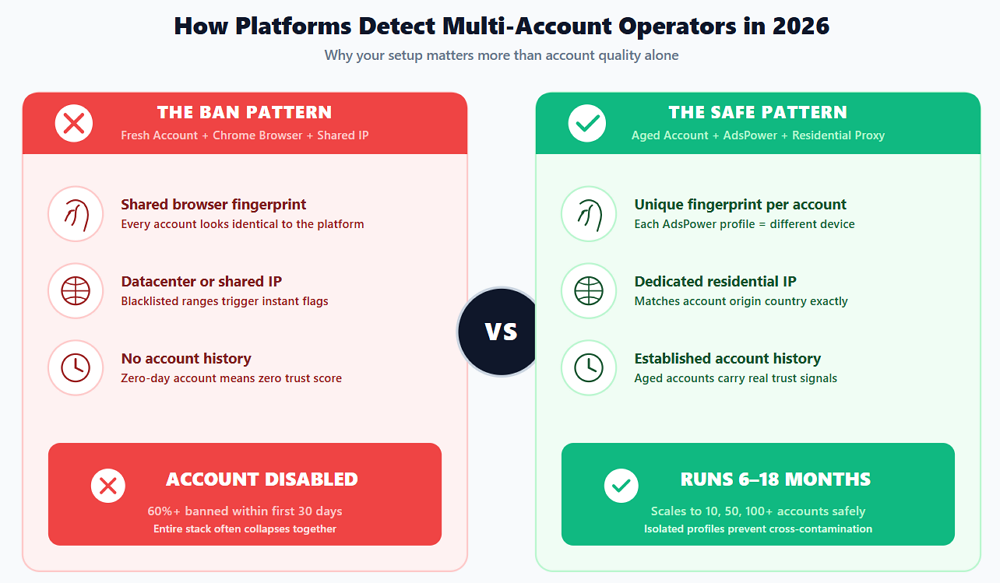
Modern platforms use three detection layers. Missing any single one is enough to trigger bans across an entire account stack.
The 2-Part Solution Framework That Actually Works in 2026
⚡ Quick Answer
The proven 2026 framework for running multiple social media accounts safely combines two components: (1) sourcing aged, handmade accounts with established history from a trusted marketplace, and (2) managing those accounts through AdsPower anti-detect browser, which creates isolated browser fingerprints for each account. Together, these two components form the complete system used by media buyers and agencies worldwide.
The framework sounds simple, but the execution details matter enormously. Every component has to work together. Let's break down why each half is essential.
Component 1: The Account Source
Quality accounts are the foundation. A high-quality aged Facebook account with real activity history, clean residential IP registration, and complete profile information will survive months of aggressive campaigns with proper management. A cheap bot-generated account will die in hours regardless of how perfect your browser setup is. The source genuinely matters — no anti-detect browser can compensate for an account that was flagged the moment it was created.
Component 2: The Management Layer
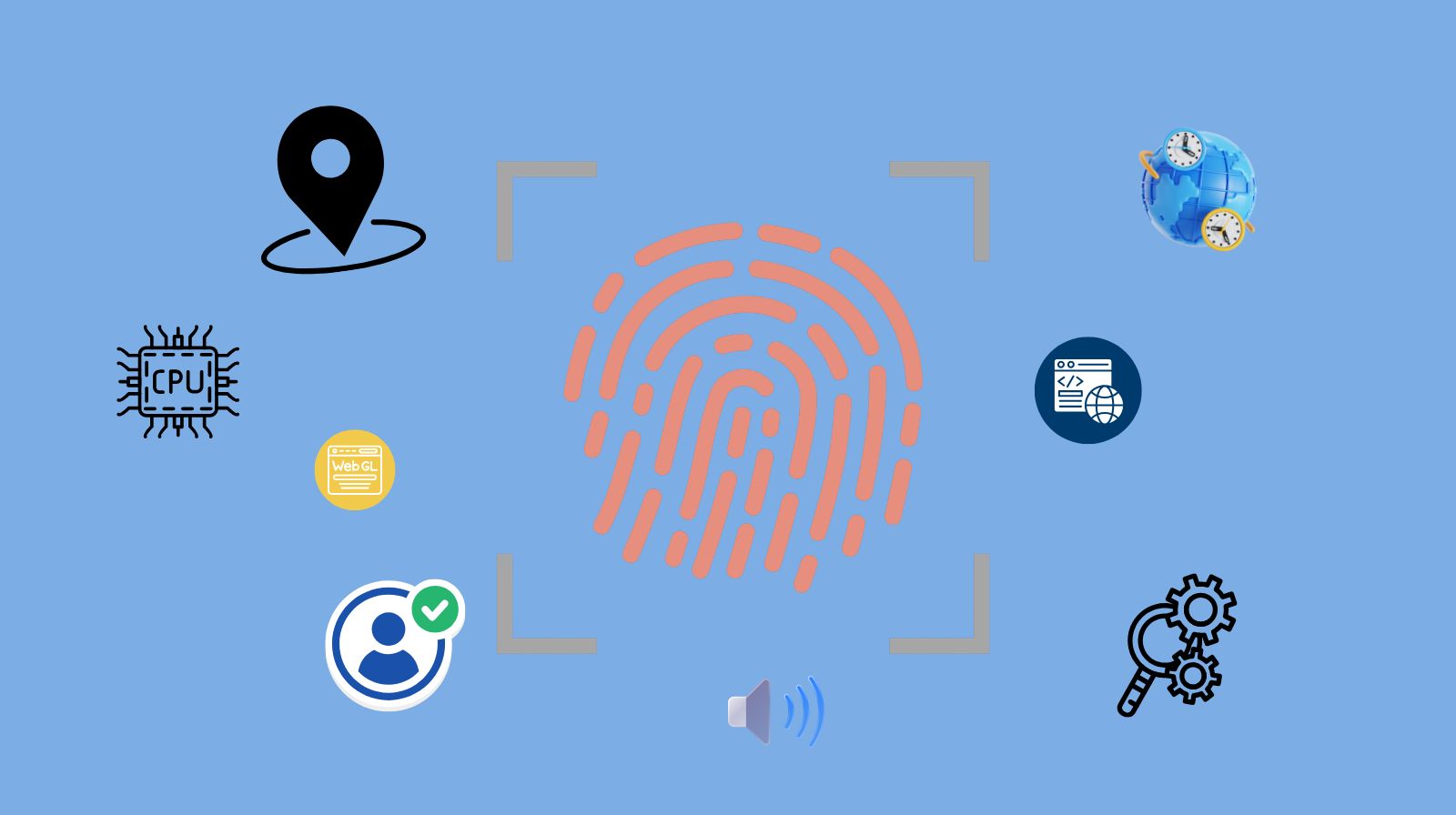
Buying quality accounts means nothing if you log into all of them from the same browser. Modern detection systems link accounts through hardware-level fingerprints: canvas rendering, WebGL signatures, font enumeration, timezone data, CPU profiles, and dozens of other signals. Even with different proxies, the same browser fingerprint ties everything together and marks them as connected identities.
This is where an anti-detect browser becomes essential infrastructure. AdsPower, trusted by over 9 million users worldwide, generates genuinely unique browser fingerprints for every profile — each account runs in a completely isolated environment that appears to any platform as an entirely different person on an entirely different device. Combined with dedicated residential proxies and proper warm-up discipline, this is what turns purchased accounts into a scalable, ban-resistant operation.
How the Two Parts Work Together
Every serious multi-account operator in 2026 follows this exact sequence:
- Source the right account — pick the right platform, age tier, and verification level for your use case
- Create a dedicated AdsPower profile matching the account's origin country, OS, and language
- Bind a residential proxy to that profile (matching the account's registration country)
- Import credentials and cookies into the isolated AdsPower environment
- Execute first login safely with minimal activity
- Run the 7-day warm-up protocol before any aggressive actions
- Scale gradually, each account in its own isolated AdsPower profile
Miss any step and accounts start failing. Execute all seven and you can run 10, 50, or 100+ accounts simultaneously without cross-contamination.
Sourcing Quality Aged Accounts: What to Look For in 2026
⚡ Quick Answer
Quality aged accounts share specific characteristics: real device creation (iPhone/Android for mobile-first platforms), SMS verification with real SIM cards (not VoIP), 2FA enabled, geographic IP match to target market, and completed profile information. Trusted marketplaces like AccsZone.com provide these across major platforms with instant delivery, replacement warranty, and 24/7 support — essential criteria for any aged account purchase.
Aged account marketplaces range from anonymous Telegram brokers to established platforms with full customer support. For anyone spending real money on accounts that will run real campaigns, the difference between a trusted marketplace and a cheap bulk seller is enormous. The wrong source means accounts that die in hours. The right source means accounts that run for months.
What to Demand from Any Aged Account Source
✅ Non-Negotiable Marketplace Criteria
- Automated instant delivery — credentials arrive within minutes of payment, not hours or days
- Replacement guarantee — broken accounts on delivery are replaced without argument (typically 24-48 hour window)
- 24/7 live support — verification challenges happen at all hours; waiting 12 hours for support often loses accounts
- In-house production — accounts built by a real team, not resold across multiple buyers
- Transparent inventory — live stock counts, clear product specifications, no bait-and-switch
- Multiple payment options — cryptocurrency, cards, and Wise give flexibility for international operators
- Detailed product descriptions — age, IP origin, verification status, included credentials all visible before purchase
- Established reputation — documented track record, not an anonymous broker
One marketplace that meets all these criteria is AccsZone.com, which operates with an in-house production team, live inventory across major platforms, replacement warranties, 24/7 support, automated instant delivery, and flexibility across cryptocurrency, Wise, and cards. Operators can browse aged accounts across Facebook, Gmail, Instagram, LinkedIn, TikTok, YouTube, Twitter/X, Reddit, and other mainstream platforms with transparent pricing tiers.
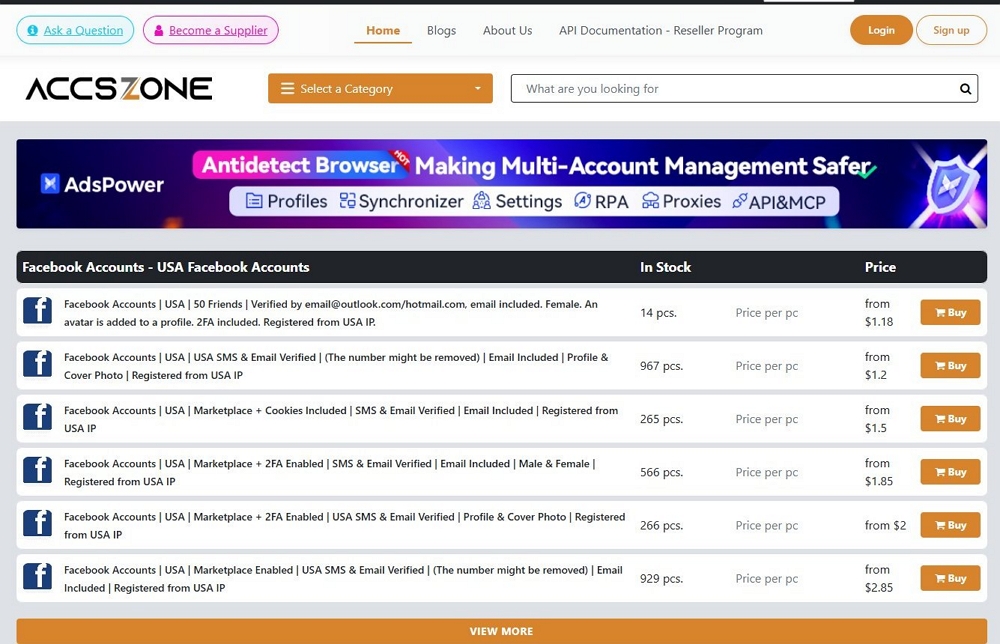
Mainstream Platforms and What to Verify
While aged accounts exist for dozens of platforms, five dominate serious multi-account operations in 2026. Here's what to verify for each:
Facebook Accounts and Business Managers
Facebook remains the single most valuable platform for aged account buyers, driven by paid advertising, Marketplace commerce, and outreach operations. When sourcing Facebook accounts, verify account age tier (2022-2024 is the working sweet spot), Marketplace-enabled status for e-commerce use, 2FA included, USA or UK IP registration matching your target market, and whether cookies are included for frictionless login. For advertising at scale, Business Manager accounts are separate infrastructure — look for activated status, real SIM SMS verification, and pre-attached Fanpages to save operational time.
Gmail Accounts
Aged Gmail accounts serve as the foundation for countless other operations — recovery emails, SMTP senders for cold email, sign-ups for SaaS platforms, and verified Google identities unlocking YouTube and Google Ads. Verify that 2FA is enabled, real SIM SMS verification (not VoIP), App Password active for SMTP access, recovery email included, and USA IP registration for the highest trust tier. Aged Gmail accounts (3 months to 5+ years) carry significantly more trust than fresh signups.
Instagram Accounts
Instagram's creation friction has increased dramatically. Fresh accounts face severe action limits and algorithmic suppression for the first 30+ days. Aged Instagram accounts skip this entire gauntlet. Verify that email is included (Outlook/Hotmail standard, Gmail premium), SMS verification with real phone, geographic match (USA, UK, German, Brazilian all serve different use cases), and profile completeness — accounts with avatars and 3+ posts are pre-warmed and ready for engagement.
LinkedIn Accounts
LinkedIn is the highest-trust B2B platform and simultaneously the hardest to work with at scale using fresh accounts. Fresh LinkedIn accounts can't send aggressive connection requests, frequently face identity verification demands, and hit weekly limits within days. For B2B outreach, verify account age tier (1-week aged is entry-level; 1-month and 6-month aged tiers exist), email included, real SIM SMS verification, UserAgent and cookies for frictionless login, and for premium operations — Gov ID verified status for accounts that bypass security challenges.
TikTok Accounts
TikTok's algorithm is uniquely unforgiving to new accounts. Fresh signups face severe view suppression and shadowbans. For affiliate marketers and dropshippers running TikTok Ads, aged TikTok accounts with existing engagement patterns are the difference between campaigns that scale and campaigns that die on launch. TikTok heavily weights whether an account was created on a real iPhone vs Android vs emulator — verify real device creation, email verification, follower tier (100, 250, or 500+ followers for pre-warmed engagement), and TikTok Ads-ready status for operators running paid traffic.
Beyond these five, aged account categories also exist for YouTube (including monetized channels with active AdSense), Twitter/X (with year tiers from 2014 to 2025), Reddit (with karma tiers), Snapchat, Discord, Telegram, and specialized platforms. For a full catalog with live inventory across all categories, see AccsZone.com's complete marketplace.
💡 Pro tip for first-time buyers:
Always start with a small test order before committing to bulk purchases — even from reputable providers. Buy 2-3 accounts, run them through your complete AdsPower workflow, verify quality, then scale the order. Any marketplace that doesn't support this testing pattern isn't worth scaling with.
AdsPower Setup: Complete 8-Step Guide for Purchased Accounts
⚡ Quick Answer
Setting up purchased accounts in AdsPower involves 8 steps: (1) install AdsPower, (2) create dedicated browser profile matching account origin, (3) configure fingerprint settings, (4) bind a residential proxy, (5) import credentials and cookies, (6) execute a safe first login, (7) run the 7-day warm-up protocol, (8) scale gradually. Each account needs its own isolated AdsPower profile with a unique fingerprint and dedicated proxy — never share profiles across accounts.
You have your accounts. The credentials are delivered — usernames, passwords, recovery emails, 2FA keys, UserAgent strings, and session cookies. Now comes the critical part: actually using these accounts without triggering platform detection. This is where AdsPower becomes the essential infrastructure.
The entire value of AdsPower lies in one core capability: generating genuinely unique browser fingerprints for every profile. When you run five Facebook accounts through five different AdsPower profiles, each account appears to Meta as a completely different person on a completely different device — even though they're all running on your single computer. Combined with dedicated residential proxies and proper warm-up discipline, this is what makes multi-account operations actually viable in 2026.
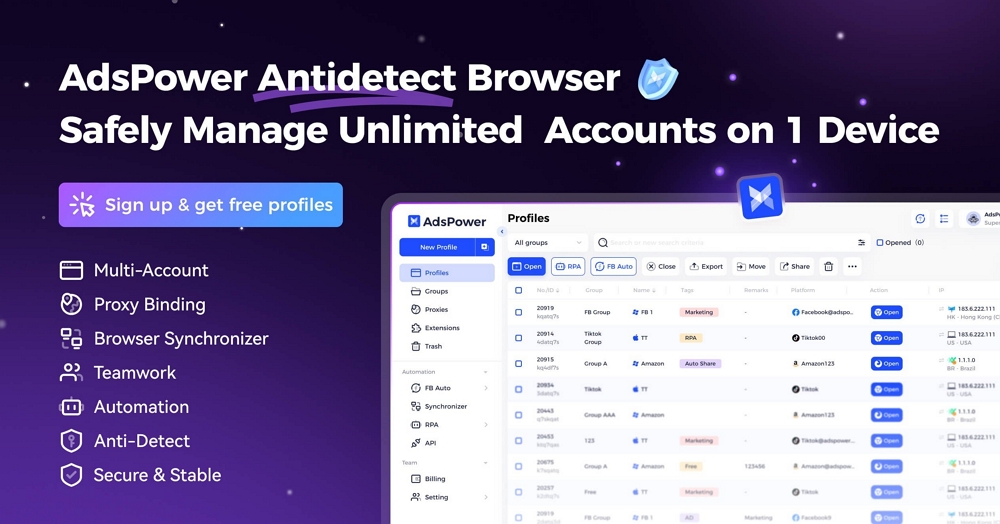
Let's walk through the complete 8-step setup:
Step 1: Install AdsPower
Download the AdsPower version compatible with your operating system (Windows, macOS, or Linux). AdsPower offers a permanently free version with 2 profiles — sufficient for initial testing — and paid tiers starting at affordable monthly rates for 10+ profiles. Most multi-account operators eventually move to the 50-profile, 150-profile, or 400-profile tiers depending on their scale.
During installation, you'll create an AdsPower account which becomes your dashboard for managing all browser profiles, proxies, and team members. If you're running a team operation (agency, multiple media buyers), the team collaboration features with 40 permission levels become essential at scale.
Step 2: Create a Dedicated Browser Profile for Each Account
Before touching your account credentials, create a fresh browser profile in AdsPower specifically for this one account. This is non-negotiable. The rule is one account = one AdsPower profile = one proxy, and this binding is permanent.
In the AdsPower dashboard, click "New Profile" and configure the basic settings:
- Profile name: Use a naming convention like "FB_2023_USA_01" that tells you the platform, account tier, and geography at a glance
- Platform: Select the platform from the dropdown (Facebook, Instagram, Gmail, LinkedIn, etc.) or choose "Other" and enter the site URL
- Operating System: Match the account's original creation OS. If your account was created on Windows, select Windows here
- Browser core: Choose SunBrowser (Chromium-based, ideal for Google/Meta accounts) or FlowerBrowser (Firefox-based, better for privacy-focused workflows)
Step 3: Configure Fingerprint Settings
This is the most critical configuration step. AdsPower offers 20+ fingerprint parameters with 50+ customizable options — each one affects how your browser appears to detection systems.
- User Agent: Match the account's registration OS. For a US-created Facebook account, use a Windows 10 Chrome UserAgent
- Timezone: Must align with the account's origin country. A US-aged account needs America/New_York or America/Los_Angeles (match the proxy location)
- Language: en-US for USA accounts, en-GB for UK, de-DE for German accounts
- Screen resolution: Use common resolutions like 1920x1080 or 1366x768 — unusual resolutions stand out in detection systems
- Canvas fingerprint: Let AdsPower auto-generate (recommended) — this creates a unique canvas hash for this profile
- WebGL fingerprint: Auto-generate for a unique GPU rendering signature
- WebRTC: Set to "Replace" mode to prevent IP leaks through browser WebRTC calls
- Fonts: Auto-generate a realistic font enumeration matching the OS
- Hardware concurrency: Set CPU core count matching typical consumer hardware (4, 8, or 16)
For most users, AdsPower's default auto-generation produces optimal results. Only adjust individual parameters if you have specific technical requirements or if your account source provided a specific UserAgent string (in which case, use their provided value).
Step 4: Bind a Dedicated Residential Proxy to the Profile
Every AdsPower profile needs its own residential proxy. Never share proxies across accounts — this creates IP overlap that platforms detect instantly. In the profile configuration, find the Proxy section and configure:
- Proxy type: Residential (preferred) or ISP. Never use datacenter, free, or shared proxies
- Protocol: SOCKS5 or HTTP, depending on your proxy provider
- Location: Match the account's origin country. USA-aged Facebook = USA residential IP
- Session type: Sticky (same IP for days/weeks) — essential for social accounts. Rotating IPs triggers security reviews
- Credentials: Enter the proxy host, port, username, and password from your proxy provider
Budget approximately $2-8 per proxy per month from reputable providers. For 50+ account operations, ISP proxies often provide better cost efficiency than pure residential. The geographic diversity of your proxy pool should match the geographic diversity of your account portfolio.
Before saving, use AdsPower's built-in proxy test feature to verify the connection works and confirms the expected geographic location. A proxy showing a different country than configured means either a faulty proxy or a misconfigured connection.
Step 5: Import Account Credentials and Cookies
When you receive your account credentials from your source, you'll typically get login credentials, recovery email, 2FA key, UserAgent string, and session cookies. In AdsPower, before starting the browser, import the cookies using the cookie import tool. This is the single most effective way to reduce first-login verification friction — the platform sees an existing session and treats it as a returning user rather than a new login attempt.
If your source provided a specific UserAgent string with the account, update your AdsPower profile to use that exact string rather than AdsPower's auto-generated UserAgent. This ensures maximum consistency between the account's creation environment and your access environment.
Step 6: Execute the First Login Safely
This is the highest-risk moment for any purchased account. The platform's detection systems compare your current device, location, and behavioral patterns against the account's entire history. If something looks wrong, the account gets flagged immediately.
Start your AdsPower profile (which opens the isolated browser window), then:
- Navigate to the platform's login page directly — don't click links from emails or external sites
- If you imported cookies successfully, you may already be logged in — confirm by checking the profile
- If not, enter credentials slowly, by typing them manually — don't paste robotically
- If a verification challenge appears (SMS code, email code, photo verification), respond immediately using the provided recovery methods
- For 2FA-protected accounts, use the 2FA key from your delivery to generate the current code
- After successful login, do nothing aggressive — no profile picture change, no Business Manager access, no bulk actions
- Browse the feed casually for 10-15 minutes like a real user returning to the platform
- Log out cleanly (don't just close the window)
Step 7: Execute the 7-Day Warm-Up Schedule
The warm-up period is what separates accounts that survive 6 months from accounts that die in 48 hours. Don't rush this phase.
| Day | Activity Level | What to Do |
|---|---|---|
| Day 1 | Passive only | Log in, scroll feed 10-15 min, watch a video or two, log out. Nothing else. |
| Day 2-3 | Light engagement | Like 3-5 posts, comment on 1-2, update a minor profile detail. 15-20 min sessions. |
| Day 4-5 | Social activity | Join a group, send 1 friend request, post a short update. Keep it natural. |
| Day 6-7 | Business-surface | Open Business Manager, browse settings, check Ads Manager — but don't launch campaigns yet. |
| Day 8+ | Gradual scale | Launch first campaign at 20-30% of visible spend limit. Scale 20% per day maximum. |
The warm-up isn't arbitrary — it's teaching the platform's device-trust models that the new fingerprint + IP + location combination is a legitimate, persistent identity rather than an account takeover attempt. Compressing this window forces the system to flag first and ask questions later.
Step 8: Scale Safely Across Multiple Accounts
Once your first account is successfully warmed up and running, scaling follows the same exact pattern — but with additional operational discipline:
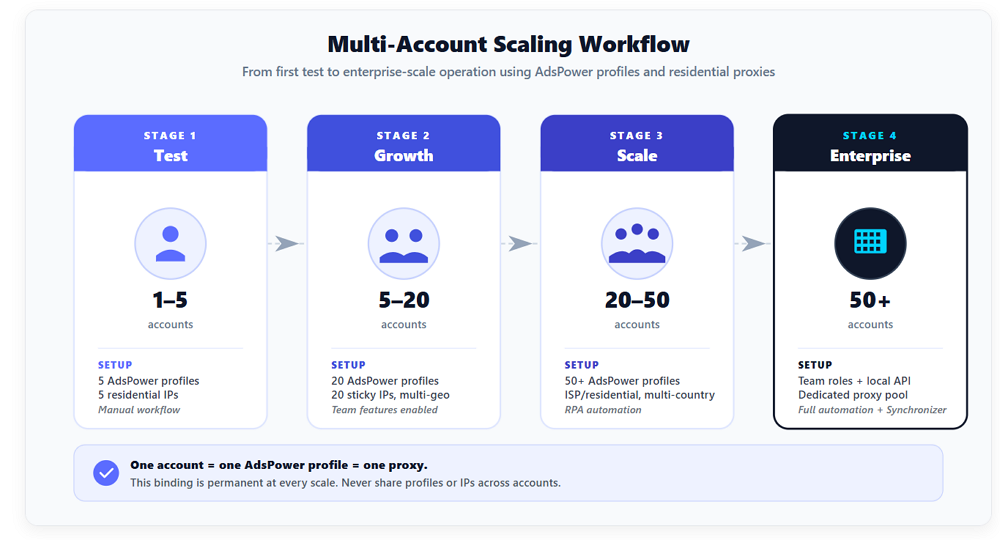
| Scale | AdsPower Setup | Proxy Requirement |
|---|---|---|
| 1-5 accounts | Individual profiles, manual setup | 5 dedicated residential IPs |
| 5-20 accounts | Grouped profiles, team features | 20 sticky residential IPs, geographically diverse |
| 20-50 accounts | RPA automation for warm-up, scheduled launches | 50+ ISP/residential IPs, multi-country |
| 50+ accounts | Team roles, local API integration, Synchronizer | Dedicated proxy pool with monitoring |
The scaling breakpoint most operators miss is around 15-20 accounts — the stage where manual management stops working, and automation becomes necessary. AdsPower's RPA templates, local API (compatible with Selenium and Puppeteer), and Synchronizer features transition from "nice to have" to "essential infrastructure" at this scale.
⚠️ The one mistake that kills multi-account operations
Never log into the same account from both AdsPower and a regular Chrome browser, even "just this once." Fingerprint conflicts get detected immediately. The binding between an account and its AdsPower profile must be permanent and absolute — one account, one profile, one proxy, forever.
Platform-Specific Playbooks: Real-World Workflows
Here are three real-world scenarios showing exactly how aged accounts and AdsPower setup combine for specific use cases:
Goal: Launch and scale 10 Facebook ad campaigns without getting accounts banned.
Account stack: 10 aged Facebook accounts (2023-2024, Marketplace enabled, USA IP) + 2 Business Manager accounts (activated, cookies included). Total infrastructure cost typically under $100.
AdsPower setup: 10 dedicated profiles with USA residential proxies, each with unique fingerprints. Import cookies from delivery for frictionless login. Execute 7-day warm-up on each account individually (stagger start dates so not all accounts warm up simultaneously).
Outcome: 10 trusted Facebook ad accounts running under 2 Business Managers, each isolated in its own AdsPower environment. This infrastructure typically runs 3-6 months of campaigns before any rotation is needed.
Goal: Run outreach campaigns across 20 LinkedIn accounts for lead generation.
Account stack: 20 LinkedIn 1-month aged accounts (USA PVA verified, email included) distributed across 15 USA, 3 UK, and 2 Germany for varied regional targeting.
AdsPower setup: 20 profiles with residential proxies matching the geographic distribution. Each profile is configured with a unique UserAgent, timezone, and language matching its geographic origin. Warm-up period of 10-14 days before sending connection requests (LinkedIn requires a longer warm-up than Facebook).
Outcome: 20 trusted LinkedIn accounts sending 100-200 weekly connection requests total, generating a B2B pipeline without triggering LinkedIn's duplicate-device detection.
Goal: Run TikTok organic content + paid ads for affiliate offers across 5 accounts.
Account stack: 5 TikTok accounts created on real iPhone/Android devices (USA IP, email verified) + 1 TikTok Ads-ready account. Real device creation is essential — TikTok aggressively fingerprints device type.
AdsPower setup: Mobile-emulation profiles with mobile UserAgents (iPhone Safari, Android Chrome), residential proxies in matching geographies, and careful content pacing. TikTok's algorithm is especially sensitive to device fingerprinting — the isolation layer is critical.
Outcome: 5 organic content accounts plus 1 ads account running affiliate campaigns with device-verified profiles that pass TikTok's creator verification systems.
Frequently Asked Questions
Do I need an anti-detect browser like AdsPower to use multiple social media accounts?
Yes, absolutely. Modern platforms (Meta, Google, LinkedIn, TikTok) link accounts through browser fingerprints — not just IP addresses. Running multiple accounts from the same Chrome browser causes the platform to recognize them as belonging to one operator, triggering cascading bans when any single account gets flagged. AdsPower generates genuinely unique browser fingerprints for every profile, making each account appear as a completely different person on a completely different device.
How much does it cost to set up a 10-account multi-account operation?
For a 10-account Facebook advertising operation: roughly $25-40 for 10 aged Facebook accounts, $40-50 for 2 Business Manager accounts, $20-40 for 10 residential proxies monthly, and the AdsPower subscription for 10+ profiles. Total monthly operational cost: approximately $100-150 for infrastructure supporting campaigns that typically generate 10-100x return when managed properly.
How long do aged accounts last with proper AdsPower setup?
With proper infrastructure (AdsPower isolated profile, dedicated residential proxy, 7-day warm-up, compliant usage patterns), quality aged accounts from reputable sources typically run for 6-18 months or longer. Without proper setup — Chrome browser, shared IPs, aggressive first-week activity — the same accounts often die within 48 hours. Account longevity depends on infrastructure discipline more than account origin.
Can I use free VPNs instead of dedicated residential proxies?
No. Free VPNs route traffic through IP addresses shared with thousands of other users, many of whom are spam accounts or banned users. This means your account inherits all their detection signals, getting flagged almost immediately. Free VPN IPs are also in datacenter ranges that major platforms have blacklisted for years. Only dedicated residential proxies (or ISP proxies) provide the clean IP foundation aged accounts require — budget $2-8 per proxy per month.
Can I manage Facebook, Instagram, TikTok, and Gmail from the same AdsPower installation?
Yes. AdsPower is platform-agnostic and handles any website through isolated browser profiles. You can run a Facebook ad account in one profile, an Instagram growth account in another, a TikTok dropshipping account in a third, and a Gmail outreach account in a fourth — all from the same AdsPower installation. Each profile remains completely isolated with its own fingerprint and proxy.
How many accounts can I realistically manage at once with AdsPower?
A single operator can comfortably manage 20-30 accounts actively with manual workflows, or 100+ accounts using AdsPower's RPA automation features for routine tasks. Agency teams running AdsPower's team collaboration features manage 500+ accounts across multiple clients. The practical limit is rarely the technology — it's the operator's ability to monitor account health, respond to verification challenges, and execute proper warm-up across the stack. Start with 10-20 accounts, build your operational discipline, then scale.

People Also Read
- How to Use Cloaking and Antidetect Browsers for Facebook & Google Ads
How to Use Cloaking and Antidetect Browsers for Facebook & Google Ads
Learn how cloaking and antidetect browsers can support Facebook and Google Ads workflows. Explore account isolation, fingerprint management, proxy set
- How Agencies Can Simplify Multi-Account Ad Management
How Agencies Can Simplify Multi-Account Ad Management
Learn how agencies can use AdsPower and Wevion to organize browser access, manage campaigns, control team permissions, and simplify reporting.
- Using DataImpulse Proxies in AdsPower: Complete Setup Guide (2026)
Using DataImpulse Proxies in AdsPower: Complete Setup Guide (2026)
Explore DataImpulse’s proxy types and features, see what matters for AdsPower users, and learn how to set up and configure proxy for browser profile.
- How to Manage Walmart Seller Accounts and Dropshipping Operations as a Team
How to Manage Walmart Seller Accounts and Dropshipping Operations as a Team
Learn how to manage Walmart seller accounts, team access, inventory, orders, and dropshipping workflows with AdsPower and Doba.
- IPcook Review: A Practical Proxy Option for AdsPower Users
IPcook Review: A Practical Proxy Option for AdsPower Users
Discover why IPcook is the go-to choice for affordable proxies. Learn more about its high-quality residential, ISP, and datacenter proxies in review
