

Learn how cloaking and antidetect browsers can work together in Facebook and Google Ads workflows. See how browser profiles, fingerprints, and proxies can help keep multiple ad accounts isolated.
Follow practical setup and campaign management tips for a more consistent advertising workflow.
Running ads on nutra, gambling, dating, or crypto offers in 2026 means fighting two different reviewers at once: the automated moderation on Facebook and Google that inspects your landing page and the anti-fraud layer on the same platforms that inspects the account and device behind the login. Solve only one side, and the campaign still fails – a clean account pointed at an unprotected offer page gets the ad rejected, and a perfectly cloaked offer running from a sloppy, easily linked profile gets the account banned instead.
This is a practical walkthrough of both halves working together: a cloaking setup that filters traffic on the landing page side and an antidetect browser that keeps the account side clean from the first profile setup through the first real clicks.
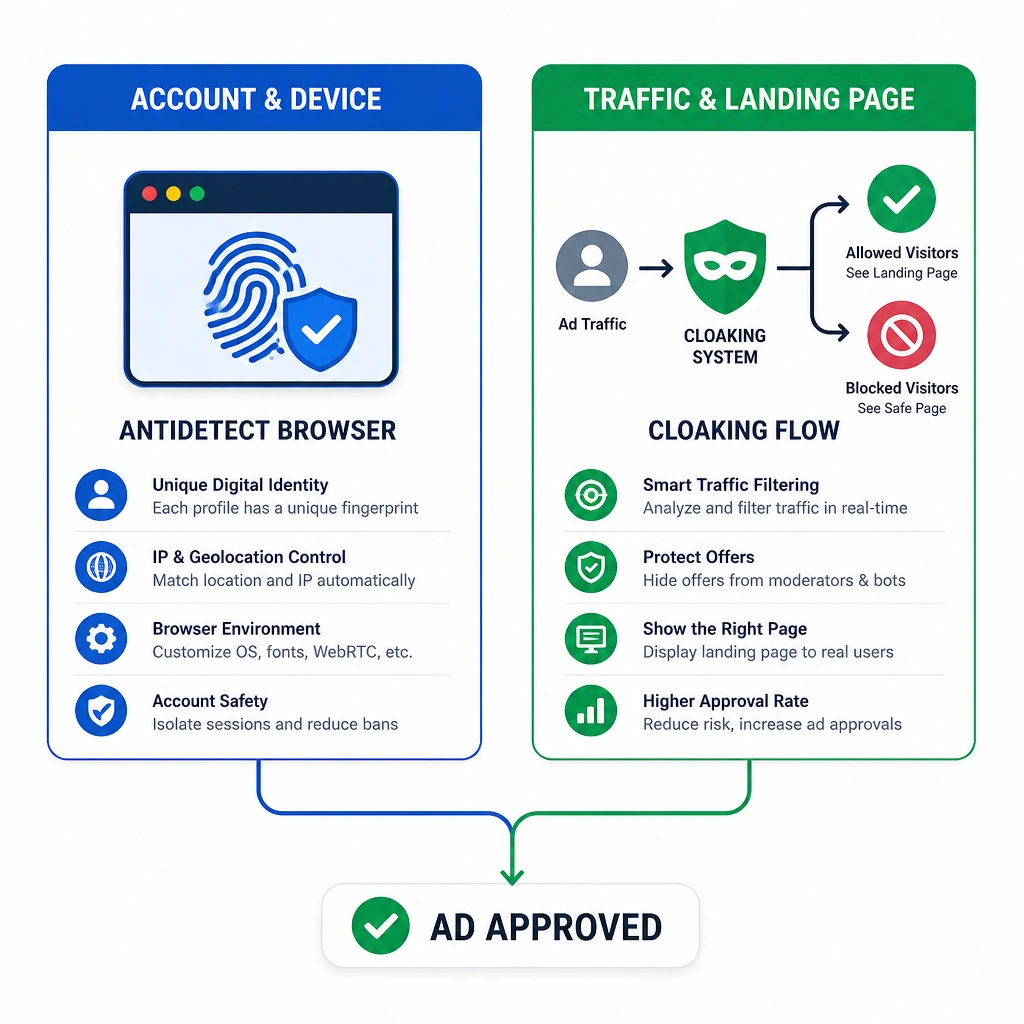
The Toolkit
Before opening any ad manager, you need five things in place:
- A cloaking service to split moderator/bot traffic from real users. This guide uses Cloaking.House.
- A White Page and an Offer Page – a compliant page for reviewers, and the real offer for actual visitors.
- A domain and hosting with PHP support, plus an SSL certificate (Facebook and Google both distrust non-HTTPS domains).
- Residential or ISP proxies, matched to your account's target geo – datacenter IPs are one of the fastest ways to get flagged on either platform.
- An antidetect browser to isolate each ad account's fingerprint, so multiple profiles don't read as the same person running a farm.
Step 1: Build the White Page
The White Page is what a reviewer or bot sees when it visits your link – and on both platforms, a thin or generic page is now a bigger red flag than no cloaking at all. It needs to be topically relevant to the ad creative, load fast on mobile, carry real Privacy Policy / Terms / Contact pages, and use content that isn't copied from an existing indexed site – both Facebook and Google can recognize duplicate or previously-seen pages, which turns a "camouflage" page into evidence of intentional circumvention.
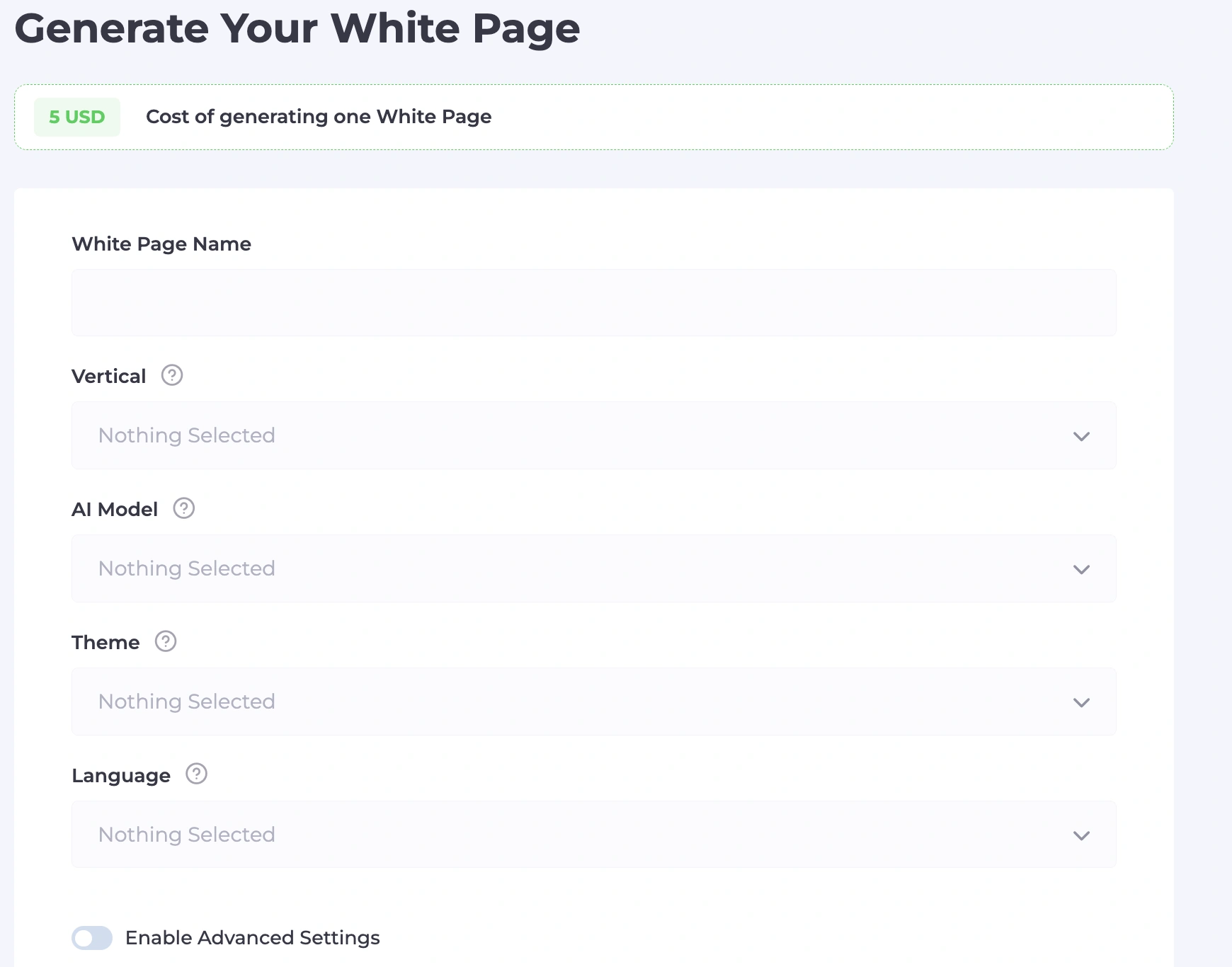
Rather than building this by hand, Cloaking.House's built-in AI generator produces a complete page for a chosen vertical and language in a couple of minutes. Two settings matter more than they might seem:
- Site format. A single-page landing usually clears Facebook's review fine, but Google Ads responds better to a multi-page format – it reads as a more substantial, "real" resource rather than a one-off placeholder.
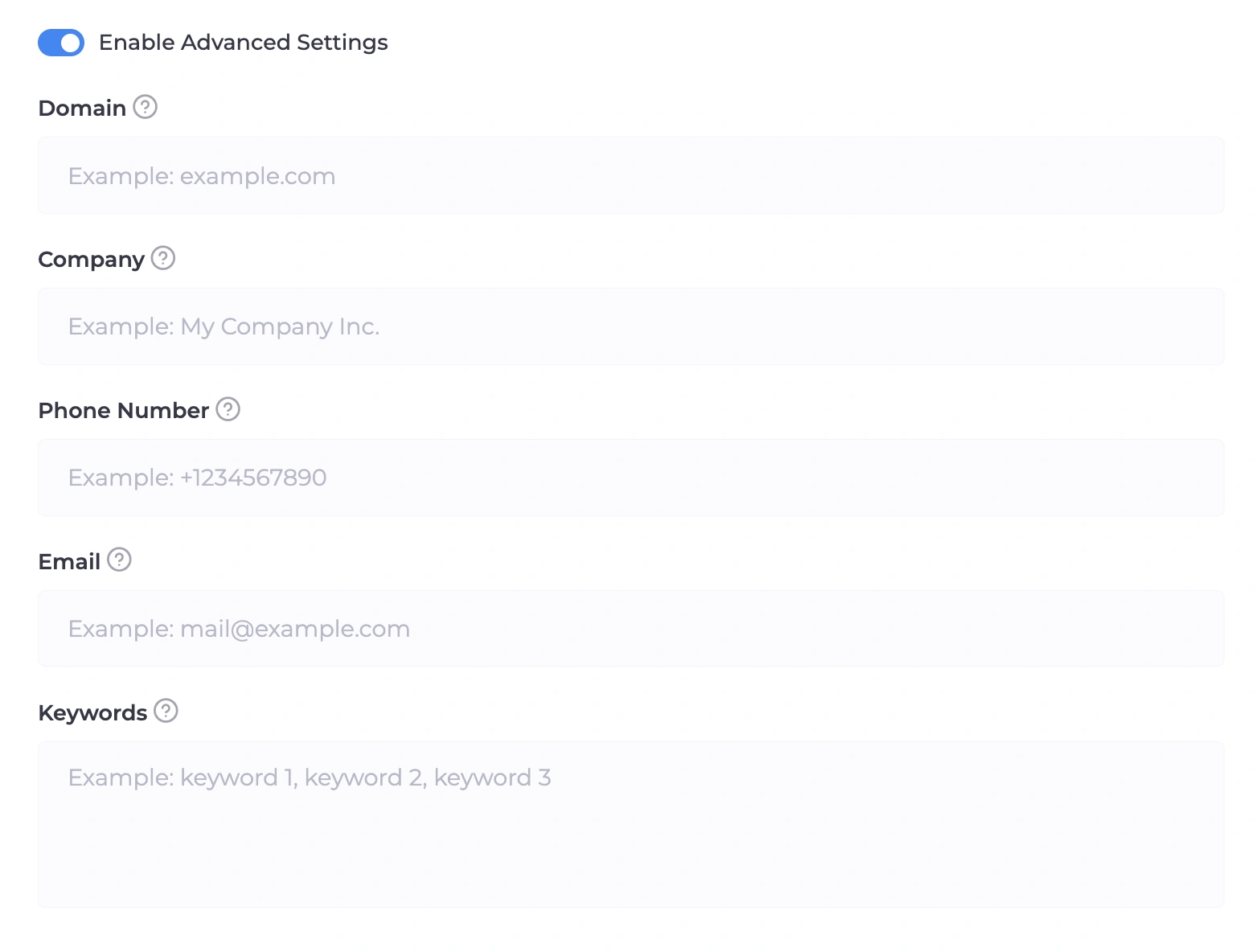
- Keywords and business details. Filling in a company name, contact info, and 5–10 relevant keywords lets the generator weave them into headings and footer content, which is exactly the kind of relevance signal automated review checks for.
Once generated, the archive is uploaded through the hosting's file manager into the domain's root folder and extracted – no manual coding required.
Step 2: Set Up the Cloaking Flow
With the White Page in place, the flow is what actually decides who sees it and who gets the real offer. Creating one comes down to three parts:
Paths. Name the flow after the offer and geo for easy tracking later. For the White Page, choose a loading-based display method – the address bar stays on your domain, which avoids the kind of visible redirect both platforms treat with suspicion. For the Offer Page, use a redirect if it's an external affiliate link, or the same loading method if the offer lives on your own hosting.
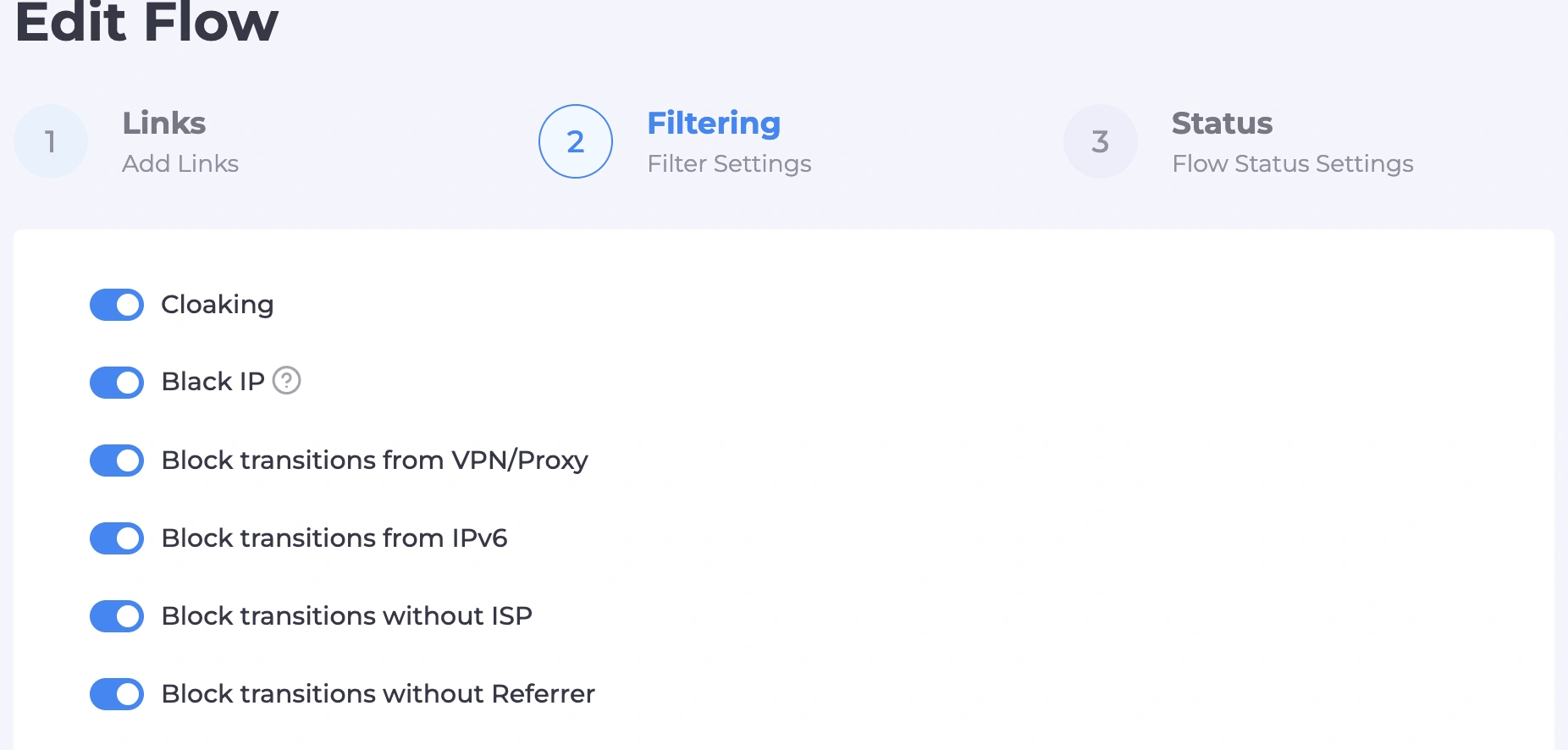
Filters. This is where the two platforms genuinely diverge, and it's worth getting right:
- VPN/proxy detection and a known bot/moderator IP database – keep both on for either platform.
Blocking visits without a real ISP (catching datacenter and cloud traffic) – on for both. - IPv6 filtering is the one setting that shouldn't be copy-pasted between platforms. A chunk of Google's own verification traffic travels over IPv6, so blocking the protocol outright can stop Google's bot from ever reaching your White Page – which reads as a broken link rather than a policy violation, and gets the ad rejected. Facebook's checking infrastructure is less dependent on it, so blocking IPv6 there is generally safe and actually helps filter out bot networks.
- Geo, device, OS, browser, and language filters should match your actual targeting – any visitor whose language or timezone doesn't line up with the target geo is a common tell worth catching automatically.
- A per-IP click limit stops repeated probing from the same source, whether that's a bot or a competitor's spy tool.
Status and verification. Leave the flow paused while you finish the technical setup – that way everyone, including you, only sees the White Page until you're ready. Add your own IP to the flow's whitelist so you can confirm the Offer Page displays correctly before switching the flow to active.
Step 3: Integrate on Your Hosting
Download the flow's integration file and upload it to your domain's root folder, alongside the already-extracted White Page. Then rename the original White Page file (usually index.html) to whatever filename you specified in the flow settings – this matters because the integration file needs to be the first thing a visitor's browser reaches, so it can decide which page to actually serve. Once that's done, switch the flow from paused to active and re-check through your whitelisted IP that the Offer Page still opens correctly for you.
For Google Ads specifically, it's worth running the flow in paused mode for the first day or two after launch, so Google's crawlers only ever see the White Page during initial review, and only switching to active once the ad has been approved.
Step 4: Set Up the Antidetect Profile
This is where the account side of the equation gets handled. Every ad account should run in its own isolated browser profile – one that doesn't share a canvas, WebGL, or audio fingerprint with any other account you're running. An antidetect browser is built specifically for this: each profile gets its own consistent set of hardware and software parameters instead of inheriting whatever the physical machine happens to report.
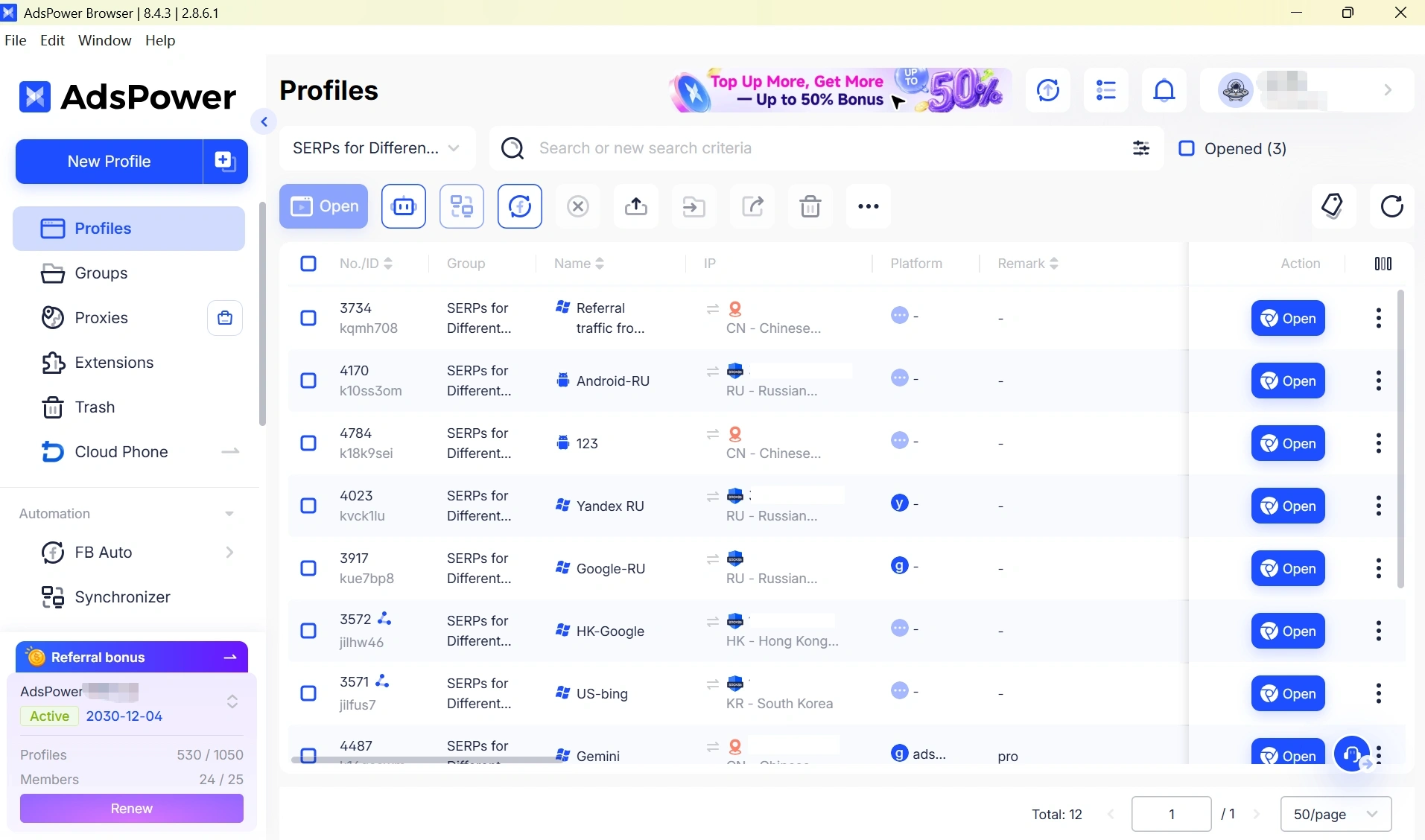
When creating a profile:
- Match the operating system to what you actually use, since fonts and system headers need to stay consistent with the reported OS.
- Add the proxy – residential or ISP, matched to the account's target geo – and run the built-in proxy checker before doing anything else. If it reports the connection type as a datacenter rather than residential or ISP, stop and swap the proxy; both platforms treat datacenter IPs as a strong ban signal on their own.
- Import cookies if the account came with an existing session – a browsing history gives the profile a "lived-in" feel that a brand-new empty browser can't fake.
- Verify the fingerprint through a checker like BrowserScan before logging into anything, confirming there are no leaks and that location and timezone line up with the proxy.
Log into general services first – check email, browse a normal site for several minutes – before ever opening the ads platform itself. Jumping straight from a fresh profile into an ad manager is one of the more obvious behavioral tells both platforms watch for.
Step 5: Warm Up Before You Spend
Neither platform rewards speed at this stage. On Facebook, spend the first day just browsing the feed, joining a couple of relevant groups, and building a Page with a neutral name and a handful of posts before running anything through it. On Google, after first logging into the profile, avoid touching the ads dashboard immediately – let the account sit untouched for roughly 24 hours after login before linking a payment method or building a campaign, since a rapid login-to-spend sequence reads as compromised-account behavior to Google's systems.
When you do link a card, make sure its billing country matches the ad account's geo exactly – a mismatch there is a common, avoidable reason for a "suspicious payment" flag regardless of how clean everything else looks.
Start any new campaign on a small daily budget, resist the urge to swap creatives or scale spend in the first few days, and treat the first approved status and first real clicks as the finish line for week one – not the moment to go all-in.
Step 6: Read the Traffic, Not Just the Approval Status
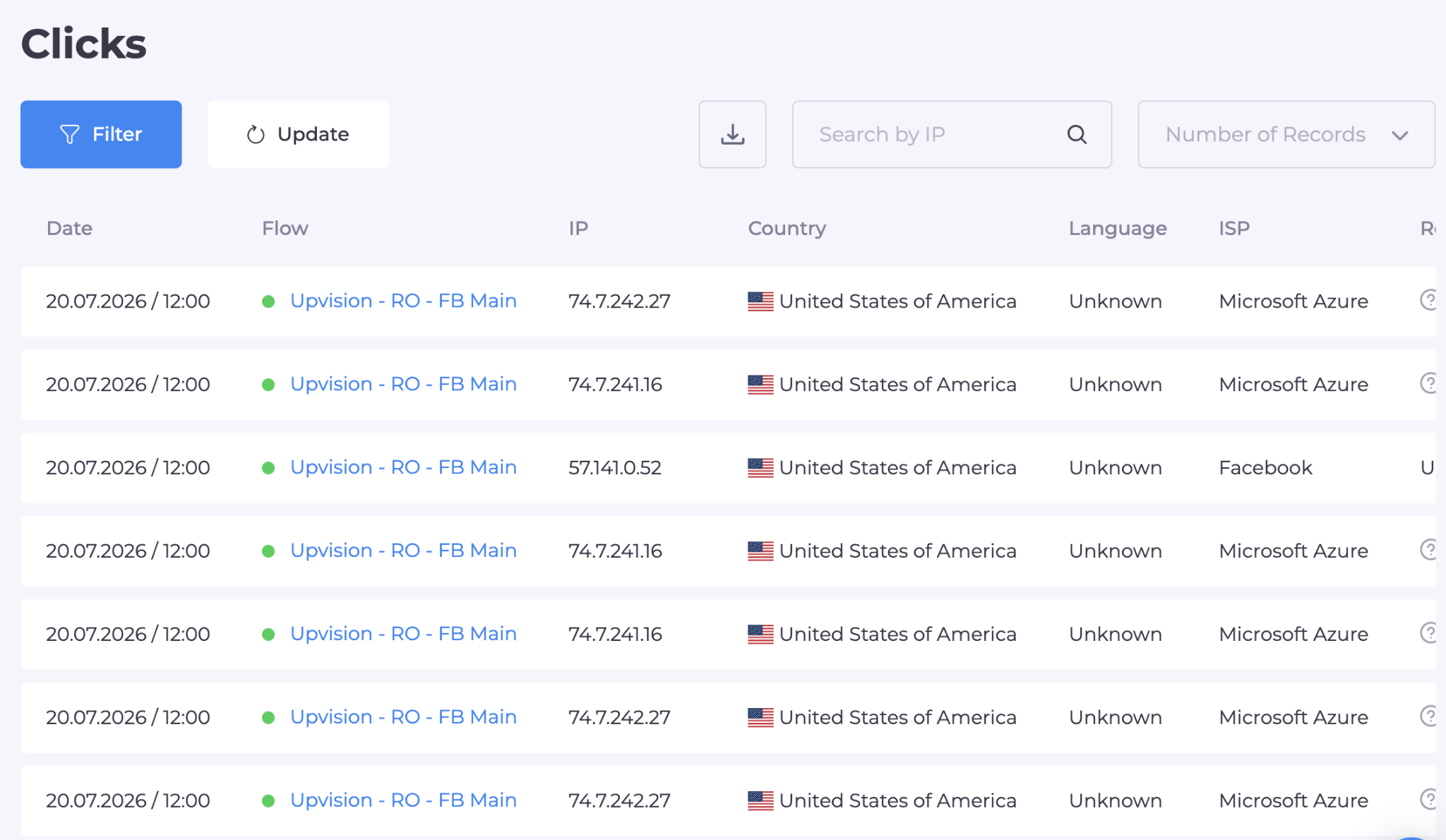
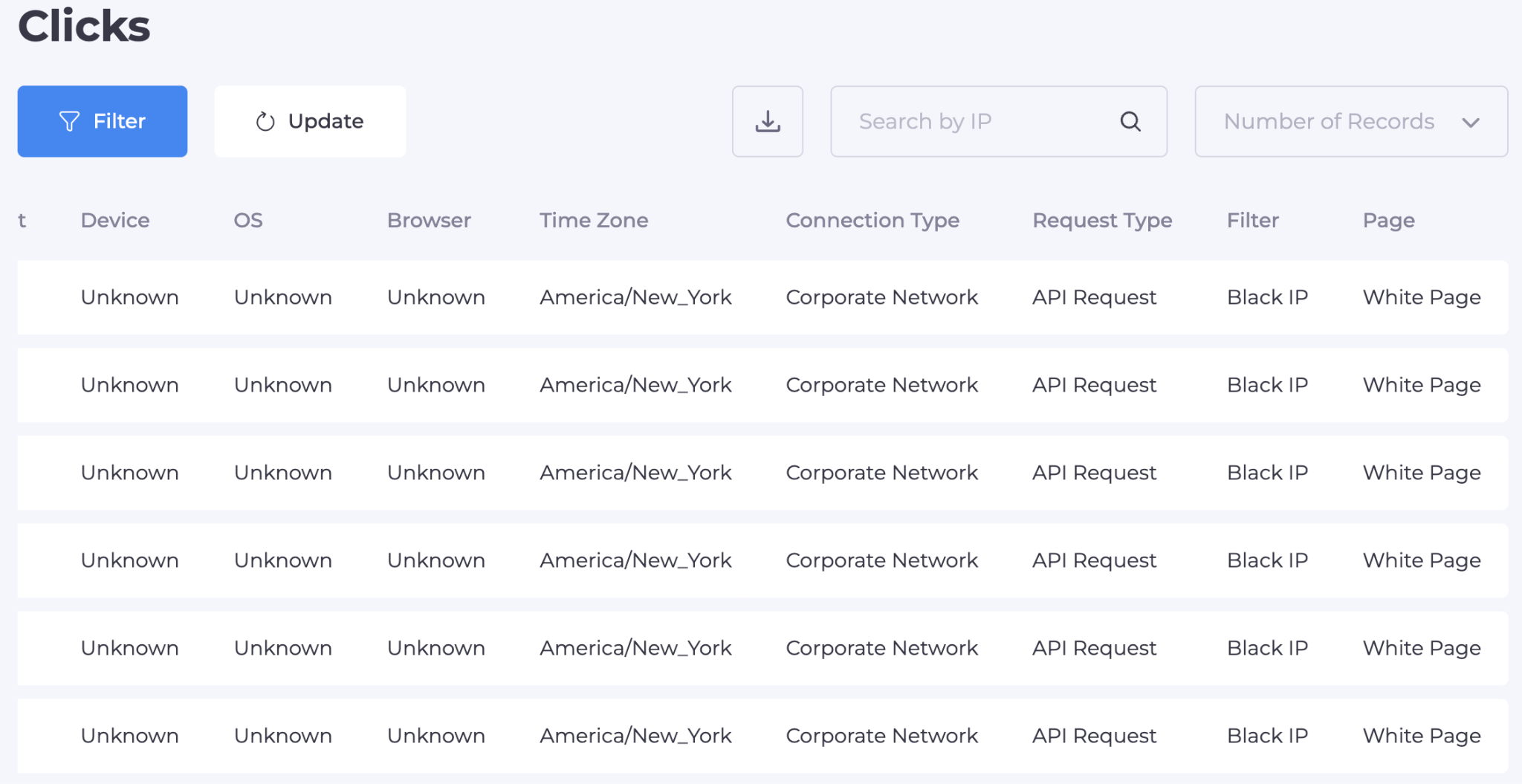
Once the ad is live, the flow's click log in Cloaking.House becomes the most useful diagnostic tool you have. Each click is tagged with a status: Cloaking (a bot, moderator, or filtered visitor) or Client (a real user sent through to the offer). A sudden cluster of Cloaking-status hits from a data-center-heavy region is usually the platform's own review crawler doing its job – that's expected, not a problem.
What's worth acting on is the opposite pattern: real users from your target geo showing up under a Cloaking status. Checking the accompanying reason field usually points to a specific filter – often IPv6 or ISP – that's tuned too tightly for that particular audience, and loosening just that one rule is almost always better than disabling filtering broadly.
A Few Things Not to Skip
- Never reuse a White Page across accounts. Both platforms can recognize a page they've already seen, which turns camouflage into evidence of intent.
- Don't run more than one ad account through the same proxy, payment method, or hosting account. Shared resources link profiles together even when the browser fingerprints are perfectly isolated.
- Keep a couple of backup profiles ready. In this line of work, occasional account reviews are a cost of doing business, not a sign the setup was wrong – having a warmed-up spare ready to go keeps a single review from stopping a campaign entirely.
Launch Checklist
- White Page generated and matched in topic, language, and format to the platform and creative
- Flow filters set correctly for the platform – IPv6 off for Google, on for Facebook
- Own IP whitelisted and Offer Page confirmed working before going active
- Integration file uploaded and original site file renamed to match the flow settings
- Antidetect profile created with a checked, matching-geo residential/ISP proxy
- Fingerprint verified clean before first login; general browsing done before touching the ads dashboard
- Card billing country matches the ad account's geo
- Small starting budget, no early creative or budget changes
- Click log checked for real users landing on the White Page by mistake
Conclusion
An antidetect browser and a cloaking flow aren't solving the same problem — one keeps the account looking like a genuine, isolated user, the other keeps the landing page from handing a reviewer the evidence it's looking for. Skip either half, and the platform only needs to catch the weak link, not both. Built together, and given the small amount of patience both platforms expect during warm-up, the setup holds up long enough to actually scale.
If you want to test the cloaking side of this setup, Cloaking.House gives new accounts a 7-day free trial on signup, and the promo code ADSPOWER takes a discount off any plan afterward.
