

How Agencies Can Simplify Multi-Account Ad Management
Take a Quick Look
How many Ads accounts are you managing now? It is a big headache to run hundreds of ads accounts from different clients. Follow us to ease your way to multi-account ad management.
An agency rarely struggles with its first advertising account. The real friction appears as the client list grows.
Media buyers begin switching between more dashboards. Client sessions become harder to organize. Similar campaigns must be recreated across accounts, while managers need to control access without distributing sensitive credentials throughout the team.
These tasks belong to two related but different parts of agency operations:
--Direct browser access to authorized client accounts
--Campaign execution and reporting across connected advertising platforms
AdsPower and Wevion have established a commercial partnership to help agencies address both sides of this workflow. AdsPower organizes browser profiles, sessions, and team access. Wevion supports API-based campaign operations and cross-platform reporting.
The products work independently, so no direct plugin is required. Agencies can use AdsPower for the browser layer and Wevion for the campaign layer.
Why Multi-Account Ad Management Becomes Complicated
A small agency may be able to manage client accounts through a few browser tabs and spreadsheets. That approach becomes unreliable once more buyers, clients, markets, and platforms enter the workflow.
Common problems include:
- Opening the wrong client account
- Sharing an account owner’s password with several employees
- Giving team members more access than their roles require
- Rebuilding similar campaign structures account by account
- Checking performance in several platform dashboards
- Combining results reported in different currencies
- Losing access control when an employee changes roles or leaves
Official tools such as Meta Business Manager and Google Ads manager accounts should remain the primary way to grant platform access whenever they meet the agency’s needs. However, direct browser work is still required for certain settings, reviews, and platform-specific tasks.
Campaign creation and reporting present a different challenge. Many of these operations can be completed through supported advertising APIs without opening each native account separately.
A more scalable workflow treats browser access and campaign operations as two distinct layers.
The Browser Layer: What AdsPower Handles
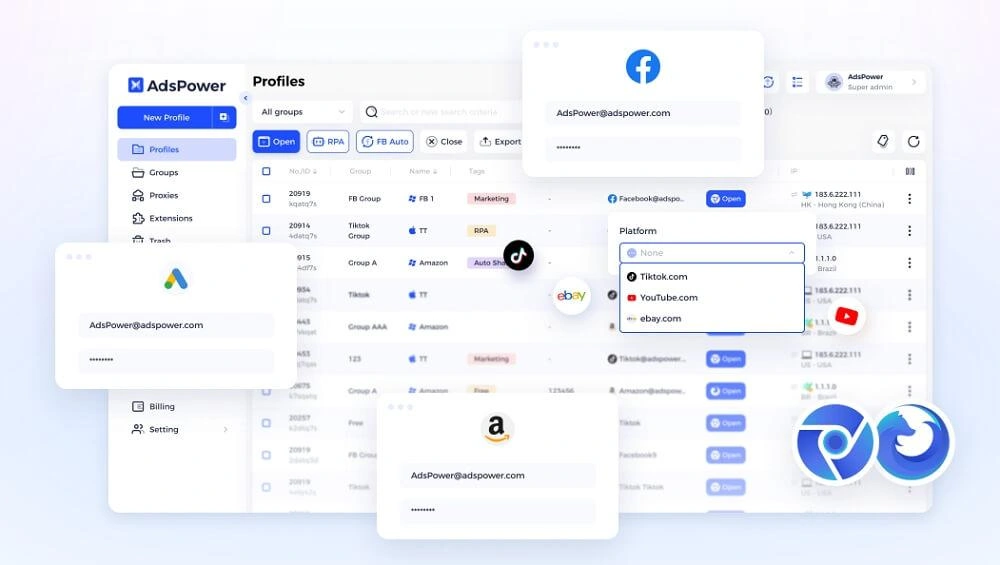
AdsPower provides separate browser profiles for authorized client, brand, or market accounts. Each profile stores its own cookies, browser settings, and login session, reducing the risk of opening a client account in the wrong workspace.
Agencies can group profiles by client or internal team and authorize members only for the profiles they need. A proxy may also be configured for a profile when required, but AdsPower does not provide one automatically.
AdsPower also supports permission-controlled RPA for approved browser tasks. It complements rather than replaces the official access systems provided by advertising platforms.
This browser layer is useful when a media buyer needs to:
- Open a client’s native Ads Manager
- Review platform-specific settings
- Use a feature that is unavailable through an API
- Complete an authorized login or verification step
- Investigate an issue that requires human review
Profile groups, team authorization, and browser-side task logs give the agency a clearer way to organize this work.
The Campaign Layer: What Wevion Handles
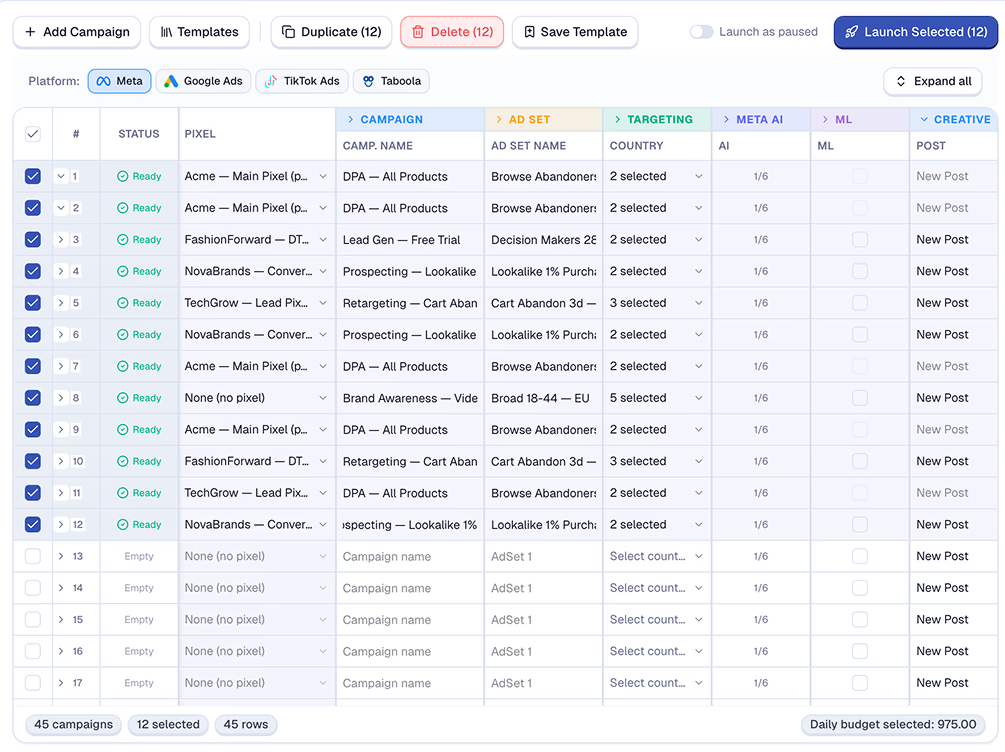
Wevion connects authorized advertising accounts through supported platform APIs. Its current platform coverage includes Meta, Google Ads, TikTok Ads, Taboola, Snapchat Ads, and Outbrain.
Once the accounts are connected, teams can use Wevion for supported campaign creation, bulk operations, and cross-platform reporting. This reduces the amount of campaign work that depends on keeping several native Ads Manager sessions open.
For agencies, Wevion provides workspaces, campaign-level roles, bulk campaign tools, and branded reports. Ecommerce teams can also connect Shopify and WooCommerce data to compare advertising results with order and revenue information.
Wevion does not replace the native advertising platforms. Some settings, verification requests, appeals, billing matters, and newer platform features may still require direct access. Those tasks can remain in the appropriate AdsPower browser profile.
What Each Tool Handles
The difference between AdsPower and Wevion is easier to understand when the work is divided by operational layer.
|
Job |
Handled by |
|
Browser profiles and fingerprints |
AdsPower |
|
Proxies per profile |
AdsPower |
|
Session and login management |
AdsPower |
|
Browser-side RPA |
AdsPower |
|
Browser-profile team access |
AdsPower |
|
Campaign creation and bulk launch |
Wevion |
|
Copying campaigns across connected accounts |
Wevion |
|
Campaign-level team access and permissions |
Wevion |
|
Cross-platform and ecommerce reporting |
Wevion |
AdsPower controls who can open and use a browser profile. Wevion controls who can work with connected campaigns, reports, and workspace features.
An agency may therefore use permissions in both products. A buyer could receive access to two client profiles in AdsPower and the corresponding client workspaces in Wevion, without gaining access to the rest of the agency’s account portfolio.
Why AdsPower and Wevion Work Well Together
The AdsPower–Wevion partnership is based on a practical division of work.
AdsPower keeps direct browser sessions organized. Wevion moves supported campaign operations and reporting into an API-based workspace. This arrangement can reduce repeated account switching while giving agencies more control over how work is assigned.
Consider a media buyer who manages three authorized client accounts.
The buyer may use AdsPower when direct access to Meta Ads Manager is needed. Each client session remains in its assigned browser profile. For supported campaign operations, the buyer can work through the relevant Wevion workspace instead of opening every native account separately.
The result is not a single merged product. It is a two-layer workflow:
AdsPower organizes browser access. Wevion organizes supported campaign operations.
This distinction also prevents teams from asking one tool to handle tasks for which it was not designed.
How Do I Set Up AdsPower and Wevion Together?
No direct integration is required. Each product connects to a different part of the agency workflow.
Step 1: Review Your Advertising Account Structure
List the client, brand, or market accounts your agency is authorized to manage. Record the account owner, advertising platform, assigned employees, and whether each account requires direct browser access.
Do not create additional accounts to bypass platform limits or enforcement. The workflow should cover legitimate accounts and business assets that the agency has permission to manage.
Step 2: Organize Browser Profiles in AdsPower
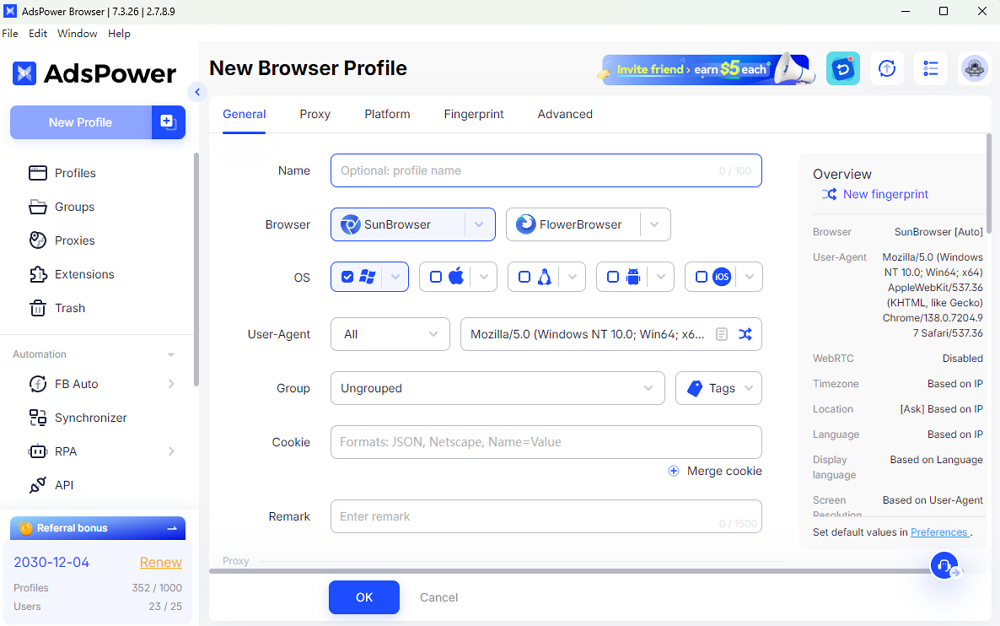
Create or retain one clearly named AdsPower profile for each account that requires direct access. Use a consistent naming format, such as:
Client – Platform – Market – Owner
Group related profiles by client, department, or project. Review existing proxy settings, saved sessions, and extensions before assigning the profiles to team members.
Step 3: Assign AdsPower Profile Access
Authorize employees only for the profile groups required by their roles.
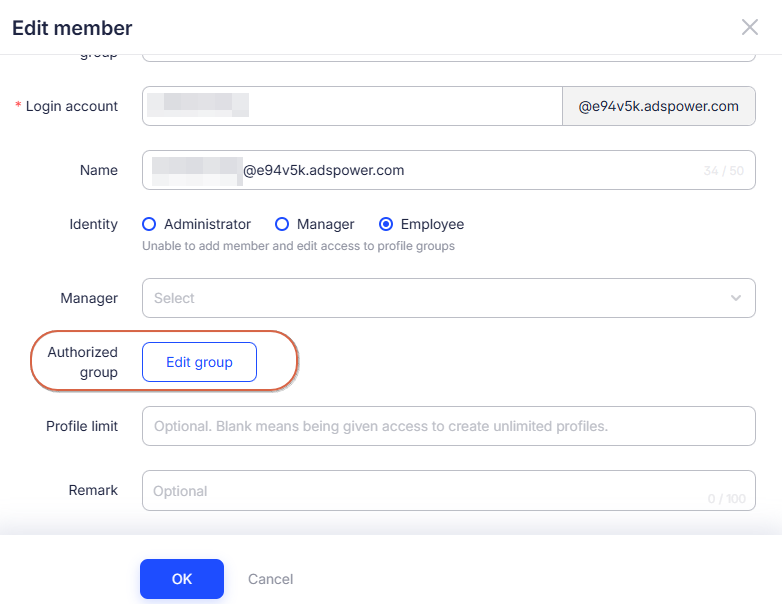
A media buyer may need the client’s advertising profile, while a team administrator may also need access to billing or account settings. Contractors should receive only the profiles needed for their assignments.
Sensitive actions, including identity verification, appeals, and major business-account changes, should remain with the appropriate account owner or administrator.
Step 4: Connect Supported Accounts to Wevion
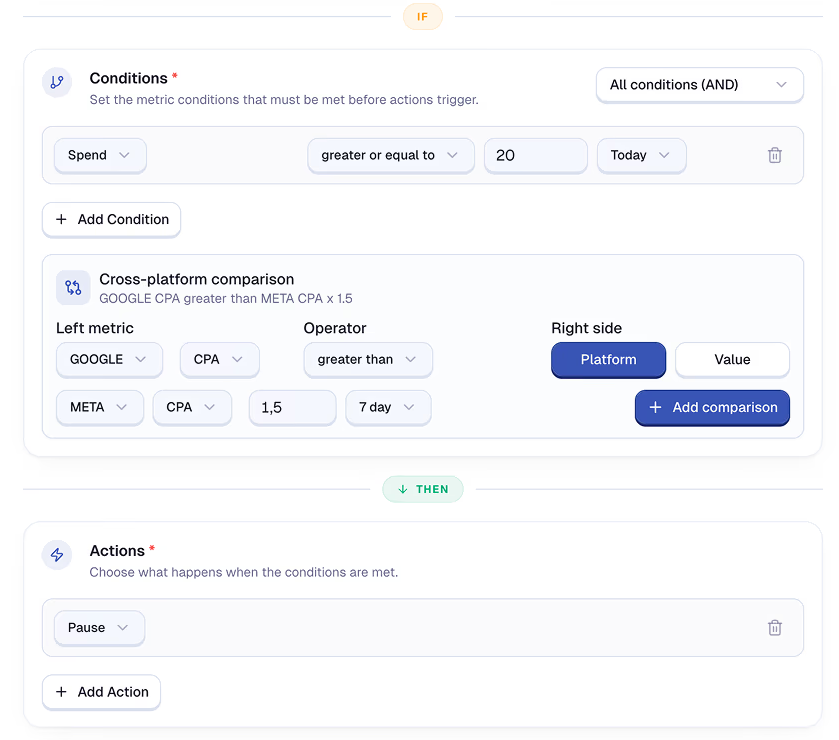
Authorize the required advertising accounts through the connection methods supported by Wevion.
For Meta, Wevion supports an OAuth-based connection. Eligible teams may also use an authorized System User configuration, depending on their Meta Business setup and Wevion plan. The accounts available in Wevion still depend on the assets and permissions granted through Meta.
The same principle applies to other advertising platforms: connect only accounts the organization is authorized to manage.
Step 5: Set Campaign Roles in Wevion
Decide who can create campaigns, review performance, export reports, or administer the workspace.
Wevion's internal permissions apply to its campaign and reporting layer. They do not replace the permissions assigned by Meta, Google, TikTok, or another advertising platform.
Keeping these roles narrow reduces the need to give every buyer administrative access.
Step 6: Test the Workflow with One Client
Start with one client or a small group of accounts.
Confirm that:
- The correct employees can open the assigned AdsPower profiles
- The required advertising accounts appear in Wevion
- Campaign structures map correctly to each platform
- Reporting currencies and time zones are configured correctly
- Shopify or WooCommerce data matches the intended store
- Sensitive tasks still reach the account owner
Resolve any permission or data issues before rolling the workflow out across the agency.
Step 7: Decide Where Each Task Belongs
Create a simple internal rule:
- Use AdsPower when direct browser access is required.
- Use Wevion for supported campaign operations and reporting.
- Use the native advertising platform as the authoritative source for account status, billing, policy notices, and final campaign data.
This prevents employees from switching tools without understanding which record should be trusted.
A Practical Agency Workflow
A campaign launch might follow this process:
1. The account owner confirms the client brief, budget, and platform permissions.
2. The media buyer reviews native account settings through the assigned AdsPower profile.
3. The campaign structure is prepared and approved.
4. Wevion deploys the supported structure to the selected connected accounts.
5. The buyer checks platform-specific details and resolves any API errors.
6. Wevion brings campaign performance into a shared reporting view.
7. The agency exports a client-facing report with the appropriate workspace branding.
Not every campaign needs to follow this exact sequence. The point is to make ownership clear and reduce unnecessary repetition.
Reporting Across Clients, Platforms, and Currencies
Cross-platform reporting becomes difficult when every advertising channel uses a different dashboard and metric structure.
Wevion normalizes common metrics such as spend, impressions, clicks, conversions, CPA, and ROAS across supported platforms. Agencies can separate clients into workspaces and export campaign-level PDF reports with configured branding.
For ecommerce clients, Shopify and WooCommerce data can sit alongside advertising results. Wevion can convert transactions into a reporting currency using the exchange rate from the transaction date.
These reports are useful for campaign analysis, but they should not replace financial reconciliation. Accounting teams should still compare the results with payment, store, and accounting records.
When Should an Agency Use Both Products?
Using AdsPower and Wevion together makes sense when an agency has both of these needs:
● Employees require organized, direct browser access to authorized client accounts.
● The team also needs API-based campaign operations or reporting across multiple connected accounts.
An agency may not need both tools in every situation.
If a team manages campaigns entirely through official manager accounts and does not need separate browser workspaces, AdsPower may not be necessary for that workflow. If a team prefers to perform all campaign work in the native advertising platforms, Wevion may not be required.
This transparency is important. The partnership is intended for teams with a genuine need for both operating layers.
What the AdsPower–Wevion Partnership Adds
AdsPower and Wevion have formally partnered to help agencies and ecommerce teams build clearer multi-account advertising workflows.
The partnership brings together expertise in:
- Browser profile organization
- Team access and permission management
- API-based campaign operations
- Cross-platform reporting
- Agency and ecommerce workflows
The two companies will also collaborate on educational content about deciding what belongs in the browser, what can move to an API, and how teams can maintain clear access as their client portfolios grow.
Eligible new users may also receive partnership discounts on AdsPower and Wevion plans. Check the current campaign or signup page for eligibility, supported plans, redemption instructions, and the latest terms.
Frequently Asked Questions
Do AdsPower and Wevion Have a Direct Integration?
No. There is no plugin or connector between the two products. AdsPower manages browser profiles and direct browser access. Wevion separately connects to supported advertising accounts through their APIs.
Does Wevion Replace AdsPower?
No. Wevion does not replace separate browser profiles, saved sessions, proxy configuration, profile groups, or browser-side RPA. It handles supported campaign and reporting operations through advertising APIs.
Does AdsPower Replace Wevion?
AdsPower supports direct account access and browser-side workflows. It does not provide the same API-based cross-platform campaign and reporting layer offered by Wevion.
Can Team Members Work Without the Account Owner’s Password?
For supported Wevion tasks, buyers can work through assigned workspace roles without receiving the account owner’s password. The required platform assets and permissions must still be granted. Some native-platform tasks may require authorized direct access.
Can I Still Work Directly in Ads Manager?
Yes. Open the relevant advertising platform through the assigned AdsPower profile when you need native settings, verification, billing, appeals, or features unavailable through the API.
Which Advertising Platforms Does Wevion Support?
Wevion currently lists Meta, Google Ads, TikTok Ads, Taboola, Snapchat Ads, and Outbrain. Platform coverage and individual feature availability may change, so check Wevion’s current documentation before deployment.
Final Thoughts
Multi-account ad management becomes easier when browser access and campaign operations are treated as separate responsibilities.
AdsPower gives agencies an organized browser layer with separate profiles, saved sessions, team authorization, and browser-side RPA. Wevion adds an API-based layer for supported campaign creation, bulk operations, and cross-platform reporting.
Their partnership does not turn the products into one platform. Instead, it gives agencies a clearer way to decide where each task belongs.
Start with AdsPower to organize browser profiles and team access. Then explore Wevion for API-based campaign operations and reporting across connected advertising accounts.

People Also Read
- AdsPower × Adpos: Get More from Our Annual Sale with 10 Free Cards and Up to $300 Cashback
AdsPower × Adpos: Get More from Our Annual Sale with 10 Free Cards and Up to $300 Cashback
Join the AdsPower Annual Sale for up to 50% off and get 10 free Adpos virtual cards plus up to $300 cashback on qualifying ad spend.
- How to Use Cloaking and Antidetect Browsers for Facebook & Google Ads
How to Use Cloaking and Antidetect Browsers for Facebook & Google Ads
Learn how cloaking and antidetect browsers can support Facebook and Google Ads workflows. Explore account isolation, fingerprint management, proxy set
- Using DataImpulse Proxies in AdsPower: Complete Setup Guide (2026)
Using DataImpulse Proxies in AdsPower: Complete Setup Guide (2026)
Explore DataImpulse’s proxy types and features, see what matters for AdsPower users, and learn how to set up and configure proxy for browser profile.
- How to Manage Walmart Seller Accounts and Dropshipping Operations as a Team
How to Manage Walmart Seller Accounts and Dropshipping Operations as a Team
Learn how to manage Walmart seller accounts, team access, inventory, orders, and dropshipping workflows with AdsPower and Doba.
- IPcook Review: A Practical Proxy Option for AdsPower Users
IPcook Review: A Practical Proxy Option for AdsPower Users
Discover why IPcook is the go-to choice for affordable proxies. Learn more about its high-quality residential, ISP, and datacenter proxies in review
