

Revocable Profile Sharing in AdsPower: Full Feature Guide
Take a Quick Look
Discover how revocable profile sharing works in AdsPower. Share safely, revoke access anytime, and protect your data. Try this new feature today to keep multi-account management secure and flexible.
Managing multiple accounts often means collaborating with partners, teams, or even third parties. But what happens when you need to take back access — especially after an account rental period ends or when business terms change? Until now, shared profiles in AdsPower couldn't be retrieved once sent. That changes with our latest feature: Revocable Profile Sharing.
This article explains what it is, who it's for, how to use it, and important considerations to keep in mind. Whether you're learning how to share a profile in AdsPower or wondering how to revoke a shared profile in AdsPower, this guide covers it all.
What Is Revocable Profile Sharing?
Revocable Profile Sharing allows you to share a browser profile or a group of profiles with another AdsPower user and later revoke that access when needed. Unlike the default ”Non-revocable” sharing, a revocable shared account gives you full control even after sharing.
In other words, you can now share with confidence — knowing you can take it back at any time.
Who Should Use It?
This feature is ideal for:
- Account rental scenarios: Share profiles with partners, freelancers, or agencies for a limited time and retrieve them once the contract ends.
- Temporary collaborations: Give someone controlled access without worrying about long-term data exposure.
- Sensitive operations: Maintain tighter control over where and how profiles are used, reducing risks of unauthorized re-sharing.
Learn how to share your accounts below:
How Can You Share Netflix Account Safely?
How It Works
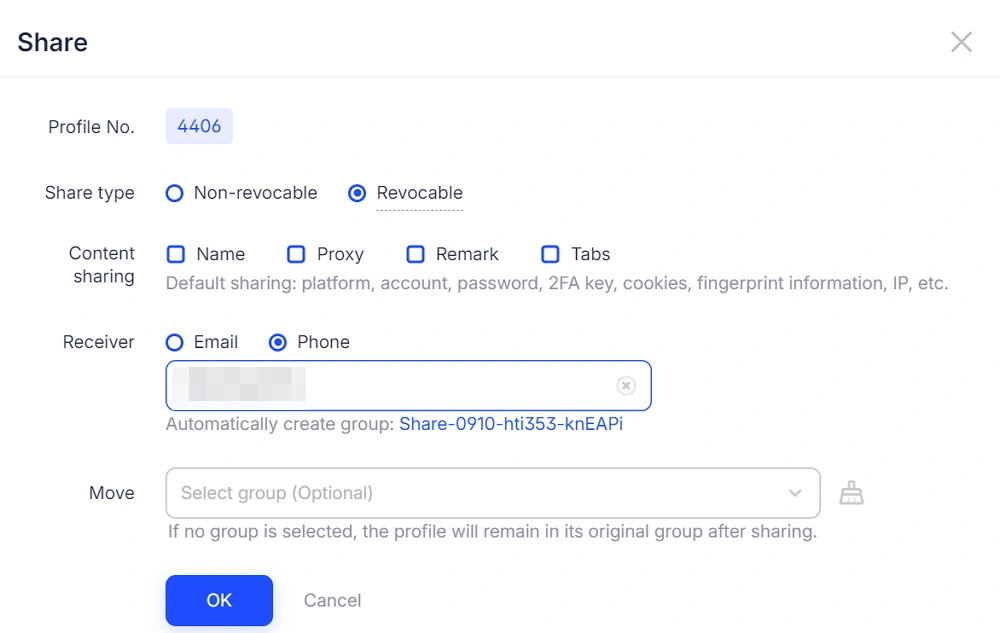
When you share a profile or profile group, the sharing window now includes two types:
- Non-revocable (default) — The traditional sharing method; cannot be recalled.
- Revocable (new) — Profiles can be revoked anytime by the original owner.
Steps to Share a Revocable Profile
1. Select the profile or profile group you want to share.
2. Click the Share button.
3. In the pop-up window, choose "Revocable" as the sharing type.
4. Enter the recipient's AdsPower account information. Then click OK.
5. Confirm to share in the pop-up window.
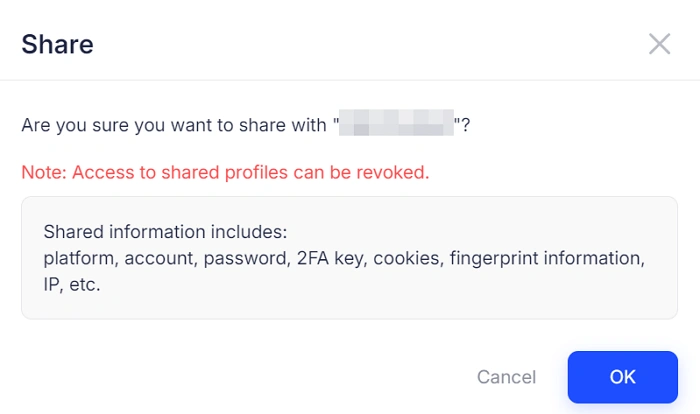
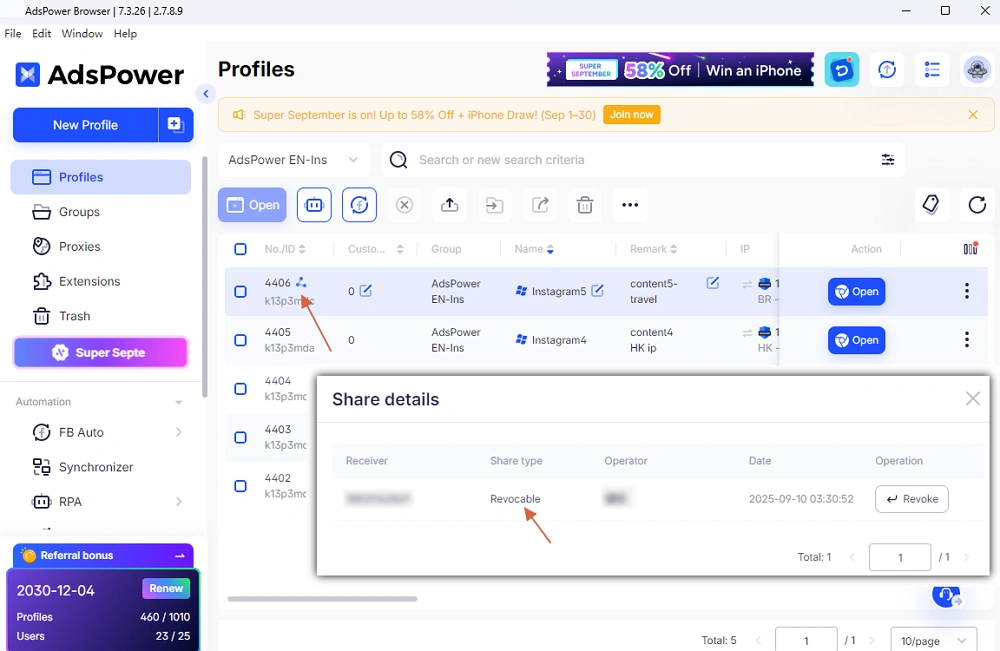
That's it — your profile is now shared but still under your control. Just check in the profile list, and you will see the Share details by clicking the sharing icon next to the profile ID.
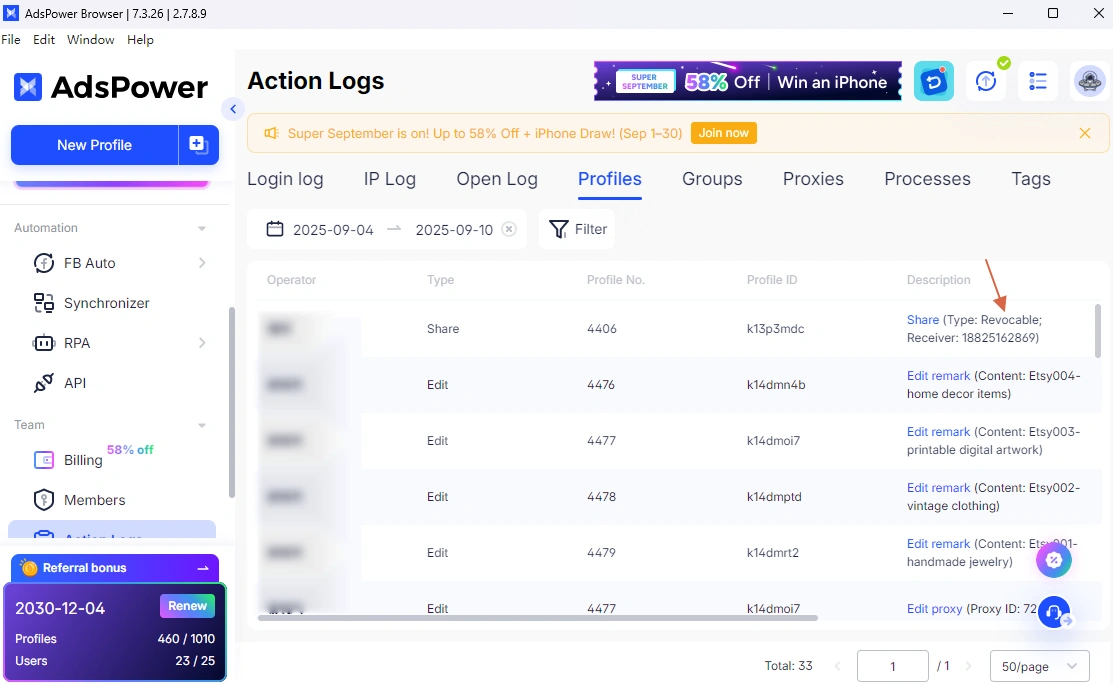
Or you can view the profile action log in Team > Action Logs > Profiles.
How to Revoke a Shared Profile
If you need to take back access:
- Go to the profile list and hit the sharing icon next to the profile that you want to withdraw.
- Click Revoke.
- Confirm to revoke the shared profile. And the recipient will get the notification of the revocation.
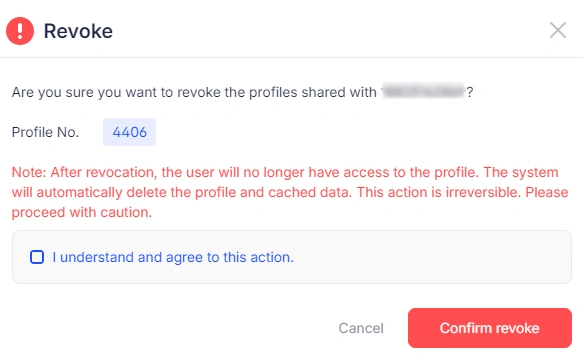
When revoked, AdsPower will:
- Delete the profile from the recipient's account (completely, not sent to trash).
- Remove all cached data associated with that profile.
- Notify the recipient via in-app message and email.
- Log the action for both parties (marked as ”Deleted” for the recipient and ”Revoked” for the sharer).
FAQs
Can I revoke any shared profile?
No. Only profiles shared as Revocable can be recalled. Non-revocable shares remain permanent.
Will the recipient still see the profile after revocation?
No. The profile and all related data are permanently deleted from their account.
Why can't a revocable profile be re-shared?
To prevent uncontrolled distribution, revocable shared accounts cannot be shared again by recipients and cannot be archived.
Will the recipient know when access is revoked?
Yes. Both an in-app message and an email notification are sent to ensure clarity.
Will old sharing data be affected?
No. Existing shared profiles are treated as non-revocable and remain unchanged.
Why This Matters
Multi-account workflows rely on trust — but trust needs flexibility. With Revocable Profile Sharing, AdsPower users can confidently collaborate, rent out accounts, or grant temporary access without losing control. It's security, flexibility, and transparency, all in one feature.
Start using revocable shared account today and take full control of your profile-sharing strategy.

People Also Read
- AdsPower Unveils AI Agent, a New Way to Automate Browser Tasks Across Multiple Profiles
AdsPower Unveils AI Agent, a New Way to Automate Browser Tasks Across Multiple Profiles
AdsPower launches AI Agent for natural-language browser automation.
- What's New in AdsPower Browser in August 2026?
What's New in AdsPower Browser in August 2026?
Explore the AdsPower August 2026 update, featuring AI Agent, Chrome 151, improved mobile profiles, easier proxy troubleshooting, and faster profile
- AdsPower Annual Sale 2026: Unlock 50% Off Your 360-Day Plan

AdsPower Annual Sale 2026: Unlock 50% Off Your 360-Day Plan
The longer you subscribe, the more you save during the AdsPower Annual Sale 2026, with up to 50% off the 360-day plan.
- Create an AdsPower Video and Earn $30 — No Follower Minimum
Create an AdsPower Video and Earn $30 — No Follower Minimum
Create an original AdsPower video, publish it on any public social platform, and earn $30. No follower minimum. Ends September 6, 2026 (23:59:59 UTC).
- The AdsPower iOS App Is Now Publicly Available
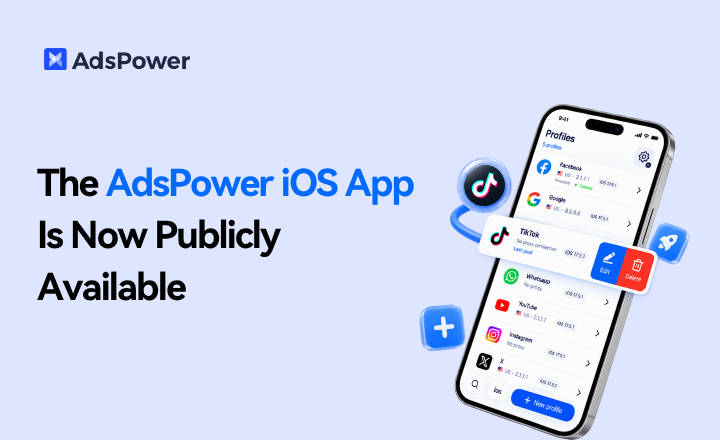
The AdsPower iOS App Is Now Publicly Available
AdsPower Browser is now available on iOS. Manage browser profiles, test proxies, access synced team data, and open iOS profiles from your iPhone.
