We're back with another round of the AdsPower Creator Program!
Last time, we rewarded creators for sharing their AdsPower experiences across different platforms. This time, we're keeping things simple: create one YouTube video, share how you actually use AdsPower, and earn $30 in cash.
Whether you've been experimenting with our AI Agent, preparing for Black Friday, or using AdsPower in your everyday workflow, we'd love to hear your story.
No minimum subscriber count. Just your own experience, a useful video, and something worth sharing with others.
📅 Campaign Period: November 20–30, 2026
⏰ Submission Deadline: November 30, 2026, at 10:00 UTC
🎁 Reward: $30 cash per approved YouTube video
Who Can Join?
You don't need thousands of subscribers to participate. We welcome creators of all sizes, as long as your YouTube channel meets these requirements:
- An authentic, active YouTube channel with genuine posting history.
- Channels must have previously published original videos. Newly created, empty, or inactive channels with no meaningful posting history will not be approved.
- Content primarily in English, with the submitted video presented in English.
- No active platform violations or restrictions.
- Not a bot-operated, mass-produced, or fully AI-generated content channel.
Note: All YouTube accounts are subject to review. AdsPower reserves the right to reject accounts that appear to have been created solely to claim campaign rewards.
YouTube Video Requirements
We're looking for videos that show how AdsPower works in real situations, not just a list of product features.
Your video should help viewers understand what you were trying to accomplish, how you used AdsPower, and what happened along the way.
What We're Looking For?
✅ At least 90 seconds long.
✅ On-camera presentation. You must appear on camera or use a digital avatar to introduce, explain, or share your experience. You can combine your presentation with screen recordings to demonstrate your workflow.
✅ Show AdsPower in action. Use actual recordings of the latest AdsPower desktop app and walk viewers through a specific use case.
✅Share practical insights. Explain the problem, the steps you took, and what you learned or achieved.
✅ Keep it clear and engaging. Good audio, readable recordings, and a natural presentation matter more than fancy editing.
✅ Publish a new, original, publicly accessible YouTube video during the campaign period.
You're welcome to share honest feedback, including what worked well, what didn't, and any tips you discovered.
What Won't Be Accepted?
❌ Videos shorter than 90 seconds.
❌ Videos without meaningful on-camera participation, including screen-recording-only videos, voiceover-only videos, slideshows, or AI avatars.
❌ Videos that only describe features without showing any real product use or meaningful application.
❌ Reuploaded official demonstrations, copied creator content, or substantially similar videos submitted through multiple accounts.
❌ AI-generated fake product interfaces, fabricated screen recordings, or misleading results.
❌ Videos with poor audio or visual quality that makes the content difficult to follow.
❌ Videos padded with repeated footage, unnecessary waiting, or filler just to meet the minimum length.
❌ Videos showing only the AdsPower website or web dashboard instead of actual desktop application use.
❌ Outdated recordings that no longer reflect the current AdsPower interface.
⚠️ Important: Approved videos must remain public and accessible for at least 60 days. Deleting, hiding, or changing a video to private or unlisted during this period may result in reward cancellation or recovery.
Need Video Ideas? Start Here!
Not sure what to record? Here are some real-world ideas to inspire your video.
These are just suggestions. Feel free to explore other workflows based on your own experience.
1. Share Your Experience with AdsPower AI Agent
Have you tried AdsPower AI Agent yet? Show us how you use it to get real work done, from managing multiple accounts and automating repetitive browser tasks to exploring other practical use cases.
Helpful resources:
Idea 1: How I Use AI Agent for Everyday Social Media Tasks
If you manage multiple social media accounts, show how you experiment with AI Agent to handle repetitive browser tasks.
For example:
- Use AI Agent to create multiple browser profiles for your social media accounts, configure their settings, and organize them into groups.
- Ask AI Agent to open a specific browser profile, log in to your account, and publish a prepared post.
- Set up scheduled tasks to publish content to your own social media accounts at specific times.
- Test an automated routine for your accounts, such as checking new content, reviewing notifications, or preparing posts for approval.
Idea 2: How AdsPower AI Agent Saves Me 2 Hours on Data Collection Every Day
If you're running an online store, researching competitors, or managing marketing campaigns, try using AI Agent to collect and organize the information you normally gather manually.
For example:
- Ask AI Agent to collect product images from selected public e-commerce pages and test how to save them into an organized folder.
- Extract product names, prices, ratings, and review counts from Amazon or other e-commerce websites, then organize the results into a spreadsheet.
- Collect competitor product listings and compare prices across several online stores.
- Gather publicly available social media post data, such as titles, engagement numbers, and publication dates, for content research.
Show the actual process and compare it with your previous manual workflow. Did it really save you time?
Idea 3: I Tried Browser Automation Without Coding
Curious about automation but don't know how to code? Try building a real workflow with AdsPower AI Agent.
For example:
- Ask AI Agent to create an RPA workflow that opens a product page, extracts specific information, and records the results.
- Set up a scheduled task to check selected product prices or other public information every morning.
- Use one prompt to complete a multi-step workflow across several AdsPower browser profiles.
- Turn a successful AI Agent task into a reusable workflow, then test how consistently it performs.
Don't just show the final result. Walk viewers through your instructions, the execution process, and any adjustments you made.
2. Show How AdsPower Fits into Your Black Friday Workflow
Black Friday means more campaigns, more store activity, and more work to manage.
Whether you're an e-commerce seller, media buyer, affiliate marketer, or agency owner, show us how AdsPower helps you prepare for the busy season.
Helpful resources:
Idea 1: How I Prepare Multiple Stores for Black Friday
Running several stores during a major sale? Show how you keep your operations organized.
For example:
- Manage multiple Shopify or other e-commerce store accounts in separate AdsPower browser profiles.
- Organize stores by brand or region and demonstrate how you switch between them to update Black Friday promotions.
- Share store profiles with team members so they can handle product updates, orders, or customer support without exchanging passwords.
- Demonstrate how you prepare and check product listings or promotional information across several stores.
Idea 2: Managing Multiple Ad Accounts During Black Friday
Black Friday is a great time to experiment with different ad creatives, audiences, and campaign strategies.
For example:
- Organize multiple authorized Facebook Ads or Google Ads accounts in AdsPower and demonstrate how you manage separate client campaigns.
- Test different Black Friday ad creatives, headlines, or landing pages and compare their CTR, CPC, or conversion performance.
- Compare different audience targeting strategies across campaigns and explain how you track the results.
- Show how you manage and review ad campaigns for several brands without constantly switching browser logins.
Idea 3: How I Automate Repetitive Black Friday Tasks with AdsPower
With so many things happening at once, even small repetitive tasks can take up hours.
For example:
- Use AI Agent to collect competitor Black Friday prices and promotional offers from selected public product pages.
- Create an RPA workflow to check product availability or other publicly accessible information across multiple websites.
- Schedule recurring product research tasks to monitor changes during the promotion period.
- Demonstrate how you organize repeated tasks across several browser profiles and compare your manual workflow with the automated version.
You don't need to reveal confidential business data or show impressive sales numbers. A practical demonstration of how you prepare for Black Friday is just as valuable.
3. Or Share Your Own AdsPower Story
Not using AI Agent or preparing for Black Friday? That's completely fine!
You can explore any AdsPower use case that genuinely helps with your work, whether it's multi-account management, team collaboration, e-commerce operations, or browser automation.
Just avoid overly basic topics, such as simple proxy setup tutorials, or generic product introductions without real-world use cases or practical value.
Be creative and make it your own! If your video stands out, we might even reach out to explore future creator collaborations.
How to Join in 3 Simple Steps
Ready to share your experience? Here's how to participate.
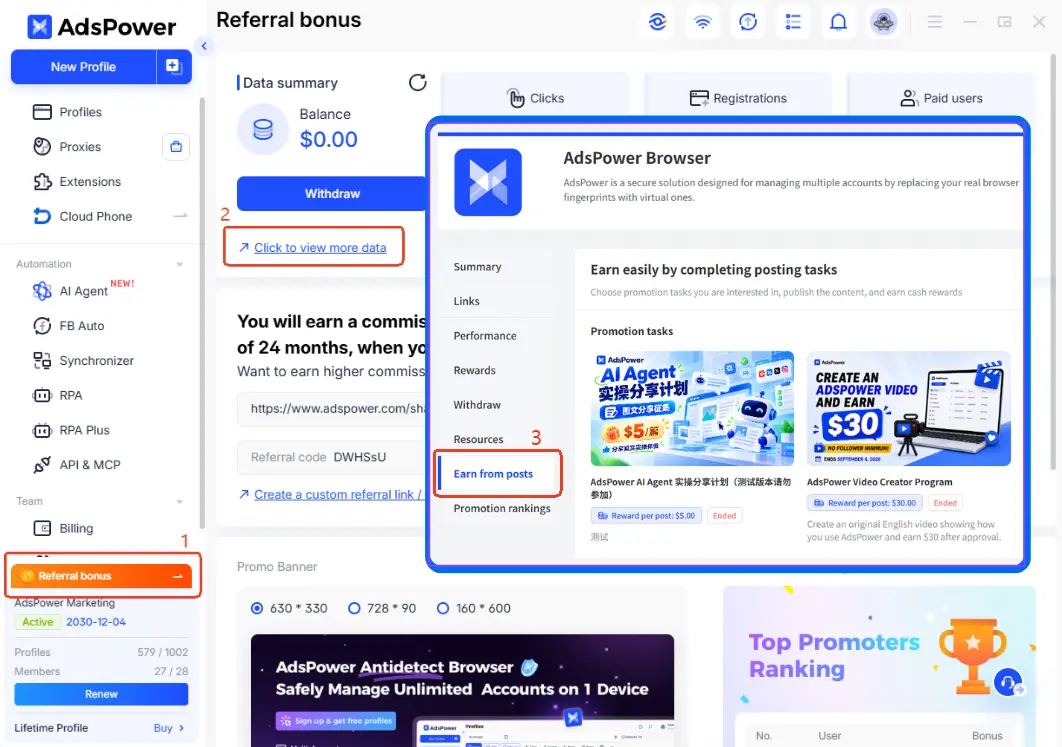
Step 1: Join the Campaign
Open AdsPower and go to: Referral bonus → Click to view more data → Earn from Posts
Find this YouTube Creator Program campaign and join.
Sign up or log in here: https://www.adspower.com/share/CreatorProgram
Step 2: Bind Your YouTube Account
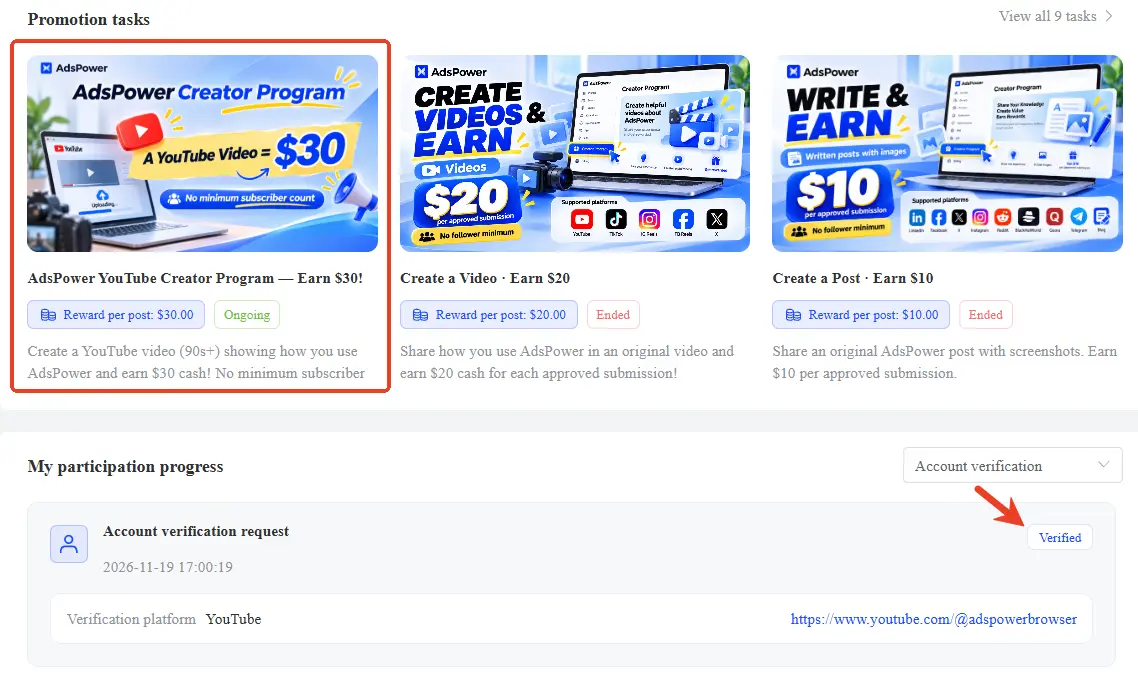
Select the YouTube account binding option.
Submit your YouTube channel homepage link and a screenshot.
Wait for account verification, usually within 1 business day.
Once approved, your account status will show Approved.
Step 3: Publish & Submit Your Video
Create and publish your video on YouTube following the requirements above.
Keep the video public and include your campaign tracking link in the description.
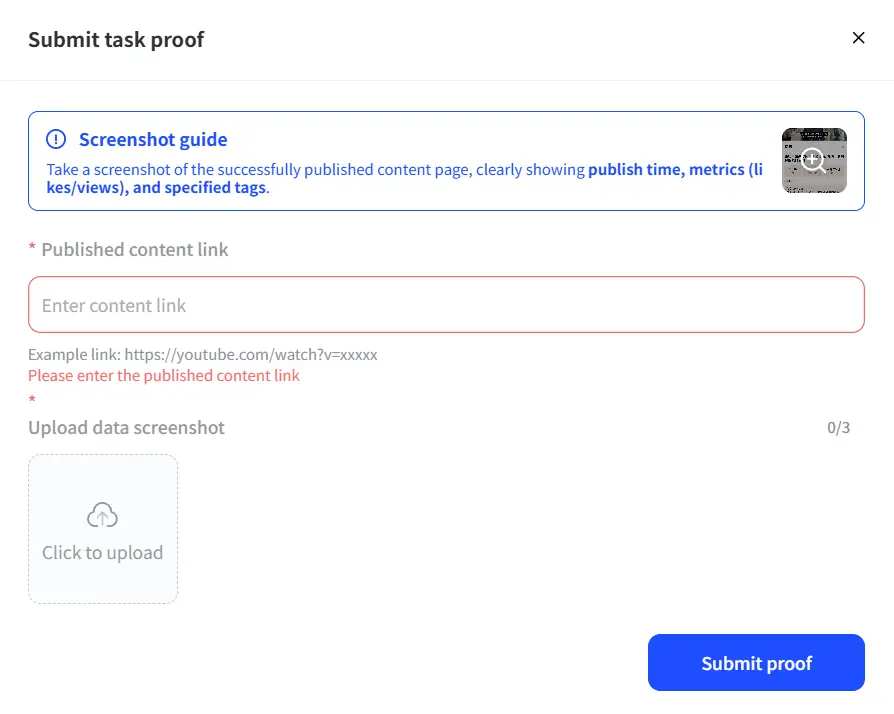
Return to Earn from Posts and submit your video URL and the required screenshot.
Our team will review your submission within 2 business days.
Once approved, $30 will be credited to your PartnerShare balance.
How to Withdraw Your $30
Your reward is a cash reward, not just a discount coupon!
The minimum withdrawal amount is $10, so you can withdraw your approved $30 reward without needing to earn anything extra.
Four withdrawal options are available:
- PayPal
- Alipay
- Capitalist
- AdsPower browser balance
Choose the payout option that works best for you.
A Few Things to Remember
- Deadline: Submit your video before November 30, 2026, at 10:00 UTC.
- Originality: Only newly created, original content is eligible.
- Video availability: Keep your approved video public for at least 60 days. Removing or hiding it during this period may affect your reward eligibility.
- Reward limit: One approved $30 reward per eligible participant.
Your Experience Could Help Someone Else
You don't need a huge audience or a professional studio to create something valuable.
Sometimes, a simple walkthrough of how you solved a real problem is more helpful than a polished product advertisement.
So whether you're testing AI Agent, preparing for Black Friday, or sharing a workflow you've refined over time, we'd love to see it.
One YouTube video. Your real experience. $30 in cash.
