

AdsPower’s new API lets you fetch browser cookies after login automatically. Eliminate manual steps and boost efficiency—try it now and streamline your automation workflow with ease.
Many users have asked:
“Can I fetch cookies directly from the browser via AdsPower API after login?”
Now, the answer is yes. AdsPower has released a new API endpoint that lets you automatically obtain cookie data from a logged-in browser profile — no more manual exports, copy-pasting, or extra steps.
Whether you're integrating with your own systems, running automated login flows, or managing large batches of accounts, this update helps simplify and speed up your entire process.
What Can You Get via API in AdsPower?
This update is built for users who:
✅ Want to retrieve cookies from a browser profile via API
✅ Need to extract post-login cookies to complete automation or pass data to other systems
✅ Prefer a fully automated login + cookie collection workflow
Now, you can log into a website through AdsPower, and once the login is successful, call the API to fetch the cookies from that session — all programmatically.
Important Prerequisites
Before using this new feature:
- Ensure you’re using the latest AdsPower patch version
- The feature is available for Advanced plan users and above
API Endpoint Overview
- Endpoint: GET /api/v2/browser-profile/cookies
GET /api/v2/browser-profile/cookies- Purpose: Query cookie data from a specific profile
- Supported Plans: Professional plan or higher
- Rate Limit: 1 request per second per device
- Query Scope: One profile per request
Request Parameters
| Parameter | Type | Required | Description |
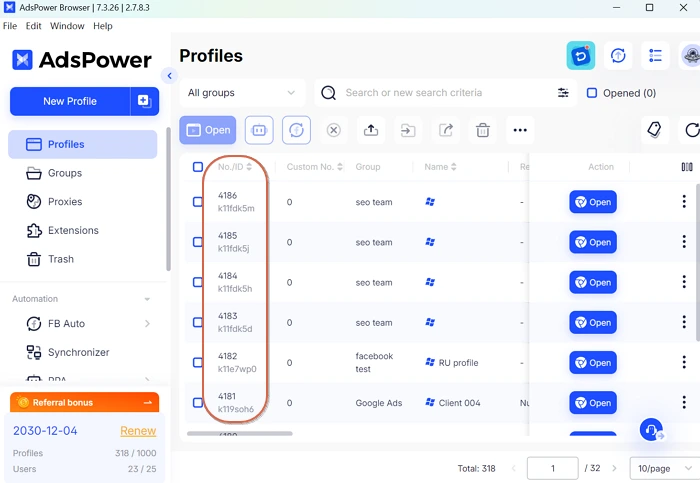
| profile_id | text | Optional | ID of the profile (use either profile_id or profile_no) |
| profile_no | text | Optional | Number of the profile (ignored if profile_id is provided) |
Best Practices for Use
- Avoid exceeding the rate limit to prevent throttling
- Set proper API access permissions to protect sensitive cookie data
- For large batches, implement queueing or delay logic to space out API calls
Learn More about AdsPower API >>
Summary
This update brings a critical boost to automation. You can now:
- Auto-login accounts in AdsPower
- Instantly fetch cookies via API
- Integrate smoothly into any backend system
Say goodbye to manual cookie exports — and start building a smarter, more efficient automation pipeline today.
