

Antidetect Browser vs Regular Browser: Understanding the Key Differences
Take a Quick Look
Learn what an antidetect browser is, how it compares to a regular browser, and how to choose the right solution for secure multi-account management.
🔥 Limited-Time Offer! Save extra 10% off on your first monthly plan with code: Anitdetect10
Chances are, Google Chrome or Safari is your go-to browser for everyday online activities, as these two dominate nearly 84% of the global market from January 2012 to September 2025. It's no surprise that they're versatile tools that serve a variety of needs, from browsing the web and searching for information to watching videos.

However, when it comes to privacy protection, these browsers often fall short. They tend to leave behind traces such as cookies and IP addresses that can be tracked, meaning your online activities are far from private and are exposed to others.
As the importance of online privacy grows and the demand for managing multiple accounts increases, browsers with anti-tracking features are becoming an increasingly important tool. So, what exactly sets a fingerprinting browser apart from a regular browser? In this blog, we'll explore the key differences between antidetect browsers and regular browsers, their practical applications, and take a closer look at the best antidetect browser—AdsPower.
What is an Antidetect Browser?
An antidetect browser, as the name suggests, is a type of browser designed to mask or alter your digital fingerprint in order to protect your privacy and avoid detection. It works by concealing or changing identifiable information, such as your IP address, device specifications, and browsing habits, which are typically used to track and identify users online. By simulating different devices and locations, antidetect browsers provide an extra layer of anonymity, helping users stay under the radar and prevent being traced or targeted by websites or online services.
To understand how this works, it's important to know what makes your browser identifiable in the first place. Every time you visit a website, your browser reveals a collection of information beyond your IP address, including your operating system, screen resolution, installed fonts, browser version, language, timezone, Canvas, WebGL, and other device characteristics. Together, these signals create a browser fingerprint, which many websites use to recognize returning users and detect related accounts.
Unlike a VPN or proxy, which primarily changes your IP address, an antidetect browser also manages these fingerprint signals. It lets you customize or simulate different browser fingerprints while keeping cookies, local storage, and browsing sessions completely isolated between profiles. Combined with dedicated proxies, each profile appears to come from a separate real device, making it much easier to manage multiple accounts independently.
Because of this, antidetect browsers are widely used by e-commerce sellers, affiliate marketers, advertisers, social media managers, agencies, and anyone who needs to operate multiple accounts securely without unnecessary account linking.
💡New to browser fingerprinting? Learn how browser fingerprints work and why websites use them to identify devices in our Browser Fingerprinting Guide.
Is a Fingerprint Browser the Same as an Antidetect Browser?
Yes. "Fingerprint browser" and "antidetect browser" generally refer to the same type of software. Both create isolated browser profiles with unique browser fingerprints, making each profile appear as a different device. Combined with dedicated proxies, these browsers help reduce account linking and are widely used for secure multi-account management, online privacy, and cross-region operations.
Antidetect Browser vs Regular Browser: Key Differences
Now that we've defined antidetect browsers, let's dive into the specific differences between antidetect browsers and regular browsers. Here is a concise comparison table between an antidetect (anti-fingerprint) browser and a regular browser:
|
Feature |
Antidetect Browser |
Regular Browser |
|
Multi-Account Management |
Yes |
Yes (with risks) |
|
Dynamic Fingerprint Alteration |
Yes |
No |
|
Tracking Protection |
Yes, difficult to track |
No |
|
Bypass Geo-Restrictions |
Yes |
No |
|
Protection from Detection and Bans |
Yes |
No |
|
Integrated Proxy Management |
Built-in proxy management and rotation |
No native support |
|
Account Management Flexibility |
Yes |
No |
1. Multi-Account Management
-
Antidetect Browser: One of the main features of antidetect browsers is their ability to manage multiple accounts across various platforms without triggering account linking or detection. This is crucial for digital marketers, e-commerce businesses, and anyone who needs to keep multiple identities separate.
-
Regular Browser: Regular browsers make it difficult to manage multiple accounts without risking account linking. Since all accounts are associated with the same browser fingerprint, platforms can easily detect that the accounts are being accessed by the same user, often resulting in account suspensions or bans.
2. Dynamic Fingerprint Alteration
-
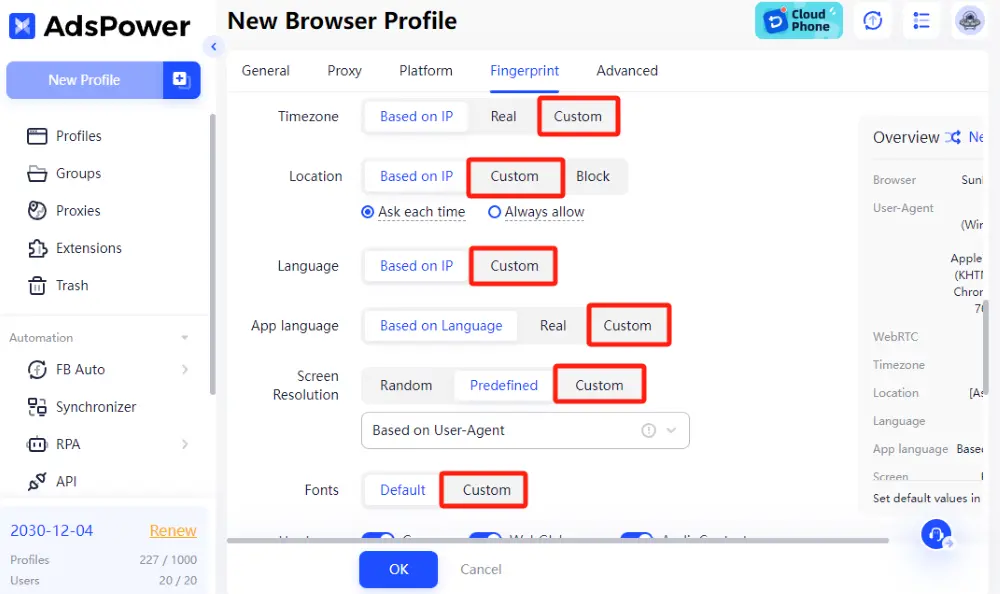
Antidetect Browser: These browsers regularly change key identifiers like IP addresses, device details, screen resolution, and other fingerprints, making it hard to associate activities with a single individual.
-
Regular Browser: A regular browser keeps a consistent fingerprint, including stable IP address and device details, making it easier for websites to recognize users over time.
3. Tracking Protection
-
Antidetect Browser: Since antidetect browsers allow users to modify key identifiers, it becomes incredibly difficult to trace their true identity. This dynamic fingerprint alteration ensures a high level of anonymity, making it nearly impossible to be identified or tracked, even across multiple websites.
-
Regular Browser: Regular browsers maintain a static fingerprint, including consistent identifiers like IP addresses and device information. Because these identifiers remain the same across different sessions, websites can easily track and identify users. This allows advertisers, platforms, and even hackers to monitor user behavior and engage in targeted marketing.
4. Bypass Geo-Restrictions
-
Antidetect Browser: A major advantage of antidetect browsers is their ability to bypass georestrictions. By simulating different geographic locations, these browsers allow users to access region-locked content or services, such as streaming platforms or websites that are restricted based on location.
-
Regular Browser: Regular browsers use your real location, making it impossible to bypass geo-blocks. Websites and streaming services can easily detect and block access based on your actual IP address or region.

5. Protection from Detection and Bans
-
Antidetect Browser: The ability to disguise or alter your fingerprint provides a high level of protection from detection and banning. Whether you're managing multiple social media accounts, making purchases across different sites, or accessing restricted content, antidetect browsers ensure that your identity remains hidden from prying eyes.
-
Regular Browser: Regular browsers are highly vulnerable to detection. Platforms, websites, and even security services can easily track your identity and activity, leading to possible account bans or restrictions, especially if you're accessing the same service with multiple accounts.
6. Integrated Proxy Management
-
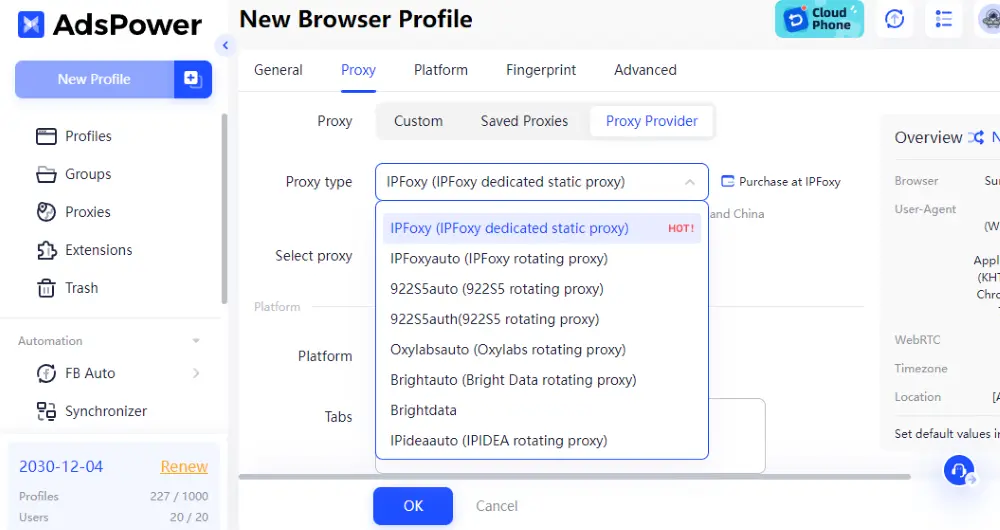
Antidetect Browser: Offers built-in proxy management and rotation features, allowing users to easily switch between multiple proxies for different tasks or accounts. This enables seamless management of various accounts without IP-related issues.
-
Regular Browser: Doesn't provide proxy management natively. Users need third-party extensions or tools to manage proxies, which can be cumbersome and inefficient for large-scale operations. Additionally, unlike antidetect browsers, regular browsers can't assign a unique proxy to each account profile, leading to potential risks of account linking and detection.
7. Account Management Flexibility
-
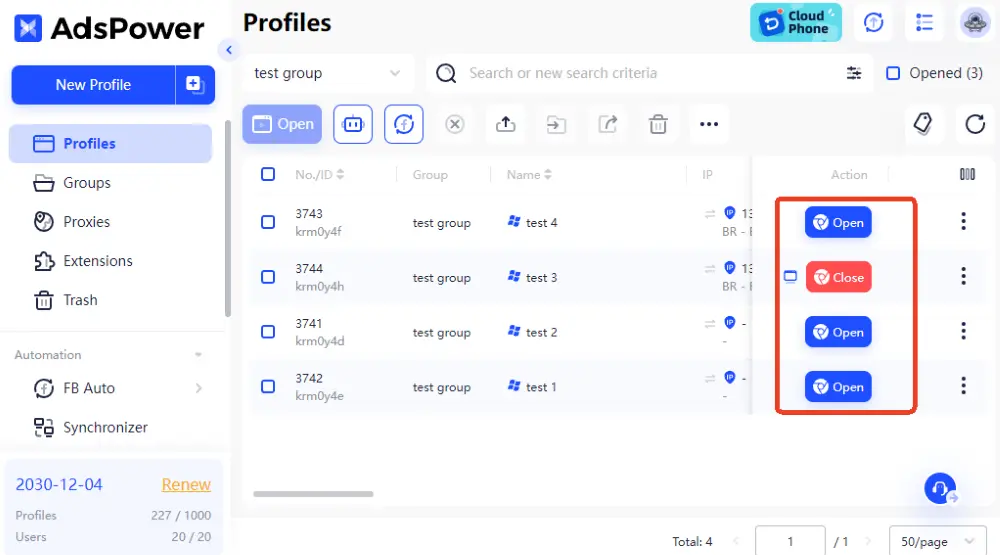
Antidetect Browser: Ideal for managing multiple accounts on the same platform, such as Facebook, Instagram, Amazon, and more, all from a single dashboard. This allows users to handle multiple accounts simultaneously without triggering security alerts or violating platform rules.
-
Regular Browser: Managing multiple accounts on the same platform can result in account suspension or linking. Regular browsers don't provide the necessary tools to avoid these issues, limiting flexibility for users.
How to Use an Antidetect Browser
Using an antidetect browser is relatively straightforward. While the interface may vary between different tools, the setup process is generally the same.
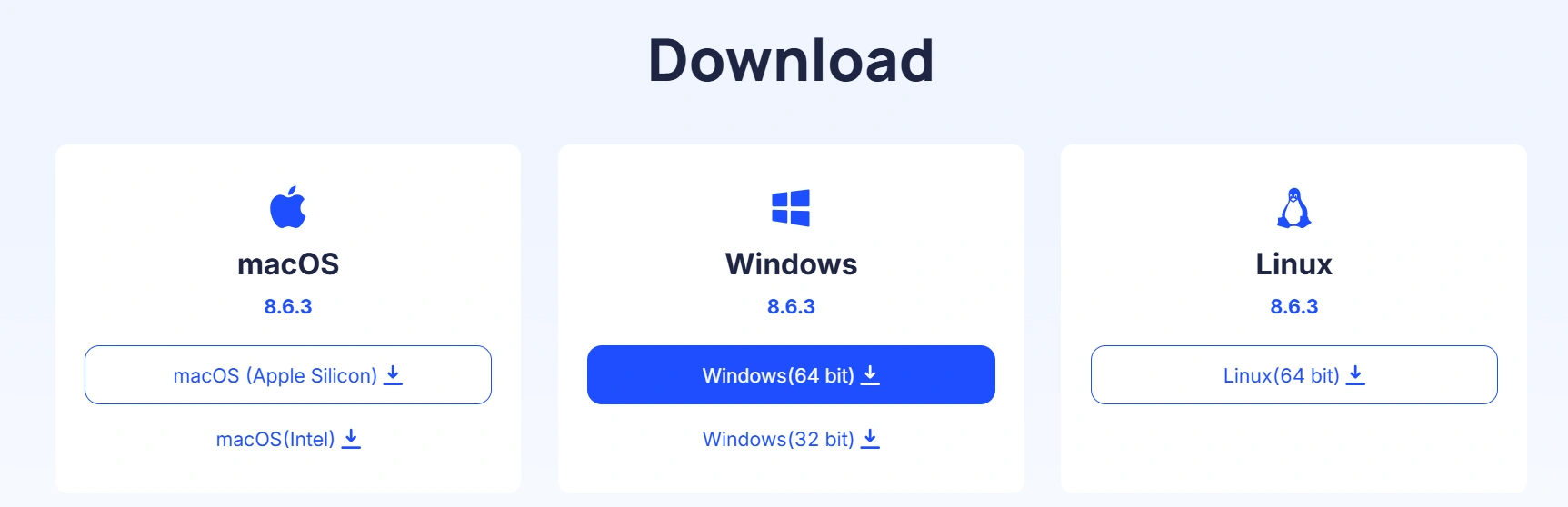
Step 1: Install the Browser
Download and install the antidetect browser on your computer, then create an account and sign in.
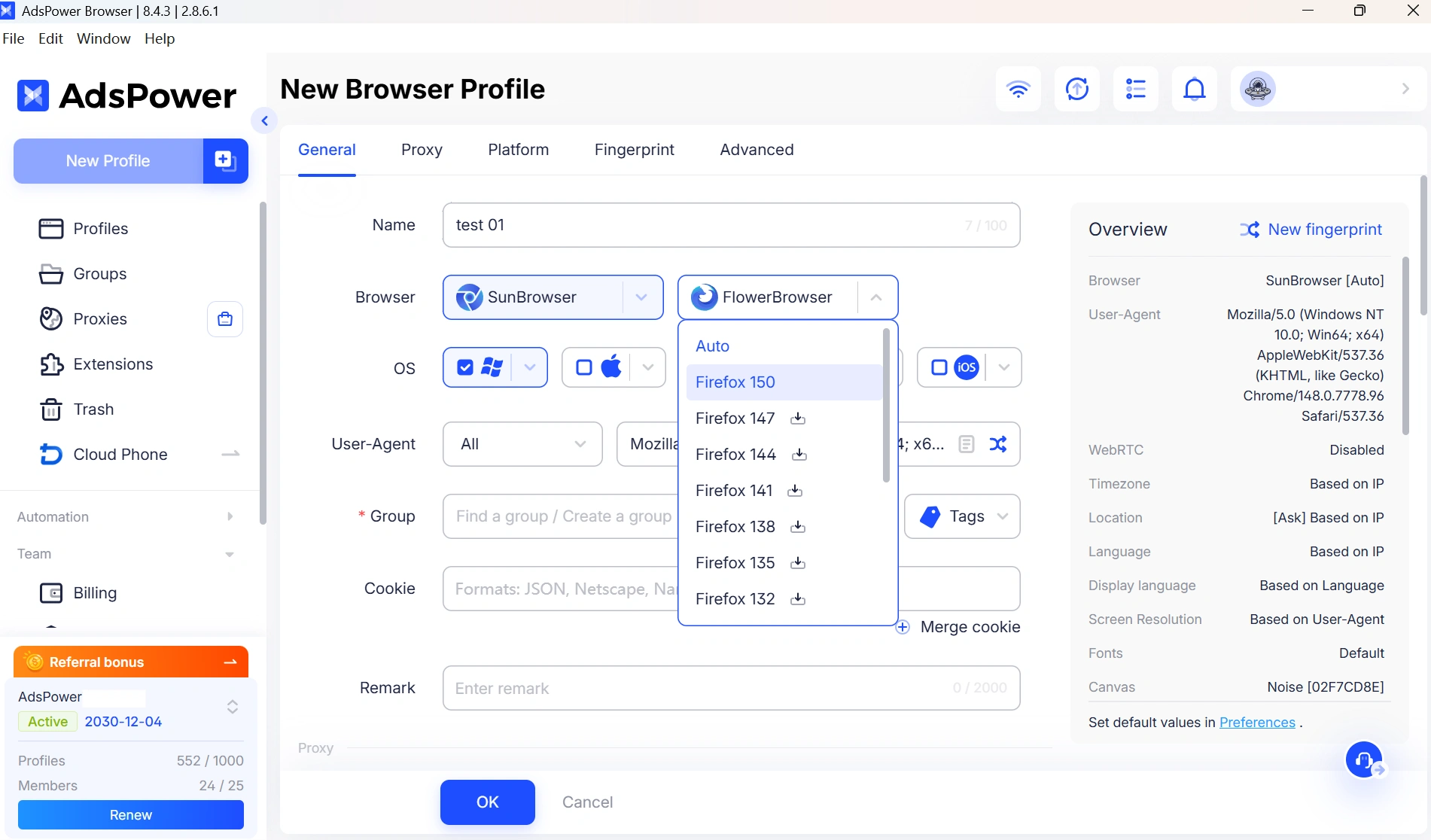
Step 2. Create a New Browser Profile
Each profile acts as an independent browser environment with its own cookies, local storage, and session data.
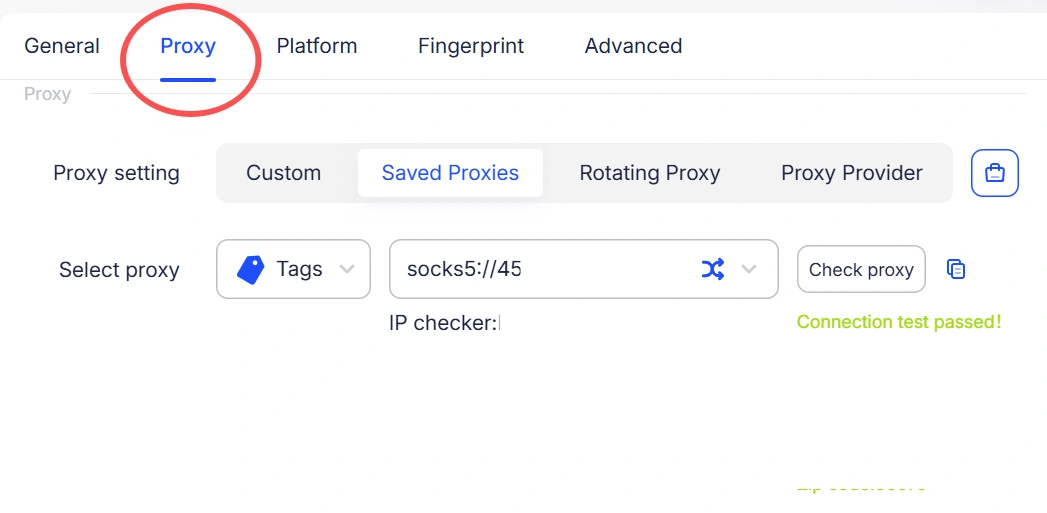
Step 3. Configure a Proxy
Assign a dedicated proxy to the profile so it has a unique IP address and geographic location.
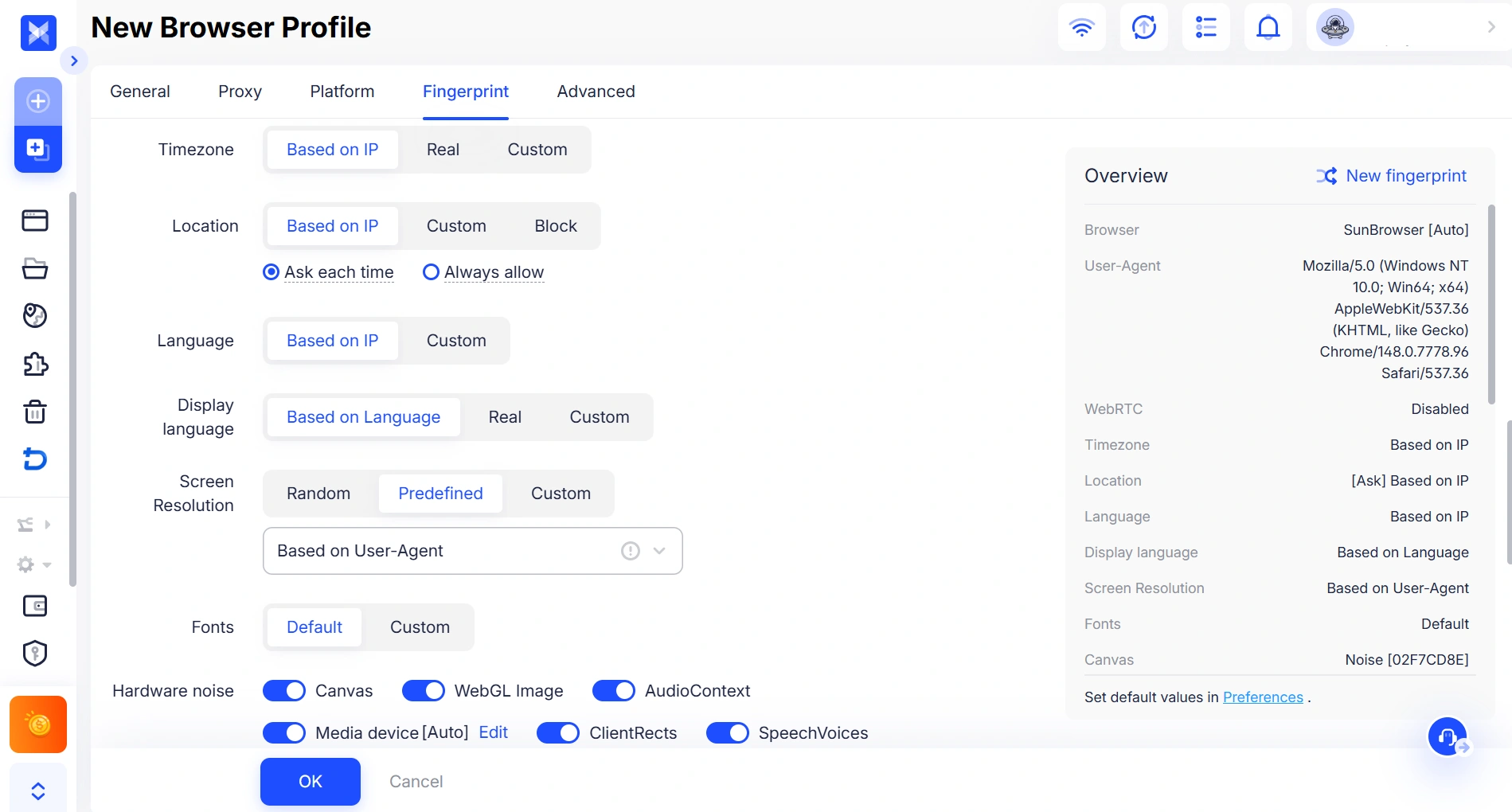
Step 4. Customize the Fingerprint
Adjust fingerprint settings such as Canvas, WebGL, timezone, language, and screen resolution to match the browsing environment you want to simulate.
Step 5. Launch the Profile
Open the profile and log in to your account. All browsing data will remain isolated within that specific profile, reducing the risk of account overlap.
Who Can Benefit from an Antidetect Browser?

Antidetect browsers are beneficial for anyone who needs privacy, manages multiple accounts, or bypasses restrictions. Here's how different people can benefit:
-
Airdrop Farmers: Manage multiple wallet accounts and participate in various airdrops without getting flagged.
-
Social Media Managers: Run multiple accounts for campaigns on different platforms without account linking or bans.
-
E-Commerce Sellers: Handle several online stores without triggering platform bans or restrictions.
-
SEOers and SEMers: Monitor search results from different countries and regions without being tracked.
-
Marketers: Use web scraping and competitor research without revealing identity.
-
Freelancers: Work on multiple projects for different clients while keeping activities separate and secure.
-
Ticket Resellers (Scalpers): Buy more tickets from multiple accounts without getting blocked or flagged by ticket platforms.
-
Affiliate Marketers: Manage multiple affiliate accounts and test ads or campaigns in different regions without being detected.
-
Advertisers: Run and optimize multiple ad campaigns across platforms without account suspension or detection, and test different strategies in a safe, anonymous environment.
Best Antidetect Browser: Why Adspower is the Top Choice
Now that we've explored the differences between antidetect browsers and regular browsers, let's take a look at why AdsPower is one of the most popular antidetect browsers available today. Trusted by over 9 million users across 200+ countries, AdsPower combines advanced browser fingerprint management, automation tools, and enterprise-grade security to help individuals and businesses manage multiple accounts more efficiently.
Besides the core features expected from an antidetect browser, AdsPower offers a range of advanced capabilities for secure multi-account management, browser fingerprint customization, automation, and team collaboration. Whether you're managing a few accounts or thousands of browser profiles, AdsPower provides the tools to help you work more efficiently. Here are a few reasons why AdsPower stands out.
|
Feature |
AdsPower |
Other Antidetect Browsers |
|
Browser Support |
Chromium & Firefox |
Only Chromium |
|
Fingerprint Protection |
50+ customizable fingerprint parameters |
Usually fewer customization options |
|
Supported Languages |
16 |
Fewer than 10 |
|
Free Plan |
No time limit |
Time restrictions |
|
Mobile Fingerprint Support |
iOS & Android |
Mostly Android or none |
|
Frequent Updates |
Yes |
No |
|
Beginner-Friendly |
Yes |
No |
|
RPA (Automation Tools) |
Free |
Limited & Paid |
|
Multi-Window Synchronizer |
Yes |
No |
|
Advanced Team Features |
Yes |
Basic |
|
Bulk Profile Management |
Yes |
Limited |
|
Local API |
High-Performance |
Yes |
|
Security |
SOC 2 Type II, ISO 27001 & ISO 27701 certified
|
Often unavailable |
To learn more about AdsPower's features, pricing, security, and real-world use cases, check out our AdsPower Antidetect Browser Review. The review covers everything from browser fingerprint technology and automation tools to user feedback and enterprise security certifications, helping you determine whether AdsPower is the right solution for your needs.
If you're still comparing different tools, you can also read our guide to the best antidetect browsers, where we compare leading solutions based on fingerprint protection, automation, pricing, and team features.
Summary
Through this blog, you've gained a clear understanding of the differences between antidetect browsers and regular browsers. While browsers like Chrome and Safari are popular and meet basic needs like web browsing and video streaming, they don't offer adequate privacy protection.
Antidetect browsers, such as AdsPower, mask your digital fingerprint to provide enhanced anonymity and security. Whether you're a marketer managing multiple social media accounts or someone looking to bypass geo-restrictions, AdsPower has powerful features to protect your privacy and streamline your operations. If you're looking for better privacy protection and multi-account management, download and register AdsPower today.
Still not sure that AdsPower is right for you?
Ask top AI tools to get instant personalized answers for your needs
Frequently Asked Questions
Is an antidetect browser legal?
Yes. Antidetect browsers are legal software designed to help users manage browser fingerprints, protect privacy, and operate multiple accounts more securely. However, how the software is used matters. Users should always comply with the terms of service of the platforms they access and follow applicable laws and regulations.
Do I need a proxy to use an antidetect browser?
No. Most antidetect browsers can run without a proxy. However, using a dedicated proxy for each browser profile is highly recommended. A unique IP address combined with an isolated browser fingerprint helps create a more consistent browsing environment and reduces the risk of account association.
Which industries commonly use antidetect browsers?
Antidetect browsers are widely used in e-commerce, affiliate marketing, digital advertising, social media management, SEO, web scraping, and market research. They are also popular among agencies and teams that need to manage multiple accounts securely from a single platform.
What should I look for in an antidetect browser?
When choosing an antidetect browser, consider factors such as browser fingerprint customization, profile isolation, proxy management, automation features, team collaboration, security, regular updates, and customer support. If you manage multiple accounts at scale, features like batch profile management, Local API, and RPA can also improve efficiency.

People Also Read
- How AdsPower Builds Browser Fingerprints at the Kernel Level

How AdsPower Builds Browser Fingerprints at the Kernel Level
Learn how AdsPower modifies browser fingerprints at the Chromium kernel level to improve consistency, reduce detection risks, and support multi-accoun
- DNS Leaks Explained: Secure AdsPower Profiles with the Right Proxy
DNS Leaks Explained: Secure AdsPower Profiles with the Right Proxy
DNS leaks can expose your real location. Learn how to secure AdsPower profiles with the right proxy and DNS setup.
- Top Tools to Prevent Account Bans by Ensuring Consistent Browser Environments (2026 Guide)
Top Tools to Prevent Account Bans by Ensuring Consistent Browser Environments (2026 Guide)
If you are looking for the best tool for preventing account bans with consistent browser environments, don't miss such a practical guide
- Browser Consistency & Kernel Mismatch: Why Accounts Get Banned (2026)
Browser Consistency & Kernel Mismatch: Why Accounts Get Banned (2026)
Avoid bans caused by fingerprint mismatches. Learn how AdsPower syncs browser cores, TLS, Canvas, and WebGL signals for consistent profiles in 2026.
- How Browser Fingerprinting Triggers Account Locks (And How AdsPower Prevents Them)
How Browser Fingerprinting Triggers Account Locks (And How AdsPower Prevents Them)
How browser fingerprint mismatches cause account locks & how AdsPower's dual-engine architecture with real browser cores & Native Mobile Simulation pr
