

If your Match.com account is blocked, this guide explains why it happens, how to recover or delete your account, and how to prevent future issues—start managing your account safely today.
Many people assume that managing a dating account is as simple as logging in and out. In reality, platforms like Match.com treat every account as part of a broader digital identity that includes your device, browser, and network environment. This means that problems such as account blocks, failed logins, or difficulty creating a new profile often have less to do with your password and more to do with how Match.com interprets your digital footprint.
Understanding how Match.com manages accounts and how tools like fingerprint isolation can help gives you more control over your online dating experience. Whether you want to delete an old account, recover a blocked one, or safely run multiple profiles, knowing how the system works is the first step.
What is Match.com?
Match.com is one of the oldest and most established online dating platforms in the world. Launched in 1995, it pioneered the idea of structured online matchmaking based on profiles, preferences, and algorithms rather than casual chatting alone.
The match.com dating service connects people looking for serious relationships, casual dating, or companionship. Unlike swipe-based apps, Match.com emphasizes detailed profiles, compatibility scoring, and messaging rather than rapid swiping.
Key features include:
● In-depth user profiles
● Search filters by interests, location, and lifestyle
● Direct messaging and video chat
● Paid subscription tiers with additional visibility
Because users often invest time, money, and emotional energy into their profiles, losing access to an account can be extremely frustrating—especially if it happens unexpectedly.
How Match.com Manages User Accounts
Match.com uses a combination of automated systems and human moderation to monitor accounts. Their goal is to prevent fraud, scams, harassment, fake profiles, and inappropriate behavior.
They evaluate risk using several signals, including:
- Login location and IP consistency
- Device fingerprint and browser characteristics
- Messaging patterns and frequency
- Reported complaints from other users
- Unusual account activity
- Payment disputes or chargebacks
If their system detects "risky behavior," the platform may restrict, suspend, or block an account—even if the user did nothing intentionally wrong. This is why many real users suddenly face a match com account blocked situation.
How to Delete a Match.com Account Properly
If you no longer want to use the platform, you should know how to delete match com account the correct way to avoid lingering data or future billing issues.
Standard deletion method
1. Log in to your Match.com account
2. Go to "Settings" or "Account Settings."
3. Select "Manage Subscription."
4. Cancel your subscription first
5. Return to "Manage account" settings
6. Choose "Delete Account."
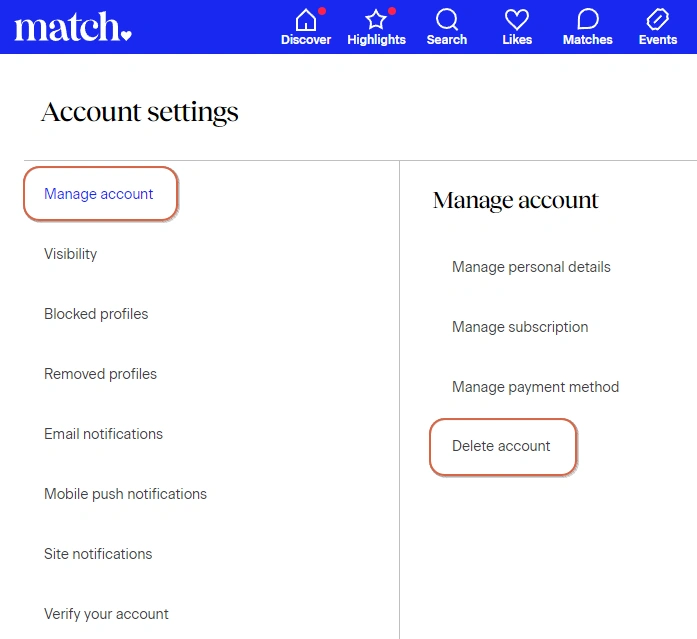
This answers the common question: How do I delete my account on Match.com?
Important notes:
- Simply deleting the app does NOT delete your account.
- If you still have an active subscription, you may continue to be charged unless you cancel first.
- Match.com may retain some data for legal or security reasons even after deletion.
If you want a cleaner digital footprint, consider removing photos, messages, and personal details before deleting the account.
Match.com Account Blocked? Can You Unblock a Match.com Account?
Account blocks are one of the most frustrating issues users face, especially when the reason is unclear.
What happens when you get blocked on a match?
When an account is blocked, users often experience one or more of the following:
- Inability to log in
- Sudden logout from active sessions
- Restricted access to messages and profiles
- Error messages related to suspicious activity
- Lack of detailed explanation
In many cases, access is removed without warning. A block does not necessarily indicate malicious intent or a serious violation; it may be triggered by automated systems responding to perceived risk.
Common Reasons Match.com Blocks Accounts
Match.com may block or restrict accounts for a variety of reasons, including:
- Logging in from multiple locations in short timeframes
- Using unstable or frequently changing IP addresses
- Accessing the account from many devices
- Rapid or repetitive messaging behavior
- Reports from other users
- Breaches of community guidelines
- Payment disputes or chargebacks
Some of these triggers are behavioral, while others are purely technical. Even routine actions such as traveling, switching Wi-Fi networks, or using privacy tools can sometimes lead to unintended restrictions.
How Can You Unblock a Match.com Account?
If your account is blocked, recovery options depend on the type of restriction applied.
Steps that may help include:
- Contacting Match.com customer support through official channels
- Responding clearly and politely to any requests for information
- Providing identity verification if requested
- Avoiding repeated login attempts from different devices
- Waiting for the review process to complete
Not all blocks are reversible. Some are temporary and lifted after review, while others may be permanent. Creating new accounts while an appeal is pending can increase the likelihood of further restrictions.
How Fingerprint Isolation Helps Protect Match.com Accounts
Many account restrictions are linked not to profile content, but to how the platform interprets your device and browsing environment.
Fingerprint isolation refers to separating each online account into a distinct digital environment. Instead of using one browser and device setup for everything, each account operates within its own isolated browser profile.
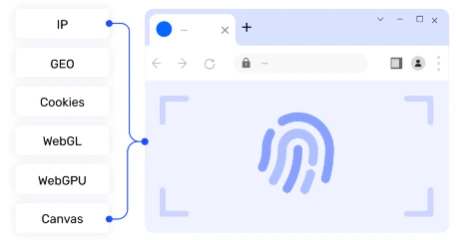
This approach helps ensure that:
● Device identifiers do not overlap
● Browser attributes remain consistent per account
● Cookies and local storage stay separated
● Network behavior appears stable over time
By reducing shared technical signals, fingerprint isolation lowers the chance that multiple accounts will be linked or flagged as related. This is particularly useful for users who need consistent access across sessions or who manage more than one profile for legitimate reasons.
Practical Use Cases for AdsPower with Match.com
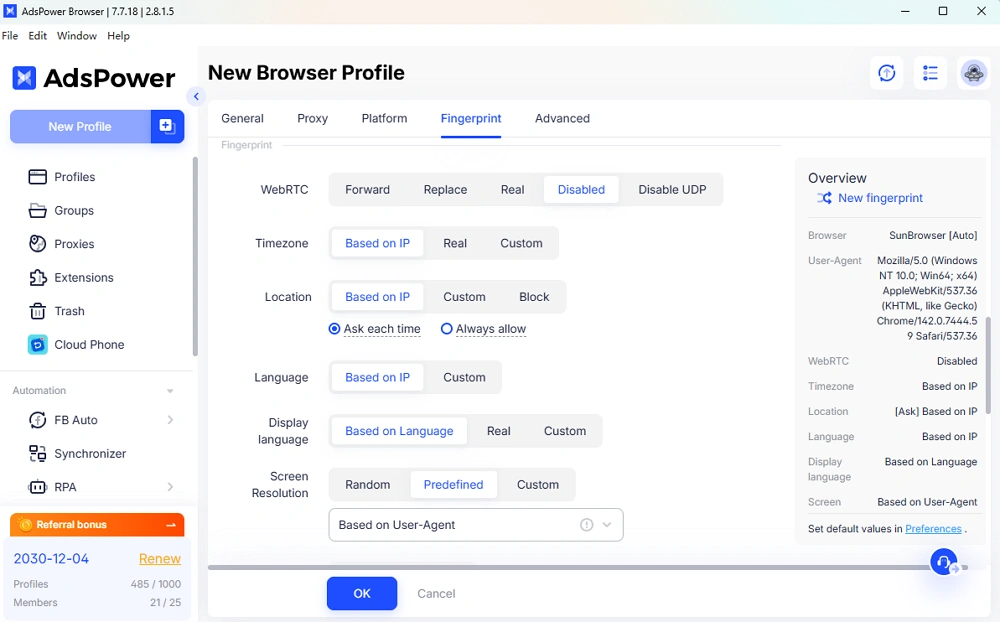
AdsPower is an antidetect browser designed to create isolated browser environments. When applied to Match.com, it supports safer and more controlled account management.
Each Match.com account can run in its own browser profile with unique technical characteristics. This reduces cross-account detection and helps maintain separation.
Reducing repeat blocks
If a previous device or browser fingerprint has been flagged, using a clean, isolated environment can prevent repeated restrictions tied to old data.
Maintaining consistent login behavior
Logging in from the same virtual environment each time appears more natural to automated systems than frequent changes across devices and networks.
Improving privacy
Personal browsing activity remains separate from dating activity, reducing unnecessary data overlap.
Supporting professional workflows
Agencies, testers, or researchers can evaluate Match.com features without risking personal profiles or triggering linked-account issues.
FAQ
Can I create a new Match.com account after deletion?
Yes, in most cases, you can create a new account after deleting your old one. However, if your previous account was banned, simply creating a new one from the same device or IP may trigger another block. Using proper fingerprint isolation can reduce this risk.
Does Match.com track devices?
Yes. Match.com can detect your device type, browser fingerprint, and network environment. This is why using the same phone or laptop for multiple accounts can sometimes lead to restrictions. Tools like AdsPower help manage this by separating digital identities more effectively.
Can using a VPN cause a Match.com account to be blocked?
Yes. While VPNs are commonly used for privacy, unstable or frequently changing IP addresses can look suspicious to Match.com's security systems. Logging in from different locations within short periods of time may trigger automated risk checks and lead to temporary restrictions or a blocked account.
How long does a Match.com account block usually last?
There is no fixed timeframe. Some blocks are temporary and may be lifted after a review, while others are permanent. In many cases, Match.com does not clearly state whether a block is temporary or final, which is why contacting customer support is often the only way to get clarification.
