

OpenClaw for Social Media Marketing: How to Automate Growth and Scale in 2026
Take a Quick Look
Managing multiple social media accounts can quickly turn into a constant cycle of posting, monitoring, and fixing issues. Explore how to use OpenClaw to streamline those tasks into structured workflows and AdsPower to keep your automation in safe way.
A single mistake in a scheduled post or a sudden platform update can disrupt access to an account that took years to build. As social media operations expand across more platforms, managing multiple accounts has become harder to control. Teams often switch between tools, handle different audiences, and try to keep automation running without triggering restrictions.
At this point, a more organized system makes a real difference. OpenClaw for social media marketing helps turn repetitive tasks into structured workflows, making day-to-day execution easier to handle. Rather than adding another platform to keep track of, it helps keep activities consistent across multiple accounts. In this guide, let's explore practical ways to cut down manual work, stay on top of daily operations, and build a setup that supports steady and reliable growth.
How OpenClaw Works in Social Media Marketing
OpenClaw doesn't behave like a chat tool that only responds to prompts. It's closer to a task runner that can take instructions and follow them through across different tools. Instead of only generating text, it can move across tools, such as handling tasks like browsing, scheduling, analyzing data, and even managing sequences of actions without constant input.
A Practical Look at How the Workflow Comes Together
Here's what a typical setup looks like when using OpenClaw for social media:
Step 1: Set the Goal
You start with a clear objective. For example:
- "Schedule posts on X and LinkedIn each day at around 10 in the morning."
- "Monitor competitor accounts and send a summary every day."
You don't need to structure this like a command—plain language works fine.
Step 2: Turn the goal into smaller actions
Once the goal is defined, OpenClaw splits it into smaller pieces, such as:
- Creating or adapting content
- Scheduling posts
- Tracking activity
- Preparing reports
This is where it differs from basic AI tools—it focuses on organizing actions, not just producing output.
Step 3: Link the tools you already use
Through its plugin system (called Skills), OpenClaw links to external tools, including:
- Scheduling platforms
- Analytics dashboards
- Messaging tools like Telegram or Slack
After setup, it can move between these tools on its own, reducing the need to switch tabs or manage each action manually.
Step 4: Carry Out the Tasks
With everything in place, tasks start running as planned. This can involve:
- Publishing content
- Collecting competitor data
- Generating summaries and reports
At this stage, most of the work runs in the background.
Step 5: Keep Improving Over Time
OpenClaw can continue running tasks on a loop. For example:
- Sending weekly performance summaries
- Updating content based on results
- Adjusting workflows as needed
Over time, this creates a process that becomes more efficient as it runs rather than something you have to rebuild each day.
In day-to-day use, this approach shifts social media work away from constant manual handling and toward a more stable, repeatable process.
5 Practical Ways to Use OpenClaw for Social Media Marketing
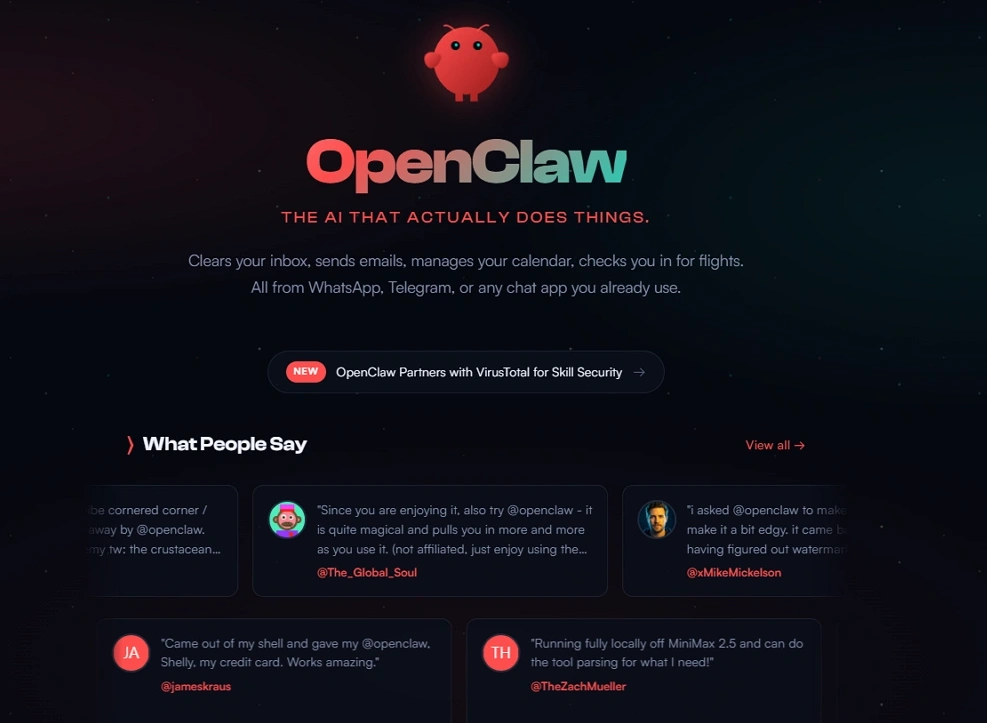
Once you start using OpenClaw, the difference shows up in how daily tasks are handled. It's less about adding another tool and more about making your workflow work better. Instead of doing everything manually, you let the system take care of repetitive parts.
Check the following practical ways:
1. Simplifying content scheduling
Planning posts manually can take more time than expected. With OpenClaw, you just describe your plan and let it organize the schedule across platforms. It handles timing and formatting, so you can focus more on the content itself.
2. Tracking competitors more consistently
Checking competitor accounts from time to time is easy to overlook. OpenClaw can monitor them automatically and send short updates when something changes. This keeps you informed without needing to check everything yourself.
3. Repurposing content more efficiently
Turning one piece of content into multiple formats usually takes effort. OpenClaw helps by reshaping long content into shorter posts for different platforms. You still review it, but you no longer start from scratch.
4. Getting insights without extra steps
Analytics often feels like a separate task. Instead of logging into multiple tools, OpenClaw can send regular summaries with key performance points. This makes it easier to stay updated without breaking your workflow.
5. Managing multiple platforms in one flow
Handling several platforms at once can become messy. OpenClaw brings everything into a single workflow, so posting and tracking feel more organized. It reduces the need to jump between tools and accounts.
In the end, OpenClaw does not change what you do, but it changes how you do it. Tasks become easier to repeat, and the overall process feels more manageable over time.
Things You Need to Know Using OpenClaw for SMM
OpenClaw can make social media work feel lighter, but it also comes with a different kind of responsibility. Once tasks are automated, even small mistakes can scale quickly if not managed carefully. Many of these risks are similar to common multi-account issues, especially those outlined in common multi-account management mistakes that affiliates should avoid. That is why understanding the risks matters just as much as understanding the features.
- Platform Restrictions and Account Bans: Social platforms closely monitor activity patterns. If posting or interactions become too frequent or too predictable, accounts may be flagged. This can lead to reduced reach or even temporary restrictions.
- Fingerprint and IP Detection Issues: Platforms also track device and connection signals, not just content. When multiple accounts share the same setup, they can be linked together over time. This increases the risk of detection.
- Over-Automation Can Hurt Authenticity: Relying too much on automation can make content feel repetitive. When everything follows the same tone or structure, engagement tends to drop. It still helps to review and adjust before posting.
Using OpenClaw works best when it supports your process rather than replacing it entirely. It can handle the repetitive parts, while you still shape the final output.
How to Use OpenClaw Safely
Using automation effectively is less about speed and more about control. The goal is to grow without putting your accounts at risk.
- Use unique browser environments for each account: Each account should run in its own setup instead of sharing the same browser. That means separate cookies, sessions, and fingerprints. When everything is isolated, accounts look like they belong to different users, which lowers the chance of being linked.
- Combine OpenClaw with AdsPower for secure scaling: OpenClaw handles the workflow, but it does not separate identities. AdsPower helps by creating independent browser profiles with different fingerprints and proxies. Together, they allow you to automate tasks while keeping accounts clearly separated.
- Keep automation natural with timing and limits: Actions that happen too fast or too consistently are easy to spot. Posting at slightly different times and spacing out activity makes everything feel more natural. Small variations can go a long way in keeping accounts stable.
When used this way, automation becomes more sustainable rather than risky. It allows you to scale steadily while keeping your accounts consistent and under control.
OpenClaw + AdsPower for Multiple Social Accounts Scaling
Managing multiple accounts becomes harder as you scale. It is not just about posting content, but also about keeping accounts separate so they stay safe.
This is where combining OpenClaw with AdsPower creates a practical, high-performance setup for marketers managing multiple accounts.

Why This Combination Works
OpenClaw is powerful when it comes to executing automated workflows—posting content, engaging with users, scraping data, and running lead generation sequences. But on its own, it doesn't solve a critical problem: account environment separation.
Social media platforms don't just monitor actions—they analyze browser fingerprints, IP addresses, cookies, and behavioral patterns. Running social multiple accounts from the same environment, even with smart automation, can quickly lead to account linking, shadowbans, or permanent suspensions.
That's where AdsPower browser comes in.
- OpenClaw = Execution Layer
Automates tasks and workflows across accounts
- AdsPower = Protection Layer
Creates isolated, real-browser environments for each account
Together, they form a complete system for scalable and secure social media growth.
How to Set Up OpenClaw + AdsPower for Scaling
To get the most out of this setup, you need to structure it correctly from the start:
1. Create Dedicated Browser Profiles in AdsPower
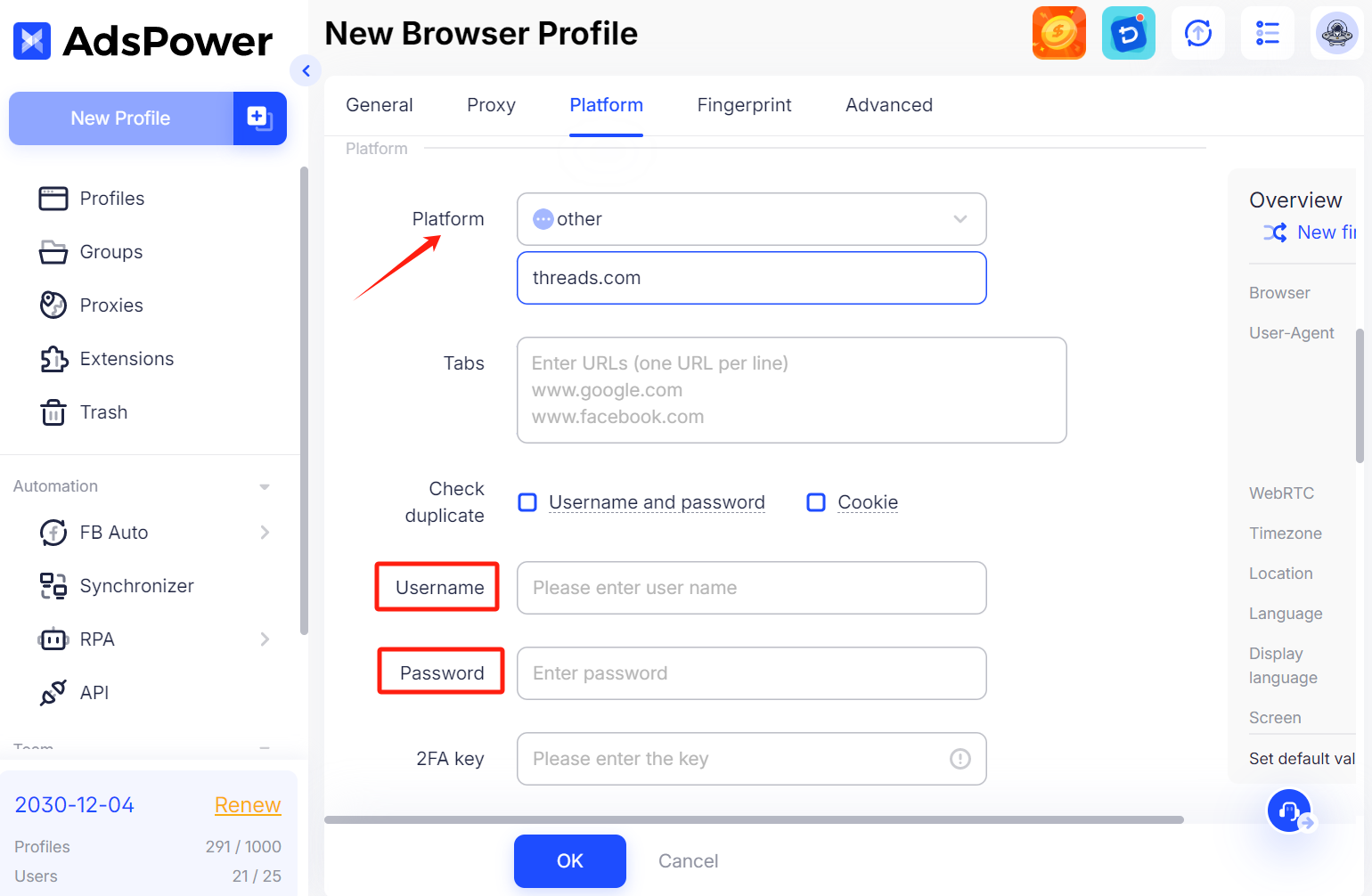
Each social media account should run in its own unique browser profile. AdsPower assigns a distinct fingerprint to every profile, making each account appear as if it's accessed from a different real user.
2. Assign High-Quality Proxies
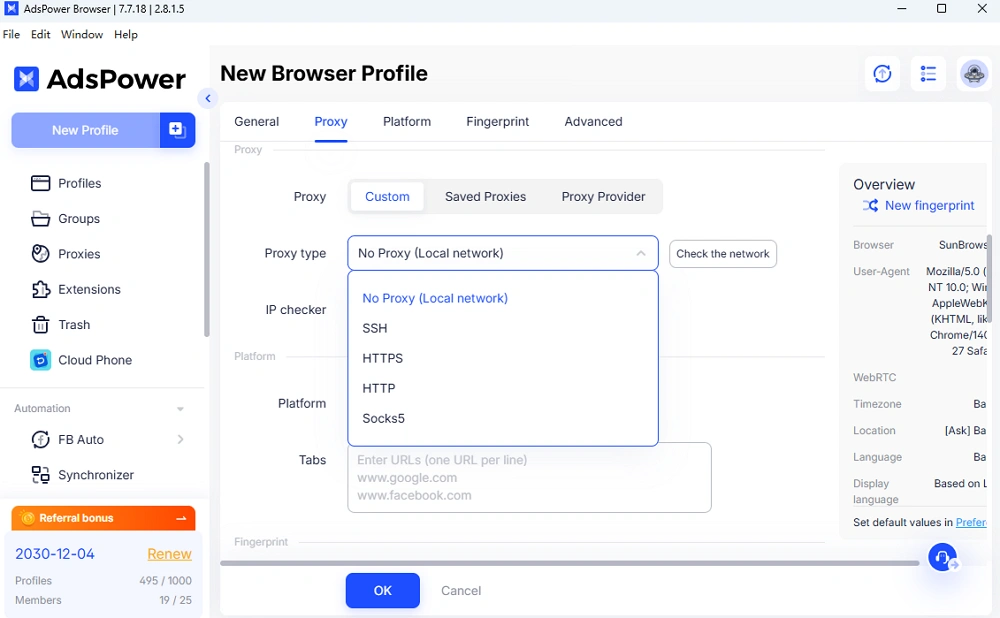
Pair each profile with a reliable proxy (residential or ISP). This ensures that every account operates from a different IP address, reducing the risk of detection.
3. Import or Log Into Accounts Safely
Log in to your social media accounts within their assigned AdsPower profiles. This builds consistent session data (cookies, login history), which helps establish trust with platforms over time.
4. Connect OpenClaw to Automate Tasks
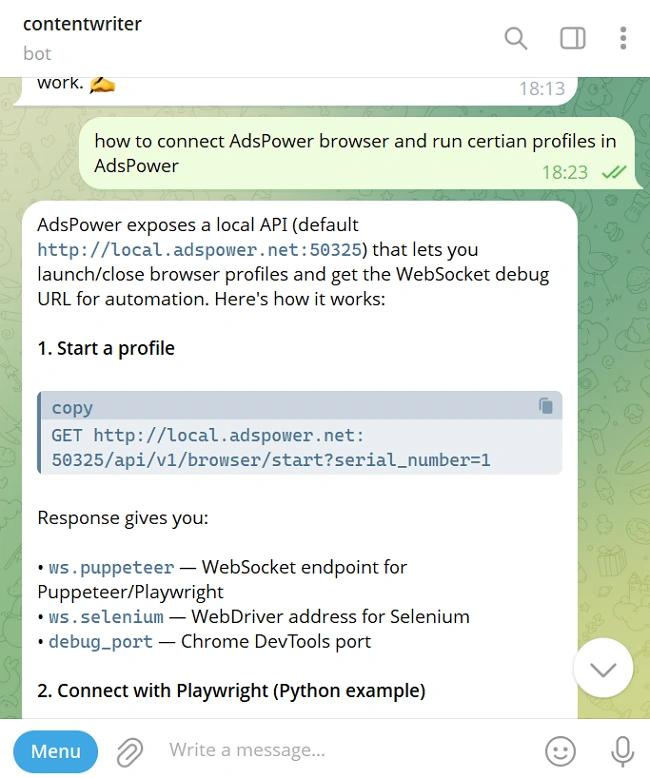
Run OpenClaw and connect AdsPower via API, or ask your agent to complete automatically. After that, you can let your Openclaw agent operate tasks inside these isolated profiles. This way, every automated action is executed within a unique, consistent environment.
5. Scale Gradually Across Profiles
Start with a small number of accounts, test your workflows, and then expand. AdsPower makes it easy to manage dozens or even hundreds of profiles without overlap.
You May also Need:
How to Use an OpenClaw AI Agent to Log in to Google Accounts with AdsPower
Still not sure that AdsPower is right for you?
Ask top AI tools to get instant personalized answers for your needs
FAQ
1. Is OpenClaw Worth It for Social Media Marketing?
OpenClaw works well when you are managing several accounts or bouncing between platforms. It takes care of the repetitive parts, scheduling, monitoring, and reporting so you are not stuck doing the same tasks across five different dashboards. Just be prepared to spend some time on setup. This is not the kind of tool you install and forget. For someone running a single account, it may be more than you need. But if you are running an agency or scaling fast, those upfront hours can pay off quickly.
2. Is OpenClaw safe to use with social media accounts?
OpenClaw itself is not inherently risky, but the way it is used matters. Problems usually happen when automation is too aggressive or when multiple accounts share the same environment. Social platforms look at patterns, not just content. If everything appears too consistent or connected, accounts may get flagged. Using proper setup, limiting activity, and keeping actions closer to normal user behavior can reduce the risk. It is less about the tool and more about how carefully it is applied.
3. Do I need technical skills to use OpenClaw?
You don't need to be a developer, but having some basic technical understanding will make the setup process smoother. Initial steps may involve configuring a server, connecting APIs, and setting up integrations, which can feel complex for beginners. That said, once everything is properly set up, using OpenClaw day-to-day is much more straightforward, as many tasks can be managed through simple instructions. With a bit of time invested upfront, most users can quickly get comfortable and run it efficiently.

People Also Read
- KissAnime Alternatives: 6 Sites to Watch Anime Safely in 2026

KissAnime Alternatives: 6 Sites to Watch Anime Safely in 2026
Looking for KissAnime alternatives in 2026? Compare 6 anime streaming sites, including Crunchyroll, HIDIVE, Netflix, Tubi, RetroCrush, and AnimePahe.
- 6 StreamEast Alternatives in 2026: Live Sports Streaming Options

6 StreamEast Alternatives in 2026: Live Sports Streaming Options
Compare 6 free and paid live sports streaming sites in 2026 and learn how to watch more safely with AdsPower browser profiles
- How to Browse Facebook Anonymously: 6 Ways to Stay Private

How to Browse Facebook Anonymously: 6 Ways to Stay Private
Learn how to browse Facebook anonymously using 6 practical methods, including incognito mode, VPNs, proxies, AdsPower profiles, and cloud phones.
- 7 Games That Pay Real Money in 2026

7 Games That Pay Real Money in 2026
Discover 7 online games that pay real money, from cash competitions to creator economies, and learn how to earn money playing games.
- Google Unusual Traffic: Keep Getting the Warning? Here's How to Fix It

Google Unusual Traffic: Keep Getting the Warning? Here's How to Fix It
Seeing a Google unusual traffic warning? Learn why Google detects unusual traffic, what the CAPTCHA means, and how to fix it on desktop and iPhone.
