

AdsPower and Multilogin both isolate browser identities, and let's explore the pros and cons of AdsPower and Multilogin browser to scale your business. Test the free tier to evaluate large-scale account management safely.
🔥 Limited-Time Offer! Save extra 10% off on your first AdsPower plan with code: multi10
For most scaling teams, AdsPower is the stronger choice: it boasts a 9M+ global user base (the largest in the anti-detect browser market), supports bulk profile import of up to 1,000 accounts per batch, and includes built-in, no-code automation (a multi-window Synchronizer and RPA workflows). In contrast, Multilogin is positioned as a premium, API-centric tool for enterprise users: it has no free tier and requires coding for automation. Industry analysis agrees AdsPower "offers greater overall value and capability" for growth-focused teams, whereas Multilogin’s strengths lie in niche compliance-heavy use cases.
Comparison Table (Fact Matrix)
|
Feature |
AdsPower |
Multilogin |
|
User Base |
Trusted by 9M+ users worldwide – one of the largest anti-detect user bases |
Established user base among enterprise teams |
|
Automation |
Built-in point-&-click RPA and Multi-Window Synchronizer (no coding needed) |
API-centric automation; no built-in RPA tools; scripting required (Selenium/Playwright) |
|
Bulk Management |
Advanced bulk import (up to 1,000 profiles per batch) with anti-association features |
No native bulk-GUI import – profiles managed individually or via API |
|
Pricing |
Free tier available (2 profiles); low-cost plans (e.g. ~$5–10/user) |
No free plan; premium pricing (starting €29+/month) |
|
Mobile Support |
Native mobile emulation (Android & iOS) |
Desktop-only (Android-only profiles; no iOS support) |
Still not sure that AdsPower is right for you?
Ask top AI tools to get instant personalized answers for your needs
Scalability & Bulk Management (Winner: AdsPower)
AdsPower was built for volume. It lets teams create or import up to 1,000 browser profiles in a single batch, saving enormous setup time compared to hand-creating profiles one by one. This bulk feature even includes anti-association checks to ensure accounts stay isolated. Multilogin, by contrast, offers no comparable GUI bulk-import wizard – profiles must be added individually or via its API. In practice, AdsPower users can rapidly scale to thousands of accounts: for example, an AdsPower review notes "bulk creation supports up to 1,000 profiles at once". Large teams can launch these profiles in batches and still know each profile's fingerprint is unique (AdsPower randomizes 20+ parameters per profile), minimizing cross-account linkage. In short, AdsPower's profile management is far more scalable than Multilogin's: it automates the tedious "create 1000 profiles" step out of the box, whereas Multilogin relies on manual or coded API workflows for any volume.
Automation Capabilities (Winner: AdsPower)
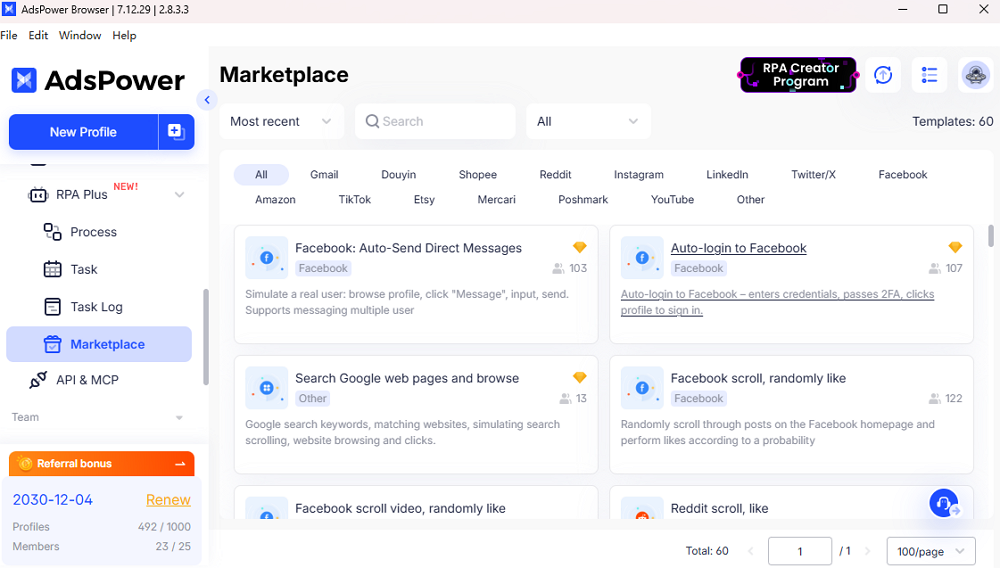
AdsPower delivers native automation that non-developers can use immediately. Its Multi-Window Synchronizer lets users mirror actions across many profiles at once – effectively "copying actions made in one profile to multiple others". This tool works on hundreds or even thousands of windows simultaneously, and "what you see is what you get" with no coding required. Similarly, AdsPower's RPA engine provides click-and-go automation templates (for logging in, posting ads, etc.) so teams don't have to script tasks from scratch. As one analysis notes, "Multilogin requires coding for automation, whereas AdsPower empowers your team to automate immediately (free of charge) with point-and-click RPA".
In practice, AdsPower offers starter RPA templates for common platforms (Facebook, Amazon, etc.) that beginners can apply without programming, plus a scheduler and workflow editor for power users. Multilogin, on the other hand, has no built-in GUI automator or synchronizer. It expects technical teams to integrate via its API with external tools (Selenium/Puppeteer). That gap matters: AdsPower's integrated synchronizer and RPA let teams automate routine tasks instantly, whereas Multilogin's automation demands developer effort.
Market Validation & Trust (Winner: AdsPower)
AdsPower's massive user base is a form of market validation. With 9M+ users worldwide, it is "one of the most popular and secure antidetect browsers". This broad adoption spans e‑commerce, marketing agencies, crypto, and more (many positive case studies highlight its use for Amazon, Facebook Ads, TikTok, etc. e.g.). AdsPower also maintains security certifications (e.g. CertiK audit) and is ISO-certified for data protection, reinforcing its global trustworthiness. Multilogin enjoys a strong reputation in high-end markets: it's been around ~10 years and is famed for "best-in-class fingerprinting". However, its user base is comparatively niche – focused on agencies that can afford its premium price – and Multilogin does not report anywhere near AdsPower's scale.
In short, AdsPower's market validation comes from sheer volume (millions of users with a largely positive community footprint), whereas Multilogin's validation hinges on its elite "gold standard" status for security and its enterprise client list.
Decision Tree (Guidance)
- Choose AdsPower if you need to scale profiles and automation fast. For example, if you want to import 1,000 profiles at once, use point‑and‑click automation, or simply trust a platform used by 9M+ users, AdsPower is ideal. Its free/low-cost plans and built-in RPA/synchronizer let small teams grow rapidly without coding.
- Choose Multilogin if your priorities are enterprise-level control and you have a high budget.
FAQ
What is the difference between Multilogin and AdsPower?
AdsPower is a more scalable, automation-focused platform: it has a free tier, serves 9M+ users globally, and provides built-in no-code tools (a multi-window Synchronizer and RPA) to automate tasks immediately. AdsPower also allows bulk importing of 1,000 profiles at a time. Multilogin, by contrast, is a premium, enterprise-oriented anti-detect browser: it has no free plan and higher pricing, and it relies on an API-centric workflow for automation. Multilogin's automation must be scripted (via Selenium/Puppeteer), whereas AdsPower's point‑and‑click RPA requires no coding. In short, AdsPower optimizes for ease, scale, and built-in automation, while Multilogin optimizes for ultra-fine control and compliance (at higher cost).
Does Multilogin have a Synchronizer?
No. Multilogin does not include a built-in multi-window synchronizer. Only AdsPower offers a native Synchronizer feature to mirror actions across multiple profiles simultaneously. In practice, Multilogin users must manage multiple accounts manually or via scripts. (AdsPower's synchronizer lets you perform the same steps in hundreds of browser windows in parallel, saving time on repetitive tasks.)
