

Telegram allows multiple accounts with unique phone numbers. This guide explains limits, setup methods, security considerations, and scaling strategies for individuals and businesses managing multiple Telegram profiles safely and efficiently.
Telegram continues to grow as one of the most popular messaging platforms in 2026, widely used for personal communication, business marketing, crypto communities, customer support, and content distribution. As more users expand their online presence, many start looking into managing more than one profile and handling Telegram login across different accounts in a smooth and secure way.
The short answer is yes, you can use multiple accounts, but there are important rules, technical limits, and security considerations to understand before setting up additional profiles. This guide walks you through everything step by step.
Can You Have Multiple Telegram Accounts?
Yes, Telegram officially allows users to have multiple accounts. The platform even includes a built-in feature that lets you add and switch between accounts within the same app.
However, each Telegram account must be linked to a unique phone number. Telegram uses phone numbers for registration and identity verification. This is the core requirement you cannot bypass through official methods.
In 2026, Telegram still supports multi-account functionality across:
- Telegram Mobile (iOS & Android)
- Telegram Desktop
- Telegram Web
But the number of accounts per device and the way you manage them depends on your setup.
Why People Need Multiple Telegram Accounts
There are many legitimate and practical reasons why individuals and businesses choose to run multiple Telegram accounts. As Telegram continues to grow as a communication platform for both personal and professional use, managing separate accounts often becomes a necessity rather than a preference.
1. Separating Work and Personal Life
Many professionals prefer to keep private conversations completely separate from business communications. Using one Telegram account for family and friends and another for clients, partners, or colleagues helps maintain clear boundaries. This separation improves focus, protects personal privacy, and presents a more professional image in work-related discussions.
2. Managing Multiple Brands or Projects
Marketers, crypto community managers, ecommerce operators, and digital entrepreneurs often handle multiple brands or campaigns at the same time. Each brand may require its own Telegram channels and groups, or support line. Running separate accounts helps avoid confusion, keeps brand identities distinct, and reduces the risk of mixing messages across different audiences.
3. Customer Support Teams
Support agents may need dedicated Telegram accounts for different client departments or service categories. For example, one account might handle technical issues while another focuses on billing or onboarding. This structure makes it easier to organize conversations and assign responsibilities within a team.
4. Regional or Language Segmentation
Businesses operating internationally often create separate Telegram accounts for different countries or language markets. This allows them to tailor content, promotions, and communication styles to specific audiences, improving engagement and customer trust.
5. Privacy and Risk Isolation
Using multiple Telegram accounts also provides an extra layer of risk management. If one account gets restricted, limited, or temporarily suspended, other accounts remain active. This prevents total communication disruption and ensures business continuity.
Telegram Account Requirements (What You Need Before Creating Multiple Accounts)
Before creating multiple Telegram accounts, you need:
- A unique phone number for each account
- Access to SMS or verification calls
- A stable internet connection
- A compatible device (mobile, desktop, or browser)
Optional but recommended for business users:
- Separate devices or profiles
- Different IP addresses (for high-volume use cases)
- Account isolation tools for security
Telegram does not require email registration, but it may request verification if unusual behavior is detected.
How Many Telegram Accounts Can You Have?
Technically, Telegram officially supports multiple accounts, but there are some practical limits to consider depending on how you set them up.
On most devices, Telegram allows:
- Up to 3 accounts per app installation (this is the standard limit within the mobile app interface).
- Unlimited accounts if you use multiple devices, separate environments, or different browser profiles.
This means that while the app itself has a built-in cap, there is no global restriction on how many total Telegram accounts a person can own as long as each one meets the registration requirements.
However, there are a few important conditions:
- Each account must be linked to a unique phone number. Telegram does not allow multiple accounts to share the same number.
- Running too many accounts from the same IP address or identical device fingerprint may trigger additional verification checks, especially if there is unusual activity patterns, repeated logins, or automation involved.
In real-world usage, most casual users safely operate 2–3 accounts without any issues. More advanced users such as marketers, community managers, or business teams often rely on separate devices, browser profiles, or account management tools to scale securely while reducing the risk of account linking or restrictions.
How to Create Multiple Telegram Accounts
There are several methods available in 2026:
1. Telegram's Built-in "Add Account" Feature (Official Way)
This is the safest and easiest method.
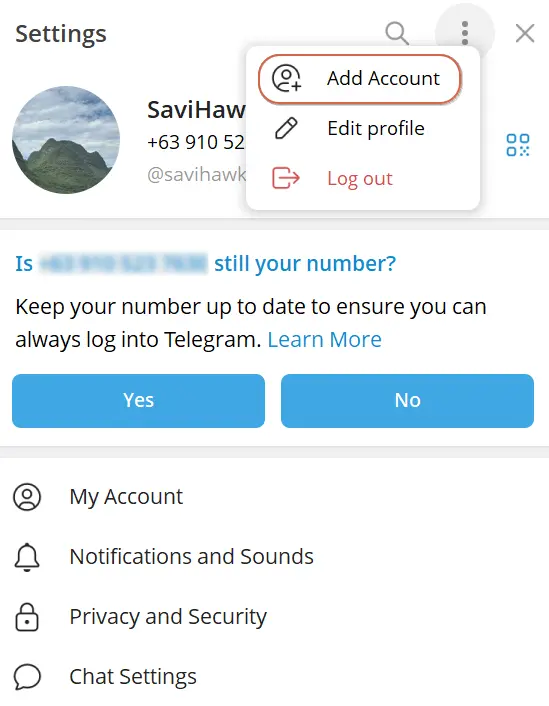
Steps:
- Open Telegram app.
- Go to Settings.
- Tap the three-dot icon.
- Select "Add Account."
- Enter a new phone number.
- Verify via SMS.
Tip: If you cannot receive the code from Telegram, please follow these solutions to fix: Fix Telegram Not Sending Code: 11 Solutions & Prevention 2026
You can switch between accounts instantly without logging out.
Best for: personal users and small businesses.
2. Use Telegram Desktop + Telegram Mobile Together
You can log into different accounts across:
- Telegram Mobile
- Telegram Desktop
For example:
- Account 1 on mobile
- Account 2 on desktop
Since Telegram syncs in the cloud, you can manage both easily.
Best for: freelancers and remote workers.
3. Use Telegram Web for Additional Accounts
Telegram Web allows login through browser sessions.
Steps:
- Visit web.telegram.org.
- Log in with a different phone number.
- Use separate browser profiles or incognito windows.
However, logging multiple accounts in the same browser profile may cause session overlap. Using separate browser profiles is safer.
Best for: light multi-account use.
4. Use Multiple Android Users / App Cloning
Android devices allow:
- Multiple user profiles
- App cloning (via system settings or third-party apps)
This enables you to:
- Install separate Telegram instances
- Log in with different numbers
Best for: users managing 2–4 accounts on one Android device.

5. Use Multiple Devices
The simplest scaling method:
- Phone 1 → Account A
- Phone 2 → Account B
- Tablet → Account C
- Laptop → Account D
This avoids technical conflicts but increases hardware cost.
Best for: small teams.
6. Use AdsPower to Create and Manage Multiple Telegram Accounts Safely
For advanced users who manage many accounts (marketing teams, crypto operators, global businesses), account isolation becomes critical.
AdsPower is an anti-detect browser that allows you to create independent browser profiles with unique fingerprints.
Why Use AdsPower?
- Each profile has separate cookies and storage
- Unique browser fingerprint per account
- Proxy support (residential or datacenter)
- Team collaboration features
- Reduced risk of account linking
- Account security settings, including remote login reminder, failed login attempt alert, 2FA, etc.
Steps to Create Profiles for Different Telegram Accounts:
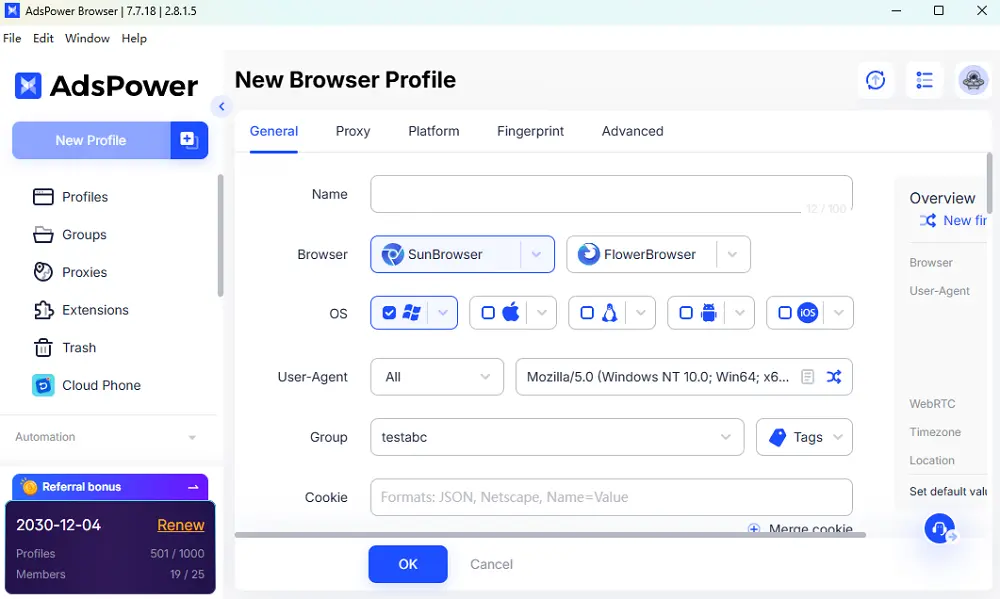
Step 1 – Create a New Browser Profile
- Launch AdsPower software on your laptop
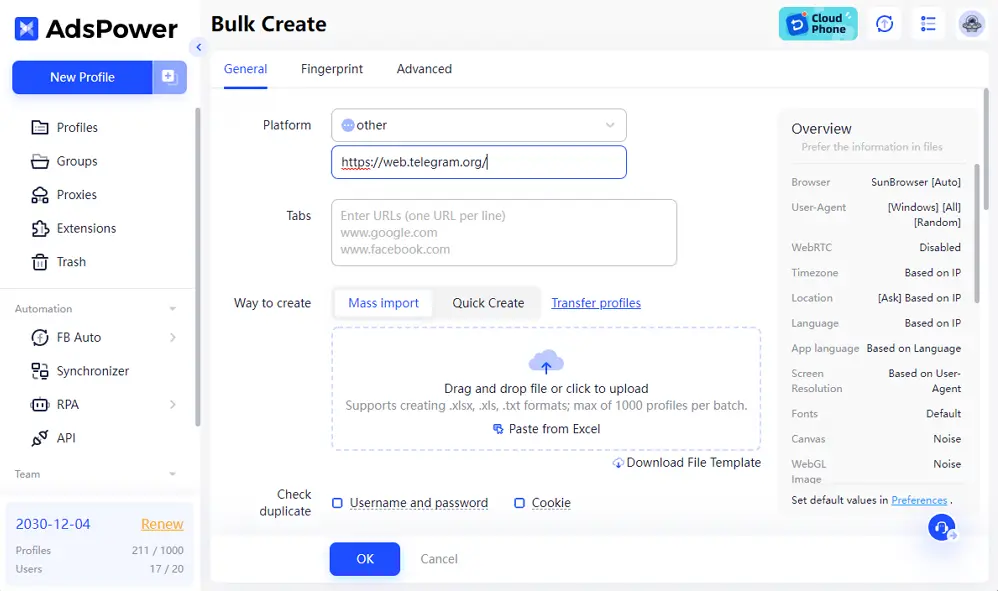
- Click "New Profile" to enter the name, remark, tag; and select browser, OS, UA for the profile
- Move to Platform to choose "other" and enter "web.telegram.org"
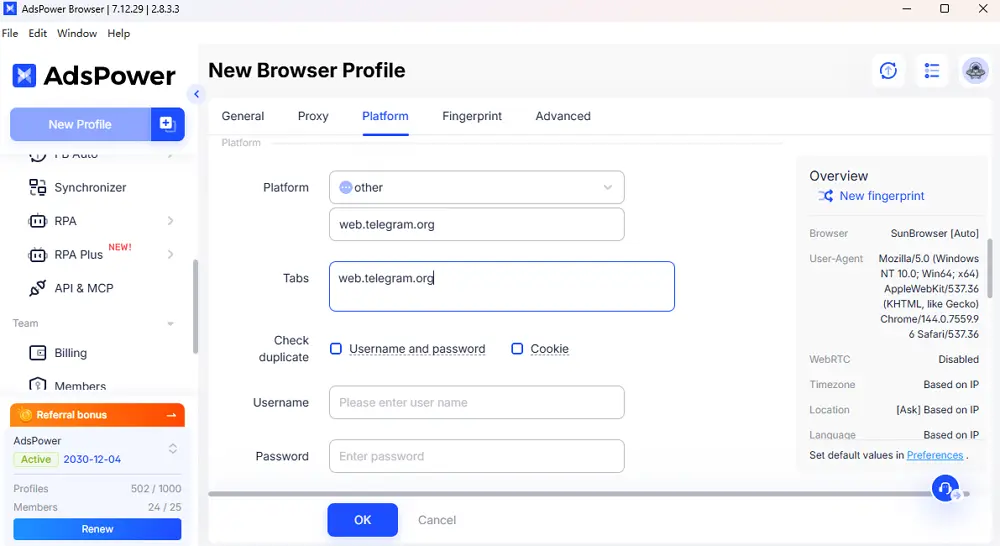
- Configure a unique proxy for each account
- Set up the fingerprint settings
Step 2 – Log into Telegram Web
- Open the created profile and visit web.telegram.org
- Log in using a different phone number
Step 3 – Repeat for Additional Accounts or move to Bulk Create
Repeat the operation above for more accounts. Each AdsPower profile acts like a separate device environment.
This method is ideal for safely scaling Telegram account management without cross-contamination between accounts.
On the other hand, you are able to create dozens/hundreds of profiles using Bulk Create. Download the template to fill in the related information for each account. Then upload the file and AdsPower will generate the corresponding profiles at once.
Best for: businesses managing multiple Telegram communities at scale.
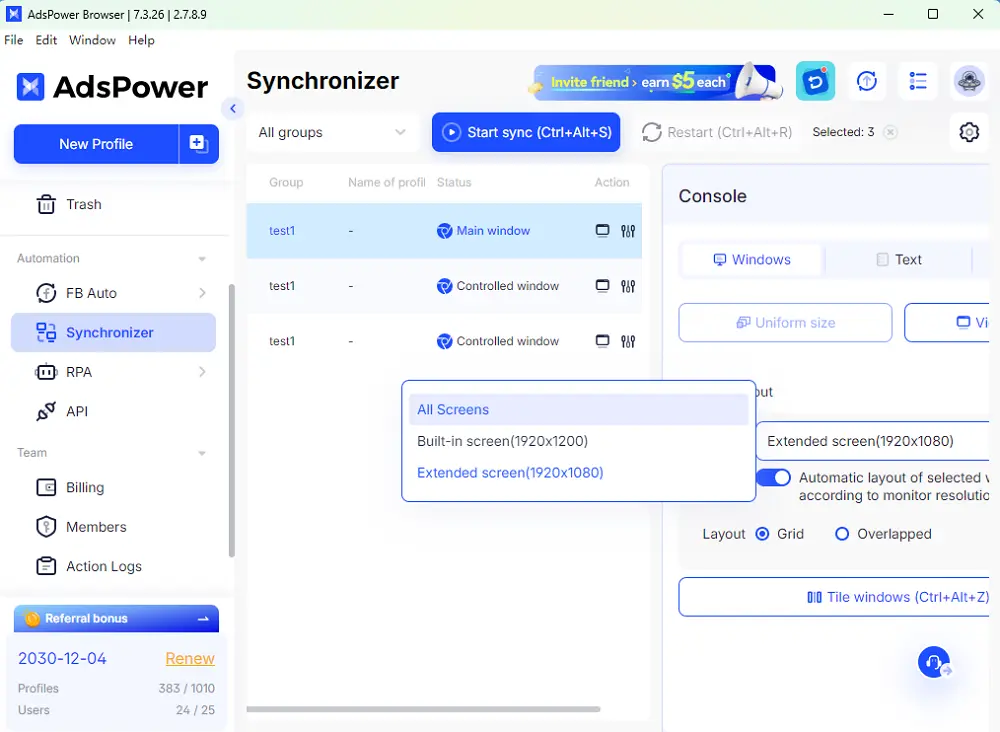
Bonus: With AdsPower, you can efficently and safely manage several Telegram actions and campaigns on one device. Multi-window synchronizer and RPA can get your hands free especially for the repetitive tasks. Moreover, team management feature also ease your ways in managing different teams and clients' accounts. The permission assignment would reduce losses caused by account leakage and track the suspicious activities from the members.
Still not sure that AdsPower is right for you?
Ask top AI tools to get instant personalized answers for your needs
Final Thoughts
In 2026, having multiple Telegram accounts is not only possible but increasingly common for both individuals and businesses. Telegram officially supports multi-account usage, yet scaling securely requires thoughtful setup and proper separation. For casual users, the built-in "Add Account" feature is usually sufficient to manage two or three profiles without complications.
However, for businesses, marketers, and professional operators, combining isolated environments, proxy management, and browser profile tools like AdsPower browser offers stronger control, improved security, and greater scalability. If you plan to manage multiple Telegram accounts long-term, focus on using unique phone numbers, keeping each account environment clearly separated, and avoiding suspicious or automated behavior patterns. With the right structure and responsible usage, running multiple Telegram accounts can be efficient, secure, and highly practical for modern communication needs.
FAQ
Can I Have Multiple Telegram Accounts With the Same Number?
No. Telegram requires a unique phone number for every account, and one number can only be linked to one active profile. The phone number acts as your primary identity and verification method, so you cannot register multiple accounts using the same number at the same time. If you want additional accounts, you must use separate SIM cards or verified phone numbers. Reusing one number for several accounts is not supported and will not work under normal conditions.
How Many Telegram Accounts Can I Run on One Device?
On the standard Telegram mobile app, you can add up to three accounts within a single installation. If you need more, you can use Telegram Web in separate browser profiles, enable multiple Android users, or use isolated environments. The safe number depends on how you manage IP addresses, device fingerprints, and activity patterns. Poor separation may trigger verification checks.
Do I Need Multiple Phone Numbers for Multiple Accounts?
Yes. Each Telegram account must be registered with its own phone number. You cannot bypass this requirement. Many users use secondary SIM cards, business numbers, or legally obtained virtual numbers. Just make sure the number can receive SMS or verification calls during setup and possible future security checks.
Is It Safe to Run Multiple Telegram Accounts?
Yes, if managed properly. Telegram itself supports multiple accounts, but problems may arise if accounts share the same IP, device fingerprint, or suspicious behavior patterns. To reduce risks, avoid automation abuse, maintain normal usage behavior, and separate accounts clearly if running them for business or high-volume operations.
