

InboxDollars lets you earn cash through surveys, offers, games, shopping, and other activities. While there are plenty of ways to earn, the value of each activity can vary depending on the reward and time involved. This review looks at how the platform works, what you can realistically expect, and what to keep in mind before getting started.
If you've been looking for ways to make a little extra money online, you've probably come across InboxDollars.
The platform lets members earn cash by taking surveys, completing offers, playing games, shopping online, and doing other activities. It has been around for years, but that doesn't automatically mean every activity is worth your time.
So, is InboxDollars legit? How much can you actually make? And which activities are worth doing?
We took a closer look at how InboxDollars works, what users say about it, and some of the common problems people run into. More importantly, we'll look at how to spend less time on low-paying tasks and get more value from the activities you choose.
What Is InboxDollars?
InboxDollars is an online rewards platform where users can earn cash by completing different activities. Depending on what's available to your account, you may find:
- Paid surveys
- Games and app offers
- Product tests and research studies
- Shopping and cashback offers
- Paid emails
- Search activities
- Other promotional offers
Unlike some rewards platforms that mainly use points, InboxDollars generally displays rewards in cash amounts. That makes it relatively easy to see how much an activity is worth before you start. However, the amount you can earn depends heavily on the activities available to you, your eligibility, and how much time you're willing to spend.
Is InboxDollars Legit?
InboxDollars has been operating since 2000 and is backed by Prodege, so it's not a new or anonymous rewards site. Plenty of Reddit users report getting paid, but there are also complaints about survey screen-outs, missing rewards, and account restrictions. In other words, the platform is legit, but that doesn't mean every offer or cash-out experience will be trouble-free.
How Does InboxDollars Work?
InboxDollars is free to join and is currently available to users who are at least 18 and physically located in the US.
Before signing up, make sure InboxDollars is available in your region and that you meet its current eligibility requirements. Since InboxDollars is intended for users in the US, your account information, IP location, and browser environment should remain consistent with where you're actually using the service. Keeping these details consistent can also help reduce unnecessary account verification or security issues.
If you're eligible to use InboxDollars, the sign-up process only takes a few minutes. Here's what it looks like:
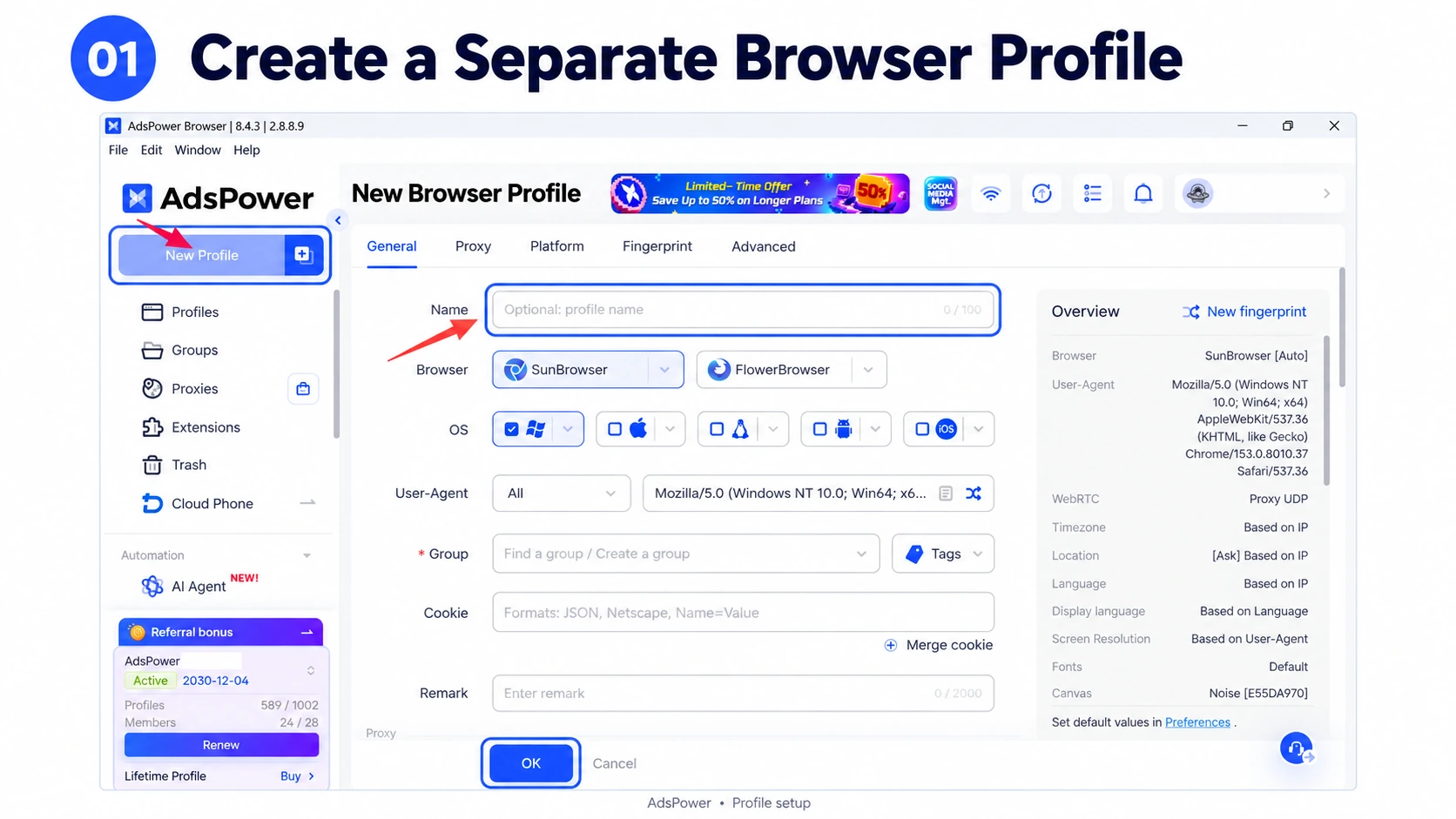
1. Create a Browser Profile
If you use InboxDollars alongside other online workflows, you can create a dedicated browser profile in AdsPower.
A separate profile keeps your cookies, local storage, browser settings, and login session isolated from your regular browser. This can make it easier to keep your InboxDollars account separate from other browsing activity.
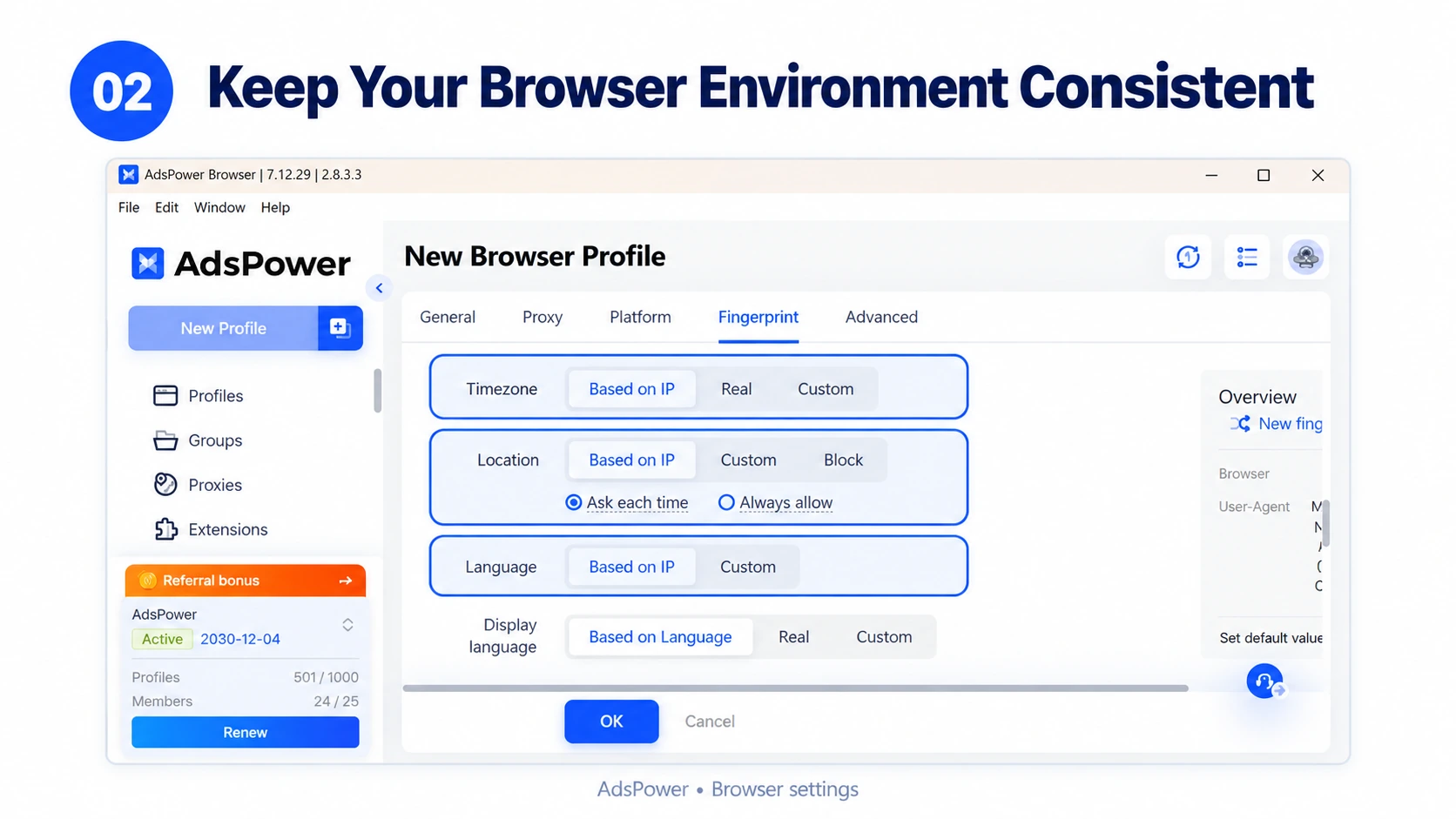
2. Configure Your Environment
When setting up the profile, keep the browser environment consistent with your actual setup and the information you provide to InboxDollars. If you use a proxy for legitimate privacy or work purposes, avoid frequently switching locations. Your IP location and browser environment should make sense for your actual use.
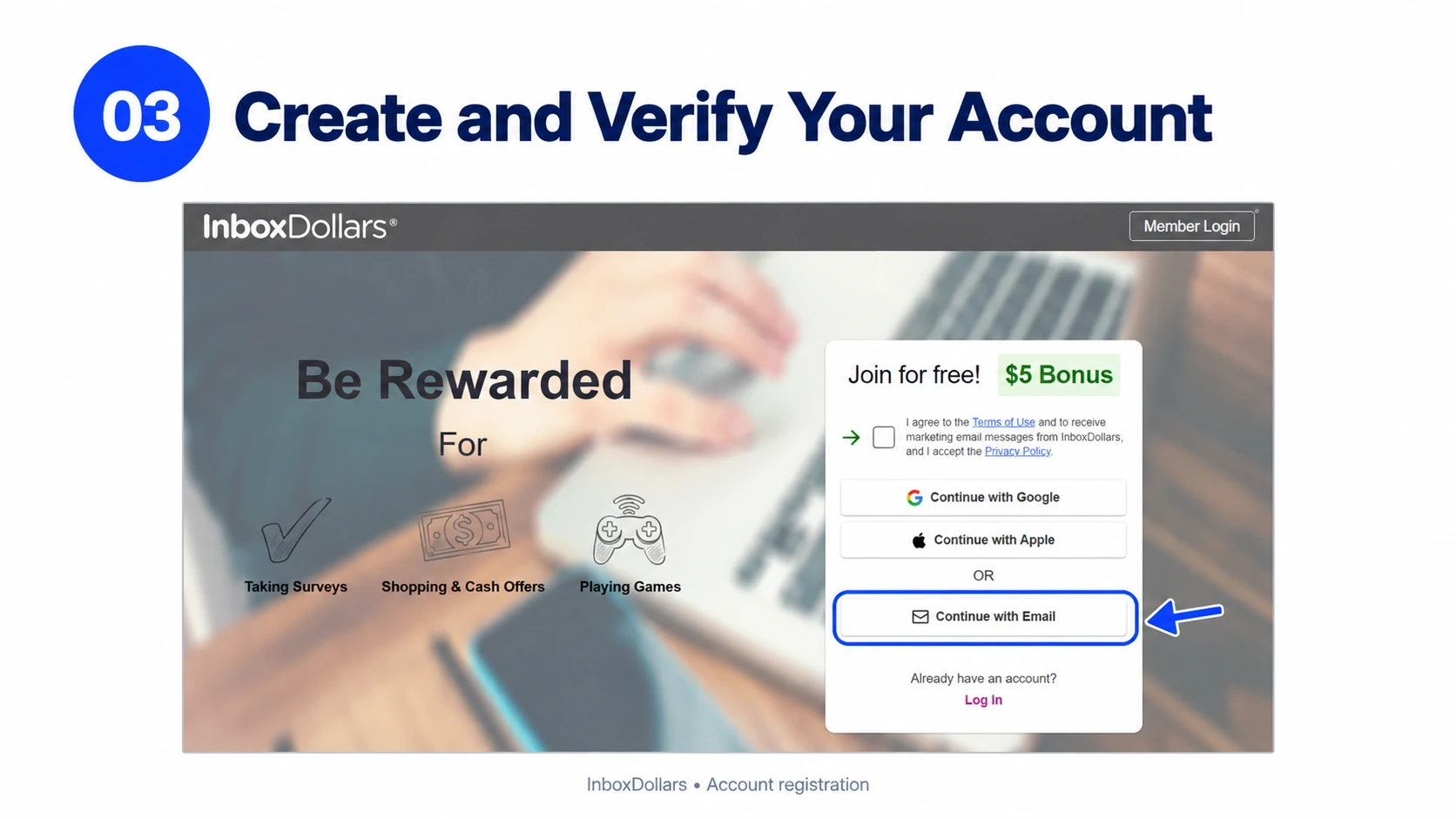
3. Sign Up and Verify
Open InboxDollars from the dedicated profile and create a free account with your email address. You can also sign up through the InboxDollars app on the App Store or Google Play. After signing up, confirm your first PaidEmail to unlock the $5 welcome bonus, if the offer is available to your account. You should also complete your profile, as this helps InboxDollars match you with relevant surveys and other opportunities.
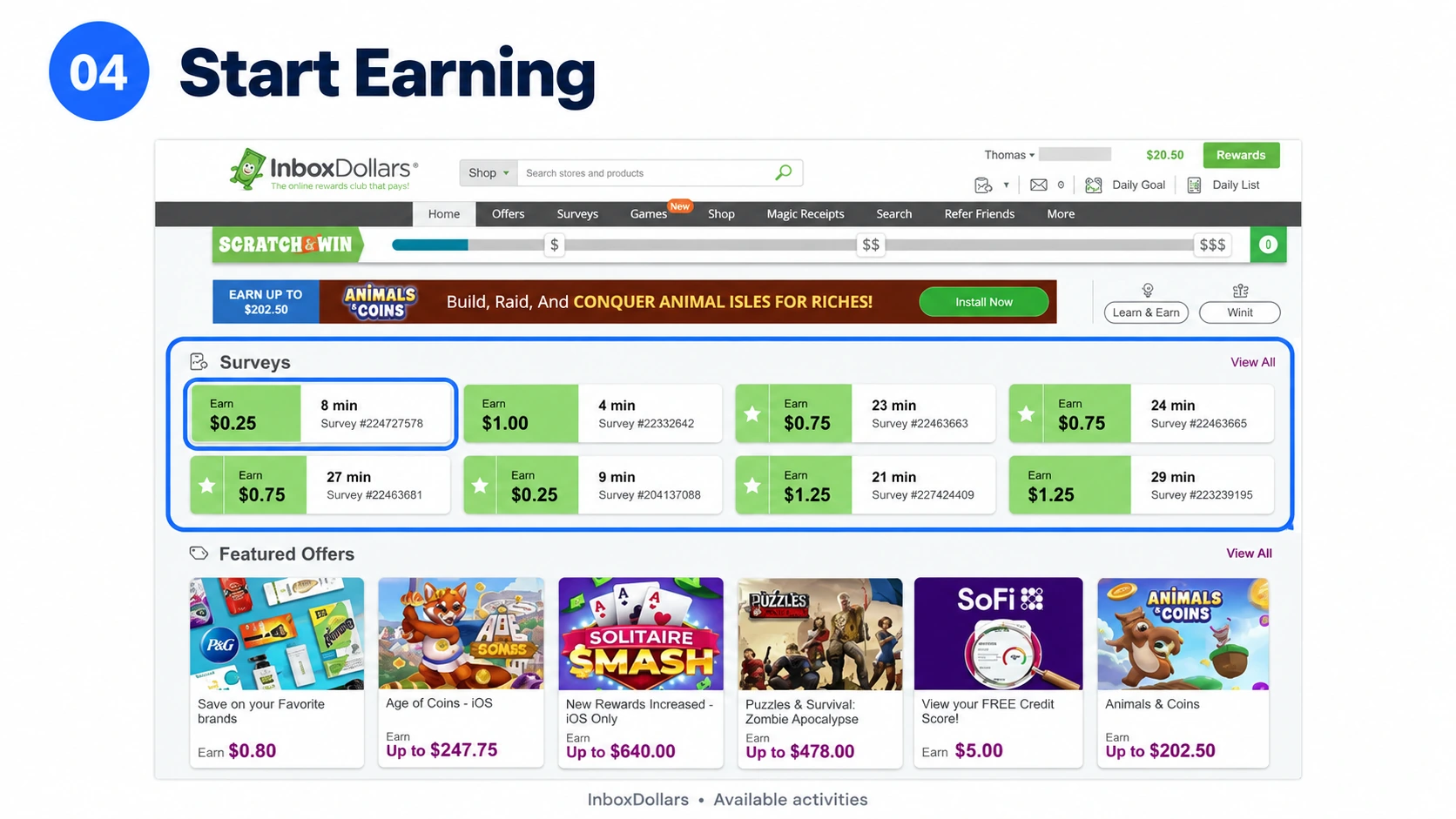
4. Start Earning
Once your account is set up, you can browse the activities available to you, including:
- Paid surveys
- PaidEmails
- Games and offers
- Product tests and research opportunities
- Shopping and cashback
- Other promotional activities
5. Track Your Rewards
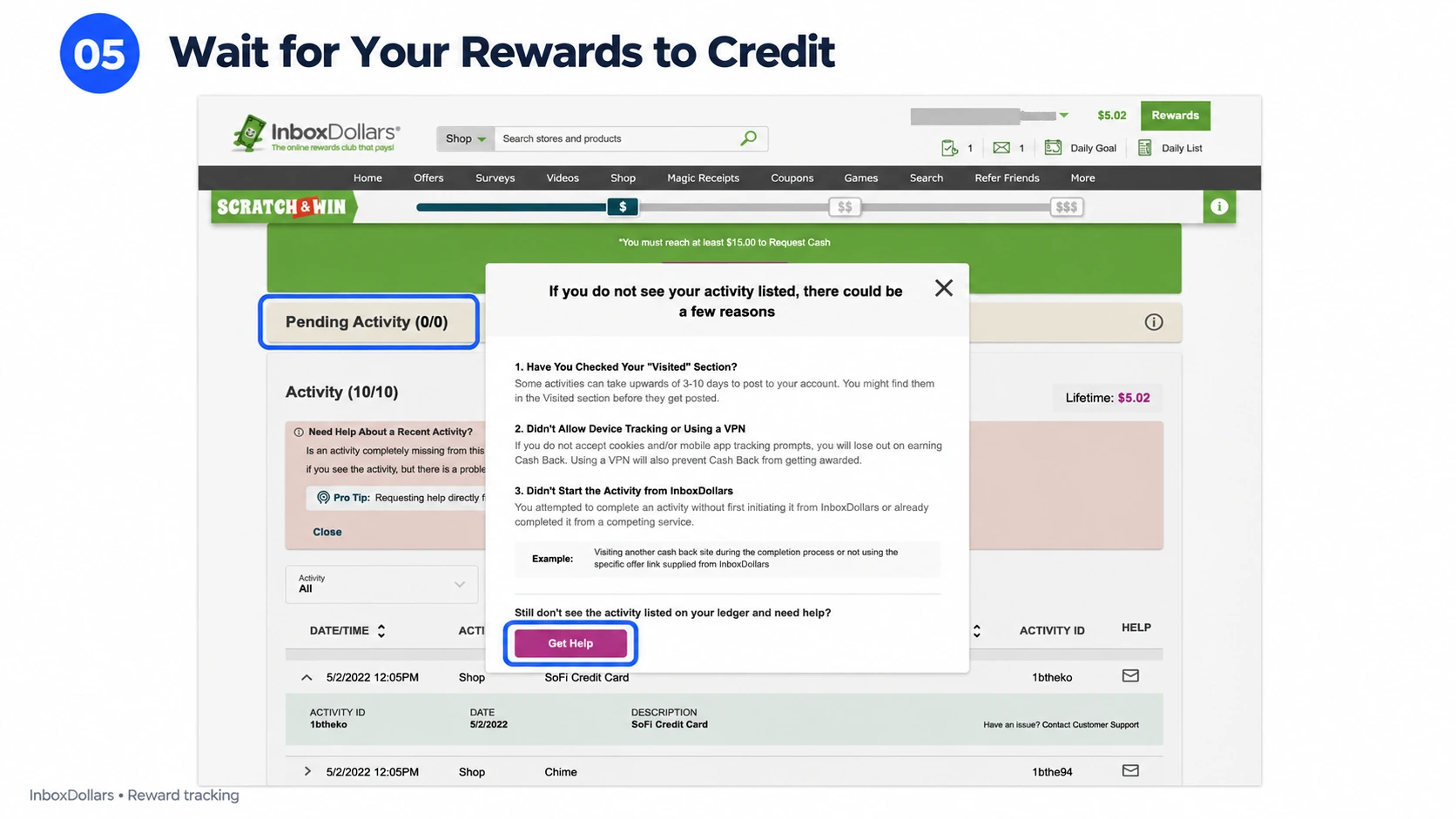
Not every reward is credited immediately. InboxDollars says some surveys can credit in around 15 minutes, while others may take several days or up to 30 days depending on the survey provider. Offers can also have different crediting periods, with some taking 2–14 days and others taking longer.
This matters when comparing opportunities. A $20 offer isn't necessarily better than a $5 survey if the $20 offer takes significantly more time or requires several days of follow-up.
For higher-value offers, it's a good idea to save screenshots of the reward, requirements, and completion details in case you need to contact support about missing credit.
6. Cash Out
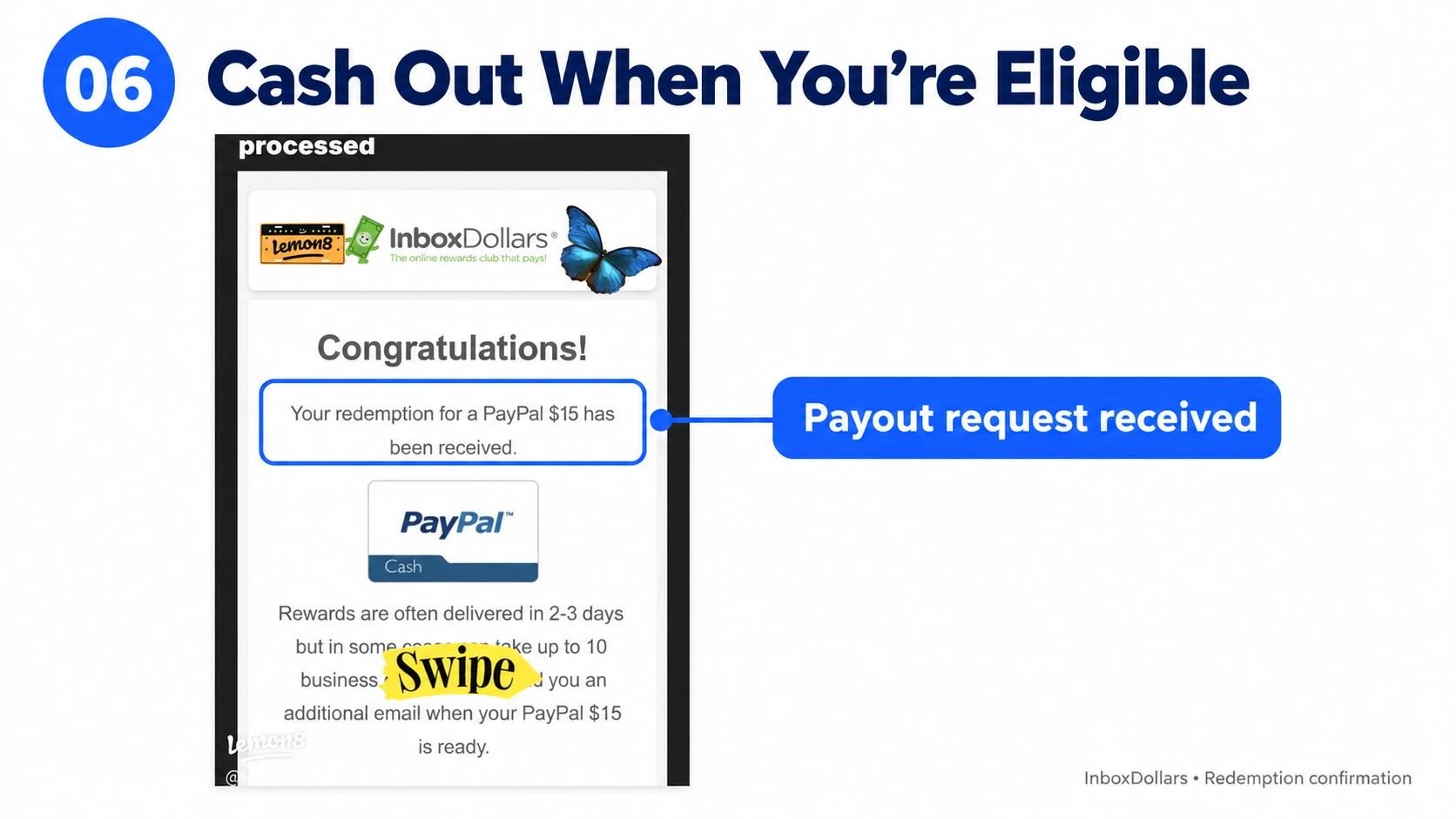
Once you've reached the current redemption requirements, you can request a payout through the available redemption options on your account. Check the requirements before spending a lot of time earning, since redemption thresholds and available payment methods can change.
One other detail is worth clearing up: a $0.30 signup or verification fee is sometimes mentioned online, but we couldn't confirm it in InboxDollars' official terms or help center. The confirmed fee listed by InboxDollars is a $3 processing fee for check cashing.
How to Make Money With InboxDollars
There are several ways to earn on InboxDollars, but they aren't equally useful for everyone.
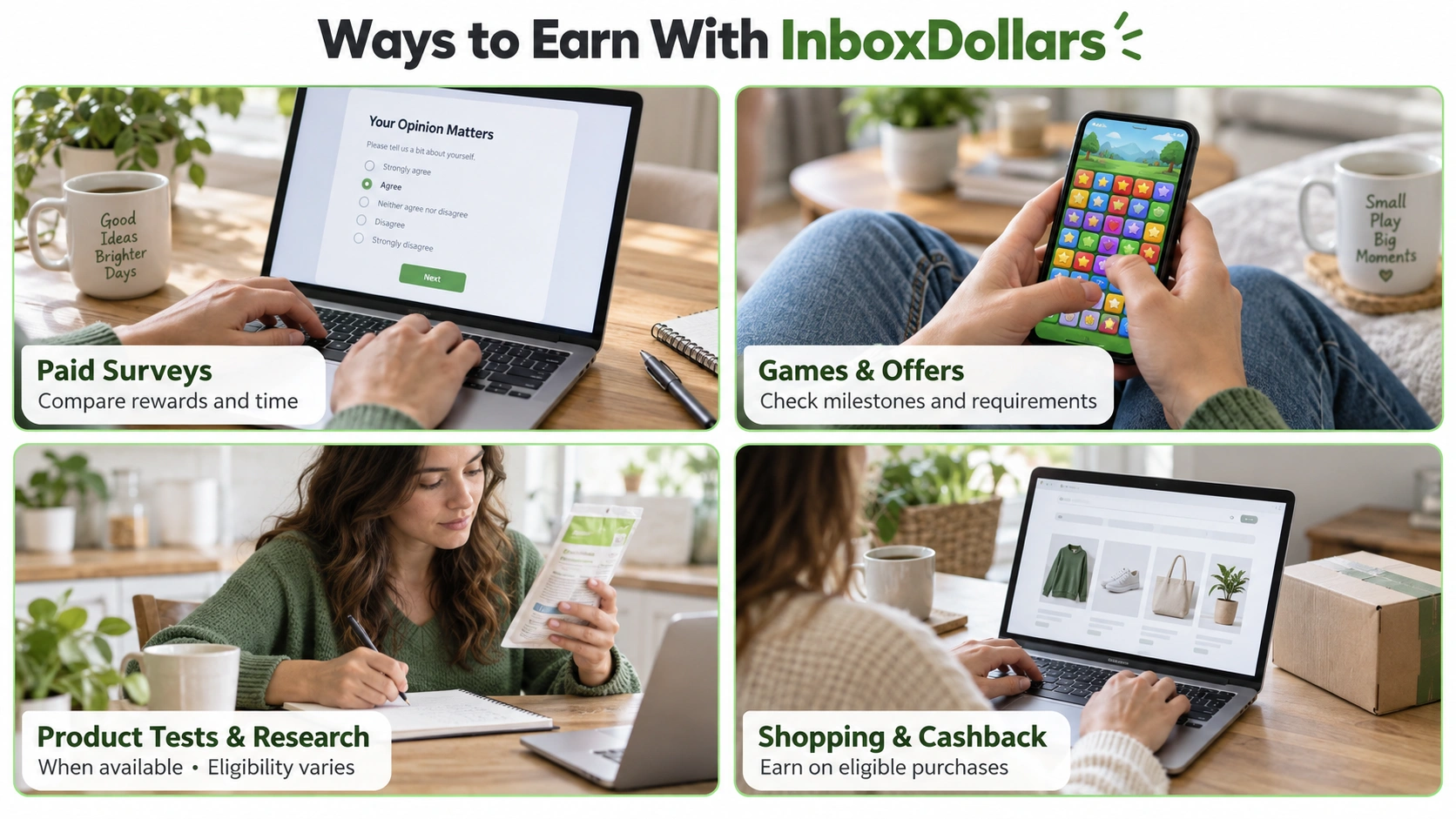
1. Paid Surveys
Surveys are probably the first thing most people try.
You answer questions about products, services, shopping habits, or other topics and receive a cash reward after completing the survey.
The catch is that you may not qualify for every survey. You can also spend several minutes answering screening questions before finding out that you aren't eligible.
For that reason, don't judge a survey only by its advertised reward. Look at the estimated time as well.
A short survey paying a smaller amount can sometimes make more sense than a high-paying survey that takes much longer.
2. Games and Offers
InboxDollars also has game and promotional offers.
Some offers pay after you install an app or game and reach certain milestones. Others may require registration, a purchase, or completion of specific activities.
Before starting an offer, read the conditions carefully.
InboxDollars itself notes that some offers are only available to first-time users of the advertiser and that completing the same offer elsewhere may make you ineligible for credit. It also recommends keeping confirmation emails when you need help with missing credits.
This is especially important for higher-value offers. Take a screenshot of the offer before you start so you have a record of the requirements.
3. Product Tests and Research Panels
Product tests and research studies can be more interesting than standard surveys because some opportunities pay considerably more.
They may also start with a short qualifying survey.
In user discussions, some InboxDollars members have reported receiving smaller qualifying surveys before being invited to higher-paying product tests or research panels. These opportunities aren't guaranteed, but they're worth checking if they appear in your account.
The important thing is to look beyond the headline reward.
A research panel advertised as taking 30 minutes may involve additional participation over several days. The real time commitment can therefore be much higher than the initial estimate.
4. Shopping, Cashback, and Other Activities
InboxDollars also offers shopping-related rewards and smaller activities such as search, emails, and Scratch & Win.
These can be useful when you're already doing the activity anyway.
For example, if you're planning to buy something online, cashback can make sense because you're not spending extra time just to earn the reward.
But if an activity pays only a few cents and takes several minutes, it may not be worth prioritizing.
InboxDollars' own help documentation says its Cash Search feature rewards qualified searches and that search activity needs to be natural rather than random searches made purely for rewards.
How to Earn More With InboxDollars
The easiest way to make more isn't necessarily to do more activities. It's to get better at choosing which ones are worth your time.
Prioritize Higher-Paying Opportunities
When you open InboxDollars, don't automatically start with the first activity you see. Look at the reward, estimated time, requirements, and whether you need to make a purchase.
A $10 offer might sound better than a $2 survey, but if the offer requires an hour of gameplay while the survey takes 10 minutes, the comparison looks very different.
Think in terms of money per hour, not just the advertised reward.
Don't Ignore Qualifying Surveys
A short qualifying survey may not pay much on its own, but it can sometimes lead to product tests, research panels, or other higher-value opportunities.
Some users have reported getting access to product-test opportunities after completing smaller qualifying surveys. So if you're interested in research studies, don't immediately skip every low-paying screener.
At the same time, don't spend an hour repeatedly qualifying for surveys that never lead anywhere. If you're consistently screened out, move on.
Compare Rewards With the Time They Take
This is one of the simplest ways to improve your results.
For example:
- $1 for 5 minutes = $12/hour
- $5 for 30 minutes = $10/hour
- $10 for 90 minutes = about $6.67/hour
These are only examples, but the idea is useful. The advertised reward doesn't tell you the whole story. Check how much work is actually involved before deciding whether an opportunity is worthwhile.
Know When to Skip Low-Paying Activities
Not every activity needs to be completed. Some users have complained about spending time on low-value emails, small bonuses, or surveys that pay very little relative to the time required. These experiences vary from person to person, but they're a good reminder that "available" doesn't necessarily mean "worth doing." If an activity repeatedly gives you a poor return, skip it.
Check for New Offers Regularly
The opportunities available to you can change. A task that isn't attractive today may be replaced by a better-paying survey or research opportunity later.
You don't need to sit on the platform all day. Checking periodically is enough to catch new opportunities without turning InboxDollars into a full-time job.
Keep Proof of High-Value Offers
This is particularly important for offers that involve several steps. Before starting a higher-value offer, save:
- The advertised reward
- The completion requirements
- The offer deadline
- Screenshots of important conditions
- Confirmation emails
- Your completion date
InboxDollars says advertisers and third-party providers are responsible for reporting many credits, and it recommends saving confirmation emails when crediting assistance is needed. Having your own record can make it much easier to explain what happened if a reward doesn't appear.
Don't Build Up a Large Balance
Some users in online discussions recommend cashing out regularly rather than letting a large balance sit in the account.
This isn't an InboxDollars rule, and it doesn't mean every user will have a problem. It's simply a practical way to reduce the amount of money tied up in pending rewards or account issues.
It's also a good reason to understand the cash-out process early rather than waiting until you've accumulated a large balance.
InboxDollars: What to Know Before You Start
Before you start, there are a few things worth keeping in mind:
- Your information: Some surveys and offers may ask for personal or profile information, so check the requirements before participating.
- Third-party offers: Many surveys and offers come from third-party providers, so eligibility, reward amounts, and crediting times can vary.
- Account security: Use a strong, unique password and keep your login details private.
- Location requirements: InboxDollars is currently intended for eligible users in the US. Make sure your account information and browser environment are consistent with your actual use.
- Cash-out terms: Check the current redemption requirements, available payment methods, and any applicable fees before you cash out.
Pros and Cons
| What We Like | What to Watch For |
|---|---|
| Free to join | You may be screened out of surveys |
| Multiple ways to earn | Some activities pay very little |
| Cash rewards are easy to understand | Rewards don't always credit immediately |
| Higher-value offers may be available | Available offers vary by user |
| Long operating history | Users report occasional account or redemption issues |
| Web and mobile access | Some cash-out methods may have fees |
Bonus: How AdsPower Helps You Manage Your InboxDollars Workflow
InboxDollars is mostly open to qualified users in the United States. Availability of surveys, offers, and rewards is subject to location requirements and eligibility regulations of the site. If your real location, account information, or network environment does not fulfill these standards, you may be subject to limited activity, further verification, or account limitations. Changing your browser settings or network location often also makes your browsing environment less stable.
AdsPower allows you to preserve your browser settings for your usual InboxDollars work. By creating a dedicated browser profile, you may segregate the cookies, login session and browser settings you use for that profile from the ones you use for other websites. That makes it easy to get back into your account, do relevant duties and not have to re-setup the same browser environment frequently.
1. Keep Your InboxDollars Account in a Dedicated Browser Profile
Create an AdsPower browser profile for InboxDollars and name it something identifiable, such as InboxDollars – Personal Account. Rather than avoid mixing InboxDollars with other browsing activity on the same browser environment, use this profile anytime you log into your account. Each AdsPower profile has its own cookies, local storage, login sessions and other browser data. Then, when you access the InboxDollars profile again, you can continue to use the saved browser environment if your login session is still active.
2. Keep Email and Other Website Sessions Separate
InboxDollars management could also include monitoring emails, reviewing account notifications, or browsing other websites. Keeping all these activities in one browser can make it tougher to identify sessions and find where to pick up. With AdsPower, you can build separate profiles for various tasks:
- InboxDollars: Go to your account and see if there are surveys or offers.
- Personal Email: View messages and account notifications.
- Other Websites: Separate unrelated browsing activities or projects.
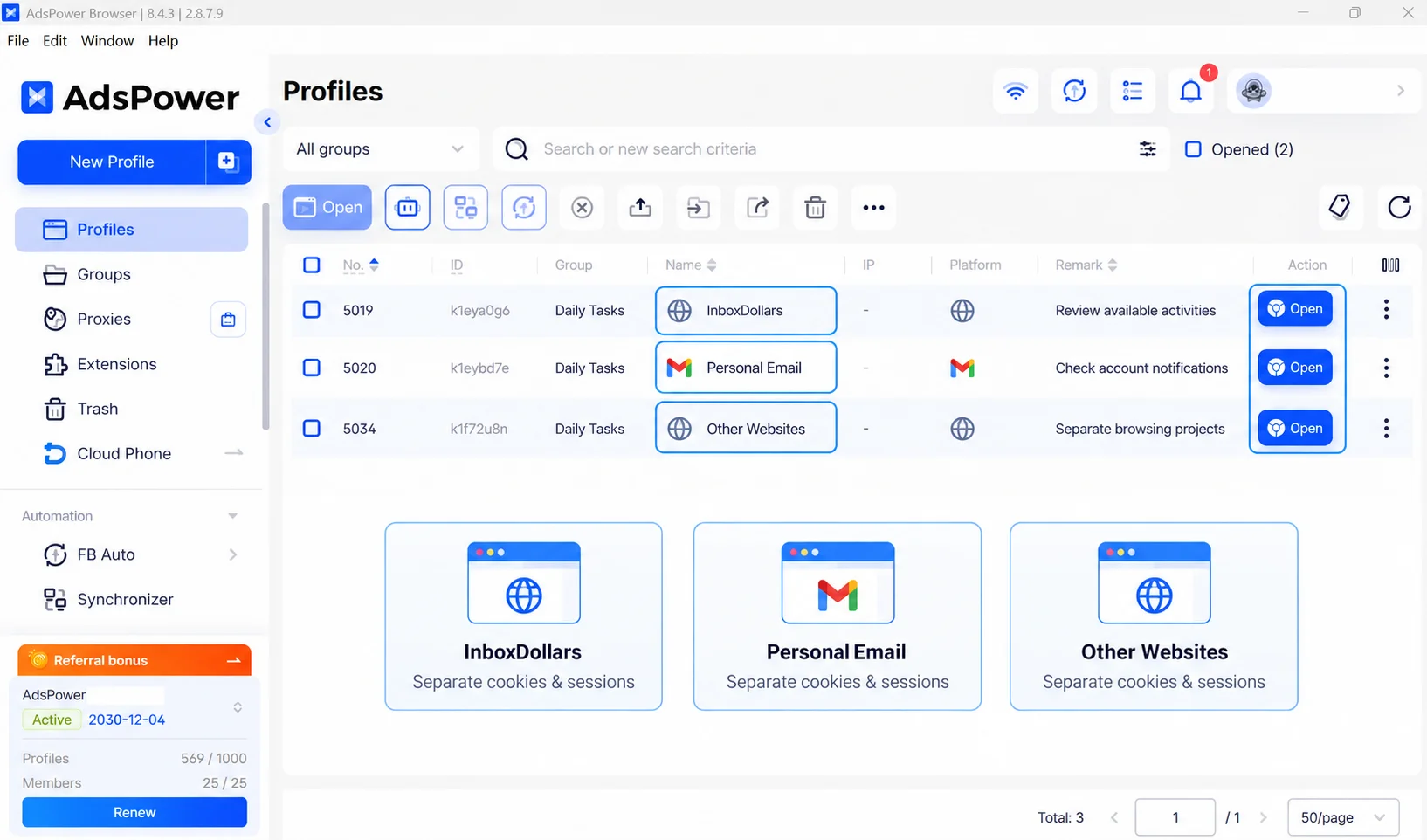
Each profile saves its own browser data, so when you enter into your email in one profile, it doesn't intermingle its cookies or login session with the InboxDollars profile. From AdsPower you can change profiles and launch the browser environment for the task you wish to work on. This configuration is particularly helpful if you frequently go between InboxDollars and other websites and want to keep your sessions organized.
3. Automate Repetitive Browser Tasks When Possible
If you use InboxDollars regularly along with email and other websites, some aspects of your surfing habit may include repeating the same navigation procedures. Supported browser tasks can be assisted by AdsPower RPA and AI Agent, to reduce manual navigation involved.
For example, you might use a browser workflow to open InboxDollars, go to your account dashboard, or open a page to review available activities. You can also use browser automation to visit specific pages on other websites and gather information for subsequent inspection if the rules of the websites and the workflow let it.
AdsPower RPA is good for fixed sequences of browser operations like opening a page and going through a predetermined path. AI Agent allows you to describe supported browser activities using natural language, making it easier to describe a process without having to explicitly list out each step.
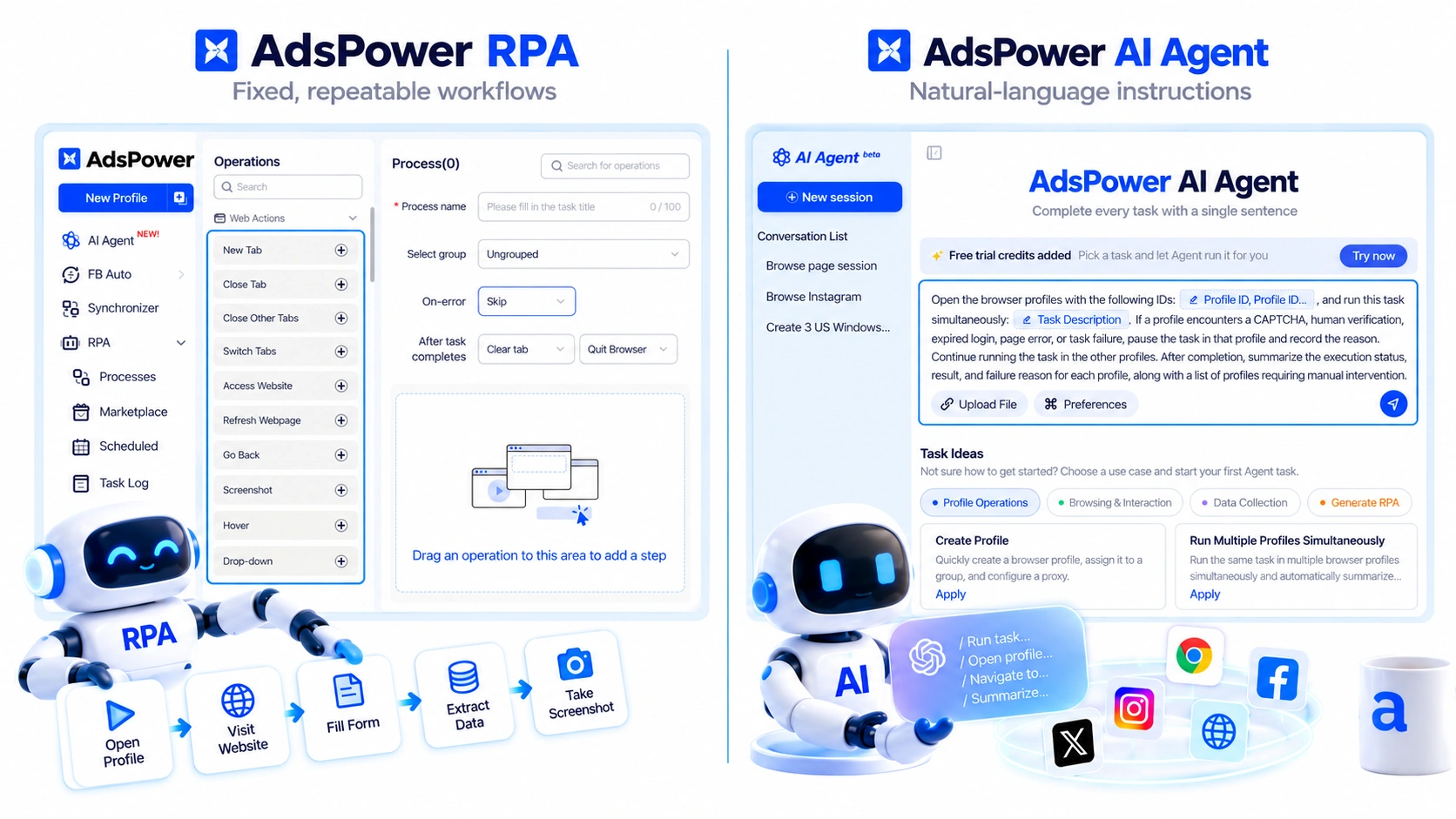
These tools are to assist you with browsing tasks, not to replace your involvement in InboxDollars activities. Do not use automation to do surveys, submit offers, mimic participation, claim rewards automatically, skip verification, or circumvent location and eligibility limitations. Before you automate any activity relating to your account, always verify InboxDollars' current regulations.
To put it briefly, AdsPower is a browser management tool, not an InboxDollars earning tool. It can help you keep your InboxDollars session separate from other surfing activity, resume to a stored browser environment, and minimize repetitive navigation. To access its activities and prizes, you still have to meet the geographical, account, and eligibility conditions of InboxDollars.
Is InboxDollars Worth It in 2026?
InboxDollars can be useful if your goal is to make some extra money from spare time, but the value depends heavily on how you use it.
The biggest mistake is treating every available activity as equally worthwhile. Instead, compare the reward with the actual time required. Look for higher-value surveys, product tests, and offers when they're available, and don't be afraid to skip activities that pay too little for the effort.
Also keep screenshots and confirmation emails for anything involving a significant reward.
If you're managing multiple browser-based workflows at the same time, using separate browser profiles can make the process easier to keep organized. AdsPower is one option for managing those profiles, cookies, sessions, and proxy settings in one place.
Frequently Asked Questions
How Does InboxDollars Cash Out Work?
InboxDollars offers cash and gift-card redemption options, with the available methods and requirements depending on your account. Check the current cash-out threshold and available redemption options before you start earning, as these requirements can change.
How Long Does InboxDollars Take to Pay?
There isn't one fixed processing time. Some rewards may appear quickly, while others depend on the survey provider or advertiser. InboxDollars says some surveys can credit in as little as 15 minutes, while others may take several days or, in some cases, up to 30 days.
What Should I Do If My InboxDollars Reward Doesn't Track?
First, check your activity ledger and the offer's stated crediting period. If the reward is still missing, keep the offer details, completion date, screenshots, confirmation emails, and any relevant transaction information before contacting support.
What If I See a Redemption Error on InboxDollars?
Some users have reported temporary redemption errors, including an “An Error occurred during redemption” message. If this happens, check whether your balance is still showing, save a screenshot of the error, and try again later. If the problem continues, contact InboxDollars support with your account and redemption details.
Why Was I Disqualified From an InboxDollars Survey?
Not every survey is available to every user. You may be screened out after answering some qualifying questions. If this happens repeatedly, consider moving on to another survey or activity rather than spending too much time on one opportunity.
How Much Can You Make With InboxDollars?
There is no fixed amount. Your earnings depend on the activities available to you, how often you qualify, the value of the offers, and how much time you spend. Higher-paying surveys, product tests, research panels, and certain offers can provide more than smaller daily activities, but availability varies.
