

TikTok Shop Selling Guide 2026: How to Start, Grow, and Scale
Take a Quick Look
Learn how to sell on TikTok Shop in 2026, from setup and products to traffic, affiliates, and scaling with AdsPower. Start growing your sales today.
TikTok Shop has quickly become one of the most popular ways to sell products online using short videos and livestreams, with its sales expected to exceed $20 billion in 2026. As more users shop directly inside TikTok, creators and businesses now have a powerful opportunity to turn views into real sales.
In this guide, you'll learn how to sell on TikTok Shop, who can sell on it, what products perform best, and how to drive traffic and orders in 2026. Whether you are a beginner or already selling online, this article walks you through each step clearly and simply.
What Is TikTok Shop and How Does It Work?
TikTok Shop is TikTok's own shopping platform that allows creators and businesses to sell products directly within the app. Users can discover and buy items through videos, livestreams, or the dedicated Shop tab without leaving TikTok.

Products on TikTok Shop appear in videos, livestreams, and on a mini marketplace inside the app. TikTok's smart recommendation system helps show your products to users who are most likely to be interested, making it easier to reach potential buyers.
Sellers use the TikTok Shop Seller Center to handle everything. They can add products, track orders, and analyze sales.
Is TikTok Shop Worth It in 2026?
In 2026, TikTok Shop has moved beyond testing and become a mature social commerce platform. Shopping content is now part of users' daily browsing. This makes finding products feel more natural and happens more often.
What makes TikTok Shop stand out in 2026 is how strongly content, data, and commerce work together. TikTok gives sellers better analytics and improved product matching. It also helps distribute traffic smarter.
TikTok Shop now has wider global coverage and more reliable logistics options. It also has clearer seller tools. For sellers who grasp content-driven sales and adapt fast, TikTok Shop is a promising channel in 2026.
TikTok Shop Seller Requirements
- Be at least 18 years old to apply as a TikTok Shop seller.
- Prepare a valid government issued ID for identity verification.
- Business sellers should have official company registration documents ready.
- Live in a country where TikTok Shop is officially available.
- Have a TikTok account that follows community and platform rules.
- Make sure your intended products meet TikTok Shop policy guidelines.
Step-By-Step Guide to Open a TikTok Shop
Register on TikTok Seller Center using your TikTok account, email address, or mobile phone number.
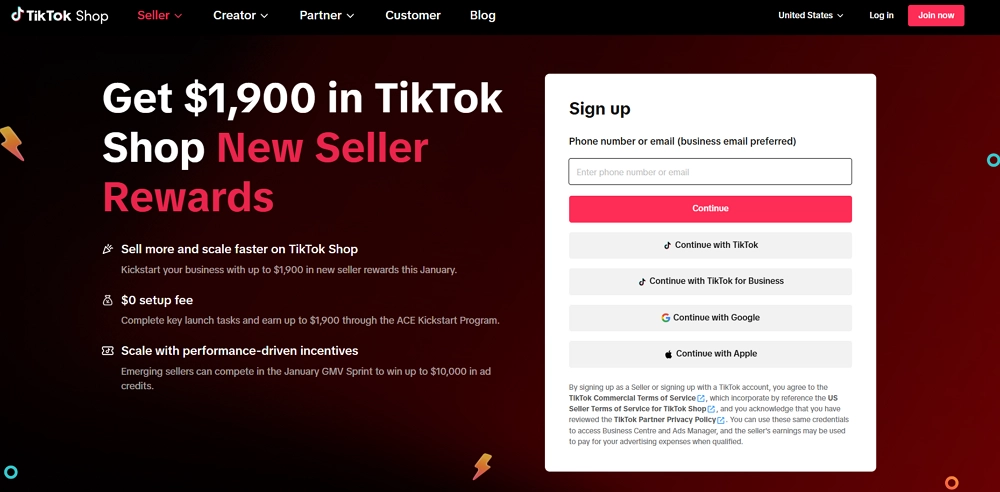
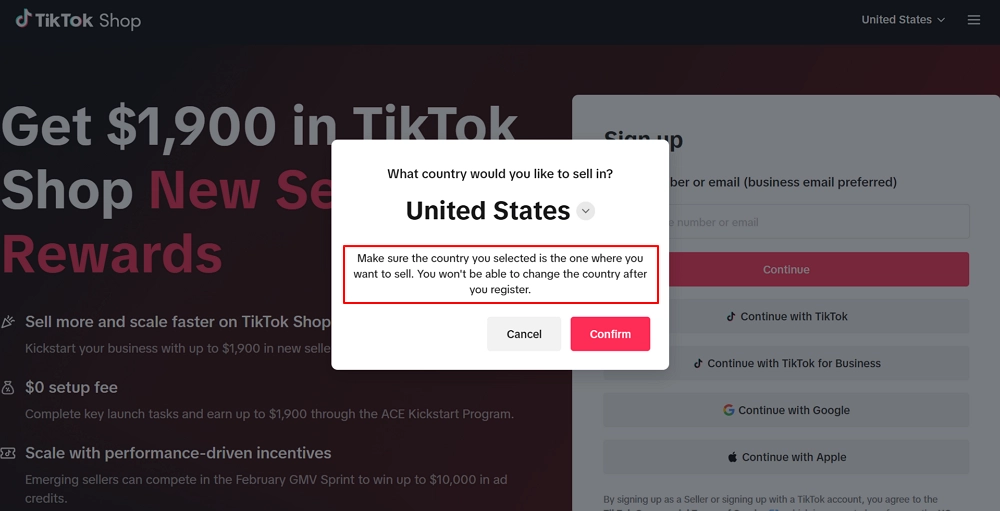
Select the country you like to sell in.
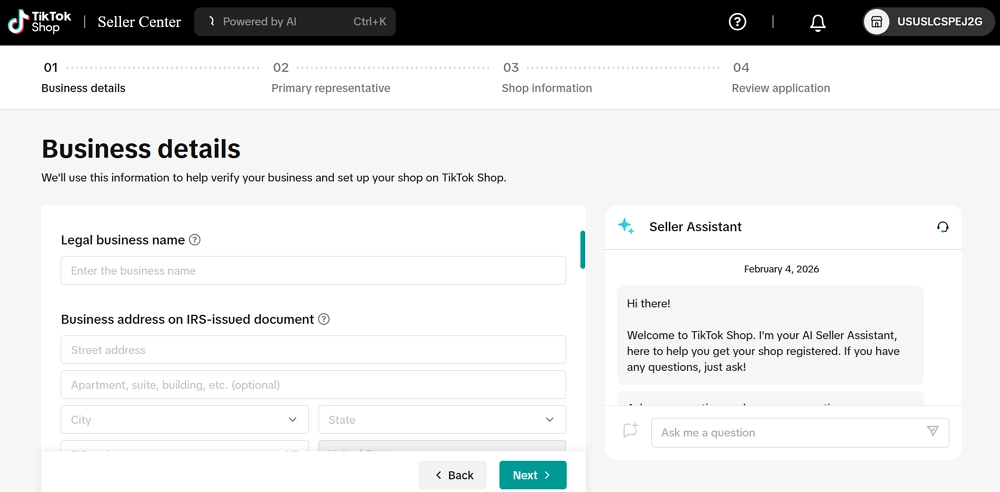
Provide your business details, including your official business name and address exactly as listed on IRS documents.
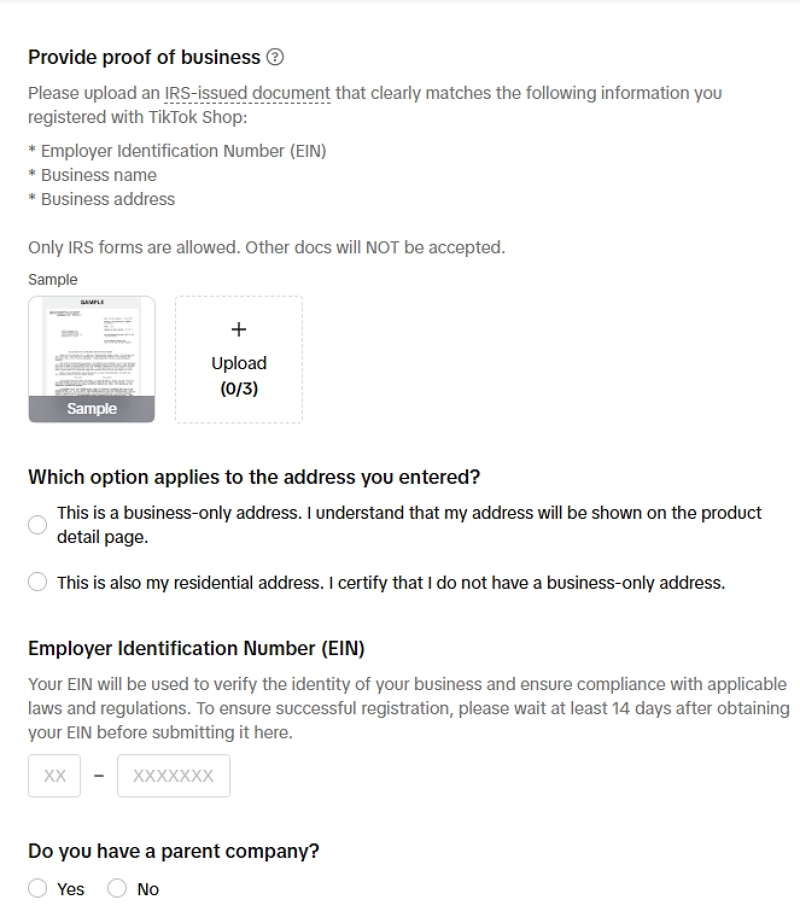
After verifying business details, you are required to provide proof of business, select the address type and other info.
Enter your primary representative's personal info, including ID verification and type of ID.
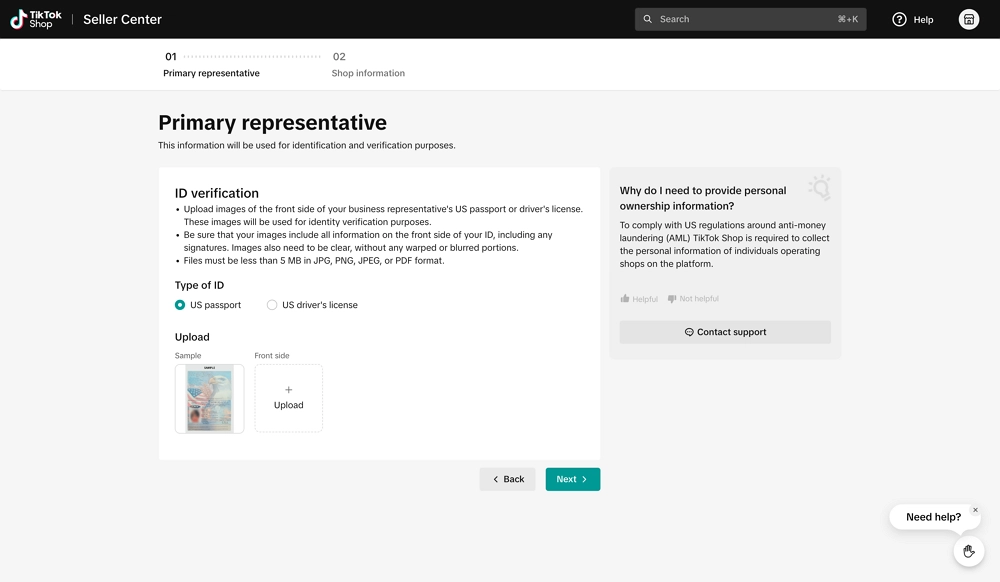
Enter your shop information (Shop name and primary product).
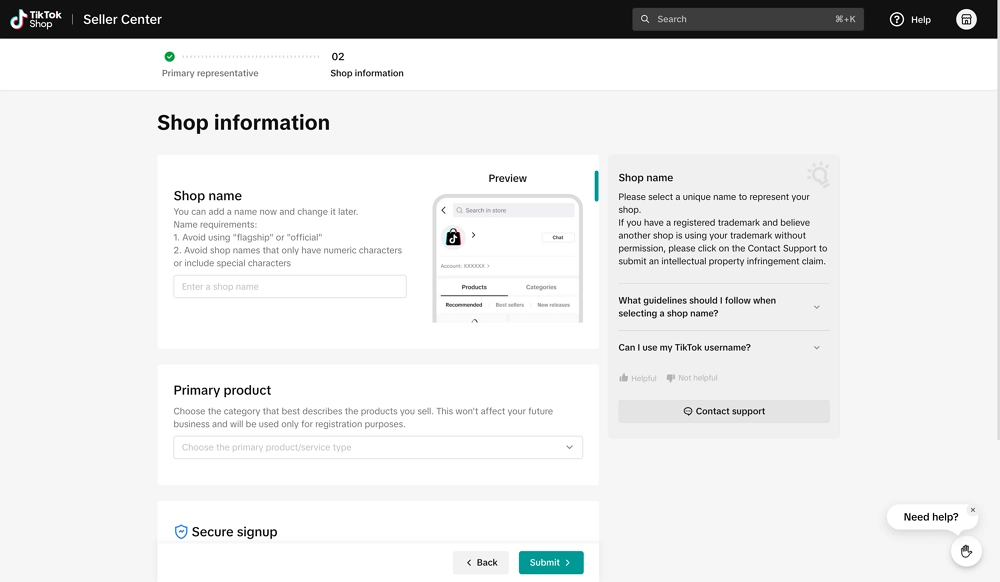
Review all details carefully and submit your application for TikTok Shop approval.
How to Set Up TikTok Shop After Approval
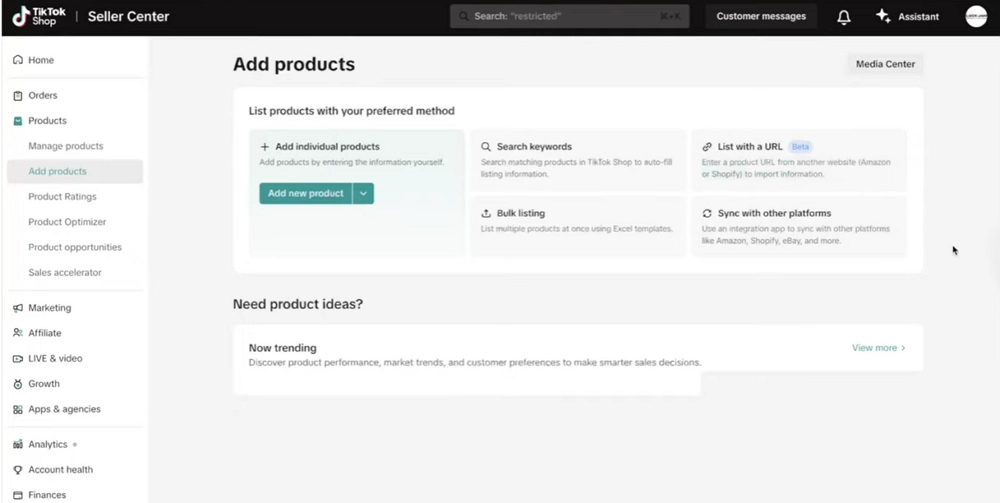
Upload your first products with titles, descriptions, images, pricing, and other info to make your shop ready for sales.
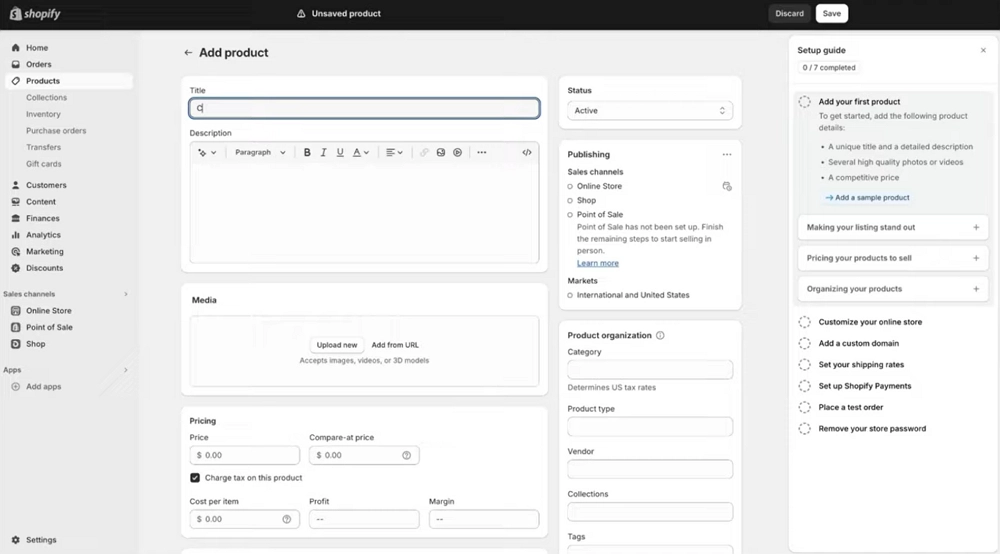
Configure your shipping method. Choose from Fulfilled by TikTok or TikTok shipping partners.
Link your bank account to receive payouts from completed orders.
Link products by selecting them in the "Add Products" section when uploading a video or going live.
What Can You Sell on TikTok Shop?
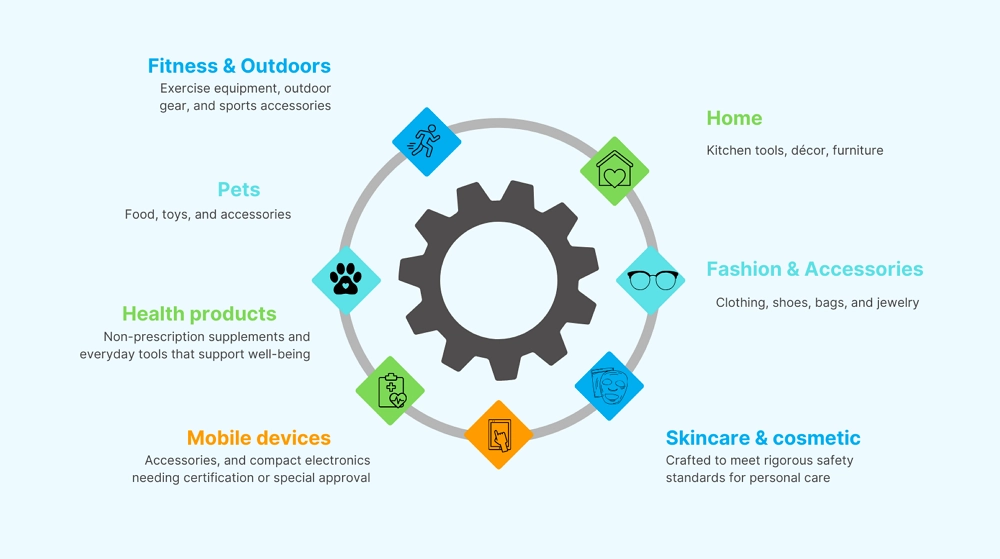
TikTok Shop supports a wide variety of products. Sellers can offer home goods, fashion, accessories, skincare, cosmetics, mobile devices, electronics, and health products, meeting platform safety and certification standards.
TikTok Shop also includes pet supplies, fitness equipment, outdoor gear, and sports accessories. This helps creators and businesses connect with shoppers using short videos and livestreams in various categories.
Notes:
- TikTok Shop only allows physical products that can be tracked during shipping. Digital products, like eBooks and software, are usually not permitted.
- Some categories (electronics, baby products, certain beauty items) require additional approval or certification.
- Regulated or banned items are: Prescription drugs, medical devices, alcohol, tobacco, adult content, weapons and counterfeit goods.
How to List Products That Actually Sell
To succeed on TikTok Shop, optimize your product pages. Use real search keywords, provide accurate stock info, and include clear delivery details.
- Show clear, high-resolution images and videos from various angles, highlighting real-life usage.
- Write clear, keyword-rich titles that shoppers are likely to search.
- Create clear, benefit-driven descriptions. Explain what the product does, why it's helpful, and how to use it.
- Price competitively by checking similar products on TikTok Shop.
- Keep inventory and shipping details updated to prevent stock shortages and delivery delays.
- Select the appropriate category and include targeted hashtags to boost visibility and improve content discoverability online.
- Promote deals, discounts, and bundles to drive sales and conversions.
- Use TikTok trends and live streams to boost audience reach and interaction effectively.
How to Get Traffic and Sales on TikTok Shop
To succeed on TikTok Shop, optimize your product pages. Use real search keywords, provide accurate stock info, and include clear delivery details. Hook viewers quickly by highlighting the main benefit of your product within the first few seconds of your video.
Collaborating with creators can boost authenticity, especially when showcasing real-use scenarios. Using TikTok Shop ads effectively helps display pricing, shipping speed, and an easy checkout process.
Build trust by sharing behind-the-scenes content. This includes updates on packing and delivery. Check performance regularly. Track sales and adjust inventory. Improve delivery planning. Prepare for viral traffic by keeping stock flexible. Ensure shipping is reliable and returns are simple.
How to Become a TikTok Shop Affiliate (Alternative Selling Model)
A TikTok Shop affiliate promotes products using special links or codes. They earn commissions on sales but don't deal with inventory, shipping, or customer service.
- Be 18+, have a TikTok account, active content, and live in a supported country. Some regions may require a minimum follower count.
- Access TikTok Shop Seller Center using your Creator or Affiliate account credentials.
- Visit the Affiliate Center. Browse products, check commissions, and grab your affiliate links or promo codes.
- Make TikTok videos or livestreams with the products. Add links and use relevant hashtags.
- Track clicks, sales, and earnings in the Affiliate dashboard. Then, tweak your strategy for better results.
Scale Your TikTok Shop the Smart Way with AdsPower
So far, we've seen how a single TikTok Shop can earn profits. To boost revenue even more, many sellers run multiple accounts at once. Managing them manually is hard, which is why AdsPower helps streamline multi-account operations and scale your TikTok Shop efficiently.
1. Manage Multiple Accounts
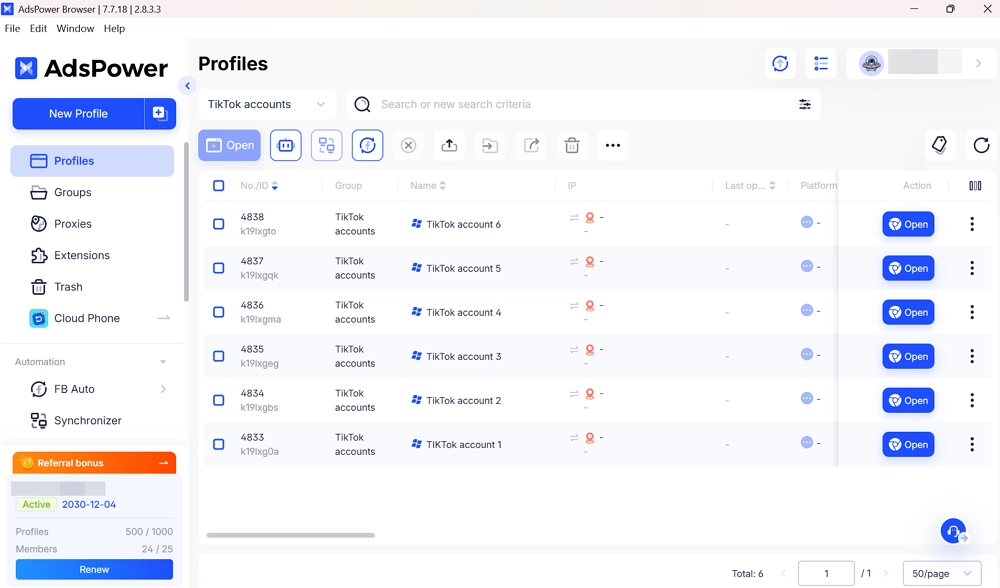
AdsPower lets you log in to multiple TikTok accounts securely. Each account runs in a separate profile, preventing TikTok from detecting multiple logins.
2. Protect Your Accounts with Unique Profiles
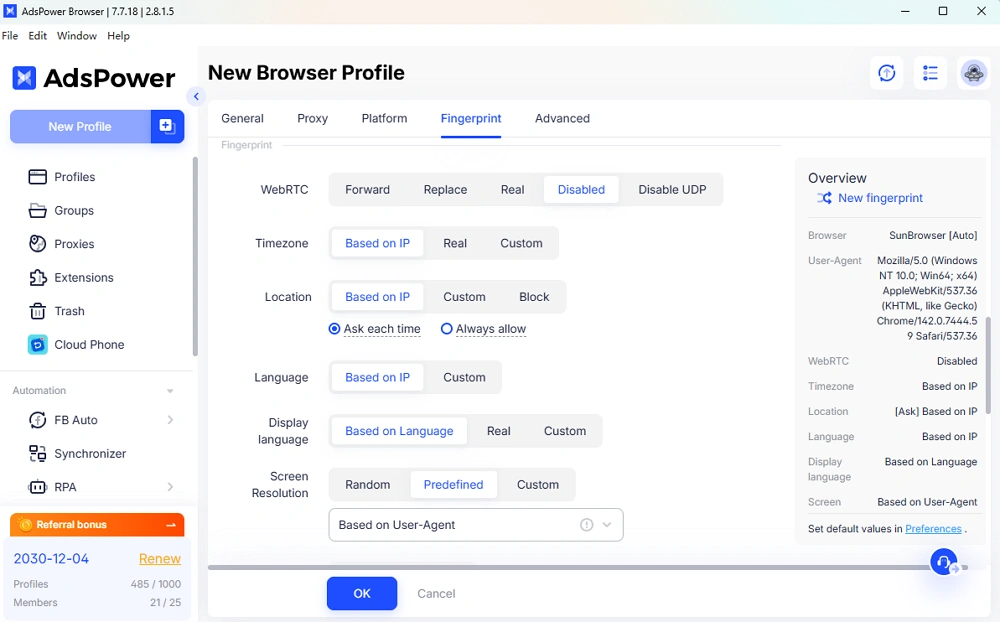
Every TikTok account gets its own unique browser fingerprint, including timezone, location, language and other details. This keeps your accounts safe from bans or restrictions.
3. Automate Repetitive Tasks
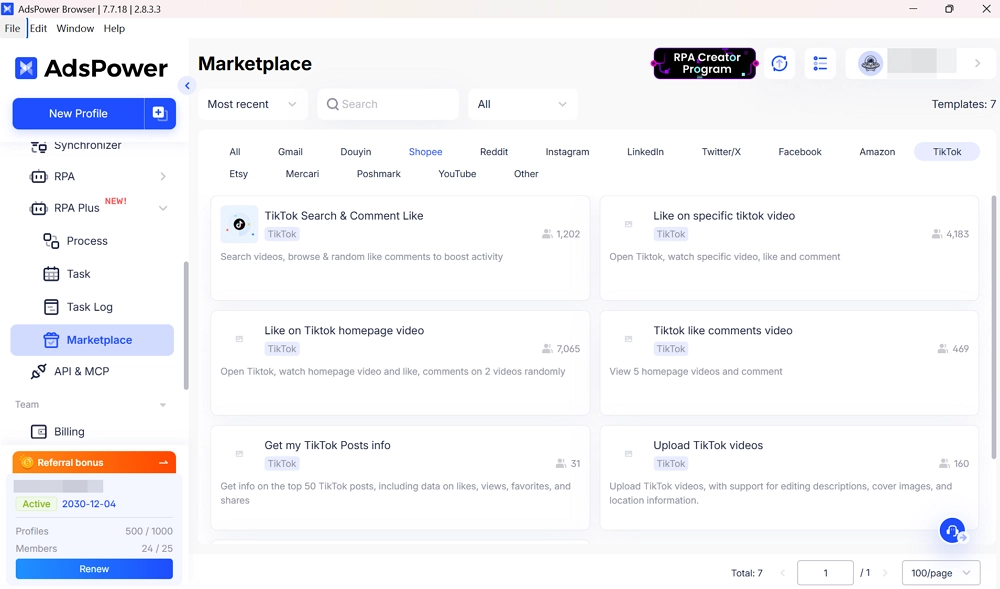
Save time by automating tasks like clicks, filling forms, or updating product listings across your TikTok Shop accounts. AdsPower's RPA and RPA Plus tools let you record, replay, and schedule actions easily. Advanced users can use the Local API with Selenium or Puppeteer for full control.
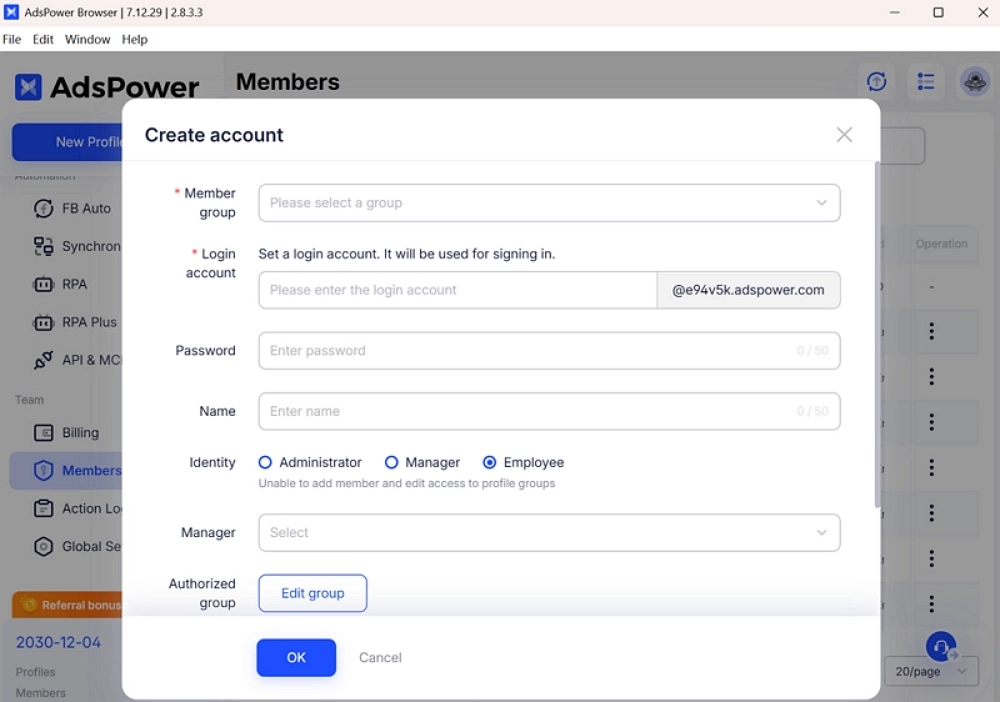
4. Collaborate with Your Team Effectively
If you work with staff or partners, AdsPower lets everyone manage TikTok Shop accounts without sharing passwords. Assign tasks, monitor progress, and keep all accounts organized.
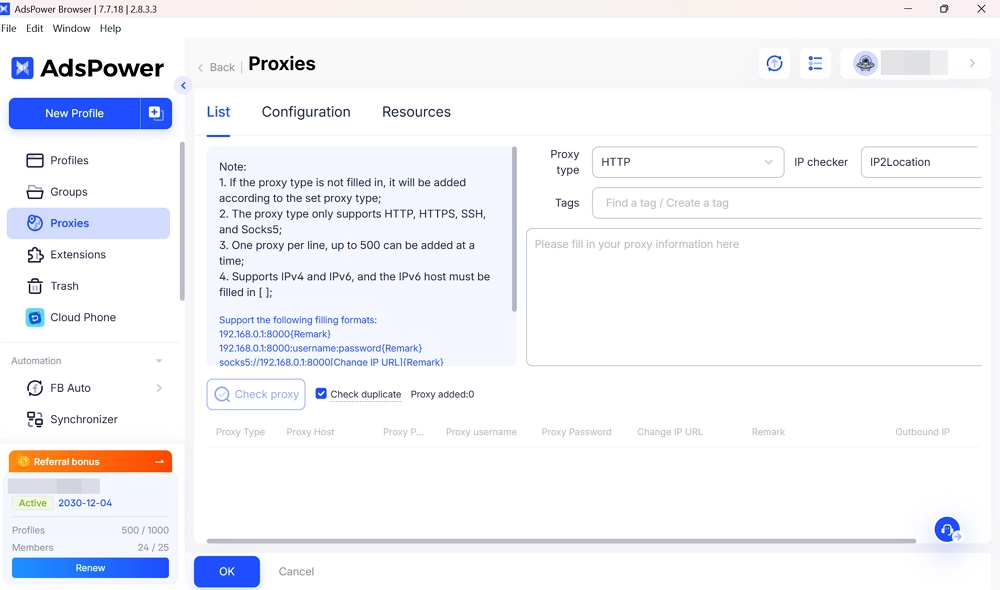
5. Manage Multiple Regions with Proxies
Selling internationally? AdsPower lets you set up proxies for each account. This helps you manage shops in different countries safely and test regional campaigns easily.
Conclusion
TikTok Shop is a powerful platform for creators and businesses to sell products. With millions of active users and TikTok's smart recommendation system, your products can reach the right buyers more easily. Success depends not only on listing items but also on presenting them well, engaging with your audience, and driving traffic effectively.
AdsPower can help you take your TikTok Shop to the next level. It allows you to manage multiple accounts safely, automate repetitive tasks, and coordinate with your team without risking bans or account restrictions. AdsPower makes it easier to run your shop efficiently, save time, and focus on growing your brand.
FAQ
Can you sell digital products on tiktok shop?
TikTok Shop doesn't let you list digital products like eBooks, online courses, or software. It only supports physical goods that need shipping and tracking.
How to add products to TikTok Shop?
To add products, go to your Seller Center, open the Products section, enter all required details like images, title, price, stock, and shipping info, then submit for review to list them in your shop.

People Also Read
- Marketing Automation for Startups and Small Teams: How AdsPower AI Agents Automate Browser Workflows

Marketing Automation for Startups and Small Teams: How AdsPower AI Agents Automate Browser Workflows
Learn how AI Agents can automate repetitive browser-based marketing tasks across multiple accounts
- Best Private Search Engines in 2026: 5 Secure Alternatives to Google
Best Private Search Engines in 2026: 5 Secure Alternatives to Google
Looking for a more private way to search? Explore the 5 best private search engines in 2026 and see how DuckDuckGo, Brave Search, Startpage, and more
- Temp Gmail: How to Create a Temporary Gmail Account in 2026
Temp Gmail: How to Create a Temporary Gmail Account in 2026
Learn how to create a temp Gmail account, compare Gmail aliases and separate accounts, and manage multiple accounts with AdsPower.
- Understanding Persistent Browser Profiles for AI Agents: Why Do They Matter?
Understanding Persistent Browser Profiles for AI Agents: Why Do They Matter?
Learn why persistent browser profiles matter for AI agents, helping maintain sessions, browser consistency, account isolation, and reliable automation
- Kickass Torrents Alternatives: Movies, TV, Games & Safe Access (2026)
Kickass Torrents Alternatives: Movies, TV, Games & Safe Access (2026)
Kickass Torrents is no longer what it once was, but there are still alternatives for finding movies, TV shows, music, books, games, and software. This
