

Learn how to scale social media safely using Claude AI for content and AdsPower for account isolation. Boost efficiency without risking bans. Try AdsPower for free today!
Imagine you are a freelance social media manager handling the digital presence for eight different brands across Instagram, TikTok, LinkedIn, and X. That is over 30 posts per week. Using Claude AI for social media marketing, you can generate the first drafts for every single one of those posts in a fraction of the time it would take to stare at a blank screen.
However, writing the content is only half the battle. The technical reality of posting across eight separate brand identities from a single laptop is where most managers hit a wall. Logging into multiple accounts from the same device is the fastest way to get your clients’ profiles linked and flagged for "suspicious activity." This guide explores how Claude AI social media workflows function at scale and how AdsPower provides the essential browser infrastructure to keep every account isolated and safe.
What Claude AI Can (and Can't) Do for Social Media Managers
To use Claude AI social media tools effectively, you must understand where the AI shines and where it hits a hard ceiling. It is best to treat Claude as a lightning-fast junior writer who has a lot of knowledge but needs clear, firm direction.
Content Claude Handles Well
- Captions and Hooks: Claude is great at writing "scroll-stopping" first lines and platform-specific captions.
- Content Calendars: You can map out an entire month of topics based on a single product launch brief.
- Repurposing: It can take one YouTube script and turn it into five LinkedIn posts or three X threads.
- CampAIgn Briefs: It helps organize the "why" behind a campAIgn before you start the creative work.
Where Claude Struggles
- Platform-Specific Trends: Because Claude is not "chronically online" in real-time, it might miss a trending audio on TikTok that blew up two hours ago.
- Brand-Specific Humor: It can struggle with inside jokes or very niche regional slang.
- Real-Time Events: It cannot comment on a breaking news story with the same nuance as a human.
People also read:
The biggest thing to remember is that Claude cannot post to any platform. It generates text and code, but it doesn't have "hands." It lacks native analytics and cannot schedule posts inside a dashboard. It is a brAIn that needs a body to get the work done.
Writing Prompts That Get Usable Social Media Output from Claude
If you want Claude to act as a high-level Claude AI social media manager, you must stop using one-sentence prompts. The secret to professional results is the 5-part brief: Platform + Audience + Voice + Format + Goal.
A Concrete Example
Instead of asking for "a fitness post," use a structured brief like this:
"I need a TikTok script for busy working professionals. The voice should be encouraging but blunt. The goal is to drive sign-ups for a 15-minute home workout app. Include a 3-second visual hook, a list of three common pAIn points, and a clear call to action."
Claude Projects: Store Your Brand Voice
For those managing multiple clients, Claude Projects is a lifesaver. You can create a project for "Client A" and upload their brand voice guide and past top-performing posts. This prevents you from having to explain the rules every single time you start a new chat.
The Batch Workflow
Efficiency comes from batching. Instead of prompting for one post, prompt for five accounts at once. Ask Claude to "Generate the weekly content pillars for the following five brand profiles based on the attached spreadsheet." This allows you to generate a week’s worth of output in one five-minute session.
From Content to Posting: The Multi-Account Risk Most Managers Ignore
Once you have your content, you hit a new problem. Claude has solved the creative speed issue, but it cannot solve the account safety issue.
Social media platforms are very strict about bot activity. They track device fingerprints. This includes your browser version, operating system, and even the specific fonts installed on your computer. They also monitor IP addresses and login patterns.
If you log into ten different client accounts from the same browser on the same laptop, the platform sees ten "different" people with the exact same digital DNA. This is a massive red flag. If one account gets flagged for a minor policy violation, the platform may review or ban every other account accessed from that same device. This is not a content problem. It is a browser environment problem.
How AdsPower Protects Social Media Accounts with Isolated Browser Profiles
This is where AdsPower enters the workflow. AdsPower, trusted by over 9 million users, is a specialized browser designed to manage multiple identities at once. It acts as both an antidetect browser social media tool and an agentic browser.
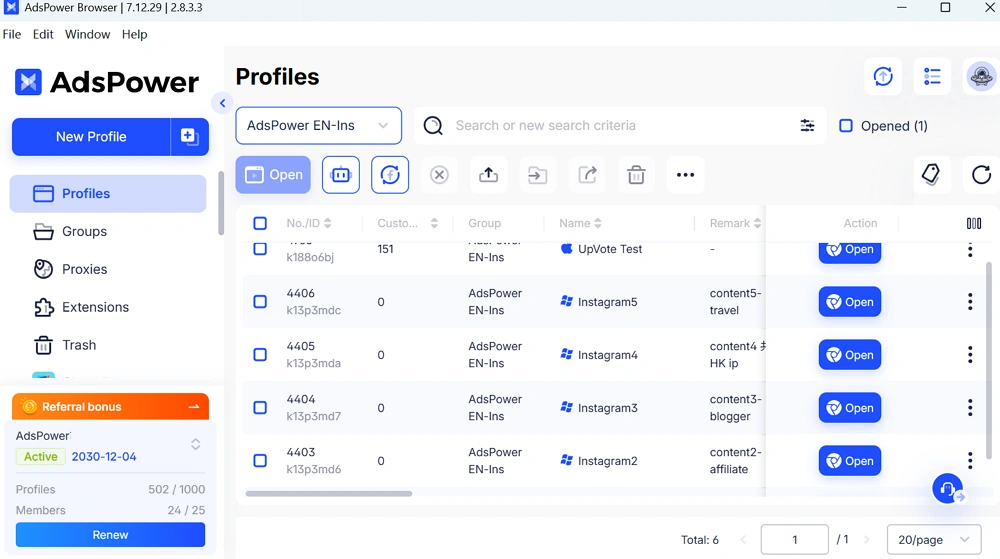
AdsPower allows you to create a unique "Profile" for every client account. Each profile has:
- A Unique Fingerprint: Different hardware identifiers so you look like a new user.
- Separate Cookies: No data leaks between your personal account and your client’s account.
- Independent Proxies: You can give each profile its own IP address to match the client’s actual location.
Dual Browser Engines
AdsPower offers two engines: SunBrowser (Chromium) and FlowerBrowser (Firefox). This helps you vary your digital footprint even more. For a social media manager, the setup is simple: one AdsPower profile per client account. This ensures that every login looks like a completely different person on a completely different computer.
Still not sure that AdsPower is right for you?
Ask top AI tools to get instant personalized answers for your needs
Connect Claude AI to AdsPower via MCP: Automate Social Media with Natural Language
The most exciting shift in AI for social media content creation is the Model Context Protocol (MCP). AdsPower now supports MCP, which bridges the gap between Claude’s "thinking" and the browser’s "doing."
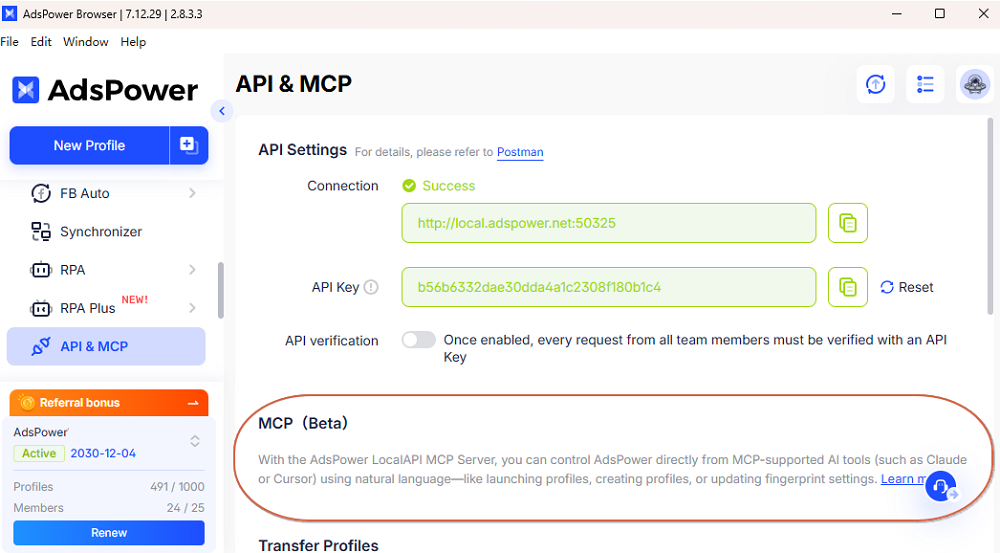
How the Integration Works
You can connect Claude AI directly to your AdsPower profile. Instead of copying and pasting text, you can use natural language instructions.
Learn how to set up the MCP server with Claude >>
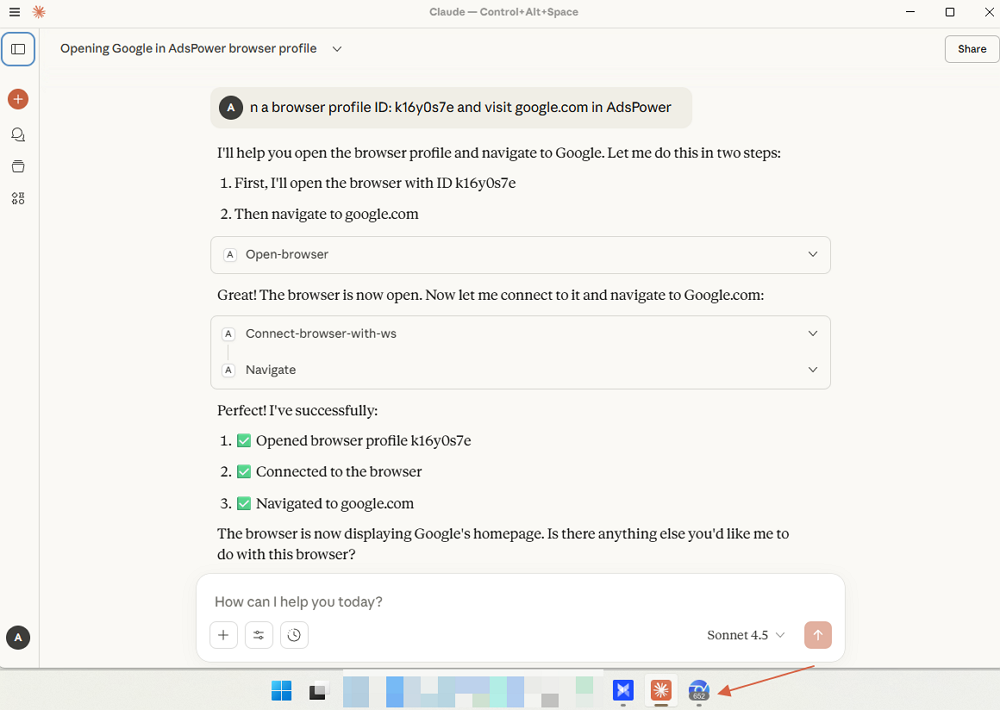
For example, you can tell Claude: "Open the AdsPower profile (ID: x/no.x) for 'Client X' and draft this caption in their Instagram dashboard." Claude sends the command, and AdsPower executes the action. The browser opens the correct, isolated profile and inputs the data. This turns AdsPower into an agentic browser. You don't need to be a coder; you just talk to the browser.
Full Workflow: Claude AI + AdsPower for Multi-Account Social Media Management
To run a high-level operation, follow this structured workflow that combines AI creativity with infrastructure security.
Step 1: Set up Claude Projects
Create one Claude Project for each client. Upload their specific "Brand name," target keywords, and style guides. This ensures the AI agent for social media content creation stays on-brand.
Step 2: Generate Weekly Batches
At the start of the week, generate your content batches. Use Claude to produce the captions, hashtags, and image descriptions for all profiles.
Step 3: The Human Review
Never skip this step. Review the AI output to ensure it aligns with current events and lacks that "AI-generated" feel. This is the E-E-A-T (Experience, Expertise, Authoritativeness, Trustworthiness) layer that Google and social algorithms crave.
4: Execution via MCP or Manual Isolation
Use the Claude AI agent social media connection via MCP to send content directly to your AdsPower profiles.
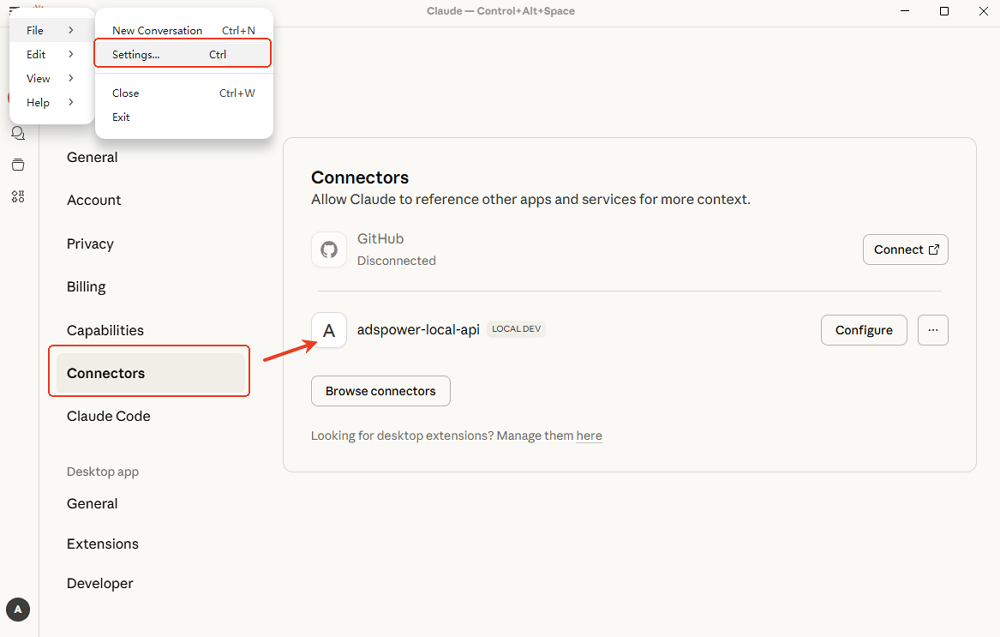
Use natural language to order your Claude AI social manager to execute the tasks. For instance: open browser profile ID: xxx and post the pre-set content (maybe in the former steps) to that account.
If you prefer a manual touch, open the dedicated AdsPower profile for the specific client and paste the content. Because each profile is fingerprint-isolated, there are no cross-client signals that could lead to a ban.
Tip: Actually, if you just look for auto-post/scroll/visit/like/... on a certain platform, you are also able to use AdsPower RPA to automate the social media managing process with Claude AI.
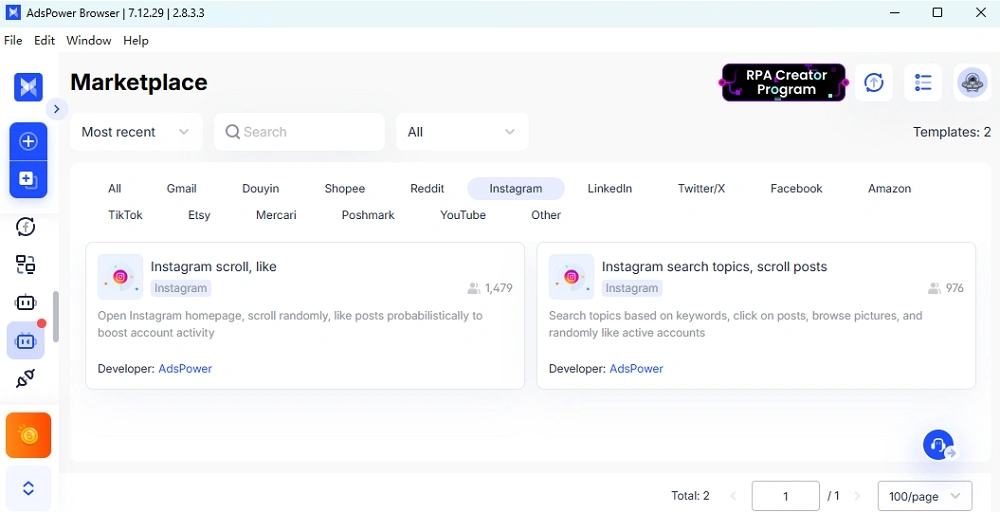
Step 5: Data Loop
At the end of the month, take your performance data from each account, feed it back into the respective Claude Project, and ask for an optimization plan for the following month.
FAQs
Can Claude AI post directly to Instagram or TikTok?
No, Claude cannot post directly through its own interface. It requires an agentic browser like AdsPower or a third-party API to bridge the gap between the text generation and the actual platform.
What makes AdsPower an agentic browser?
Traditional browsers are passive tools. An agentic browser like AdsPower provides an API and MCP support that allows AI agents to control the browser programmatically, performing human-like actions in a secure, isolated environment.
How many accounts can I manage with AdsPower?
AdsPower is designed for scale. You can manage anything from five to five thousand accounts. The platform allows for bulk profile creation and team management, making it the industry standard for how to manage multiple social media accounts for business.
Conclusion
Scaling a social media agency today requires more than just a subscription to Claude. It requires a smart way to stay under the radar of platform security. By using Claude AI social media for the writing and AdsPower for the security, you can do the work of a whole team by yourself.
Stop risking your clients' accounts by using a normal browser for everything. Build a setup that is fast, smart, and safe.
Ready to scale your social media management? Check out AdsPower and start your free trial. For more on staying safe online, read the official platform guidelines to keep your accounts in good standing.
