

Use a Cookie Robot to warm up new TikTok accounts, mimic real activity—ideal for e-commerce and affiliate marketing beginner.
TikTok is growing rapidly in global e-commerce, content creation, and affiliate marketing. Because of this, more beginners are trying to create TikTok accounts from scratch. However, many run into problems soon after signing up, such as low reach, zero views, frequent verification requests. One solution for managing multiple accounts safely is using a Multi-Login Browser for Multiple TikTok Accounts.
For beginners, account warm-up is critical. This article explains how TikTok's risk-control system works and what "account warm-up" really means. You will learn how using a Cookie Robot to simulate real user behavior can help set up a stable TikTok account from the very beginning.
What TikTok Account Warm-Up Means
Account warm-up is the process of allowing a new TikTok account to behave like a real user before publishing videos.
Key signals include:
- Whether the device and browser environment is stable
- Whether the IP or network environment changes frequently
- Whether content is published immediately after registration
- Whether there are abnormal activity patterns (instant scrolling, likes and switching)
- Whether cookie behavior is continuous and reflects real user activity
If a new account posts content right away, switches between accounts too often, or acts strangely, TikTok may trust it less. This can make it hard to grow, even if the content is good.
For this reason, account warm-up is an important step for beginners under TikTok's current risk controls.

Limits of Manual Account Warm-Up
Traditional manual warm-up methods are no longer reliable under TikTok's 2026 risk control system.
Many beginners still try watching videos for one or two days, liking and following manually, or switching between accounts in multiple browsers. These methods have clear problems:
- Manual actions aren't consistent because people get tired and take breaks. In contrast, the system can monitor cookie behavior continuously over time.
- Accounts can get linked easily because incognito mode doesn't hide all the data your browser stores, like cache and fingerprints.
- Activity timing is inconsistent because beginners find it hard to watch videos at random times, scroll naturally, and interact in different ways.
This is why more teams now use cookie robots to warm up accounts in a more stable way.
What Is a Cookie on TikTok?
On TikTok, a cookie is a small piece of browser data that tracks account activity. It keeps track of things like whether you're logged in, what device you use, what pages you visit, how long you stay, and how often you come back. TikTok uses this information to see if an account behaves like a real, consistent user.
If a new account logs in from different devices, browses too fast, or suddenly changes its activity, TikTok may trust it less. This can lower its reach or cause verification checks. This is why proper account warm-up is so important.
Tools like AdsPower help manage cookies by keeping them separate and consistent. This makes accounts appear natural and trustworthy, helping them grow steadily over time.
What Is a Cookie Robot?
The Cookie Robot provided by AdsPower is an automated solution designed to simulate real users' long-term behavioral patterns. It is commonly used during the initial setup and nurturing stages of new TikTok accounts.
Its main purpose is to create consistent, human-like cookie behavior, reduce the risks of manual operations, and help accounts maintain a normal status under the platform’s risk-control system.
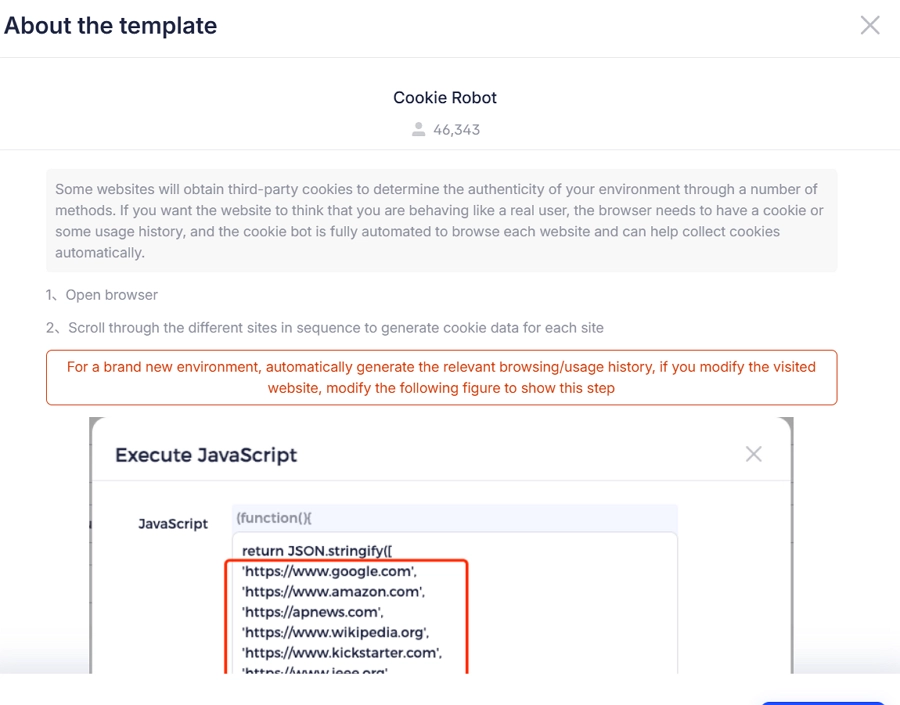
The Cookie Robot can simulate:
- Opening TikTok's official page
- Browsing recommendation, search, and topic pages
- Watching videos randomly for varying durations
- Normal exits and revisits
These actions are recorded in browser cookies, creating a stable, traceable user profile.
Who the Cookie Robot is for:
- New TikTok users
- E-commerce sellers
- TikTok Affiliate operators
- Content/multi-account teams
- Anyone needing stable accounts
It's especially suitable for beginners who want a safe and steady account start.
How to Use a Cookie Robot for Warm-Up
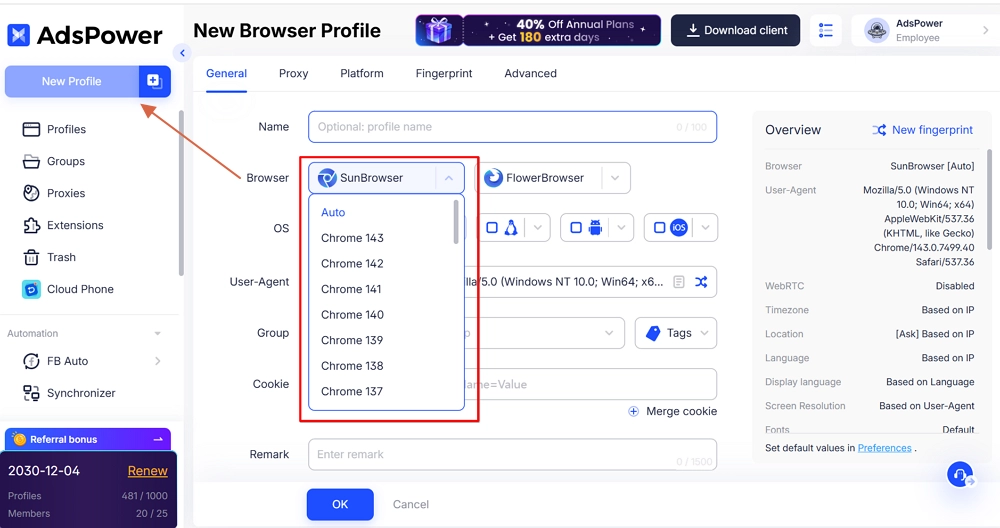
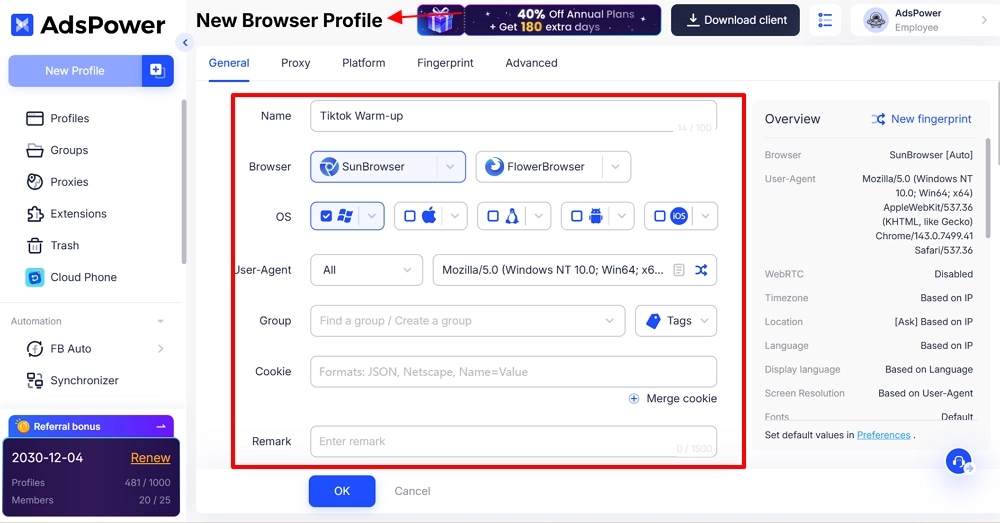
1. Create a new profile for TikTok accounts
Open the AdsPower client, click "New Profile", name the environment, and set parameters (choose Chrome; Firefox is not supported for the Cookie Robot temporarily).
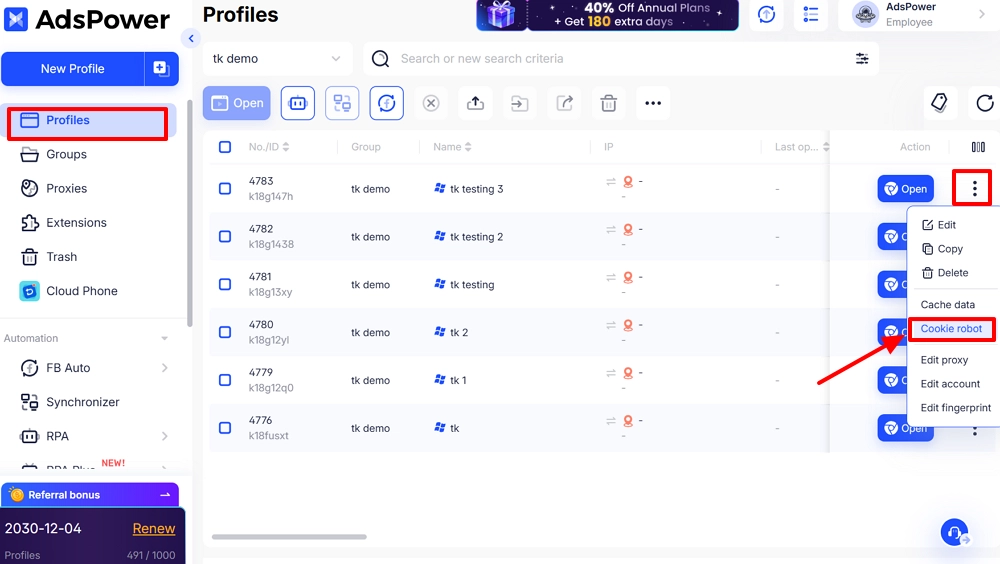
2. Open the Cookie Robot
In "Profiles", find the newly created profile and click to launch the "Cookie robot".
3. Set target websites
- Always enter the full web address to visit (e.g., TikTok and related sites) in the "Target website", starting with https:// or http://.
- If you wish to visit multiple sites for Tiktok, enter each URL on a separate line.

4. Customize browsing behavior (optional)
These settings can be tailored to simulate realistic TikTok engagement. You can adjust the scrolling speed and how deeply the account scrolls through the For You feed. You can also control how long the account watches each video or browses user profiles. In addition, you can choose whether video thumbnails are preloaded or media plays automatically. Finally, headless mode allows the system to operate invisibly in the background without user interaction.

5. Start the Cookie Robot
After confirming your settings, click "OK". The Cookie Robot will begin automatically browsing your specified TikTok pages, simulating natural user engagement—such as scrolling through the "For You" feed, watching videos, and interacting with profiles—while building authentic browsing history and platform cookies.
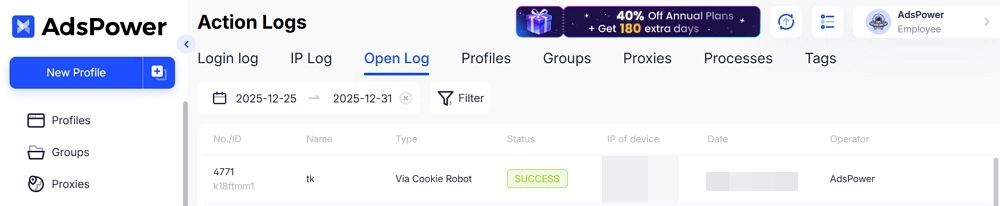
6. View action logs
Check the "Action Logs" to see if the cookie robot started and ran successfully. Any issues (e.g., profile already open, deleted, or Firefox not supported) are flagged with a small triangle—follow the prompts to resolve them.
Advantages of Using the Cookie Robot for TikTok Accounts
- Continuous behavior: generates consistent, natural activity daily, avoiding "cold start" gaps for new accounts.
- Reduces manual risk: prevents errors or over-operations that may trigger platform controls.
- Supports multi-account management: ideal for global teams or account matrices.
- Prepares for content posting: accounts gain baseline authority before posting videos.
Other AdsPower Features to Stabilize New TikTok Accounts
For beginners, the Cookie Robot ensures consistent behavior, but long-term account stability also depends on a consistent, controllable environment. This is why many focus on browser environment management tools.
Beyond cookie simulation, multi-account tools like AdsPower also support new TikTok accounts in several other key ways.
1. Isolated browser profiles
TikTok monitors not just a single account but also:
- Multiple logins from the same device
- Shared browser fingerprints across accounts
- Highly similar local cache, time zone, and language
AdsPower provides each account with an isolated, consistent environment:
- Separate cookie storage
- Independent cache and local data
- Stable fingerprint parameters
For beginners, this means multiple accounts can be managed safely without cross-account risks.
2. Proxy IP & network setup
During TikTok account setup, risks arise from:
- IP country mismatching account registration
- Frequent IP changes
- Multiple accounts sharing unusual networks
AdsPower provides a stable, controllable network, making logins appear natural, behavior consistent, and reducing verification or security checks.

3. RPA automation
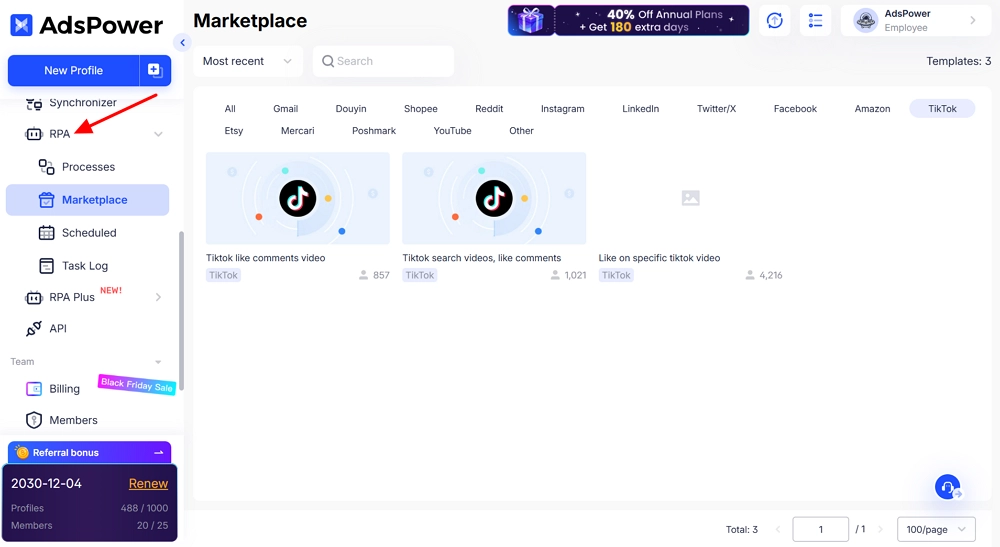
During TikTok account warm-up, AdsPower's RPA automates consistent and repeatable browsing behaviors. Benefits include:
- More stable activity patterns for TikTok's algorithm scrutiny
- Fewer manual errors (too fast or excessive actions) to avoid triggering TikTok's risk controls
- Replicates authentic TikTok user behavior paths
4. Multi-account management
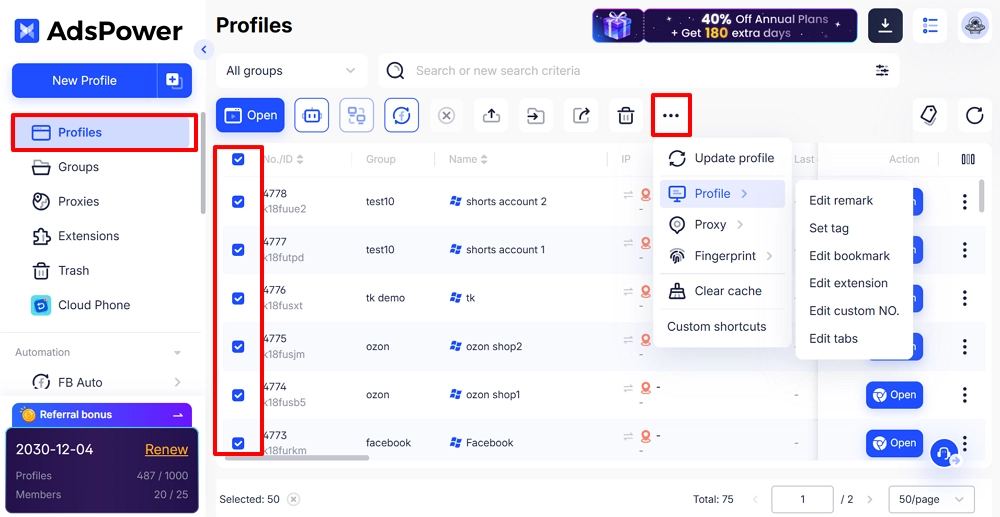
AdsPower's multi-account tools may seem unnecessary for beginners but are crucial.
Many TikTok users start with 1 account, grow to 3–5 test accounts, and eventually build a content matrix. Without early environment isolation, accounts may need to be restarted later.
Using a solid account management system early ensures:
- Longer account lifespans
- More stable account setup success
- Lower costs for future expansion
Conclusion
When you first set up a TikTok account, risk control is more important than posting content. The key is to build consistent, real behavior to ensure a stable start. Tools like AdsPower's Cookie Robot, isolated browser environments, and multi-account management help reduce risk and prepare accounts for long-term growth.
The most important step is not to post content immediately. Instead, focus on creating a stable environment and maintaining consistent behavior. This makes the account look like a real, normal, long-term user on the platform.
Once your TikTok account is stable and warm-up is complete, you can explore ways to earn from your content. For detailed strategies, check out How Do You Earn Money on TikTok? 10 Ways to Help
