

How to Build Durable Facebook Accounts Using a Cookie Bot
Take a Quick Look
Check the solutions of keeping Facebook accounts stable by Facebook cookie robot in AdsPower browser. Try it free now to prevent your Facebook accounts from bans.
Facebook account bans rarely happen by accident. Many operators follow careful routines, limit actions, and still face sudden verification or restrictions. The reason often lies deeper than IPs or speed. It comes down to whether Facebook recognizes consistent, human-like behavior at the browser level. That's where cookies play a defining role.
Understanding what is a cookie on Facebook and how it affects trust signals can change how accounts survive long-term. This article explains why incomplete or fragmented cookies increase risk, how Facebook evaluates account environments, and how a Facebook cookie bot—sometimes called a Facebook robot—helps simulate realistic browsing behavior at scale.
You'll learn how to build durable Facebook accounts using AdsPower, reduce unnecessary risk signals, and create environments that hold up under long-term use. The value is simple: fewer disruptions, more stability, and predictable account performance when it matters most.
Why Facebook Accounts Get Banned Even When You're Careful
Many users believe slowing down activity is enough to avoid bans. In practice, Facebook evaluates a broader set of signals. These include cookies, IP stability, browser fingerprints, device history, login consistency, and browsing rhythm.
When these signals don't align—or appear incomplete—the system flags the account as abnormal. Sudden changes, missing data, or a "fresh" environment with no history all increase scrutiny.
Risk increases further when accounts perform sensitive actions before building trust. Bulk operations amplify every inconsistency. That's why bans often occur early, even when actions seem cautious on the surface.
Why Facebook Account Warm-Up Is Necessary
New Facebook accounts often jump straight into high-frequency actions: adding friends, messaging, joining groups, or switching between multiple accounts. From Facebook's perspective, this behavior lacks a foundation.
Account warm-up exists to establish continuity. It creates browsing history, stable login patterns, and consistent environment parameters. Over time, Facebook associates these signals with a real user.
Accounts that are warmed up properly face fewer interruptions later. They also handle batch operations and commercial activity more reliably. Early patience leads to longer account lifespan and higher operational success.
Why Traditional Warm-Up Methods Often Fail
Facebook's security system is cautious with unfamiliar accounts. The issue is not account intent, but missing historical data.
New accounts usually lack:
- Long-term browsing records
- Established browser fingerprints
- Persistent cookies and interaction trails
These elements help Facebook confirm that the same user is returning consistently. Without them, trust develops slowly and verification triggers more often.
Environmental instability adds further risk. Frequent IP changes, device switching, or inconsistent browser settings resemble takeover patterns. Facebook responds with additional checks to protect accounts, not target users.
Why Browser Cookies Matter for Durable Facebook Accounts
Before posting or engaging, understanding cookies is essential.
What Is a Cookie on Facebook?
A cookie is a small data file stored in your browser. It records login states, visited pages, session length, and interaction behavior. On Facebook, cookies help determine whether activity comes from a real, continuous user or a fragmented environment.
Real users leave predictable traces over time. Cookies are part of that trail.
How Cookies Influence Facebook Risk Control
- Cookies confirm continued use on the same device
- They log login times and interaction pacing
- Complete cookies reduce the need for aggressive checks
- Independent cookies prevent cross-account contamination
In simple terms, cookies influence whether Facebook trusts the account behind the screen.
How to Use a Facebook Cookie Robot to Reduce Ban Risk
Manually building cookies by browsing pages takes time and discipline. It also doesn't scale. That's why many operators rely on a Facebook cookie bot.
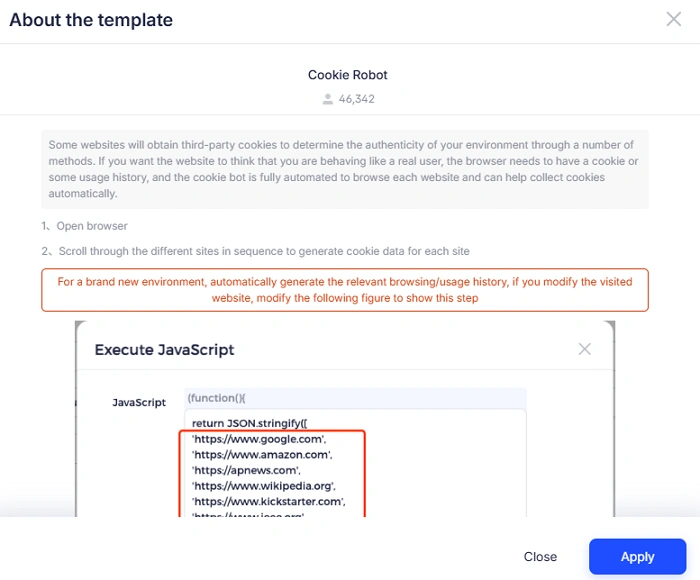
A Facebook robot automates browsing behavior. It visits selected websites, scrolls pages, pauses naturally, and generates cookies that resemble real usage.
What a Cookie Bot Does
- Automatically opens predefined websites
- Simulates scrolling and dwell time
- Builds cookies across multiple domains
For multi-account operators, this saves hours of manual work. Each account gets its own cookie environment, reducing linkage risk and speeding up the warm-up phase. It's a practical way to let accounts "settle in" before serious activity—no drama, no guesswork.
How to Create Durable Facebook Accounts with AdsPower Cookie Bot
Step 1: Create a Browser Environment
Open the AdsPower client and click New Profile. Name the profile and configure parameters. Use the Chromium engine, as the cookie bot currently supports it.
Note: Remember to keep each account safe with the rule: 1 profile + 1 account +1 profile.
Step 2: Enable the Cookie Bot
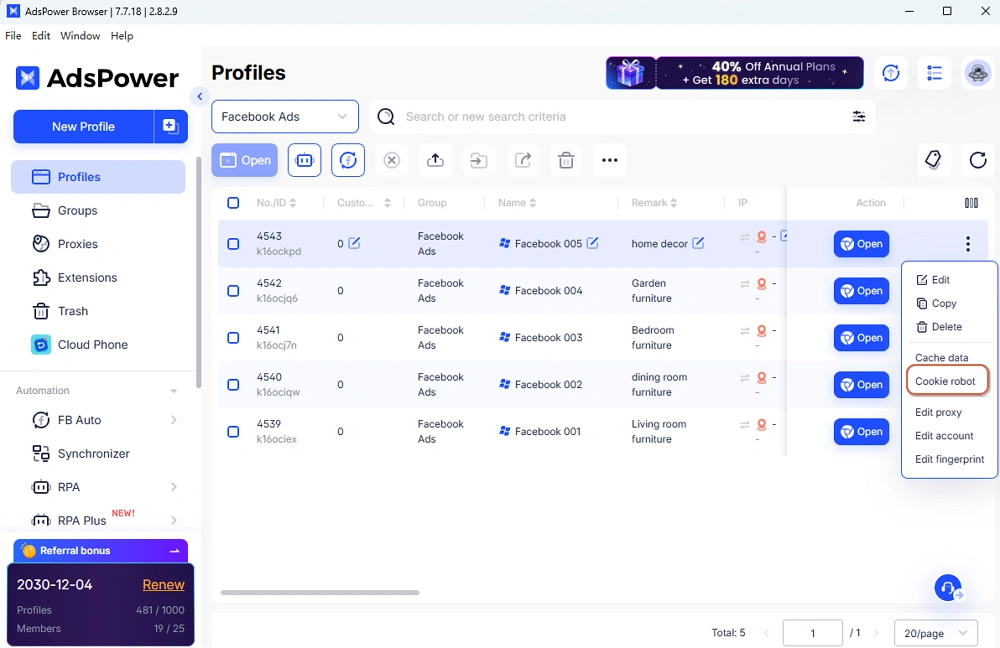
Go to Profiles, locate your browser profile, and enable the Cookie robot feature.
Step 3: Set Target Websites
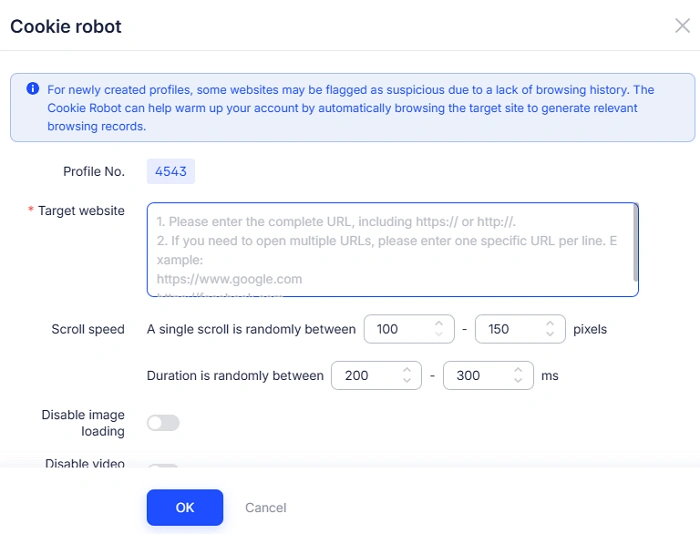
Enter the URLs you want the bot to visit, such as Facebook and commonly used related sites. Use one URL per line and include https:// or http://.
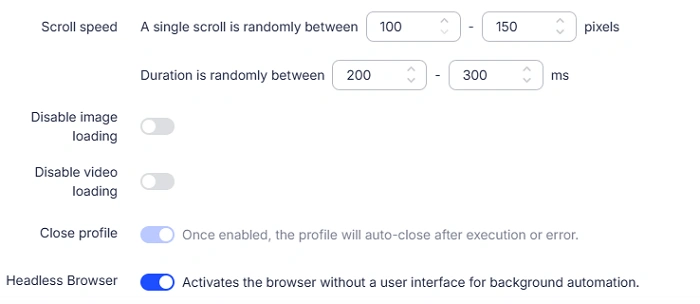
Step 4: Adjust Browsing Behavior (Optional)
You can customize:
- Scroll speed and range
- Time spent on each site
- Whether images or videos load
- Headless mode for background execution
Default settings are sufficient for most use cases.
Step 5: Start the Cookie Bot
Confirm the settings. AdsPower will simulate browsing behavior automatically, generating history and cookies without manual effort.
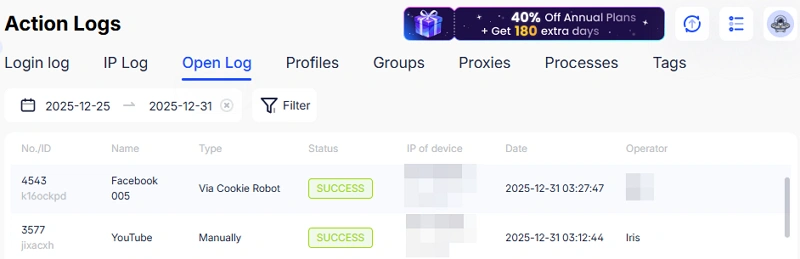
Step 6: Review Logs
Check Open Log to confirm successful execution. Alerts appear if issues occur, such as unsupported engines or environment conflicts.
Using AdsPower's cookie bot reduces setup time and improves long-term account stability across large account sets.
Strengthen Facebook Multi-Account Security with AdsPower
Cookies alone are not enough. Facebook also evaluates IPs, fingerprints, devices, and login habits. AdsPower addresses all of these factors in one platform.
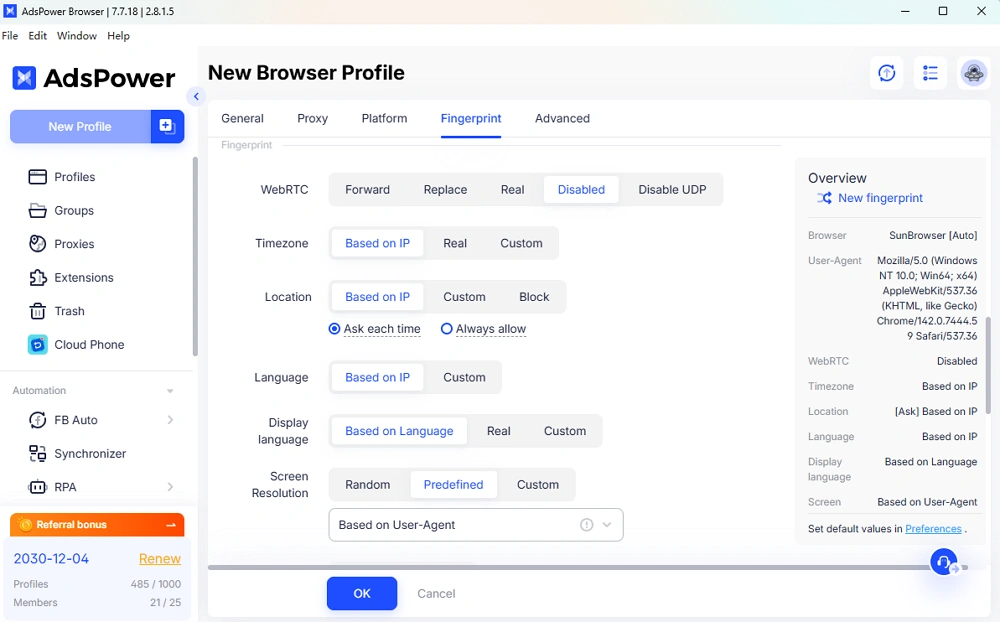
1. Fingerprint and Privacy Protection
Modify OS, User-Agent, time zone, language, WebRTC, location, resolution, Canvas, and WebGL. Each browser profile stays isolated and trace-resistant.
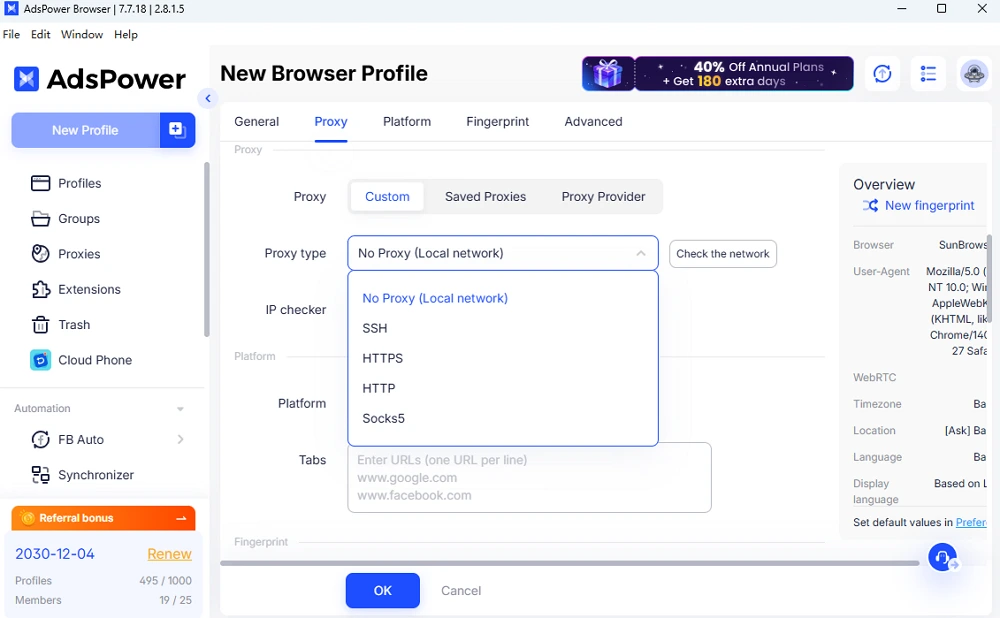
Support for HTTP, HTTPS, and SOCKS proxies. Assign unique IPs per account or match dynamic proxies automatically.
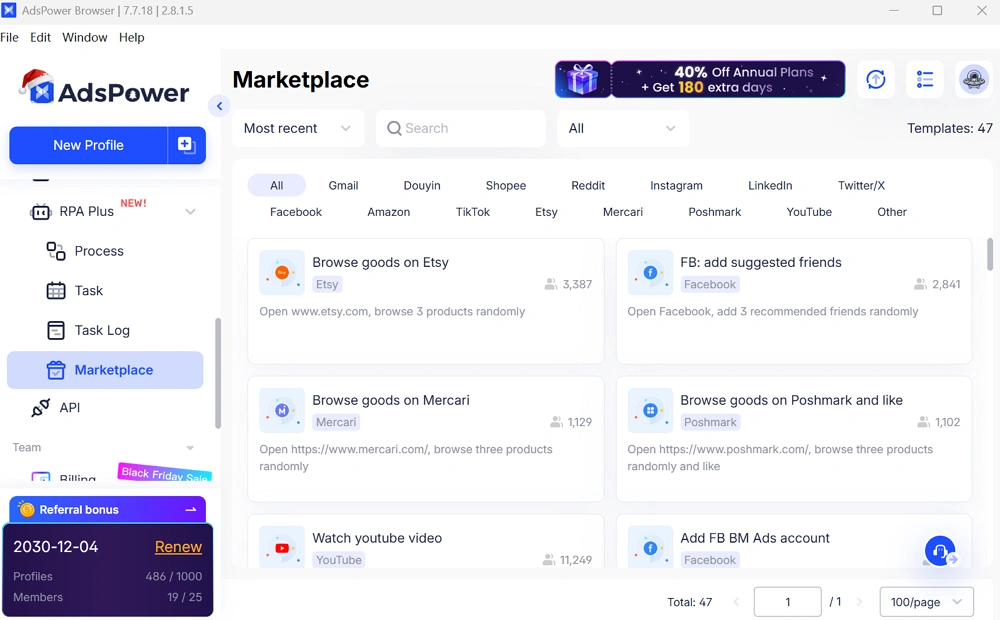
No-code automation supports clicks, inputs, scrolling, and templates for Facebook, YouTube, Amazon, and more.
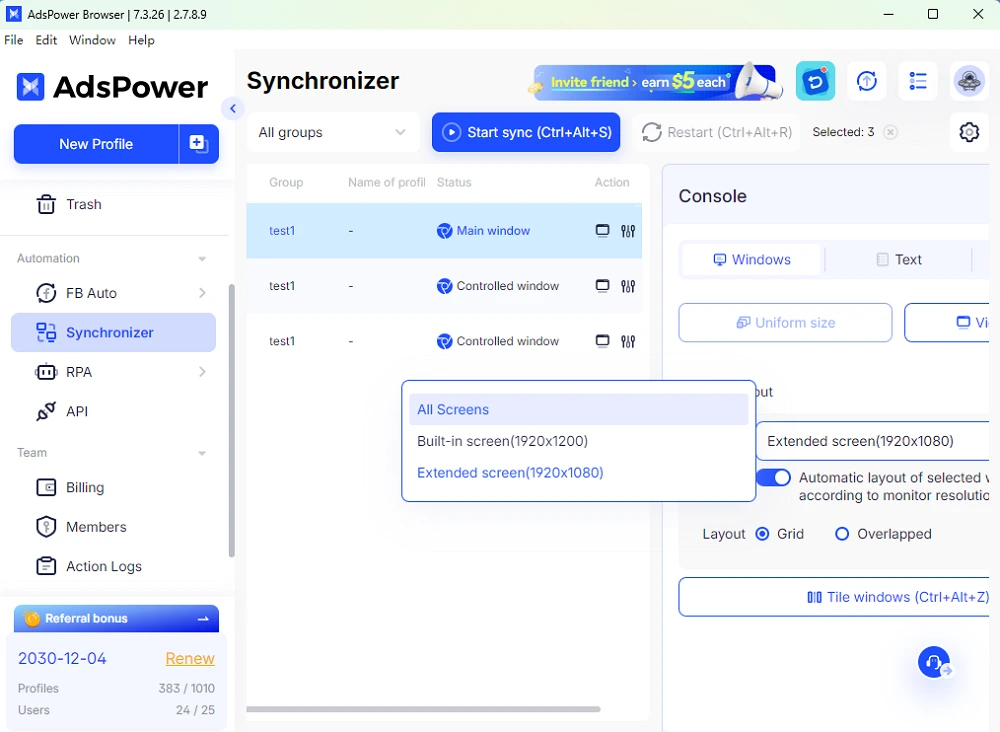
Control multiple browser profiles from a main window for efficient multi-account operations.
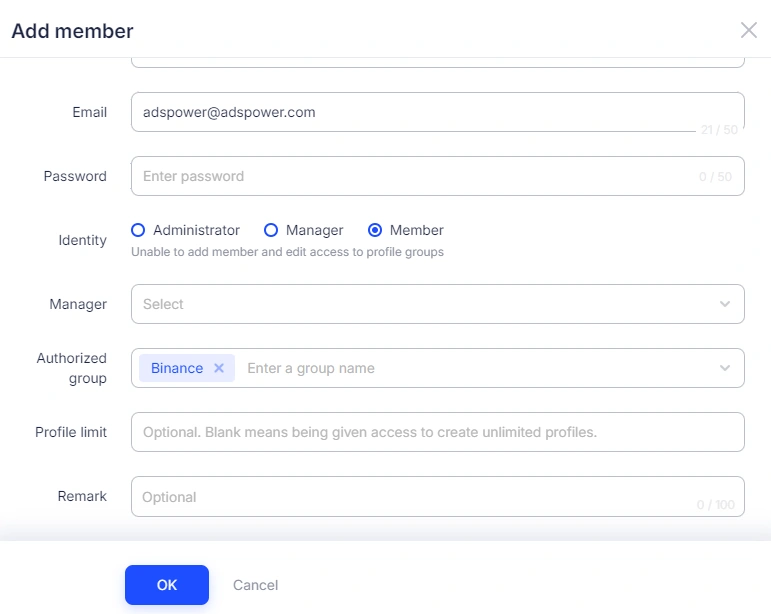
Permission-based access ensures safe collaboration without compromising account environments.
Conclusion
Durable Facebook accounts are built on three pillars: stable cookies, isolated environments, and behavior that mirrors real users. AdsPower combines all three through its fingerprint browser and cookie bot system.
For teams managing multiple Facebook accounts, this approach reduces interruptions, improves predictability, and supports long-term growth without unnecessary risk.
Register on AdsPower to experience safer, more stable Facebook account management.

People Also Read
- How to Safely Manage Multiple Apple Accounts in 2026
How to Safely Manage Multiple Apple Accounts in 2026
Learn how to manage multiple Apple accounts safely with practical tips
- Buy Reddit Accounts: Top Sites, Risks, and Account Management
Buy Reddit Accounts: Top Sites, Risks, and Account Management
Compare where to buy Reddit accounts, what risks to check, and how AdsPower helps manage multiple Reddit accounts more securely.
- How to Make a Naver Account for Foreigners & Beginners 2026
How to Make a Naver Account for Foreigners & Beginners 2026
Learn how to create a Naver account for foreigners in 2026, avoid SMS verification issues and reduce the risk of account restrictions during signup.
- Bet365 Account Blocked? Reasons & How to Secure Your Digital Presence
Bet365 Account Blocked? Reasons & How to Secure Your Digital Presence
Bet365 account blocked? Learn common reasons, how to unblock your account step by step, and tips to avoid restrictions in the future.
- How to Run Multiple Reddit Accounts to Scale Your Business 2026
How to Run Multiple Reddit Accounts to Scale Your Business 2026
Learn how to run multiple Reddit accounts safely. Avoid bans, understand detection signals, and manage profiles with smart strategies and best practic
