

Discover how to create multiple Instagram accounts safely and avoid common mistakes. Read the full guide and optimize your account setup today.
How many Instagram accounts do you have? If you're running more than one Instagram profile can open real opportunities, you might separate personal and business content, test niche themes, or manage accounts for clients. But many users hesitate because they worry about phone verification, device limits, or sudden suspensions. If you've searched for how to create multiple Instagram accounts, you're likely looking for clear steps without risking your existing profiles.
This guide explains what Instagram officially allows, how to register multiple accounts with or without a phone number, and how to structure them responsibly. The tone here is expert yet approachable, with practical advice you can apply immediately. Keep reading to build a safer setup that protects your accounts and supports long-term growth.
Can You Have Multiple Instagram Accounts?
Before creating anything new, it's important to understand what Instagram actually permits. Many people assume multiple accounts violate the rules. That is not accurate.
Instagram platform allows users to create and manage more than one account. This is confirmed in Instagram's official Help Center: https://help.instagram.com/
There is no published rule that limits you to only one account per person. Many creators, brands, and agencies operate multiple profiles legitimately.
How Many Instagram Accounts Can You Have?
Inside the Instagram mobile app: You can log into and switch between up to five accounts at one time.
This does not necessarily mean you can only own five accounts total. It simply limits how many you can stay logged into within one app session.
If you need more than five active logins, you would need separate browser sessions or devices. However, creating many accounts too quickly from the same device can trigger security reviews.
The key takeaway: multiple accounts are allowed, but careless setup can cause friction.
How to Create Multiple Instagram Accounts
Now that we've clarified policy, let's look at practical methods. The approach you choose depends on whether you are creating accounts casually or at scale.
Create Multiple Instagram Accounts Using the App
This is the most straightforward method and works well for personal users or small businesses.
Steps to manually create in-app:
- Open the Instagram app.
- Go to your profile.
- Tap your username at the top.
- Select "Add account."
- Choose "Create New Account."
- Register with a new email or phone number.
- Complete verification.
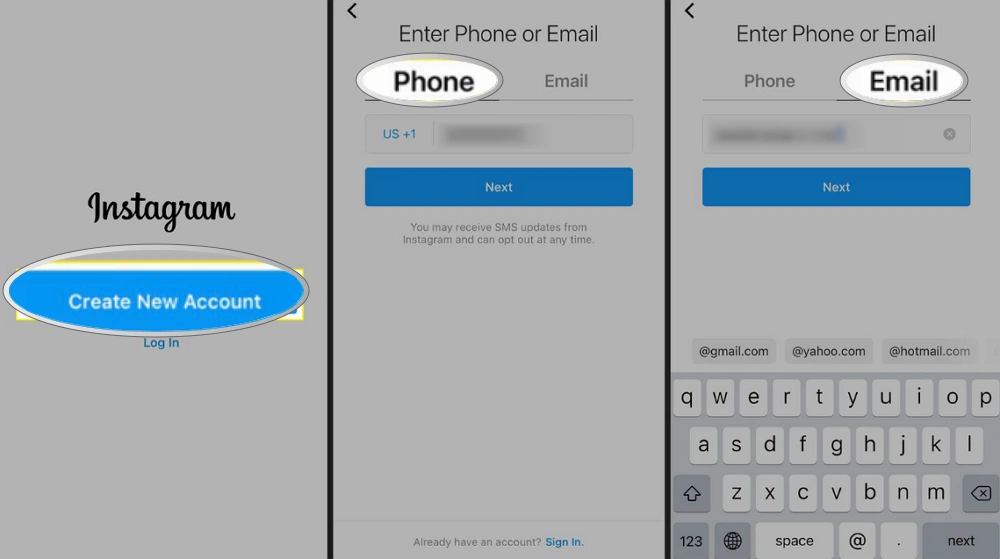
You can repeat this until you reach the five-account login limit inside the app.
A few practical tips:
- Use a unique email for each account.
- Avoid copying identical bios across profiles.
- Upload profile photos and basic content gradually.
- Do not follow hundreds of users immediately.
Don't register all at once or in a short time! Natural setup reduces risk.
Create Multiple Instagram Accounts Using One Email
A common question is: can you have multiple Instagram accounts on one email?
Officially, Instagram requires one unique email address per account. You cannot register two accounts using the exact same email. However, email aliasing can help if you use Gmail.
For example:
- example@gmail.com
- example+brand1@gmail.com
- example+brand2@gmail.com
All messages still arrive in one inbox. Gmail treats them as the same mailbox, but Instagram sees them as unique addresses. Google explains this feature in its support documentation: https://support.google.com/a/answer/2727156
This method is useful if you want centralized email management.
Still, keep expectations realistic. Instagram may request additional verification later, especially if multiple accounts share similar behavior patterns.
How Can I Create Multiple Instagram Accounts Without a Number?
Many users ask: how can I create multiple Instagram accounts without number?
You can register using only an email address. A phone number is not mandatory during initial signup.
When registering:
- Choose email instead of phone.
- Verify via the confirmation email.
- Complete profile details gradually.
However, Instagram may later request phone verification if it detects unusual activity. This can happen if:
- You log in from multiple locations quickly.
- You create several accounts within a short period.
- Engagement behavior looks automated.
So yes, it is possible to create multiple Instagram accounts without number. Long-term stability depends on how responsibly you operate them.
Common Problems When Creating Multiple Instagram Accounts
Creating accounts is easy. Keeping them stable is the real challenge. Before scaling, understand the common issues people face.
One frequent message is "Too many accounts created from this device." This usually appears when multiple registrations happen in a short timeframe from the same environment.
Another issue is repeated SMS verification prompts. Instagram may request phone confirmation multiple times if it sees irregular login signals.
Some users also experience account suspension shortly after creation. Common triggers include:
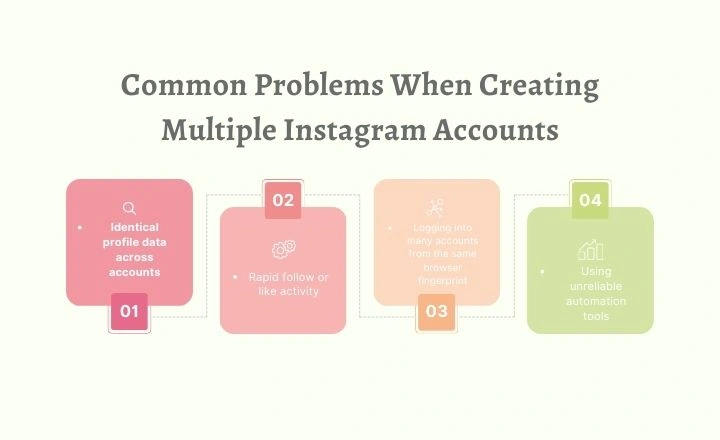
- Identical profile data across accounts
- Rapid follow or like activity
- Logging into many accounts from the same browser fingerprint
- Using unreliable automation tools
Instagram operates under Meta Platforms, which invests heavily in abuse detection systems. Their monitoring focuses on patterns, not just single actions.
Understanding these risks helps you avoid avoidable mistakes.
How Instagram Detects Multiple Accounts
To create accounts safely, you need basic awareness of how detection works.
Instagram does not rely only on email or phone numbers. It evaluates:
- Device fingerprint data
- Browser characteristics
- Cookies and local storage
- IP address history
- Login timing and consistency
- Engagement behavior patterns
If ten accounts constantly log in from the same browser setup with identical technical signals, they may become linked internally.
This does not mean multiple accounts are forbidden. It means structured separation matters, especially for businesses.
How to Safely Create and Manage Multiple Instagram Accounts (Without Triggering Flags)
If you only manage two accounts, simple precautions may be enough. If you manage many accounts for clients or marketing campaigns, structure becomes essential.
1. Use Separate Emails and Recovery Details
Each account should have:
- A unique email address
- A strong password
- Separate recovery settings
Avoid using the same recovery phone number across many accounts. Keep login data organized in a secure password manager.
2. Avoid Rapid Account Creation
Spacing registrations reduces suspicion.
Create accounts gradually. Complete profile information over several days. Post lightly at first. Avoid aggressive engagement during the first week.
Accounts need warming time before scaling activity.
3. Maintain Consistent Login Environments
Consistency is one of the most overlooked factors.
Logging into many IG accounts from the same browser environment increases linkage risk. For professionals, isolated browser profiles offer more stability.
AdsPower antidetect browser allows users to create separate browser environments with independent fingerprints, cookies, and proxy configurations. This helps reduce cross-account interference and keeps operations structured.
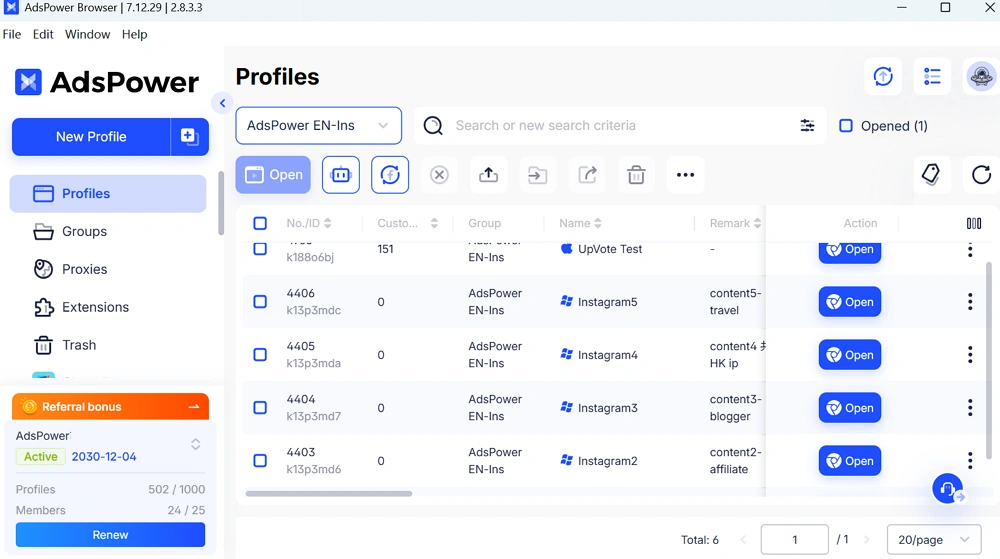
If you want to set up multiple profiles for all accounts, read this detailed tutorial to manage multiple Instagram accounts with AdsPower browser.
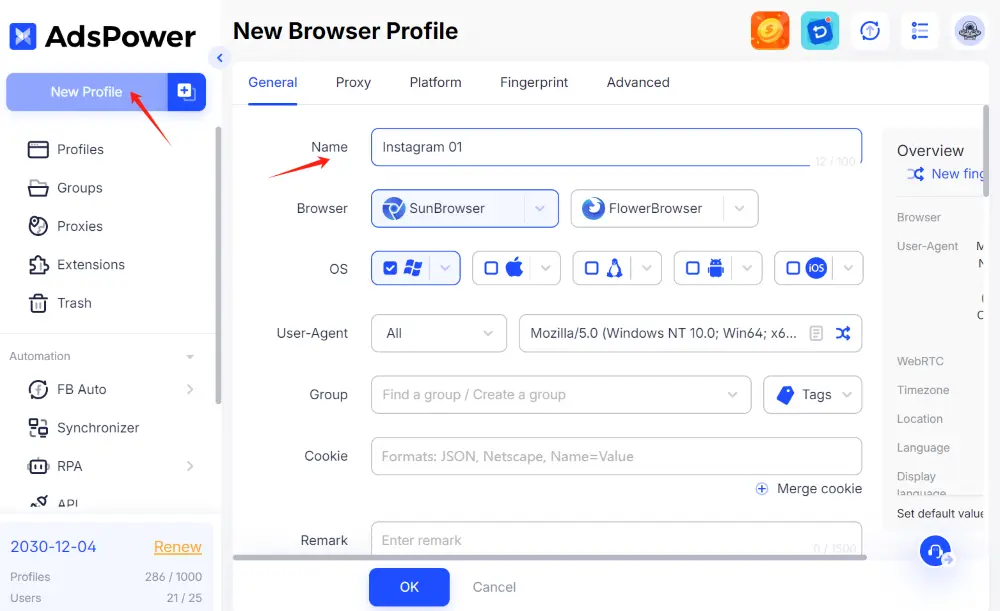
This setup is especially helpful for:
- Social media agencies
- E-commerce operators
- Affiliate marketers
- Teams managing client accounts
4. Avoid Risky Automation Patterns
Automation is not automatically harmful, but aggressive tactics are.
Avoid:
- Bulk direct messages
- Massive follow-unfollow cycles
- Identical content posted simultaneously across accounts
- Sudden engagement spikes
If you use scheduling tools, vary timing and maintain realistic activity levels.
5. Separate Roles for Business and Clients
If you manage accounts for different brands, keep environments separate from the beginning.
Do not mix client logins in one browser session. Use clear permission controls if working in teams. Organized workflows reduce both security risks and operational confusion.
Practical Checklist Before You Start
Before creating additional accounts, review this short checklist:
✅Do you have unique emails prepared?
✅Are you creating accounts slowly instead of all at once?
✅Do you understand Instagram’s Community Guidelines?
✅Are you prepared to warm up accounts gradually?
✅Do you have a system to organize login environments?
✅Preparation prevents unnecessary suspensions.
Final Thoughts
Multiple Instagram accounts are normal in business and content marketing. Instagram allows them. Problems usually come from rushed setup and careless management.
If you are creating extra accounts for branding, niche content, or client services, treat them professionally. Separate environments. Avoid automation abuse. Maintain consistency.
If you plan to scale seriously, explore structured browser management options like AdsPower to organize accounts safely and efficiently.
Building accounts the right way protects your time, your content, and your long-term growth.
