

Play Roblox Without VPN: Safe and Easy Ways to Access Roblox
Take a Quick Look
Learn proven 2026 methods to play Roblox without a VPN safely and avoid bans. Discover secure tools like AdsPower. Read the full guide now to start playing freely!
Many Roblox players want to enjoy the game anywhere — at school, work, or on restricted Wi-Fi — but often run into network blocks or "access denied" messages. The first instinct is usually to use a VPN. But what if VPNs are also blocked, slow, or even unsafe to use?
The good news is that you can still access and play Roblox without VPNs in 2026. This guide explains why Roblox and VPNs get blocked, whether using VPNs is legal, and how to play Roblox safely through alternative methods — including tools like AdsPower, a browser that keeps your online identity secure without triggering VPN restrictions.
Sign up AdsPower now to get a free trial:
How to Play Roblox Without VPN (Working 2026 Methods)
Let's explore some proven and secure ways to play Roblox without using VPNs. These methods work across most school, workplace, or public Wi-Fi networks and are much less likely to trigger blocks or detection.
1. Use an Anti-detect Browser Like AdsPower
If your network restricts VPNs, an anti-fingerprint browser like AdsPower offers a smarter workaround. Unlike VPNs that tunnel traffic through encrypted servers (which networks can easily detect), AdsPower creates unique browser profiles that make your connection appear as if it's coming from a normal device — not a masked IP.
How it works:
1) Install the AdsPower browser on your computer and create an AdsPower account.
2) Add a new browser profile (each has a unique fingerprint and a proxy) for your Roblox account.
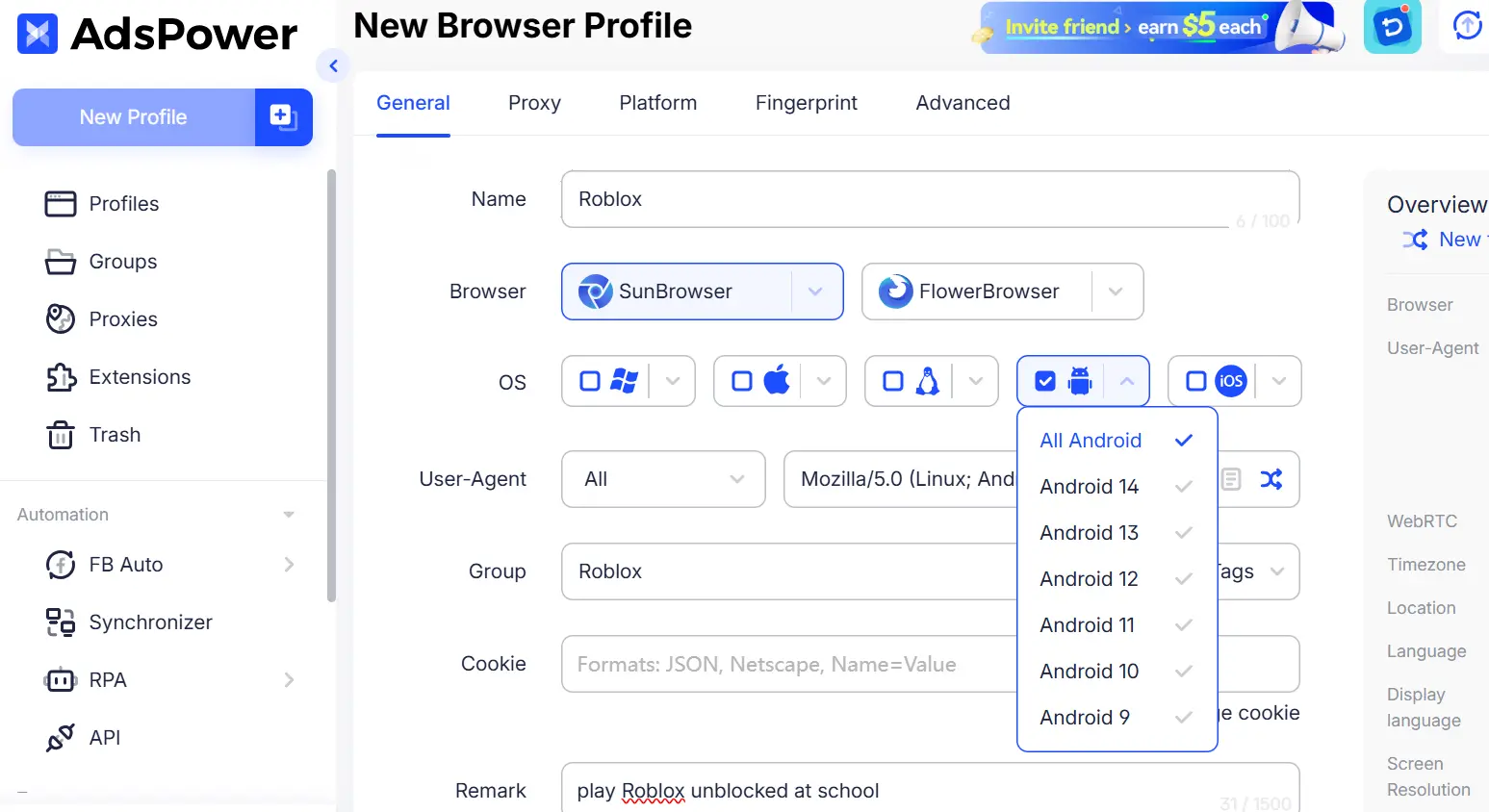
3) Open Roblox within that profile.
4) You can even use your own proxy, without encrypting traffic like a VPN.
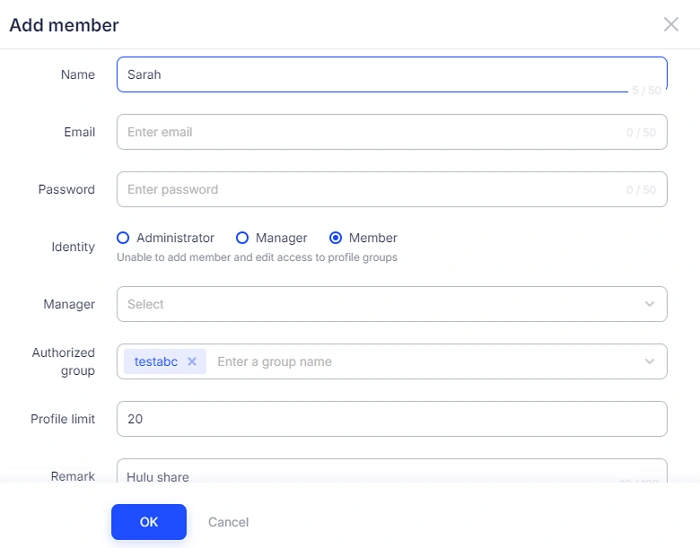
Bonus: You can also easily and safely share your Roblox accounts with your friends via AdsPower profiles, so your team can manage those accounts together.
Why it's better:
- No VPN connection = no detection.
- Works smoothly on school or work networks.
- Protects your Roblox login and personal data.
- Ideal for users managing multiple Roblox accounts safely.
Pro tip: AdsPower's browser isolation prevents cookies and trackers from linking your profiles — perfect for both privacy and gaming flexibility.
2. Change Your DNS Settings
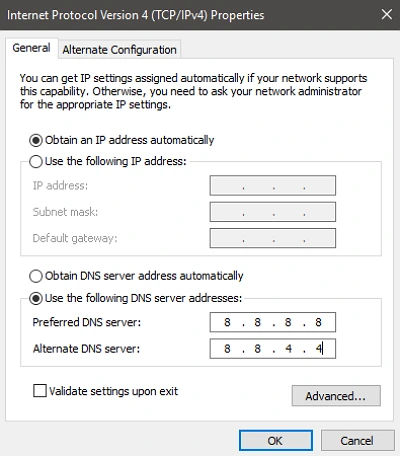
One of the simplest ways to bypass Roblox restrictions is by changing your DNS (Domain Name System) to a public DNS provider like Google (8.8.8.8) or Cloudflare (1.1.1.1).
Steps:
a. Go to your computer's Network Settings → Wi-Fi → Properties.
b. Find the DNS section and replace the existing addresses with:
- Preferred DNS: 1.1.1.1
- Alternate DNS: 1.0.0.1
c. Save settings and reopen Roblox.
This doesn't hide your identity like a VPN but can help you bypass local DNS restrictions that block Roblox.com.
3. Use Cloud Gaming Platforms (No VPN Required)
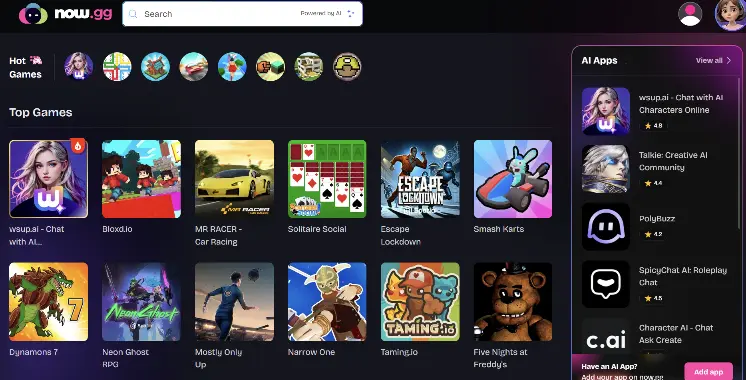
Platforms like Now.gg (https://now.gg/) or Xbox Cloud Gaming let you stream Roblox directly in your browser. You're not technically downloading or running Roblox on the restricted computer — you're playing it remotely through the cloud.
Bookmark now.gg for easy access later, and use Incognito or InPrivate mode if you don't want the session saved in your browser history.
Benefits:
- Works on most browsers, including Chromebooks.
- No VPN or installation required.
- Doesn't trigger network firewalls as the traffic appears as regular browsing.
This is one of the easiest and safest ways to access Roblox anywhere.
4. Try Browser Mirrors or Lightweight Proxy Tools
Some websites offer mirror access to Roblox or act as a web intermediary that fetches the page for you. These aren't full VPNs — they simply load Roblox through a third-party server.
While these can work, only use trusted and secure mirrors. Avoid sites that request your Roblox login or personal data, as many "free unblocking" services are unsafe.
5. Use Your Personal Hotspot or a Separate Network
If nothing else works, you can use your mobile hotspot to get around restricted Wi-Fi. Connect your device to your phone's data connection and play Roblox normally.
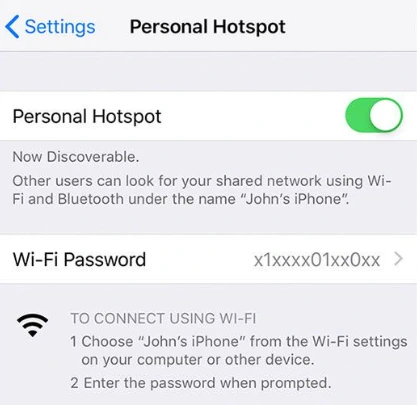
Just make sure:
- You have enough mobile data.
- You only do this where it's allowed.
- You disconnect once you're done to avoid excessive usage.
This is the most reliable last-resort option when public Wi-Fi or school networks block everything.
6. Use a Portable Browser or AdsPower
If USB drives are permitted, you can run a portable browser (such as Firefox Portable) directly from the USB drive, without installing it on the school computer. This can be useful if you don't have permission to install software. Note that USB access may be blocked, and this method will not bypass network-level Roblox restrictions.
How to do it?
1. Download Firefox Portable on your personal computer.
2. Copy it to a USB drive.
3. Plug the USB into the school computer.
4. Launch the portable browser and visit Roblox.com.
Quick Comparison: Roblox Without VPN Methods
| Method | VPN Needed | Best For | Reliability |
|---|---|---|---|
| AdsPower | No | Multiple accounts | ⭐⭐⭐⭐ |
| Change DNS | No | DNS restrictions | ⭐⭐⭐ |
| Cloud Gaming | No | Playing in browser | ⭐⭐⭐⭐ |
| Browser Mirrors/Proxies | No | Quick access | ⭐⭐ |
| Personal Hotspot | No | Restricted Wi-Fi | ⭐⭐⭐⭐⭐ |
| Portable Browser | No | No-install access | ⭐⭐ |
Why Roblox and VPNs Are Blocked at School or Work
If you've ever tried playing Roblox on a public or school network, you know it can be restricted. Roblox itself isn't harmful — it's one of the world's largest online platforms for creativity and gaming. However, institutions often block it for several reasons:
1. Productivity and Distraction
Schools and offices block entertainment sites to keep students and employees focused. Roblox can easily turn a short break into hours of playtime, so administrators often restrict gaming domains entirely.
2. Network Bandwidth
Roblox is an online multiplayer game that consumes a lot of bandwidth. When dozens of users connect simultaneously, it slows down the network for everyone else. Blocking gaming traffic ensures a stable internet for educational or business purposes.
3. Online Safety and Policy Concerns
Roblox has chat and community features. Some institutions block it to prevent students or staff from accessing online communities that could include inappropriate content or external communication.
4. Why VPNs Get Blocked Too
Most people try to bypass restrictions using a VPN (Virtual Private Network) — a tool that hides your IP address and encrypts your internet traffic. However, schools and workplaces are increasingly using firewalls and deep packet inspection (DPI) to detect and block VPN traffic.
So even though VPNs offer privacy, they often trigger security filters. As a result, both Roblox and VPNs end up on the restricted list — making VPN-free alternatives more practical in 2025.
Is Using VPN Illegal in Roblox?
This is one of the most common questions among players: "Can I get banned from Roblox for using a VPN?"
The short answer: No, VPNs are not illegal — but they can cause issues if misused.
Roblox's terms of service do not explicitly ban VPN use. However, the platform has strict anti-fraud and account protection policies. If multiple users connect from the same VPN server or suspicious IP addresses, Roblox might:
- Temporarily lock your account for "unusual activity."
- Block login attempts from shared or anonymous IPs.
- Flag your account for review if the IP location changes frequently.
So while using a VPN for privacy is fine, using it to exploit regional settings, bypass bans, or spoof identities can violate Roblox's community standards.
| Purpose | Roblox Policy | Risk Level |
|---|---|---|
| VPN for personal privacy | Allowed | Low |
| VPN for region hopping or exploiting | Not allowed | High |
| Browser fingerprinting tools (like AdsPower) | Allowed | Low |
If your VPN keeps disconnecting or causing login errors, that's a sign Roblox's system is detecting shared or flagged IPs. In that case, VPN-free access methods — like the ones below — are more stable and safer.
Safe Practices When Playing Roblox Without VPN
Even if you've found a working method, safety and responsibility come first. Here are some tips to keep your Roblox experience secure and trouble-free:
- Avoid shady unblocking websites. Many claim to "unlock Roblox instantly" but are actually phishing traps.
- Use a secure browser. AdsPower isolates browsing sessions to protect logins and cookies.
- Don't share your Roblox credentials with others or log in on random public computers.
- Keep your Roblox account verified with two-step authentication for extra protection.
- Play responsibly. Even when unblocked, only play during breaks or personal time — not during class or work hours.
Tip: When to Avoid Unblocking Roblox
While it's technically possible to bypass restrictions, it's not always the right choice.
Avoid trying to unblock Roblox if:
- Your school or company has strict IT policies — getting caught might lead to penalties.
- You're using shared or public devices.
- You notice the network slowing down — excessive gaming can affect others.
Always prioritize compliance and digital safety. Playing Roblox is fun, but keeping a good digital reputation is even more important.
FAQs
1. Can I get banned for playing Roblox with VPN?
Not usually. Roblox doesn't ban users for simply using a VPN, but if your VPN IP is shared with many others or linked to suspicious activity, your account might face login restrictions.
2. What's the safest way to unblock Roblox without VPN?
Using a fingerprint browser like AdsPower is the safest approach. It doesn't trigger VPN detection, keeps your data private, and works smoothly even on restricted networks. Changing DNS settings or using cloud platforms are also safe alternatives.
3. Can I play Roblox on school Wi-Fi without breaking rules?
Yes, if your school allows it during breaks or personal time. However, always respect network policies. Use safe, non-invasive tools that don't harm the system or slow down others' connections.
4. Is AdsPower safe for Roblox access?
Absolutely. AdsPower is an anti-detect browser used worldwide for secure browsing and account management. It lets you create separate, private environments that hide digital fingerprints — perfect for accessing Roblox safely without VPNs.
Final Thoughts
You don't need a VPN to play Roblox safely and privately. In 2026, there are many smarter, faster, and safer ways to access Roblox without breaking rules or risking account bans.
Tools like AdsPower help you play Roblox seamlessly — without detection, lag, or privacy risks. Whether you're at school, work, or using public Wi-Fi, you can enjoy Roblox safely and responsibly.
Try AdsPower today and experience a smoother, VPN-free way to play Roblox.

People Also Read
- 6 StreamEast Alternatives in 2026: Live Sports Streaming Options
6 StreamEast Alternatives in 2026: Live Sports Streaming Options
Compare 6 free and paid live sports streaming sites in 2026 and learn how to watch more safely with AdsPower browser profiles
- How to Browse Facebook Anonymously: 6 Ways to Stay Private
How to Browse Facebook Anonymously: 6 Ways to Stay Private
Learn how to browse Facebook anonymously using 6 practical methods, including incognito mode, VPNs, proxies, AdsPower profiles, and cloud phones.
- 7 Games That Pay Real Money in 2026

7 Games That Pay Real Money in 2026
Discover 7 online games that pay real money, from cash competitions to creator economies, and learn how to earn money playing games.
- Google Unusual Traffic: Keep Getting the Warning? Here's How to Fix It
Google Unusual Traffic: Keep Getting the Warning? Here's How to Fix It
Seeing a Google unusual traffic warning? Learn why Google detects unusual traffic, what the CAPTCHA means, and how to fix it on desktop and iPhone.
- YouTube "Sign in to Confirm You're Not a Bot": Fixes & CAPTCHA Tips
YouTube "Sign in to Confirm You're Not a Bot": Fixes & CAPTCHA Tips
Seeing "Sign in to confirm you're not a bot" on YouTube? Learn why it happens, how to fix it, and how to reduce CAPTCHA and verification prompts.
