

Want to view Instagram Stories anonymously without appearing in someone's viewer list? This guide explains the most effective methods in 2026, compares their pros and cons, and highlights the safest option for public accounts, private accounts, and multi-account users.
You spot a competitor's new launch on Instagram and want to check their Story—but having your brand account show up in their viewer list is the last thing you need. Or maybe you just want to browse a public figure’s updates without drawing attention to yourself. Either way, Instagram doesn’t give you an option to turn off view tracking.
That's where a few practical workarounds come in. This guide breaks down four ways to view Instagram Stories anonymously in 2026. We'll cover what still works, where each method falls short, and how to choose the right approach for your situation. Before you pick a method, it helps to know what "anonymous" actually means in this context.
What Does It Mean to View Instagram Stories Anonymously?
Every time you open someone's Instagram Story, your username shows up in their "Seen by" list. The account owner can tap through that list and see every single viewer for up to 48 hours after the Story was posted. As you can see from the interface above, Instagram has never added a private viewing option, and there's no setting to turn off view tracking.
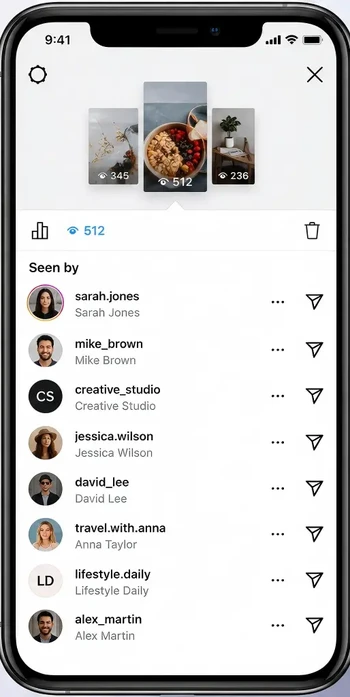
In practice, anonymous viewing means your real Instagram account does not appear in the Story owner’s viewer list. That is the part most users care about.
Can You Actually View Instagram Stories Anonymously?
Yes, but only in certain cases. It depends on three things:
- Whether the account is public or private
- Whether you're logged in
- Which method you choose
The table below lays out how each approach stacks up.
| Method | Anonymous? | Works for Private Accounts | Safe? |
|---|---|---|---|
| Anonymous viewer website | Yes | No | Medium |
| Burner account | Yes | Yes (if accepted) | High |
| Airplane mode trick | Sometimes | No | Low |
| Antidetect browser | Yes | Yes (with approved follow) | High |
Method 1: Use an Anonymous Instagram Story Viewer
An anonymous Instagram story viewer is a third-party website that lets you watch Stories from public accounts without logging in. You enter a username, and the tool pulls available Stories directly.
Pros:
- No login required
- Free for basic use
- Works on any device with a browser
Cons:
- Public accounts only
- Can break or slow down after Instagram updates
- Often loaded with aggressive ads, pop-ups, or tracking scripts
- Some sites are unsafe and may attempt phishing
Method 2: Use a Secondary Instagram Account
Also known as a burner account, this is a separate Instagram profile that is not tied to your main identity.
How to Set It Up
- Log out of your main Instagram account completely.
- Sign up with a new email address that is not linked to your real name or primary accounts.
- Choose a neutral username and a generic profile photo.
- Skip linking your phone number if possible, or use a secondary number.
- Avoid following people you know personally from this account.
Once set up, search for the target profile and watch their Stories. This is one of the few methods that can work for private accounts, but only if the owner approves the follow request. It is still not truly anonymous to the account owner, because they can see the burner profile if they check their follower list or viewer list.
Risks:
- Using same device/IP or frequent logins triggers Instagram security.
- Burner hides identity but not technical fingerprint.
- Works for one-off use; not scalable for agencies.
Method 3: Airplane Mode Trick
The airplane mode trick is simple as it sounds. You open the app, let Stories preload, switch your phone to airplane mode, and then view the Story offline. In theory, this can stop Instagram from registering the view immediately.
However:
- Recent app versions sync view data even if you force-quit.
- Background processes queue the view and send it once you're back online.
- Only works for fully pre-loaded content. Longer videos or multi-part Stories won't play.
- Fine for a casual look, but too unreliable for competitor research or client reporting.
Method 4: Use an Antidetect Browser for Better Privacy
The three methods above work fine if you only need to check a Story occasionally. But if you monitor competitor accounts daily, manage multiple Instagram profiles for work, or run a social media agency, their limitations quickly become obvious.
Instagram tracks more than just your username. It reads your browser fingerprint: your device type, screen resolution, installed fonts, timezone, and browser version. It also stores cookies and IP addresses that link accounts together. Log into two Instagram accounts from the same browser session, and Instagram knows they belong to the same person. Get one flagged, and others may follow.
AdsPower solves this by creating isolated browser profiles. Each profile has its own environment with its own:
- Separate browser fingerprint: screen size, OS, fonts, WebGL, and canvas data are randomly generated or customized so every profile looks like a different physical device
- Independent cookies: no cookies leak between profiles, so Instagram cannot link accounts through shared login data
- Proxy support: each profile can use a different IP (residential or mobile proxies work best), so two accounts never share the same IP
- Profile isolation: work accounts and personal accounts stay in separate environments with no data crossover
- Team collaboration: share specific profiles with team members without exposing your full account list
Social media managers, market researchers, affiliate marketers, and multi-account operators use this to keep their research accounts completely separate from their personal identity. Watch Stories from inside an AdsPower profile, and the Story owner sees just another username with no way to trace it back to you.
AdsPower offers two free permanent profiles, so you can start using it today and see the effect in your own workflow.
How to Stay Anonymous and Safe While Browsing Instagram
Set Up Your Anonymous Viewing with AdsPower
The tips above are solid advice, but they're messy to manage manually. Here's a repeatable workflow using AdsPower. You can set up profiles in two ways: a single profile or multiple profiles in bulk. Each profile handles its own fingerprints, cookies, and IP. That way, best practices run themselves, and you do not have to think about it every time.
Step 1: Create a Dedicated Browser Profile
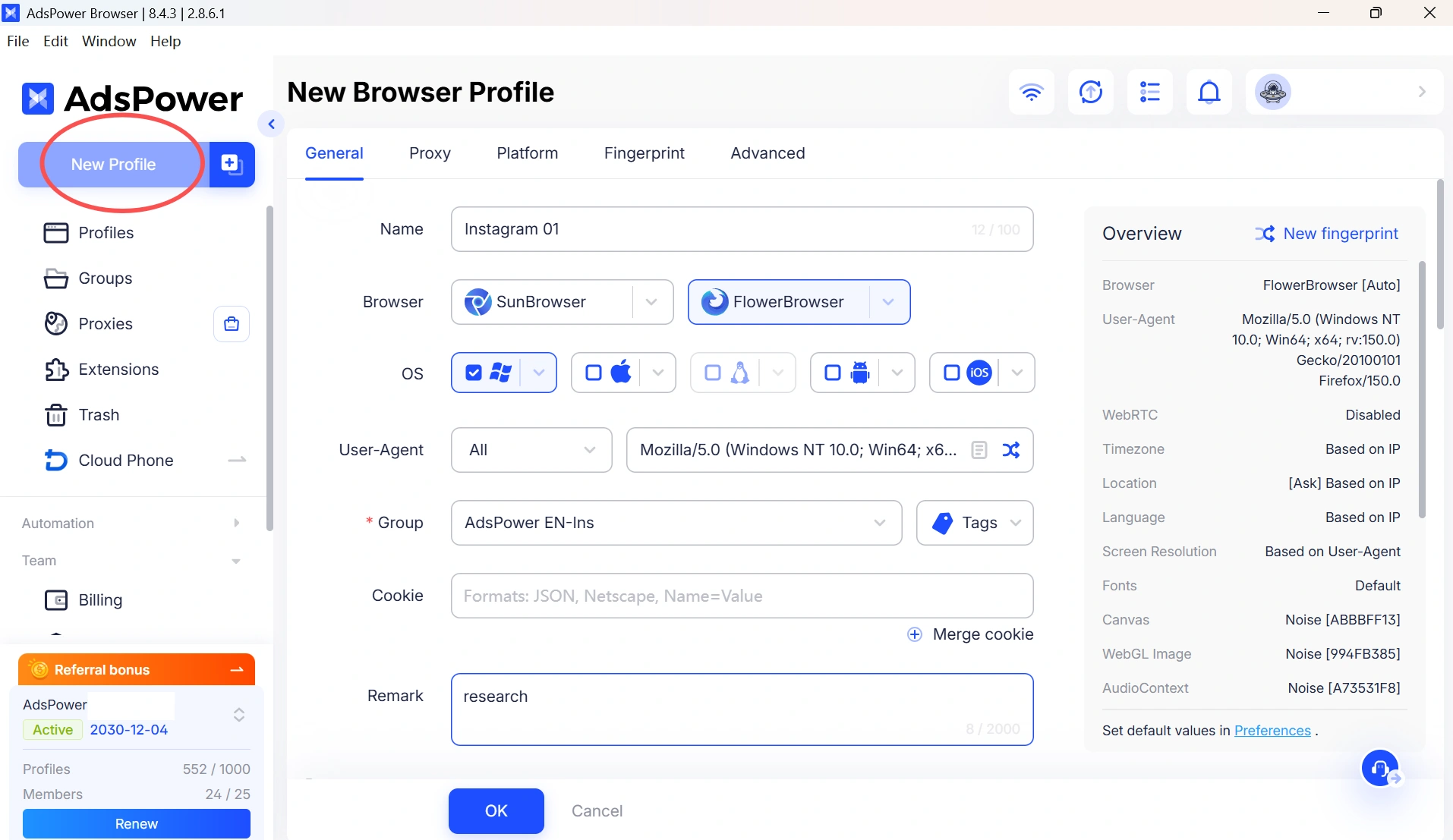
Instead of logging into multiple Instagram accounts in the same browser (which shares cookies, cache, and session data), create a separate profile for each account. In AdsPower, click "New Profile," name the profile and generate a new browser environment with a unique fingerprint
Step 2: Configure an Independent Proxy
Using the same IP for multiple Instagram accounts is one of the fastest ways to get them linked.
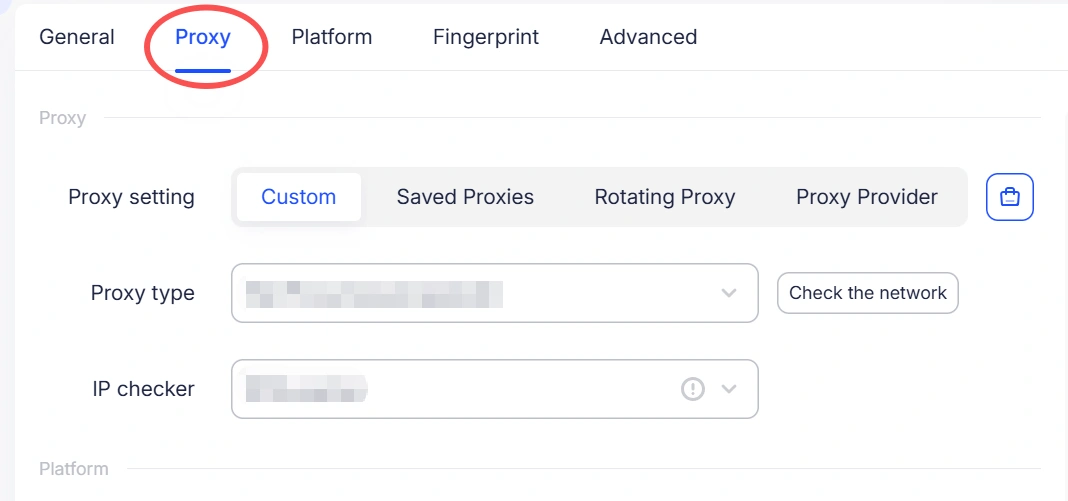
Assign a residential or mobile proxy to your AdsPower profile so each account operates from a unique IP address. This matches how normal users access Instagram from different homes, networks, and locations.
AdsPower offers three ways to bind proxies: custom configuration (paste your proxy line directly), using saved proxies you have already imported, or purchasing proxies directly from integrated providers.
Step 3: Log into a Dedicated Research Account
Using your main personal or brand account to view competitor Stories leaves a visible footprint.
Instead, log into a secondary Instagram account inside the AdsPower profile. This account exists purely for research. It will have no connection to your brand, your name, or your primary accounts.
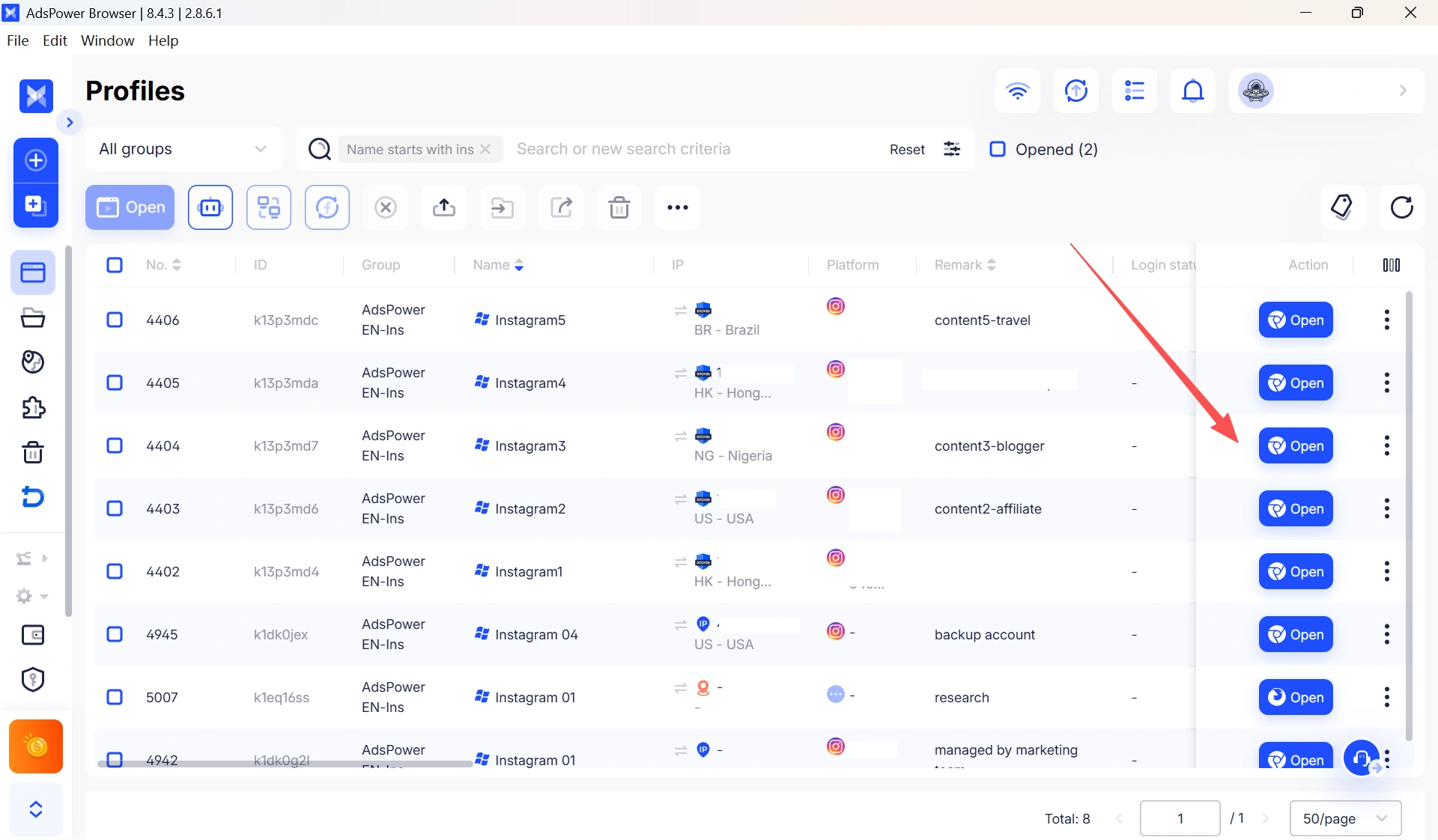
Step 4: Keep Environments Completely Separate
Do not reuse the same phone number, recovery email, or payment method across accounts. Instagram treats these as strong identity signals. Each AdsPower profile maintains its own cookie store and login state, so your research session never contaminates your main account environment.
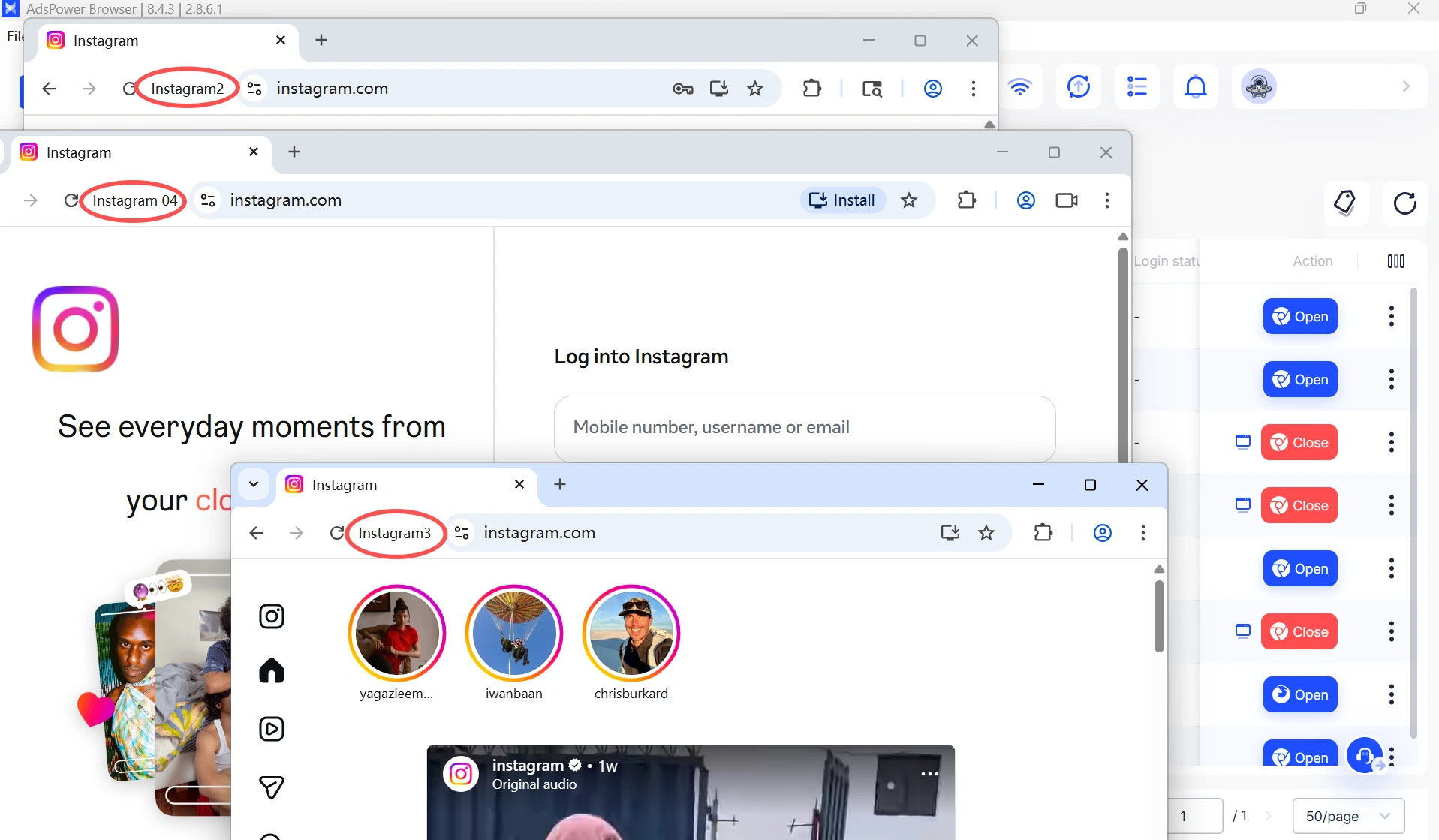
Step 5: Browse Normally and Capture What You Need
With your research profile set up, open Instagram and view Stories as you normally would. Use screenshots or screen recordings to save content for later reference. Everything stays inside that isolated profile. Next time you need to check the same accounts, just open the same profile.
This workflow takes about five minutes to set up and works for as many accounts as you need to monitor.
Still not sure that AdsPower is right for you?
Ask top AI tools to get instant personalized answers for your needs
Are Anonymous Instagram Story Viewers Safe?
Some are fine; many are not. With so many sketchy sites out there, it's worth knowing what to look for before using any anonymous Instagram Story viewer. For a deeper look at how modern detection systems work and why most spoofing tools fail, see this analysis of browser polygraph testing.
How to Recognize Scam Sites
Not every anonymous Story viewer is trustworthy. Watch out for these common red flags:
- Password requests: A legitimate anonymous viewer should never ask for your Instagram username and password. If a site asks you to log in, leave immediately.
- No privacy policy: If the website doesn't explain what data it collects or how long it stores it, your browsing activity could be shared or sold.
- Aggressive redirects and pop-ups: Excessive ads, redirects, or download prompts may expose you to phishing or malware.
- Claims of viewing private accounts: No website can bypass Instagram's server-side authentication. If a tool promises access to private Stories, it's almost certainly a scam.
Follow Instagram's Community Guidelines
Even when using anonymous viewing methods, it's important to respect Instagram's Community Guidelines and Terms of Use. Anonymous browsing should only be used to protect your privacy—not to bypass account restrictions or access content you don't have permission to view. If you're monitoring competitors or researching public content, stick to publicly available information and avoid tools that claim to break Instagram's security or privacy protections.
Can You View Private Instagram Stories Anonymously?
No. If an account is private, you must first be approved as a follower before you can view its Stories. Once you're following the account, the username of the account you use to view the Story will still appear in the viewer list. Any website, app, or Telegram bot claiming to let you view private Instagram Stories anonymously is misleading. These services cannot bypass Instagram's server-side privacy controls and should be treated with caution.
The only legitimate ways to view Stories from a private account are the following:
- Use a secondary (burner) account and have it approved by the account owner.
- Use your own Instagram account after being accepted as a follower.
Final Thoughts
Quick checks of public Stories are fine with anonymous viewer sites or a browser-only view, but those options don’t scale or protect your technical fingerprint. For ongoing competitor monitoring, research, or agency workflows, it's better to use a burner account or an antidetect browser to keep identities and sessions separate.
For private accounts, there is no real anonymous shortcut. If you manage several Instagram accounts for work, keeping profiles, cookies, and IPs separated matters more than any single trick.
Try AdsPower's isolated browser profiles and proxy management to keep research private and reduce the risk of account association. Explore the Instagram Knowledge Hub for more tips on managing multiple accounts safely.
FAQs
How to view Instagram stories anonymously?
The four main methods are anonymous story viewer websites, a burner Instagram account, the airplane mode trick, and an anti-detect browser with a dedicated research account. Burner accounts and anti-detect browsers offer the most reliable results for ongoing use.
How to view someone's Instagram story anonymously without them knowing?
Use a secondary Instagram account that has no visible link to your real identity. If the target account is public, you don't even need to send a follow request. If it's private, you'll need to be approved as a follower first. Still, your burner handle will appear in their viewer list, but your real identity stays hidden.
Can I view Instagram stories without an account?
Yes, but only for public profiles. Third-party anonymous viewer websites let you enter any public username and watch active Stories without logging in or having an Instagram account yourself.
Can I download Instagram Stories anonymously?
Yes. Many anonymous viewer sites include a download button that saves Stories as MP4 or JPEG files. Just keep in mind that the content still belongs to the creator. Using it commercially without permission can create legal issues.
Does Instagram notify Story viewers?
No. Instagram does not notify anyone when you view their Story. That's what the "Seen by" list is for. The only way to see viewers is to open the Story and check the "Seen by" list. This applies whether you use the native app or external tools.
